What is the volunteer waiver & code of conduct form template?
Before someone serves at a food bank, a youth event or a building clean-up, most organisations want three things on record: that the volunteer has read the code of conduct, that they understand the safeguarding rules, and that they accept the ordinary risks of the work. Add an emergency contact and any medical information the coordinator needs, and you have a short form that should be completed before the first shift.
This template puts all of that on four short pages. Under-18s are handled with logic: a volunteer who answers no to 'Are you 18 or over?' is asked for a date of birth, and the final page adds a parent or guardian name, consent statement and signature. Medical details are only requested if the volunteer says there's something to know.
Each signed form is saved as a PDF in your FileIt vault, so when a coordinator needs to check who has signed — or find an emergency contact — it's in one place rather than a filing cabinet.
- Best for
- Charities, churches, clubs and event organisers taking on volunteers
- Filled in by
- The volunteer, plus a parent or guardian for under-18s
- Time to complete
- About 5 minutes
- Includes
- Code of conduct, safeguarding, risk acknowledgement, emergency treatment consent and signatures
Who uses a volunteer waiver & code of conduct form?
- A food bank or shelter signing up new volunteers before their first shift
- A church collecting conduct and safeguarding agreements from youth and children's workers
- A charity run or community clean-up where every helper signs before the day
- A school or club accepting teenage volunteers with a parent's consent
- An annual re-signing of the code of conduct by existing volunteers
Questions on this volunteer waiver & code of conduct form
24 questions over 4 pages · includes signature, conditional questions, multiple pages, consent checkbox.
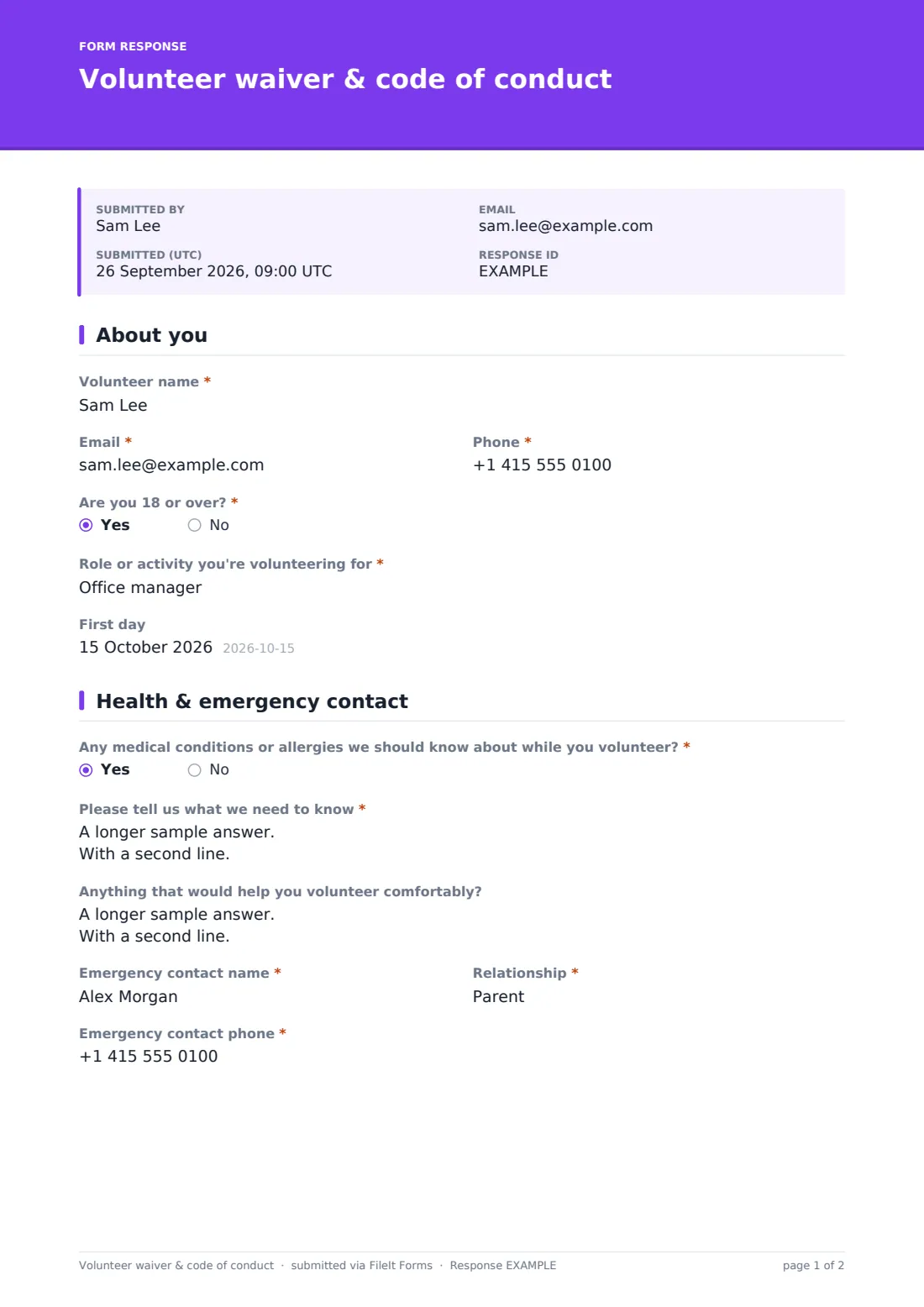
1 About you
- Volunteer name*
- Email*
- Phone*
- Are you 18 or over?*
- Date of birth* asked only when it applies
- Role or activity you're volunteering for*
- First day
2 Health & emergency contact
- Any medical conditions or allergies we should know about while you volunteer?*
- Please tell us what we need to know* asked only when it applies
- Anything that would help you volunteer comfortably?
- Emergency contact name*
- Relationship*
- Emergency contact phone*
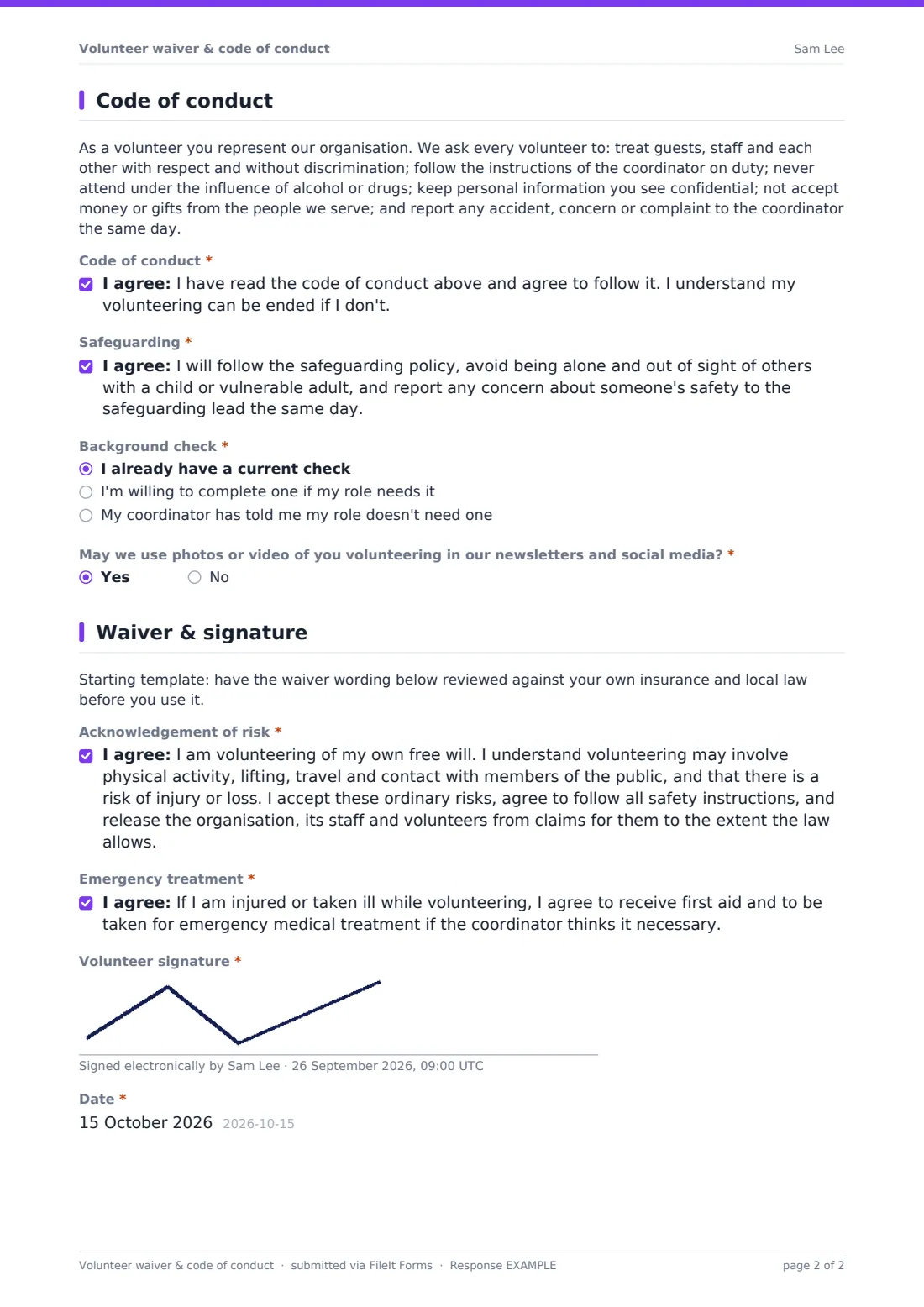
3 Code of conduct
- Code of conduct*
- Safeguarding*
- Background check* I already have a current check · I'm willing to complete one if my role needs it · My coordinator has told me my role doesn't need one
- May we use photos or video of you volunteering in our newsletters and social media?*
4 Waiver & signature
- Acknowledgement of risk*
- Emergency treatment*
- Volunteer signature*
- Parent or guardian name* asked only when it applies
- Parent or guardian consent* asked only when it applies
- Parent or guardian signature* asked only when it applies
- Date*
The volunteer waiver & code of conduct form, page by page
1 About you
Name, email and phone, then Are you 18 or over? Answering no reveals Date of birth and, later, the parent or guardian section. The volunteer names the role or activity and can give a first day.
2 Health & emergency contact
A yes/no about medical conditions or allergies opens a required field for what the coordinator needs to know and what to do. An optional question asks about adjustments such as lifting limits or breaks. Emergency contact name, relationship and phone are all required.
3 Code of conduct
A paragraph sets out the expectations — respect, following the coordinator, no alcohol or drugs, confidentiality, no gifts, reporting concerns — followed by a required agreement. A separate safeguarding statement covers not being alone with a child or vulnerable adult and reporting concerns the same day. The volunteer says whether they already have a background check, are willing to complete one, or have been told their role doesn't need one, and answers the photo and video question.
4 Waiver & signature
A note reminds you to have the waiver wording reviewed locally. The volunteer agrees to an acknowledgement of risk and to emergency treatment, then signs. For under-18s, a parent or guardian adds their name, a consent statement and their own signature, and the form is dated.
Make the template yours
- Replace the code of conduct paragraph with your own policy, or link to it
- Edit the waiver wording after checking it with your insurer or adviser
- Rename the background check options to the check used where you are
- Add a dropdown of your volunteer roles instead of the free-text role field
- Turn off AllowMultiple or set CollectIdentity if each volunteer should sign only once
- File signed waivers in a folder per site or per year
Tips for a better volunteer waiver & code of conduct form
- Ask volunteers to complete the form before their first shift, not on arrival
- Keep medical and emergency information visible to coordinators who need it, and to nobody else
- Have volunteers sign again whenever your code of conduct or safeguarding policy changes
- Honour the photo answer — keep a list of volunteers who said no for whoever takes event photos
- For under-18s, check the guardian section is complete before the young person starts
Every response becomes a PDF in your vault
The signed form is saved as a PDF — signatures included — in your chosen vault folder, and you're notified by email. The volunteer can receive a copy of what they signed automatically.
Use the Responses table to see who has signed, filter by role, or find volunteers who haven't consented to photos. Export to CSV to update your volunteer rota or database.
- Start from this template. It opens in the FileIt Forms designer — change any question, add pages, set the rules for when questions appear.
- Share it. Turn on a public link, or send it to people by email, each with their own link. They don’t need a FileIt account.
- Get the answers as PDFs. Each response is saved as a PDF in the vault folder you choose, with uploaded files attached — and listed in a Responses table you can export to CSV.
Volunteer waiver & code of conduct form: frequently asked questions
Is this volunteer waiver template free?
Yes. It's one of the ready-made templates in the Forms app on every FileIt account, including the free plan. Use it as it is or change any question in the designer.
Do people need a FileIt account to fill it in?
No. Anyone with the public link, or a personal invitation you send by email, can fill it in without signing up.
Is the waiver wording legally binding?
The template gives a plain-language starting point, not legal advice. How far a waiver is enforceable depends on where you are, so have the wording reviewed against your own insurance and local law — the form includes a reminder to do that.
How does it handle volunteers under 18?
Answering no to 'Are you 18 or over?' asks for a date of birth and adds a parent or guardian name, consent statement and signature on the last page.
Can I use my own code of conduct?
Yes. The code is an ordinary paragraph in the designer — replace it with your own text.
Can volunteers sign on a phone?
Yes. The signature field works with a finger on a touch screen as well as a mouse.