What is the volunteer sign-up form template?
Recruiting volunteers usually starts the same way everywhere: someone says they'd like to help, and then a coordinator has to work out when they're free, what they're good at, and who to call if something goes wrong during a shift. This template collects all of that from the start, so a new volunteer arrives in your system ready to be matched to a role rather than needing a separate intake conversation first.
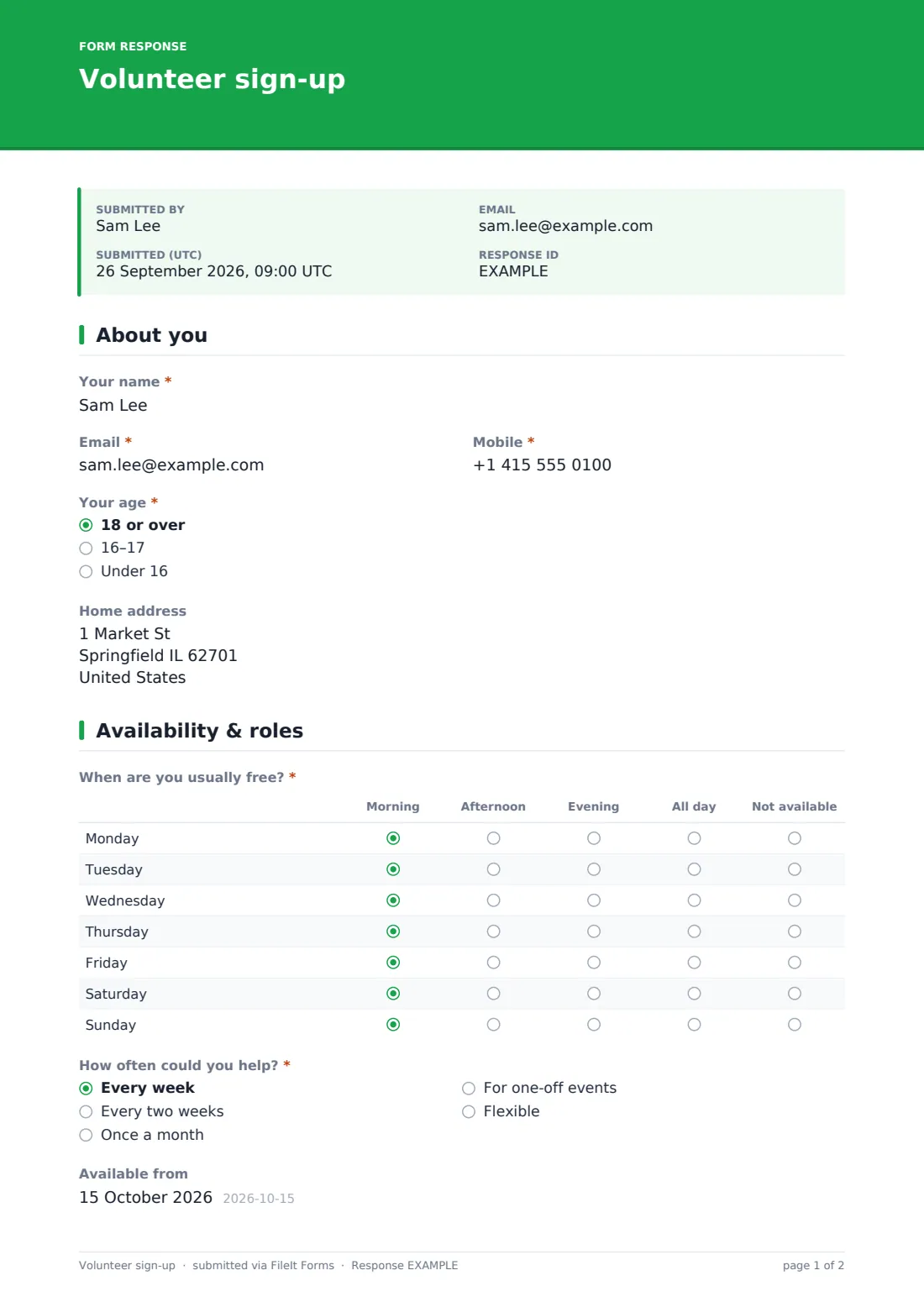
A weekly availability matrix — pick morning, afternoon, evening or all day for each day of the week — gives coordinators something they can actually schedule from, rather than a vague "weekends are usually good." Combined with a checklist of role interests and an optional skills field, most sign-ups give a coordinator enough to make a first match without ever picking up the phone.
Every sign-up is saved as a PDF in your FileIt vault, so a new volunteer's details, availability and any background check status are on file from day one, ready to reference the first time they're rostered onto something.
- Best for
- Charities, community groups, faith organisations and events recruiting volunteers
- Filled in by
- The volunteer, or a parent/guardian for volunteers under 18
- Time to complete
- About 5-6 minutes
- Includes
- Age-based conditional logic, weekly availability matrix, background check consent
Who uses a volunteer sign-up form?
- A community organisation opens a general volunteer sign-up and matches people to roles afterward based on their answers
- A charity shop or food bank recruits regular weekly volunteers and needs to know their usual availability up front
- A youth-focused organisation records whether a role will require a background check and gets early consent to that process
- An events team recruits one-off volunteers for a single day and uses the frequency question to identify them separately
- A group recruiting under-18 volunteers collects a parent or guardian's name and phone alongside the young person's own details
- A driving-dependent programme, like meal delivery, checks whether a volunteer holds a full driving licence before assigning that role
Questions on this volunteer sign-up form
22 questions over 3 pages · includes conditional questions, multiple pages, consent checkbox, ratings.
1 About you
- Your name*
- Email*
- Mobile*
- Your age* 18 or over · 16–17 · Under 16
- Parent or guardian's name* asked only when it applies
- Parent or guardian's phone* asked only when it applies
- Home address
2 Availability & roles
- When are you usually free?* Morning · Afternoon · Evening · All day · Not available
- How often could you help?* Every week · Every two weeks · Once a month · For one-off events · Flexible
- Available from
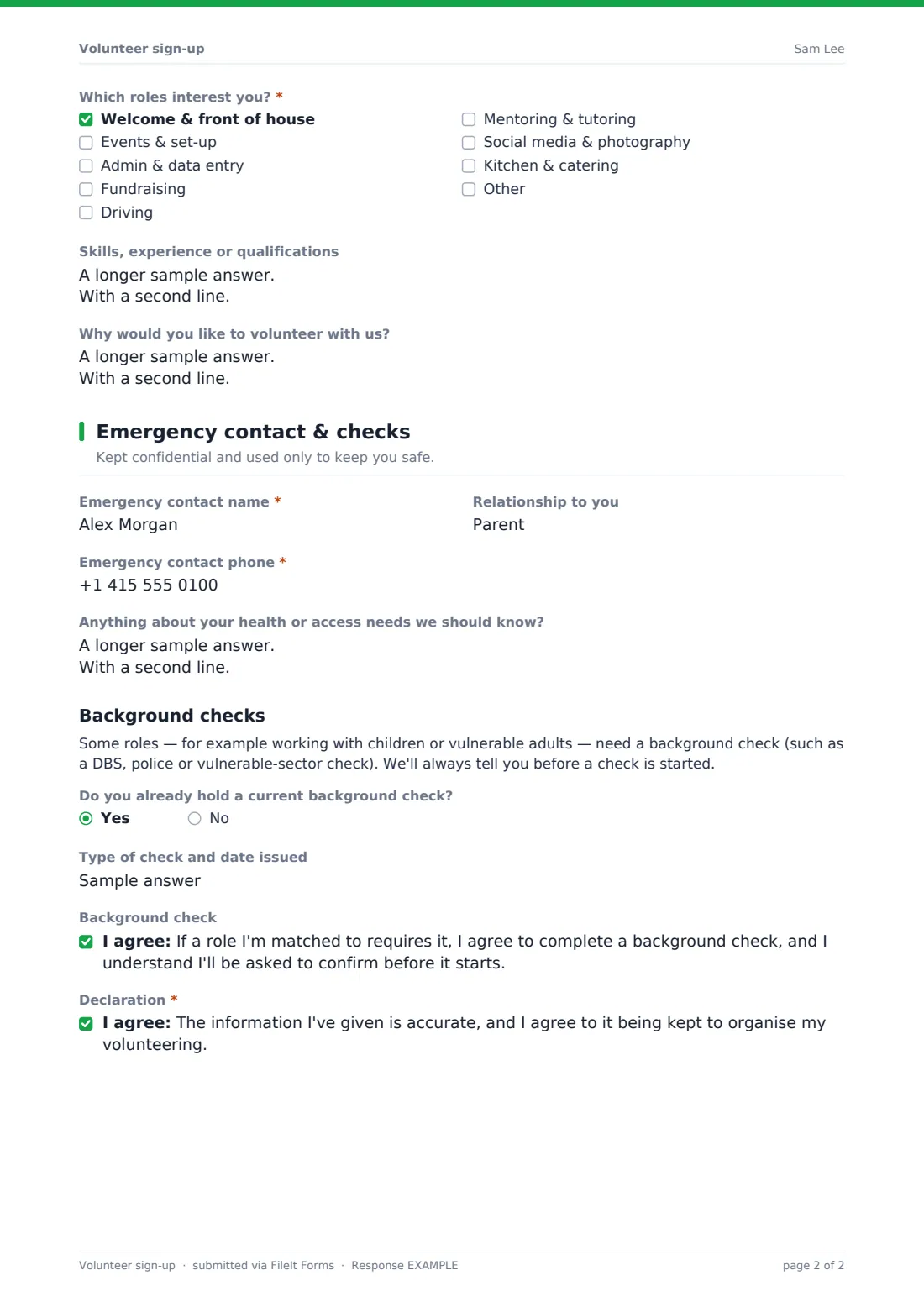
- Which roles interest you?* Welcome & front of house · Events & set-up · Admin & data entry · Fundraising · Driving · Mentoring & tutoring · Social media & photography · Kitchen & catering
- Do you hold a full driving licence?* asked only when it applies
- Skills, experience or qualifications
- Why would you like to volunteer with us?
3 Emergency contact & checks
- Emergency contact name*
- Relationship to you
- Emergency contact phone*
- Anything about your health or access needs we should know?
- Do you already hold a current background check?
- Type of check and date issued asked only when it applies
- Background check
- Declaration*
The volunteer sign-up form, page by page
1 About you
The volunteer gives their name, email, mobile number and age group — 18 or over, 16-17, or under 16. Choosing either of the younger age bands reveals required fields for a parent or guardian's name and phone number, so the organisation has a responsible adult on record for any volunteer under 18. A home address is optional.
2 Availability & roles
A matrix lets the volunteer mark morning, afternoon, evening, all day or not available for each day of the week — a much faster way to capture a weekly pattern than a free-text description. A frequency dropdown (every week, every two weeks, once a month, one-off events, or flexible) and an available-from date help a coordinator plan ahead.
A checklist of roles — welcome & front of house, events & set-up, admin & data entry, fundraising, driving, mentoring & tutoring, social media & photography, kitchen & catering, plus "Other" — lets the volunteer tick everything that interests them. Choosing driving reveals a required question about holding a full driving licence. Optional fields for skills, experience or qualifications, and why the volunteer wants to help, round out the page.
3 Emergency contact & checks
The page description sets expectations: this information is kept confidential and used only to keep the volunteer safe. It collects an emergency contact's name, relationship and phone, and an optional field for any health or access needs the organisation should know about, framed around what helps rather than requiring a diagnosis.
A background checks section explains, in plain terms, that some roles — like working with children or vulnerable adults — need a check such as a DBS or police check, and that the organisation will always tell the volunteer before one is started. A yes/no question asks whether the volunteer already holds a current check, with a field for the type and date if so, and an optional consent checkbox covers agreeing to a future check if a matched role requires one. A final declaration confirms the information given is accurate.
Make the template yours
- Adjust the role checklist to match the actual volunteer roles your organisation offers
- Remove or rename the background check section entirely if none of your roles require one
- Add a question asking which locations or branches a volunteer can get to, if you operate across multiple sites
- Set a minimum age higher than the template default if your insurance or policies require it for certain roles
- File each sign-up into a folder for new volunteers awaiting matching, moving it once they're placed in a role
- Add a reference contact question if your vetting process requires one before a volunteer starts
- Adjust the confirmation message to describe your actual next step, such as an induction session or a welcome call
Tips for a better volunteer sign-up form
- Follow up quickly after a sign-up — enthusiasm to volunteer tends to fade if there's a long silence before the first contact
- Use the availability matrix as a starting point in scheduling conversations, not a fixed rota commitment
- Be upfront early about which roles require a background check, so no one is surprised partway through matching
- Ask only for the health and access information you'll actually use to support a volunteer, not a general medical history
- Keep emergency contact details up to date by asking long-term volunteers to reconfirm them periodically
- Thank every volunteer who signs up, even if you can't offer a role immediately — a good first impression affects whether they wait
Every response becomes a PDF in your vault
As soon as someone submits the sign-up form, FileIt saves it as a PDF in your vault, in the folder you've set up for new volunteers, and you're notified by email straight away. If you've turned on the optional copy, the volunteer also receives their own PDF of what they submitted.
A coordinator then reviews the sign-up in the Responses table, matches the volunteer's availability and role interests to what's currently needed, and follows up directly — usually by phone or email, as the confirmation message promises. Because every sign-up follows the same structure, comparing several new volunteers side by side is quick, even when sign-ups arrive in a batch after a recruitment drive.
- Start from this template. It opens in the FileIt Forms designer — change any question, add pages, set the rules for when questions appear.
- Share it. Turn on a public link, or send it to people by email, each with their own link. They don’t need a FileIt account.
- Get the answers as PDFs. Each response is saved as a PDF in the vault folder you choose, with uploaded files attached — and listed in a Responses table you can export to CSV.
Volunteer sign-up form: frequently asked questions
Is this volunteer sign-up form template free?
Yes. It's included in FileIt's Forms app on every plan, including the free plan, and every question can be edited to fit your organisation.
Do volunteers need a FileIt account to sign up?
No. Share a public link on your website or social media, and volunteers submit the form without creating an account.
How do we see the sign-ups that come in?
Every sign-up is saved automatically as a PDF in your FileIt vault, and you can browse, filter or export the full list from the Responses table.
Can under-18s sign up through this form?
Yes, selecting an under-18 age group reveals required fields for a parent or guardian's name and phone number.
Does this form actually run a background check?
No. It only records consent and whether a volunteer already holds a current check — running any actual background check is a separate process outside the form.
Can we ask about availability in more detail than the matrix allows?
You can add further conditional questions in the designer if a simple morning/afternoon/evening/all-day matrix isn't specific enough for your scheduling.
Can we limit sign-ups if we don't need more volunteers right now?
Yes, you can set a closing date or a maximum number of responses in the form's settings.
Can we collect a reference before matching a volunteer to a role?
You can add a reference contact question to the template if that's part of your vetting process.