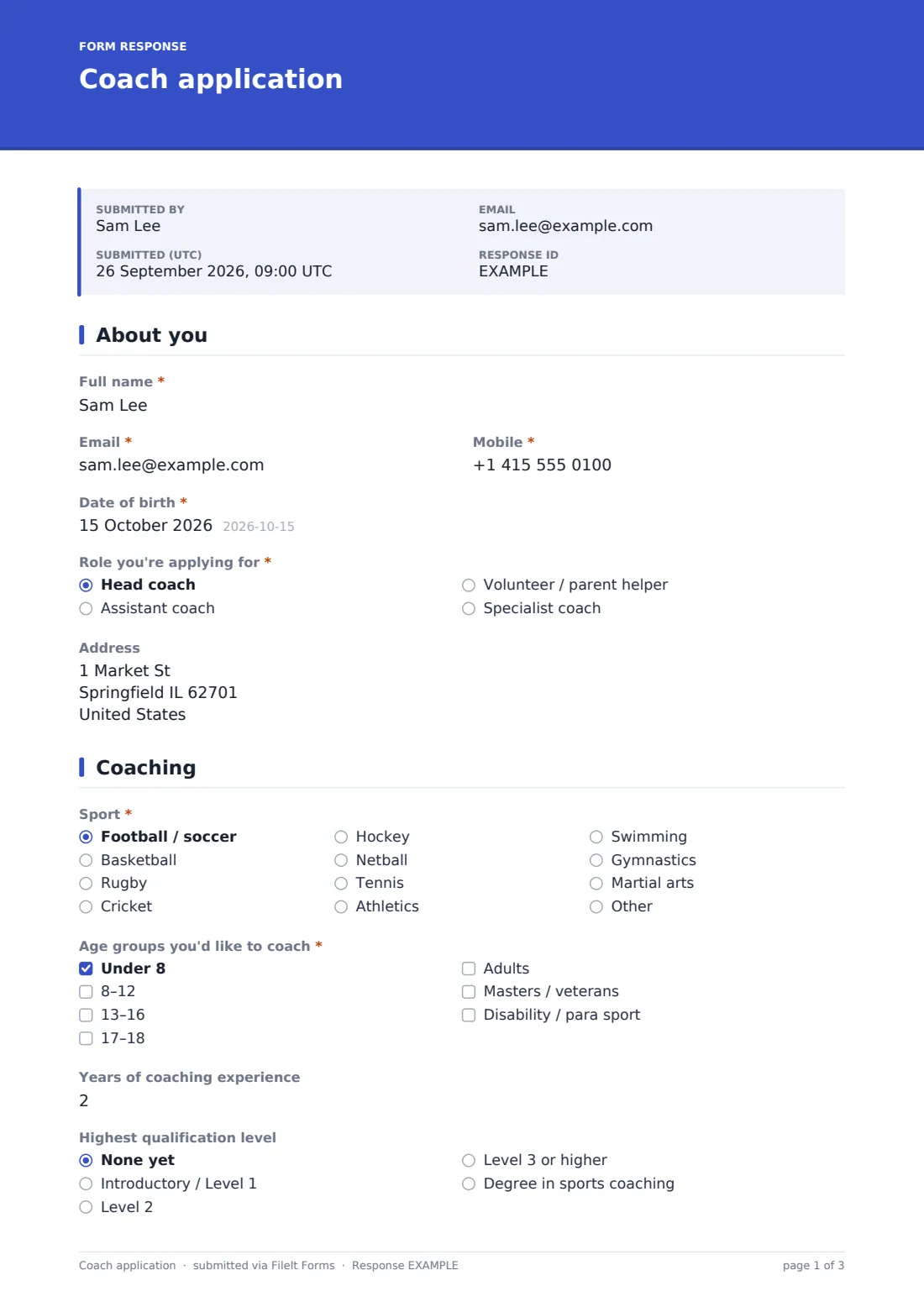

What is the coach application form template?
Recruiting a coach, whether a paid head coach or a parent volunteer helping out on Saturday mornings, usually means gathering the same handful of things: who they are, what they're qualified to do, whether they've had the necessary background check, and when they can actually turn up. Doing this over email or a paper form tends to mean some applicants forget to mention their first aid certificate, or a referee's contact details go missing along the way.
This coach application template puts all of it on one structured form: personal details, the sport and age groups they'd like to coach, their qualifications and certificates, a dedicated safeguarding section covering background checks and training, two referees, and their availability. A short built-in declaration confirms the information given is true and that they'll follow the club's code of conduct, with a signature to match.
Every application becomes a PDF in the club's FileIt vault the moment it's submitted, uploaded certificates included, so committee members reviewing applicants have everything in one document instead of a scattered set of email attachments.
- Best for
- Sports clubs, academies and youth organizations recruiting paid or volunteer coaches
- Filled in by
- The person applying to coach
- Time to complete
- About 10-15 minutes, longer with certificates to upload
- Includes
- Conditional qualification and safeguarding questions, file upload, signature, consent statements
Who uses a coach application form?
- A local football or netball club recruiting volunteer coaches ahead of a new season
- A sports academy hiring paid, qualified coaches across multiple age groups and sports
- A club standardizing what information every applicant provides, regardless of who on the committee first speaks to them
- A parent stepping forward as a volunteer helper, applying through the same structured process as a professional coach
- A club building a record of who has a current background check and safeguarding training on file, and who's still due one
- An academy comparing applicants' availability against gaps in the coaching schedule before making an offer
Questions on this coach application form
28 questions over 4 pages · includes signature, file upload, conditional questions, multiple pages, consent checkbox.
1 About you
- Full name*
- Email*
- Mobile*
- Date of birth*
- Role you're applying for* Head coach · Assistant coach · Volunteer / parent helper · Specialist coach
- Address
2 Coaching
- Sport* Football / soccer · Basketball · Rugby · Cricket · Hockey · Netball · Tennis · Athletics · Swimming · Gymnastics · Martial arts · Other
- Which sport?* asked only when it applies
- Age groups you'd like to coach* Under 8 · 8–12 · 13–16 · 17–18 · Adults · Masters / veterans · Disability / para sport
- Years of coaching experience
- Highest qualification level None yet · Introductory / Level 1 · Level 2 · Level 3 or higher · Degree in sports coaching
- Coaching qualifications and certificates asked only when it applies
- Upload certificates asked only when it applies
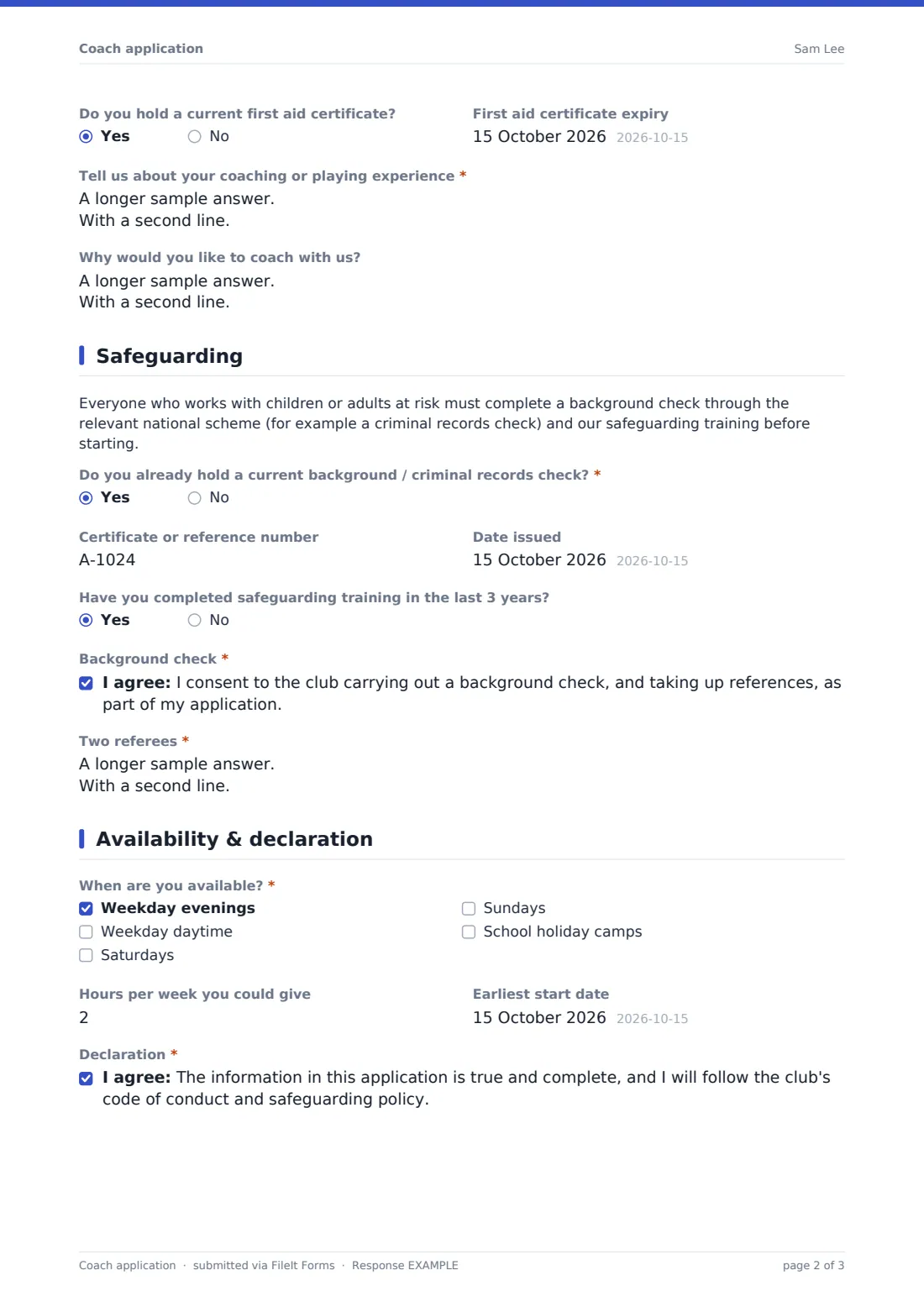
- Do you hold a current first aid certificate?
- First aid certificate expiry asked only when it applies
- Tell us about your coaching or playing experience*
- Why would you like to coach with us?
3 Safeguarding
- Do you already hold a current background / criminal records check?*
- Certificate or reference number asked only when it applies
- Date issued asked only when it applies
- Have you completed safeguarding training in the last 3 years?
- Background check*
- Two referees*
4 Availability & declaration
- When are you available?* Weekday evenings · Weekday daytime · Saturdays · Sundays · School holiday camps
- Hours per week you could give
- Earliest start date
- Declaration*
- Signature*
The coach application form, page by page
1 About you
The applicant provides Full name, Email, Mobile, Date of birth, the Role you're applying for (Head coach, Assistant coach, Volunteer / parent helper, or Specialist coach), and an optional Address. Keeping role selection near the top means the rest of the application, particularly qualification expectations, can later be tailored by the club depending on which role was chosen, even though this template asks the same core questions for all of them.
2 Coaching
Sport is a dropdown covering football, basketball, rugby, cricket, hockey, netball, tennis, athletics, swimming, gymnastics, martial arts, or Other, and choosing Other opens a free-text field for anything not listed. Age groups you'd like to coach is a checkbox list from Under 8 through adults, masters/veterans and disability/para sport, letting one applicant indicate several groups they're happy working with.
Years of coaching experience and Highest qualification level (from None yet up to a degree in sports coaching) set the scene, and if any qualification level beyond none is selected, the form opens Coaching qualifications and certificates for details plus an upload field for the certificates themselves. A separate Do you hold a current first aid certificate? question, answered yes, reveals a field for its expiry date, useful for a club that wants to know at a glance who's due for renewal. Tell us about your coaching or playing experience and an optional Why would you like to coach with us? round out the applicant's own account of their background.
3 Safeguarding
This page opens with an information paragraph explaining that anyone working with children or adults at risk must complete a background check through the relevant national scheme and the club's own safeguarding training before starting. Do you already hold a current background or criminal records check? is answered yes or no; a yes reveals fields for the Certificate or reference number and the Date issued, so the club has something concrete to verify rather than taking the applicant's word alone.
Have you completed safeguarding training in the last 3 years? is asked as a separate yes or no, since a background check and training are two different things a club may track independently. A required consent statement confirms the applicant agrees to a background check and reference checks as part of the application, and Two referees asks for names, relationships and contact details for two people who are not family members.
4 Availability & declaration
When are you available? is a checkbox list, weekday evenings, weekday daytime, Saturdays, Sundays, and school holiday camps, followed by optional Hours per week and an Earliest start date, giving the club a realistic sense of how the applicant fits around existing sessions.
The form closes with a Declaration consent statement confirming the information given is true and complete and that the applicant will follow the club's code of conduct and safeguarding policy, backed by a signature field. Together, the declaration and signature give the club a dated, signed record of what the applicant agreed to at the point of applying.
Make the template yours
- Add or remove sports from the dropdown to match exactly what your club or academy offers
- Adjust the age group checkboxes if your club only ever coaches, say, youth teams and has no adult or masters sections
- Make the first aid certificate question required rather than optional if your club's policy expects every coach to hold one
- File applications by role, head coach, assistant, volunteer, into separate vault folders so committee members reviewing each type see only what's relevant to them
- Add a question about background-check scheme membership number if your national body issues one, alongside the existing certificate reference field
- Turn on notifications to more than one committee member so applications aren't missed if one person is away
- Set a closing date if you're only recruiting for a specific season and want the form to stop accepting applications afterward
Tips for a better coach application form
- Be specific about what counts as current for a background check or certificate; a renewal date field, as used here, avoids ambiguity
- Ask for referee details who are not family members, exactly as this template does, so references carry more weight
- Follow up promptly once safeguarding checks and references come back, so a keen applicant doesn't lose interest waiting
- Keep the declaration wording plain and specific, so an applicant knows exactly what they're confirming when they sign
- Store certificates and background check reference numbers securely and only share them with people who genuinely need to see them
- Review the availability answers against your actual coaching schedule early, rather than after an offer has already been made
Every response becomes a PDF in your vault
As soon as an applicant submits the form, FileIt saves the whole application, including any uploaded certificates, as a single PDF in the club's vault, and the account owner is notified by email straight away. Nothing needs to be manually collated from separate attachments or messages.
From there, the committee typically reviews the Responses table, checks background-check and referee details, and follows up directly with the applicant to arrange an interview, request a formal certificate copy, or take up references. Because every application is filed the same way, comparing candidates for the same role, or checking who still needs to renew a certificate, is a matter of filtering the table rather than digging through old emails.
- Start from this template. It opens in the FileIt Forms designer — change any question, add pages, set the rules for when questions appear.
- Share it. Turn on a public link, or send it to people by email, each with their own link. They don’t need a FileIt account.
- Get the answers as PDFs. Each response is saved as a PDF in the vault folder you choose, with uploaded files attached — and listed in a Responses table you can export to CSV.
Coach application form: frequently asked questions
Is this coach application form template free?
Yes. It's included in FileIt's Forms template library on every account, including the free plan, and every question can be edited to match your club's requirements.
Does an applicant need a FileIt account to apply?
No. Share the form as a public link or email it to prospective coaches and they can complete and submit it without creating an account.
How do we get each application as a PDF?
Every submission, including uploaded certificates, is automatically saved as a PDF in your club's FileIt vault, ready to review or forward to a committee.
Does completing this form mean a coach has passed a background check?
No. The form only records the applicant's consent to a check and any existing certificate details they provide. Clubs should still verify certificates and complete their own screening process according to their own safeguarding policy and local requirements.
Can volunteers apply through the same form as paid coaches?
Yes, the Role you're applying for options include Volunteer / parent helper alongside head coach, assistant and specialist roles, so one form covers all types of applicant.
Can I ask for a specific national background-check number?
The template's Certificate or reference number field can be relabeled or added to in the designer to match whichever national scheme your club or country uses.
Is the declaration on this form legally binding?
It's a written declaration, not legal advice, and the wording here is a starting point; check it fits your club's own code of conduct and any local safeguarding rules before relying on it.