What is the field trip chaperone form template?
Organising chaperones for a school trip usually means checking several things at once: who's actually free on the day, who has a current background check, who knows first aid, and who has agreed to follow the school's rules for supervising other people's children. This field trip chaperone template brings all of that into a single online sign-up instead of a paper slip that goes home in a backpack and sometimes doesn't come back.
Doing this online means the school office gets typed, complete answers rather than a form filled in on a knee at pickup time, and can immediately see who is fully available, who's only free for part of the day, and who should go on a reserve list. Conditional logic only asks for certificate details when someone says their safeguarding check is through another organisation, and only asks about first aid training details when someone confirms they hold a certificate.
Each volunteer's sign-up becomes a signed PDF in your FileIt vault, giving the trip leader a single, dated record of who agreed to the code of conduct — useful if a question ever comes up about who was supervising which group.
- Best for
- Schools organising field trips, excursions and outings
- Filled in by
- Parent, guardian or other adult volunteers
- Time to complete
- About 5 minutes
- Includes
- Safeguarding check status, first aid question, signed code of conduct
Who uses a field trip chaperone form?
- A primary school recruits parent helpers for a museum trip
- A secondary school gathers chaperones for a multi-day residential visit
- A PTA coordinates volunteers across several classes going on the same day out
- A school checks who already holds a current background check before assigning groups
- A trip leader builds a reserve list of volunteers who are only available part of the day
- A school keeps a signed record of every chaperone's agreement to its safeguarding guidance
Questions on this field trip chaperone form
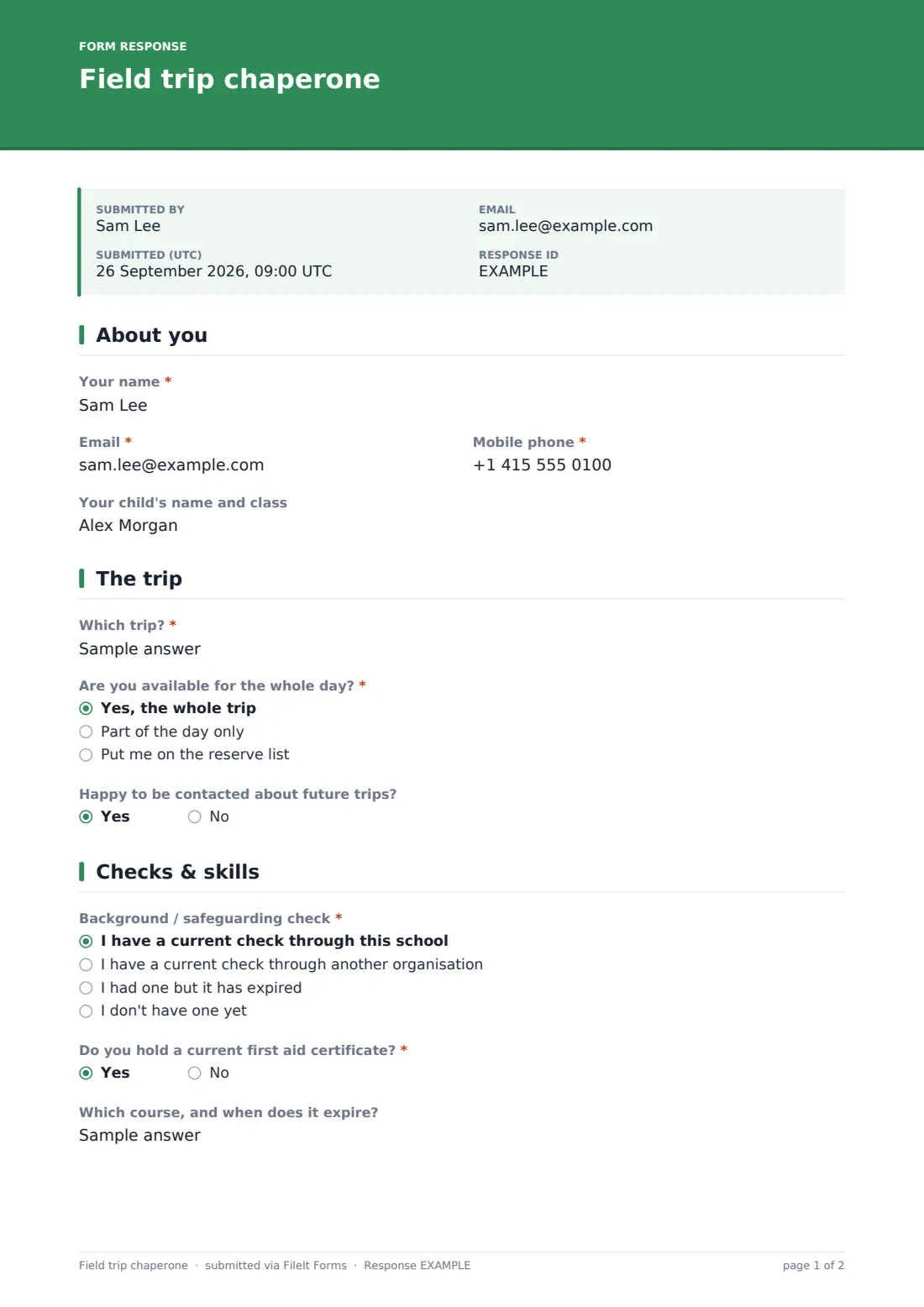
20 questions over 4 pages · includes signature, file upload, conditional questions, multiple pages, consent checkbox.
1 About you
- Your name*
- Email*
- Mobile phone*
- Your child's name and class
2 The trip
- Which trip?*
- Are you available for the whole day?* Yes, the whole trip · Part of the day only · Put me on the reserve list
- Which part?* asked only when it applies
- Happy to be contacted about future trips?
3 Checks & skills
- Background / safeguarding check* I have a current check through this school · I have a current check through another organisation · I had one but it has expired · I don't have one yet
- Certificate or reference number asked only when it applies
- Issue or expiry date asked only when it applies
- Copy of the certificate (optional) asked only when it applies
- Do you hold a current first aid certificate?*
- Which course, and when does it expire? asked only when it applies
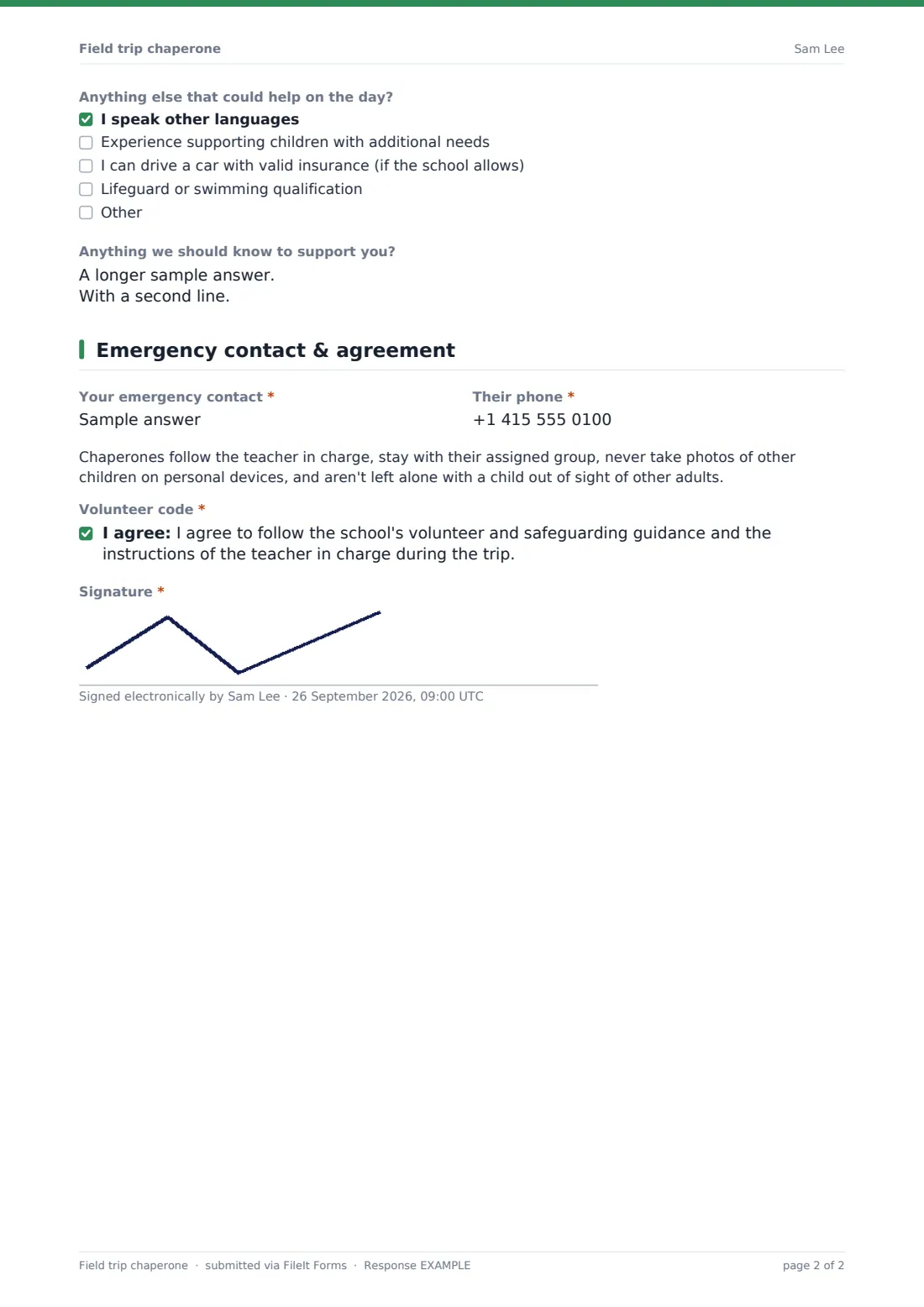
- Anything else that could help on the day? I speak other languages · Experience supporting children with additional needs · I can drive a car with valid insurance (if the school allows) · Lifeguard or swimming qualification
- Anything we should know to support you?
4 Emergency contact & agreement
- Your emergency contact*
- Their phone*
- Volunteer code*
- Signature*
The field trip chaperone form, page by page
1 About you
The volunteer gives their Name, Email and Mobile phone (used on the day itself), and can optionally note Your child's name and class, which helps the school link the volunteer to a particular class if relevant.
2 The trip
A short Which trip field identifies the outing by name and date, and an Are you available for the whole day question sorts volunteers into the whole trip, part of the day only, or the reserve list. Choosing part of the day reveals a field asking which part, so the school can plan cover around it. A separate yes/no question asks if the volunteer is happy to be contacted about future trips, building a standing pool of willing helpers.
3 Checks & skills
A Background / safeguarding check question — current through this school, current through another organisation, expired, or not yet obtained — decides what comes next. Choosing 'another organisation' reveals fields for a certificate or reference number, its issue or expiry date, and an optional upload of the certificate itself; choosing 'not yet obtained' shows a plain note that the office will follow up before the trip. A required Do you hold a current first aid certificate question reveals a field for which course and its expiry date when answered yes. A checklist covers other useful skills — extra languages, experience supporting children with additional needs, driving with valid insurance, or a lifeguard qualification — and a final box lets the volunteer flag anything the school should know to support them.
4 Emergency contact & agreement
The volunteer gives their own Emergency contact name and phone, then reads a short code of conduct — staying with their assigned group, following the teacher in charge, never photographing other children on personal devices, and never being left alone out of sight of other adults with a child — before ticking to agree and signing.
Make the template yours
- Adjust the code of conduct wording to match your own school's safeguarding policy — this template is a starting point
- Add a question about transport if some volunteers are also being asked to drive
- Set a closing date so sign-ups stop with enough time to finalise groups before the trip
- Add a maximum number of responses if you only need a fixed number of chaperones
- Route the confirmation message to mention when and how the trip leader will confirm which volunteers are needed
- File responses in a vault folder per trip so each outing's volunteer records stay together
Tips for a better field trip chaperone form
- Confirm which volunteers are actually needed as early as possible, since people plan their own day around it
- Follow up individually with anyone who hasn't yet obtained a safeguarding check well before the trip date
- Keep the code of conduct short and specific — a long policy document is less likely to be read carefully
- This code of conduct is a starting point, not legal advice; check it matches your school's own safeguarding policy and local requirements before relying on it
- Thank volunteers by name afterwards — chaperoning is unpaid and often thankless, and a short note goes a long way
Every response becomes a PDF in your vault
As soon as a volunteer submits their sign-up and signature, FileIt saves the whole thing — including any uploaded certificate — as a PDF in the vault folder set up for this trip. The school office gets an email notification straight away, so nothing needs to be tracked down later.
Trip leaders typically use the Responses table to see at a glance who's fully available, who's part-time, who's on the reserve list, and who still needs a safeguarding check followed up, before confirming the final list of chaperones. Because each response is a signed PDF, the record of who agreed to the code of conduct is kept safely in the vault alongside the rest of the trip's paperwork.
- Start from this template. It opens in the FileIt Forms designer — change any question, add pages, set the rules for when questions appear.
- Share it. Turn on a public link, or send it to people by email, each with their own link. They don’t need a FileIt account.
- Get the answers as PDFs. Each response is saved as a PDF in the vault folder you choose, with uploaded files attached — and listed in a Responses table you can export to CSV.
Field trip chaperone form: frequently asked questions
Is this field trip chaperone form template free?
Yes, it's included in the Forms app on every FileIt account, including the free plan, and every question can be edited to match your school.
Do parent volunteers need a FileIt account to sign up?
No. Share the form by public link or email, and volunteers fill it in and submit — including drawing a signature — with no account needed.
How do we get chaperone sign-ups as PDFs?
Every submission is automatically saved as a PDF, including the signature and any uploaded certificate, in the vault folder you set for the form.
Does this form check a volunteer's background for us?
No — FileIt doesn't run background checks. The form only records what a volunteer tells you about the status of their own check, which your school then verifies through its usual process.
Is the code of conduct on this form legally binding?
No — it's a plain-language agreement, not a legal document. Review and adapt the wording to match your own school's safeguarding policy and local rules before relying on it.
Can we use this for a multi-day trip rather than a single day out?
Yes — just adjust the wording on the trip page (for example asking about overnight availability) to fit a residential visit.
Can volunteers sign up for future trips as well as this one?
There's a yes/no question asking if they're happy to be contacted about future trips, which builds a standing list of willing helpers over time.