
What is the donation pledge form template?
A donation pledge form is how a charity, club, church or community group records a supporter's intention to give, before any money changes hands. It captures the amount, how often they plan to give, where they'd like the gift to go, and the details needed to send a thank-you or a tax receipt. It is a record of intent, not a payment page.
Paper pledge cards get lost in a drawer, and pledges taken over the phone or by email often miss details like Gift Aid eligibility or whether a gift is in memory of someone. An online pledge form asks the same questions every time, only shows the follow-up questions that apply, and reaches supporters wherever they are — at an event, in a newsletter link, or in a follow-up email.
With FileIt's Forms app, you build this pledge form (or start from this template and adjust it), share it by public link or send personal email invitations, and every submission arrives as a PDF filed automatically into your FileIt vault. No respondent needs a FileIt account to fill it in.
- Best for
- Charities, places of worship, schools and community fundraisers recording giving pledges
- Filled in by
- The donor or pledger, with no account needed
- Time to complete
- About 3–4 minutes
- Includes
- Conditional questions, a Gift Aid declaration, tribute gifts, and an optional signature
Who uses a donation pledge form?
- A nonprofit collecting monthly giving pledges after a fundraising appeal or gala
- A church or congregation recording regular tithes or one-off gifts, including Gift Aid where it applies
- A school or PTA taking pledges toward a building fund or annual campaign
- A community group logging in-memory or in-honour gifts and who should be notified
- An organisation that wants pledges recorded consistently before following up to arrange payment by bank transfer, direct debit or its own donation page
Questions on this donation pledge form
24 questions over 3 pages · includes signature, conditional questions, multiple pages, consent checkbox.
1 Your gift
- Amount*
- How often?* Monthly · One-off gift · Quarterly · Annually
- First payment from asked only when it applies
- For how long? asked only when it applies Until I cancel · 1 year · 2 years · 3 years · 5 years
- Where should your gift go?* Where it's needed most · A specific project or appeal
- Which project or appeal?* asked only when it applies
- Is this gift in memory or in honour of someone?
- Their name* asked only when it applies
- Should we let anyone know about your gift? asked only when it applies
- How would you like to pay?* Bank transfer / standing order · Direct debit · Our secure online donation page · Cheque · Please call me to arrange it
2 About you
- Giving as* An individual · A couple or family · A business · A trust or foundation
- Your name*
- Organisation name* asked only when it applies
- Email*
- Phone
- Address
3 Receipts & recognition
- Would you like a receipt for tax purposes?*
- UK taxpayers: would you like to add Gift Aid?
- Gift Aid declaration* asked only when it applies
- How may we acknowledge your gift?* You may list my name among supporters · Please keep my gift anonymous
- Name as it should appear asked only when it applies
- How may we keep in touch about our work? Email · Post · Phone
- Your pledge*
- Signature
The donation pledge form, page by page
1 Your gift
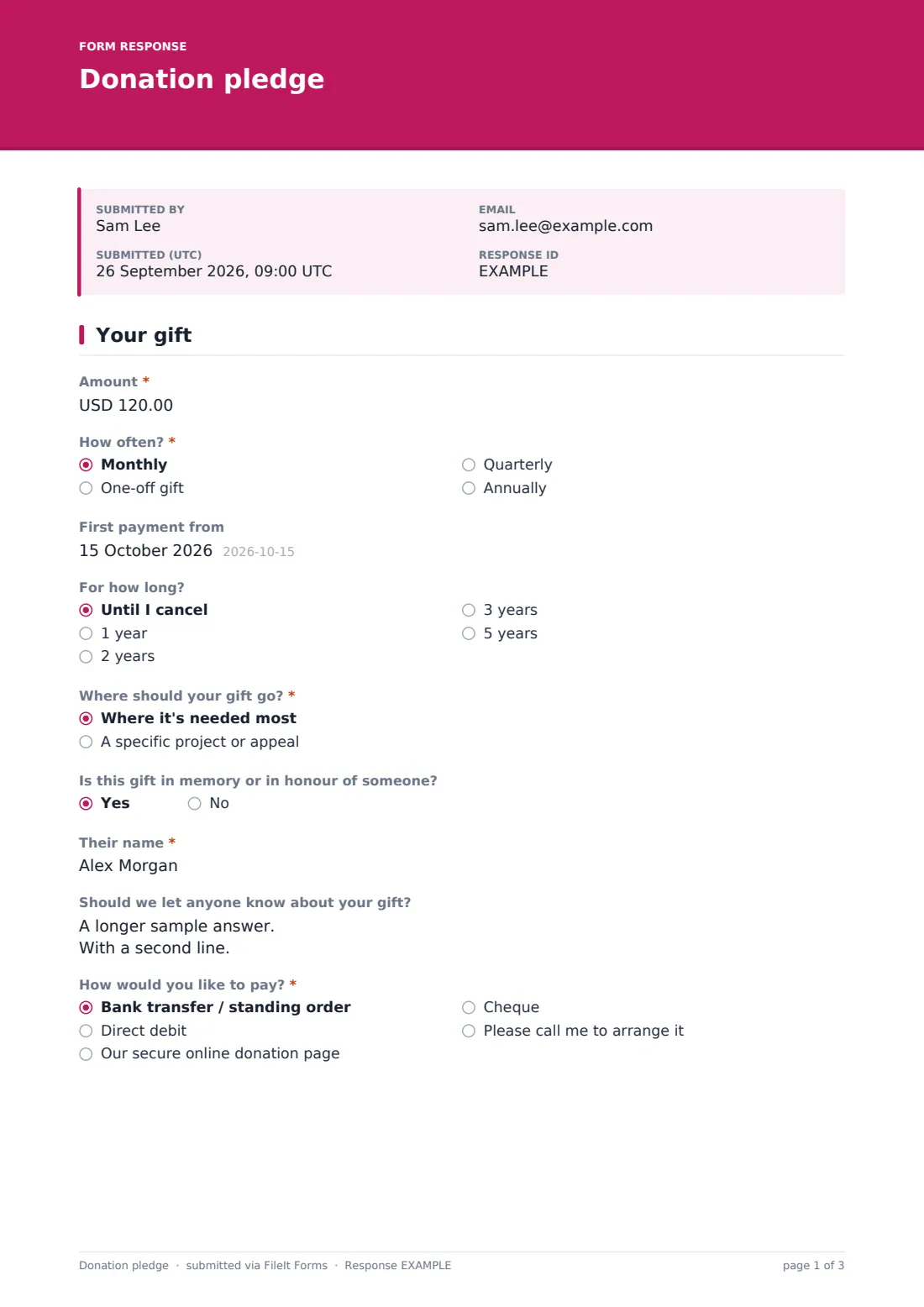
The form opens by asking the Amount and How often? (Monthly, One-off gift, Quarterly, or Annually). If the donor picks anything other than a one-off gift, two more questions appear: First payment from and For how long? (until cancelled, or a fixed term from one to five years) — so a recurring pledge has a clear start and, if wanted, an end.
Next comes Where should your gift go?, with a choice between "Where it's needed most" and "A specific project or appeal." Choosing the specific option reveals Which project or appeal? so the pledge is tied to the right fund. A yes/no question asks whether the gift is in memory or in honour of someone; answering yes opens Their name and a note field for who should be told about the gift (without the amount). The page ends with How would you like to pay?, offering bank transfer, direct debit, the organisation's own secure donation page, cheque, or a request to be called — the form itself never asks for card numbers.
2 About you
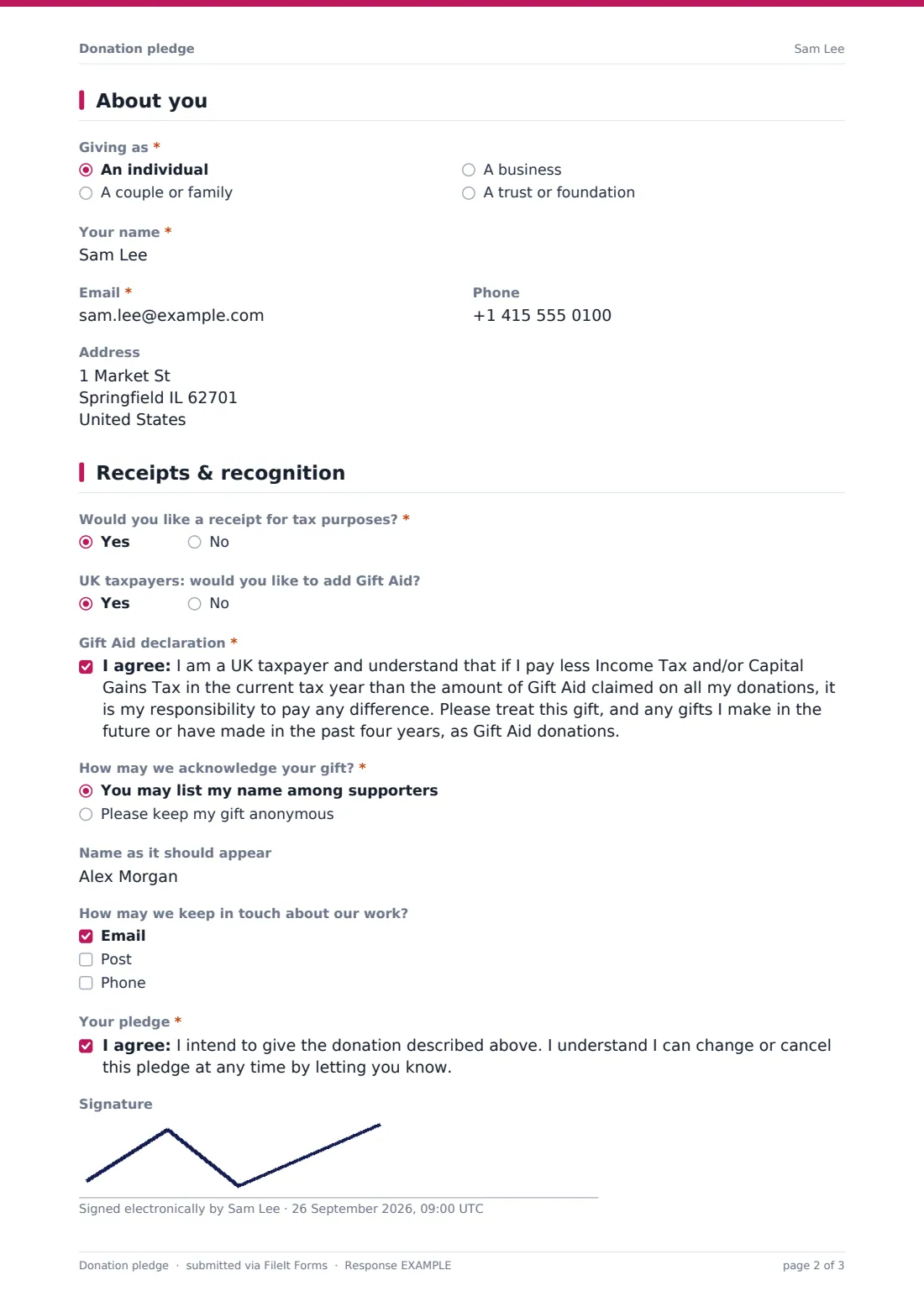
This page records who is giving: Giving as (an individual, a couple or family, a business, or a trust/foundation), with Organisation name appearing only when "a business" is chosen. Your name, Email and Phone follow, along with an Address field noted as needed for tax receipts and Gift Aid.
3 Receipts & recognition
Would you like a receipt for tax purposes? is a straightforward yes/no. UK donors are separately asked whether they'd like to add Gift Aid; answering yes reveals the standard Gift Aid declaration statement for the donor to agree to, confirming they pay enough UK tax to cover the amount claimed.
How may we acknowledge your gift? lets the donor choose to be listed among supporters or to stay anonymous, with a Name as it should appear field appearing for named gifts. A checkbox list covers how they're happy to be kept in touch about the organisation's work (email, post or phone). The page closes with the pledge statement itself — confirming intent to give and that the pledge can be changed or cancelled at any time — and an optional signature.
Make the template yours
- Change the currency on the Amount field, or adjust the minimum amount, to match your campaign
- Edit or remove the Gift Aid question and declaration entirely if it doesn't apply outside the UK
- Swap the payment method options for whatever your organisation actually offers
- Add a required field for CollectIdentity in Settings if you want every pledge tied to a verified name and email
- Set a closing date or a maximum number of responses if the pledge form is tied to a time-limited appeal
- Point the vault folder and document title in Settings so pledges file automatically under the right fundraising campaign
- Turn on an emailed PDF copy to the donor so they have their own record of the pledge
Tips for a better donation pledge form
- Only ask for the address if you genuinely need it for receipts or Gift Aid — it's already marked optional on general gifts
- Be clear up front (as the cover note does) that this form does not collect card or bank details itself
- Follow up promptly once a pledge comes in, especially where the donor asked to be called to arrange payment
- Keep tribute gift details (in-memory or in-honour) accurate, since these are often shared with a grieving family
- Review pledges regularly against actual payments received so recurring gifts that lapse can be gently followed up
- Decide in advance how you'll handle anonymous-gift requests so no name is accidentally listed
Every response becomes a PDF in your vault
When someone submits a pledge, FileIt turns their answers into a PDF and saves it in the vault folder you've chosen — you can also file it under a specific family member or entity if your account is organised that way. You (and any extra addresses you've added) get an email notification for each new pledge, and the donor can receive their own PDF copy automatically if you've turned that setting on.
From there, every pledge shows up in the Responses table, where you can filter by fields like frequency or designation, open any individual PDF, or export the whole list to CSV for your fundraising records. Most organisations use this to build a follow-up list — for donors who asked to be called, to set up standing orders or direct debits, or simply to log a one-off gift as received once payment arrives.
- Start from this template. It opens in the FileIt Forms designer — change any question, add pages, set the rules for when questions appear.
- Share it. Turn on a public link, or send it to people by email, each with their own link. They don’t need a FileIt account.
- Get the answers as PDFs. Each response is saved as a PDF in the vault folder you choose, with uploaded files attached — and listed in a Responses table you can export to CSV.
Donation pledge form: frequently asked questions
Is this donation pledge form template free?
Yes. It's one of over 160 ready-made templates included in FileIt's Forms app on every account, including the free plan. You can use it as-is or edit every question.
Do donors need a FileIt account to fill it in?
No. Anyone with the link can complete the form — no sign-up or account is required on their end.
Does this form actually take the donation payment?
No. It records the pledge — the amount, frequency and how the donor wants to pay — but it does not process card payments itself. You'll need to follow up with your own payment method, whether that's a bank transfer, direct debit, or a separate secure donation page.
Can I add Gift Aid or remove it if I'm not a UK organisation?
Yes. The Gift Aid question and declaration are ordinary fields in the designer, so you can edit the wording, make it required, or delete it entirely if it doesn't apply to your donors.
How do I get the pledges once people submit them?
Every submission is saved automatically as a PDF in your FileIt vault, in the folder you choose, and also appears in a Responses table you can filter and export to CSV.
Can donors stay anonymous?
Yes. The recognition question lets them choose to have their gift kept anonymous instead of listed among supporters.
Can I collect recurring pledges as well as one-off gifts?
Yes. The frequency question covers monthly, quarterly, annual and one-off gifts, and recurring choices reveal extra questions about the start date and how long the pledge should run.