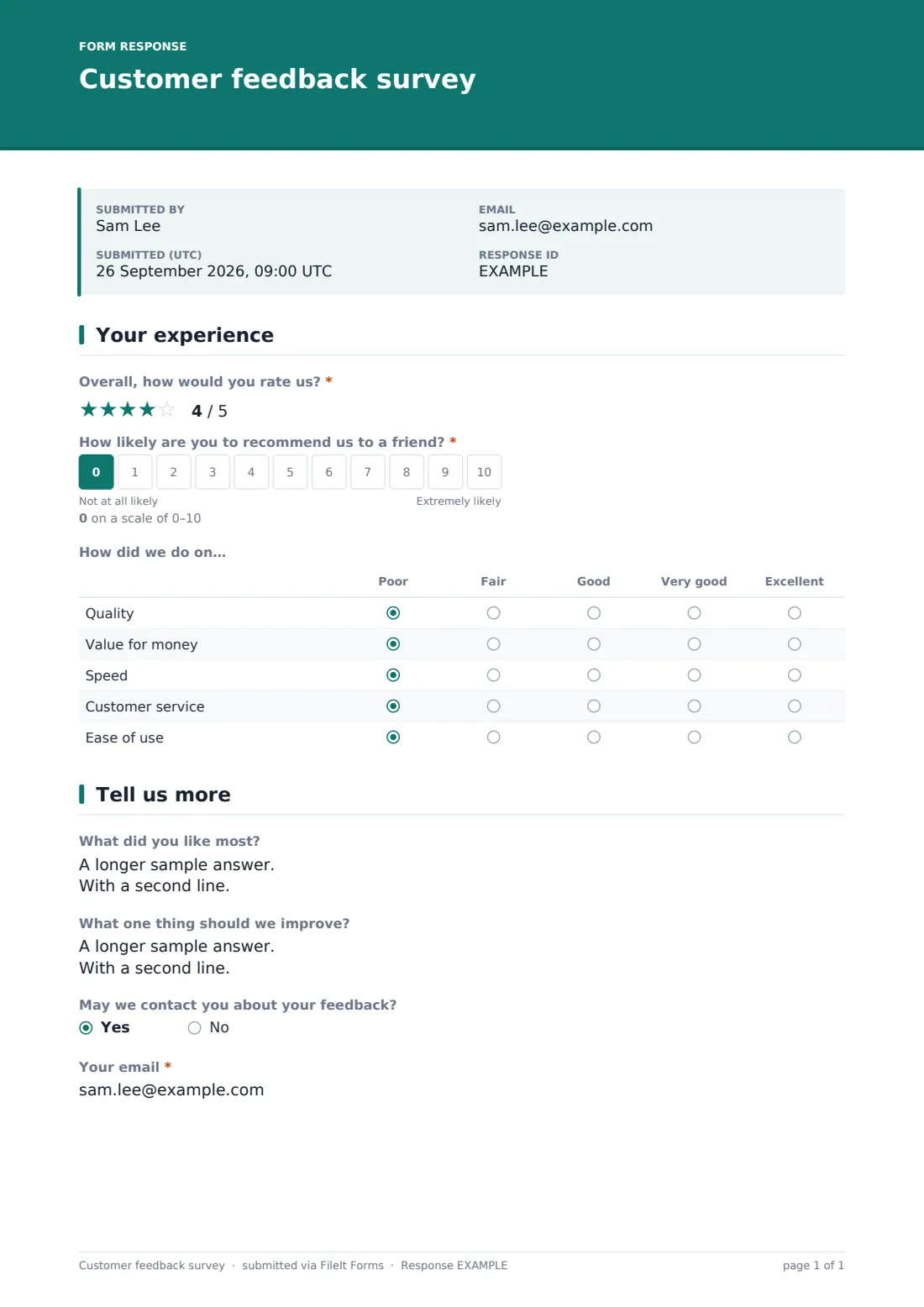
What is the customer feedback survey form template?
Most businesses want customer feedback but don't want to build a survey from scratch every time. This template covers the ground almost any business needs — an overall star rating, a recommend-to-a-friend score, a quick grid on specific aspects like quality and service, and open text for anything a number can't capture — in a form short enough that customers actually finish it.
Because it runs online rather than as a comment card or a follow-up phone call, customers can leave feedback in under a minute from their phone, right after a purchase or visit, with no FileIt account needed on their end. The form adapts as they answer: only customers who rate their experience below four stars are asked what went wrong, so people who had a good experience aren't slowed down justifying it.
Every response becomes a PDF filed straight into your FileIt vault, so a single bad review doesn't just disappear into an inbox — it's a dated record you can review, and if the customer opted in to be contacted, their email is right there on the same document.
- Best for
- Any small business, shop, restaurant or service provider gathering general customer feedback
- Filled in by
- Customers, immediately after a purchase, visit or service
- Time to complete
- About 2–3 minutes
- Includes
- Star rating, recommend scale, ratings grid, conditional follow-up question
Who uses a customer feedback survey form?
- A retail shop collecting feedback after checkout via a QR code on the receipt
- A restaurant or cafe gathering quick feedback by texting or emailing the link after a visit
- A service business (salon, garage, cleaning company) checking satisfaction after each job
- An online store following up by email a few days after delivery
- A subscription business tracking recommend scores over time to spot trends early
- A small business owner who wants one simple survey rather than building a new one for every touchpoint
Questions on this customer feedback survey form
8 questions over 2 pages · includes conditional questions, multiple pages, ratings.
1 Your experience
- Overall, how would you rate us?*
- How likely are you to recommend us to a friend?*
- How did we do on… Poor · Fair · Good · Very good · Excellent
2 Tell us more
- Sorry to hear that — what went wrong? asked only when it applies
- What did you like most?
- What one thing should we improve?
- May we contact you about your feedback?
- Your email* asked only when it applies
The customer feedback survey form, page by page
1 Your experience
The form opens with a five-star "Overall, how would you rate us?" question, followed by a 0–10 scale asking "How likely are you to recommend us to a friend?", labeled from "Not at all likely" to "Extremely likely" — a widely used way of gauging loyalty in a single question.
A ratings grid then asks how you did on quality, value for money, speed, customer service and ease of use, each scored from poor to excellent. Because this is the only page most customers need to complete a meaningful response, the survey stays fast even for someone answering on their phone in a queue or a car park.
2 Tell us more
If a customer's overall rating was below four stars, the form asks what went wrong — a targeted way of capturing detail from the people most likely to have a specific complaint, without asking everyone to write an essay. Two open questions follow for every respondent: what they liked most, and one thing you should improve.
A yes/no question then asks whether you may contact them about their feedback; saying yes reveals an email field, so you only collect contact details from customers who've actually agreed to be reached, keeping the form's default anonymous and low-friction for everyone else.
Make the template yours
- Add your business or branch name as a hidden note in the cover text so you know which location feedback came from if you run several
- Change the aspects in the ratings grid to match what actually matters in your business — delivery time, cleanliness, staff friendliness, and so on
- Turn on email notifications so a low overall rating reaches you the same day, not at the end of the month
- Set the confirmation message to thank customers and mention any loyalty program or follow-up they can expect
- File responses by month or by branch so trends are easy to review later
- Adjust the threshold for the "what went wrong" follow-up question if you want it triggered at a different rating
- Add a short_text question for the customer's name if you want to be able to identify specific feedback later, while keeping it optional
Tips for a better customer feedback survey form
- Send the survey while the experience is still fresh — right after checkout, delivery or service works better than days later
- Keep it short; this template is deliberately two pages so customers actually finish it
- Only ask for contact details from customers who opt in, and be clear about why you're asking
- Read open comments alongside the ratings grid — a low quality score paired with a specific comment is far more actionable than the score alone
- Respond promptly to negative feedback where a customer has agreed to be contacted; a quick reply often does more for the relationship than the original service
- Review responses regularly rather than only at year-end, so small problems don't go unnoticed for months
Every response becomes a PDF in your vault
The moment a customer submits, FileIt saves their answers as a PDF in your vault, in the folder you've set up for feedback, and — if enabled — sends you an email notification right away. If the customer agreed to be contacted, their email is captured on that same PDF, so a low rating is easy to follow up on without digging through a separate spreadsheet.
Most businesses check the Responses table regularly, respond directly to customers who opted in, and export the full set to CSV periodically to look for patterns across a week, a month or a location. Because every submission is a stored PDF, you also have a defensible, dated record if a complaint or dispute needs to be revisited later.
- Start from this template. It opens in the FileIt Forms designer — change any question, add pages, set the rules for when questions appear.
- Share it. Turn on a public link, or send it to people by email, each with their own link. They don’t need a FileIt account.
- Get the answers as PDFs. Each response is saved as a PDF in the vault folder you choose, with uploaded files attached — and listed in a Responses table you can export to CSV.
Customer feedback survey form: frequently asked questions
Is this customer feedback form template free?
Yes. It's included in the Forms app on every FileIt account, including the free plan, along with the other 160 ready-made templates.
Do customers need a FileIt account to leave feedback?
No. You share a link, QR code or email invite, and customers respond directly — no sign-up required.
How do I keep a record of each response?
FileIt automatically saves every submission as a PDF in your vault, in the folder you choose, so nothing needs to be exported manually to have a record.
Can I make the survey fully anonymous?
Yes — the template only asks for an email if the customer agrees to be contacted, so anyone who answers no submits an anonymous response.
Can I use this for more than one location or branch?
You can duplicate the form and file responses from each branch into a separate vault folder, or add your own field to record which location the feedback relates to.
What is the recommend-to-a-friend question for?
It's a simple 0–10 loyalty score often used alongside star ratings to see how likely customers are to recommend a business, which can be tracked over time.
Can I get notified as soon as someone leaves negative feedback?
Yes, turning on owner notifications means you get an email for every new response, so a low rating doesn't sit unread.
Can I export all the feedback for analysis?
Yes — the Responses table supports filters, and the full list can be exported to CSV whenever you want to review it elsewhere.