What is the guest satisfaction survey form template?
Most guests won't write an unprompted review, but plenty will answer a short survey right after checking out — if it's quick and feels like it actually gets read. This guest satisfaction survey template rates every part of a stay from booking through to check-out, asks a simple recommend-to-a-friend question, and reacts differently depending on how the guest felt.
Keeping this as a single page, with a five-star overall rating up top, means it can be filled in from a phone in under two minutes. Conditional logic does the real work of making that short form still useful: a low likelihood-to-recommend score reveals a question asking what could have been done better and whether the issue was raised during the stay, while a high score instead asks what the guest enjoyed most — so every guest gets a relevant follow-up rather than a generic one.
Every response becomes a PDF in your FileIt vault, giving your management team a running, dated archive of guest feedback that's far easier to review at a glance than a page of star ratings on a review website.
- Best for
- Hotels, B&Bs and other short-stay accommodation
- Filled in by
- A guest, after checking out
- Time to complete
- About 2 minutes
- Includes
- A per-area rating matrix, an NPS-style question, conditional follow-up on low or high scores
Who uses a guest satisfaction survey form?
- A hotel emails a survey link to every guest shortly after check-out
- A B&B owner reviews feedback each week to spot recurring issues before they affect more guests
- A guest relations manager follows up personally with anyone who reports a low score
- A hotel identifies a staff member for a shout-out based on specific guest comments
- A property collects permission to quote positive comments in its own marketing
- A hotel tracks satisfaction trends across booking, cleanliness, breakfast and value over time
Questions on this guest satisfaction survey form
17 questions · includes conditional questions, consent checkbox, ratings.
1 Your stay
- When did you check out?
- Room number
- What brought you here? Leisure · Business · Family trip · Event or wedding · Other
- Overall, how was your stay?*
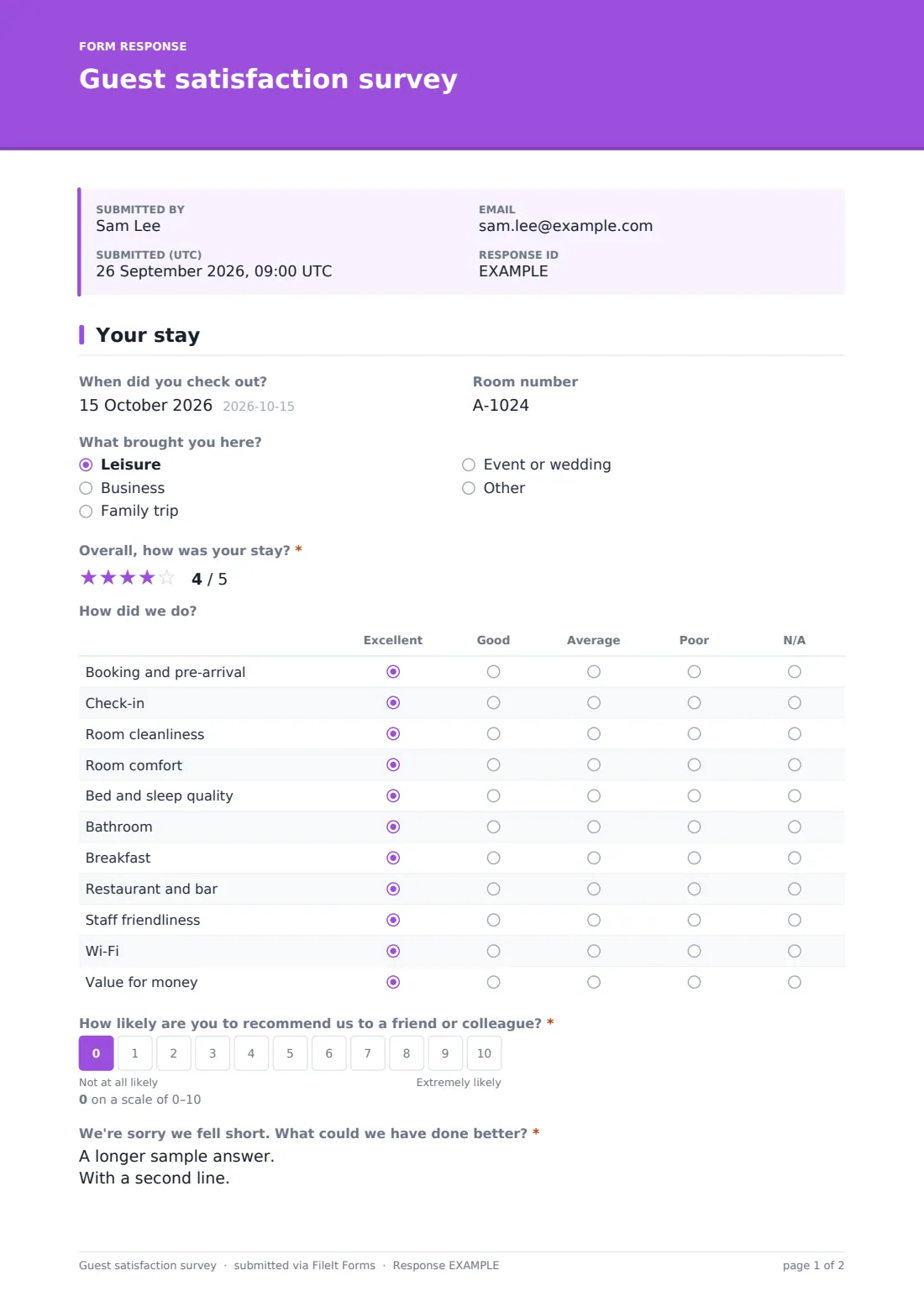
- How did we do? Excellent · Good · Average · Poor · N/A
- How likely are you to recommend us to a friend or colleague?*
- We're sorry we fell short. What could we have done better?* asked only when it applies
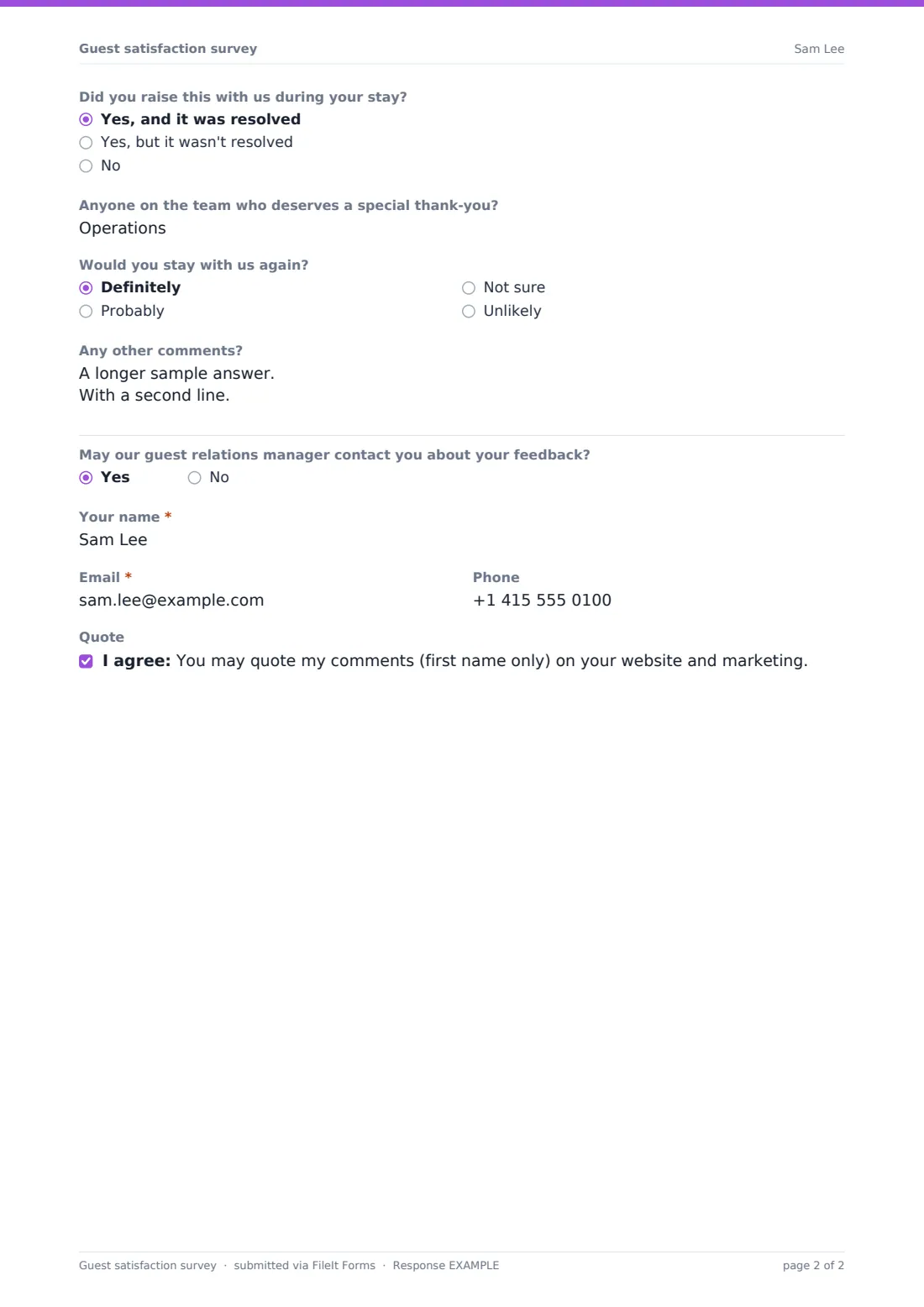
- Did you raise this with us during your stay? asked only when it applies Yes, and it was resolved · Yes, but it wasn't resolved · No
- What did you enjoy most? asked only when it applies
- Anyone on the team who deserves a special thank-you?
- Would you stay with us again? Definitely · Probably · Not sure · Unlikely
- Any other comments?
- May our guest relations manager contact you about your feedback?
- Your name* asked only when it applies
- Email* asked only when it applies
- Phone asked only when it applies
- Quote
The guest satisfaction survey form, page by page
1 Your stay
The whole survey sits on one page. An optional Checkout date and Room number help match feedback to a specific stay, and What brought you here (leisure, business, family trip, event or wedding, or other) adds context. An Overall, how was your stay star rating comes first, followed by a matrix rating eleven specific areas — booking and pre-arrival, check-in, room cleanliness, comfort, sleep quality, bathroom, breakfast, restaurant and bar, staff friendliness, Wi-Fi and value for money — each as excellent, good, average, poor or not applicable.
A 0–10 How likely are you to recommend us score drives what comes next: a score under 7 reveals a required question asking what could have been done better and whether the guest raised it during their stay, while a score over 6 instead reveals an optional question about what they enjoyed most. Everyone can name a staff member for a shout-out, say whether they'd stay again, and leave any other comments. A closing yes/no asks permission for a guest relations manager to follow up, revealing name, email and phone fields if agreed, plus an optional consent to quote the guest's comments, first name only, in the hotel's marketing.
Make the template yours
- Adjust the rated areas in the matrix to match the facilities your property actually offers
- Add a question about a specific new amenity or renovation you want targeted feedback on
- Turn on notification to a specific manager whenever a low recommend score comes in, for faster follow-up
- Set the vault folder to file feedback by month or by property if you run more than one location
- Add a QR code linking to this survey on the room key card or check-out receipt
- Consider disabling SendCopy if guests don't need their own copy of a quick satisfaction survey
Tips for a better guest satisfaction survey form
- Send the survey link soon after check-out, while the stay is still fresh in the guest's mind
- Follow up personally, and quickly, with anyone who reports a low score and agrees to be contacted
- Read comments alongside the ratings — a specific comment often explains a rating better than the number alone
- Share positive comments and shout-outs with the staff members named, not just with management
- Only ask to quote a guest's feedback publicly when they've explicitly agreed via the consent question
Every response becomes a PDF in your vault
The moment a guest submits their feedback, FileIt saves it as a PDF in the vault folder you've set up, and your team gets an email notification straight away — useful for catching a low score and responding quickly while the guest can still be reached.
Most hotels review the Responses table weekly to spot trends across the rated areas, and export to CSV when compiling a monthly report for ownership or management. Because each response is kept as a dated PDF, it's easy to track how scores for a specific area, like breakfast or Wi-Fi, change after you make an improvement.
- Start from this template. It opens in the FileIt Forms designer — change any question, add pages, set the rules for when questions appear.
- Share it. Turn on a public link, or send it to people by email, each with their own link. They don’t need a FileIt account.
- Get the answers as PDFs. Each response is saved as a PDF in the vault folder you choose, with uploaded files attached — and listed in a Responses table you can export to CSV.
Guest satisfaction survey form: frequently asked questions
Is this guest satisfaction survey form template free?
Yes, it's included in the Forms app on every FileIt account, including the free plan, and every question can be edited.
Do guests need a FileIt account to leave feedback?
No. Share the survey link by email or QR code and guests submit their feedback with no account needed.
How do we get survey responses as PDFs?
Every submission is automatically saved as a PDF in the vault folder you choose for this form.
What happens if a guest gives a low recommend score?
The survey reveals a required question asking what could have been done better and whether the guest raised the issue during their stay, so you can follow up on specifics.
Can guests give permission for us to quote their comments in marketing?
Yes — there's an optional consent statement asking if the hotel may quote their comments, using their first name only.
Can we ask a guest for permission to contact them about their feedback?
Yes, a yes/no question asks if a guest relations manager may follow up, revealing contact fields when the guest agrees.
Is this survey the same as leaving a public online review?
No — it's a private feedback form that goes straight to your team as a PDF, separate from any public review site.