What is the patient satisfaction survey form template?
Most patients never volunteer feedback unless something went badly wrong, which means practices rarely hear about the small things that would actually improve the experience for everyone. This template asks a short, structured set of questions right after a visit — how different parts of the experience felt, whether the patient would recommend the practice, and what could have gone better — so feedback becomes routine rather than rare.
It's designed to be genuinely quick: rating grids rather than long essay questions, an overall score, and a note reminding patients this isn't the place for detailed medical concerns or formal complaints, which keeps responses focused on the experience itself. Patients can stay anonymous or leave contact details if they're comfortable being followed up with.
Every response is saved as a PDF in your FileIt vault, so feedback isn't scattered across a suggestion box and a review site — it's in one place, filterable, and easy to review as a set rather than one comment at a time.
- Best for
- Clinics, hospitals and private practices gathering feedback after a patient visit
- Filled in by
- Patients, shortly after their appointment
- Time to complete
- About 2 minutes
- Includes
- An experience rating grid, a recommend (NPS-style) score, and optional contact details for follow-up
Who uses a patient satisfaction survey form?
- A GP or specialist practice tracking patient experience over time
- A hospital department collecting feedback after outpatient appointments
- A telehealth provider surveying patients after a video consultation
- A dental or allied health clinic benchmarking satisfaction across locations or clinicians
- A practice manager identifying recurring friction points, like long waiting times
- Any healthcare provider that wants a lightweight, ongoing pulse on patient experience
Questions on this patient satisfaction survey form
15 questions over 3 pages · includes conditional questions, multiple pages, ratings.
1 Your visit
- Date of your visit
- Type of appointment* In person · Video · Phone · Home visit
- Clinic, department or clinician
- Was this your first visit to us?
2 Your experience
- How would you rate… Poor · Fair · Good · Very good · Excellent · N/A
- Did you leave knowing what happens next? Yes, clearly · Partly · No
- Overall, how was your visit?*
- We're sorry. What went wrong? asked only when it applies
3 Recommend & comments
- How likely are you to recommend us to friends or family?*
- What's the main reason for your score?
- Anything we did especially well?
- May we contact you about your feedback?
- Your name* asked only when it applies
- Email asked only when it applies
- Phone asked only when it applies
The patient satisfaction survey form, page by page
1 Your visit
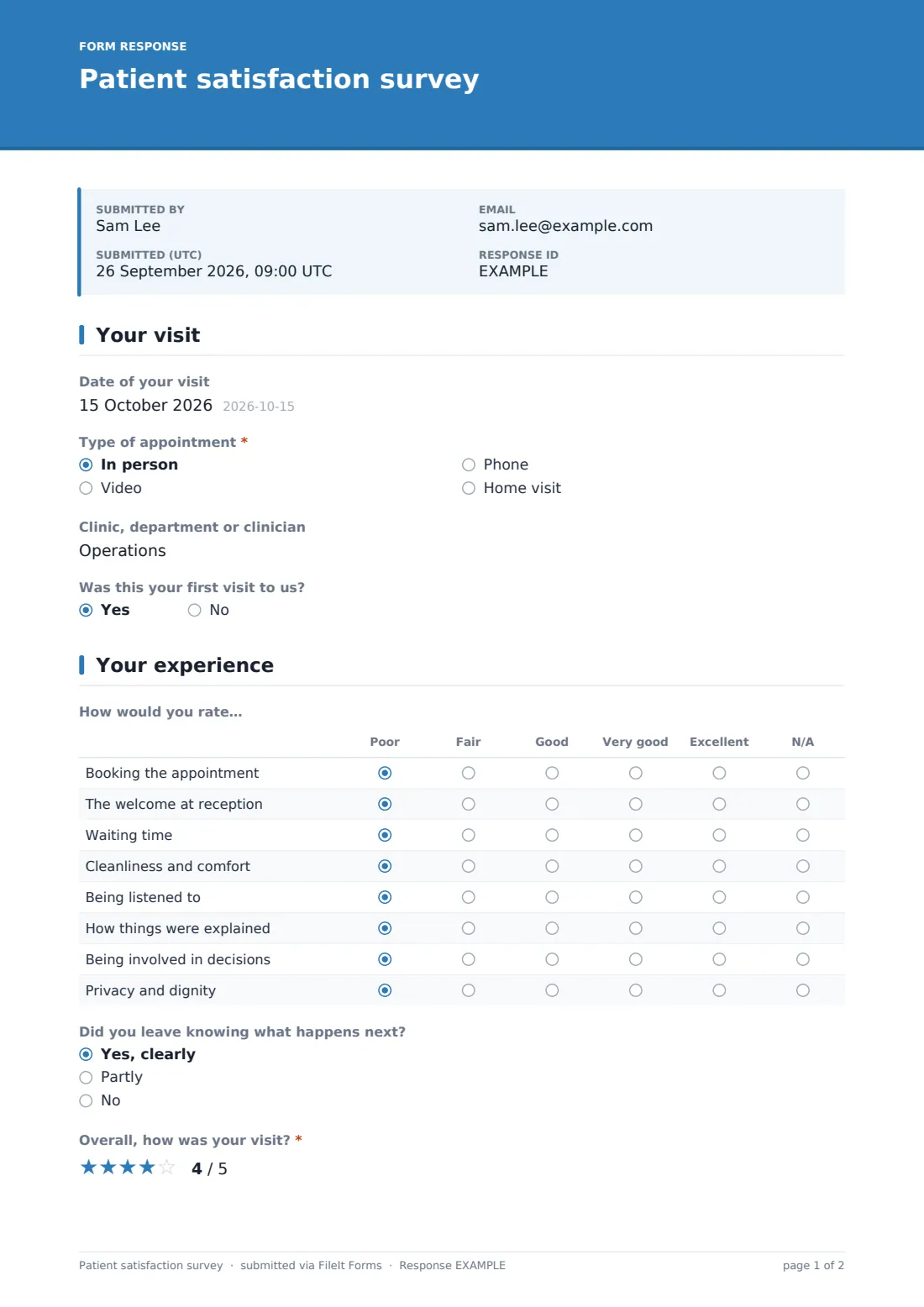
The survey opens with Date of your visit, Type of appointment (in person, video, phone or home visit), an optional Clinic, department or clinician field, and whether it was the patient's First visit. Keeping this section short means patients reach the actual feedback questions quickly.
2 Your experience
A rating grid covers How would you rate… booking the appointment, the welcome at reception, waiting time, cleanliness and comfort, being listened to, how things were explained, being involved in decisions, and privacy and dignity — each rated Poor to Excellent or N/A. A Did you leave knowing what happens next? question and an Overall rating (1-5) follow, and if the overall rating is low, a required field asks what went wrong, so the practice can follow up on genuinely poor experiences rather than just logging a low number.
3 Recommend & comments
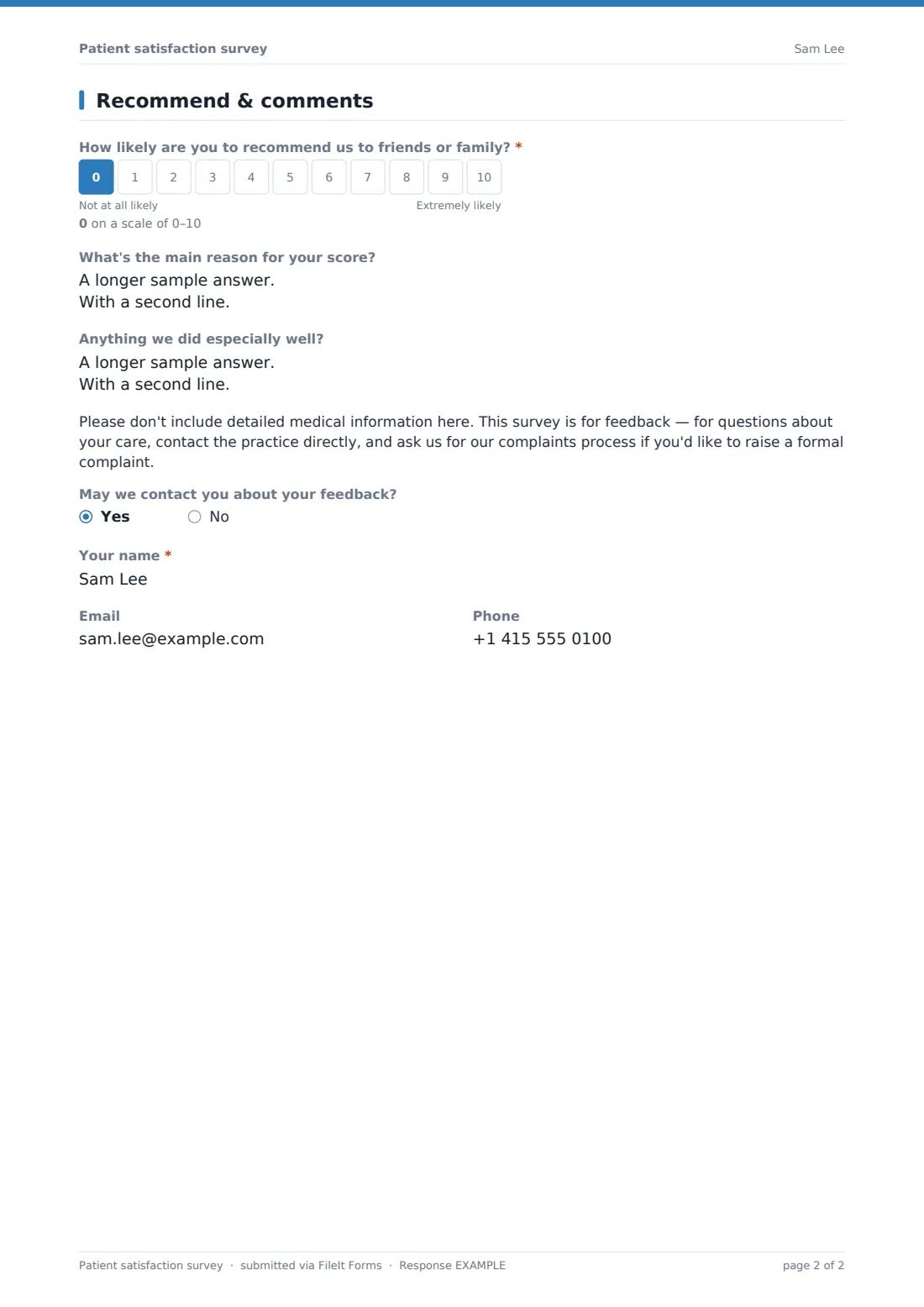
Patients rate How likely are you to recommend us? on a 0-10 scale, with a field for the main reason behind their score, and a separate question inviting anything the practice did especially well. A clear note asks patients not to include detailed medical information here, and to contact the practice directly for care questions or its formal complaints process. A final yes/no asks whether the practice may contact them about their feedback, revealing name, email and phone fields only if they agree.
Make the template yours
- Add a department or clinician dropdown if you want to compare satisfaction across teams
- Shorten the experience rating grid if you want an even faster survey for high patient volumes
- Turn off the notification email per response and instead review submissions in a weekly batch
- Set the document title to include the visit date so responses are easy to scan chronologically
- Add a specific question about a new service or process you're piloting and want direct feedback on
- Keep identity collection off by default, as in the template, if you want to encourage more candid responses
Tips for a better patient satisfaction survey form
- Send the survey soon after the visit, while the experience is still fresh, rather than days later
- Read low-score responses promptly — the required "what went wrong" field is often the most actionable feedback you'll get
- Track the recommend score over time rather than reacting to any single response, to spot real trends
- Make clear this is for feedback, not clinical concerns, so patients with a genuine medical question contact the practice directly
- Respect a patient's choice not to be contacted — only follow up with those who explicitly agree to it
Every response becomes a PDF in your vault
As soon as a patient submits the survey, FileIt saves it as a PDF in your vault and sends a notification if you've kept that setting on. Because the survey is designed to be anonymous by default, most responses simply build up as a dataset — but any patient who opts in to being contacted gives the practice a clear, consented way to follow up.
Practice managers typically review responses in the Responses table on a regular schedule, watching the recommend score and experience ratings over time, and reading low-score comments as soon as they come in. Exporting to CSV makes it easy to track trends over a quarter or compare feedback across departments or clinicians.
- Start from this template. It opens in the FileIt Forms designer — change any question, add pages, set the rules for when questions appear.
- Share it. Turn on a public link, or send it to people by email, each with their own link. They don’t need a FileIt account.
- Get the answers as PDFs. Each response is saved as a PDF in the vault folder you choose, with uploaded files attached — and listed in a Responses table you can export to CSV.
Patient satisfaction survey form: frequently asked questions
Is this patient satisfaction survey template free?
Yes, it's included in FileIt's Forms app on every account, including the free plan, and every question can be edited.
Do patients need a FileIt account to respond?
No. You share a link by email, text or a printed QR code, and patients respond without creating an account.
Is the survey really anonymous?
By default it doesn't require a name, email or phone number — patients only provide contact details if they specifically agree to being contacted about their feedback.
Do we get responses as PDFs?
Yes, every submission is saved as a PDF in your FileIt vault, and all responses are also browsable and exportable from the Responses table.
Is this suitable for handling formal complaints?
No — the survey includes a note directing patients with a formal complaint or a medical concern to contact the practice directly rather than raising it here.
What is the recommend score based on?
It's a 0-10 likelihood-to-recommend question, similar in style to a Net Promoter Score, along with a free-text field for the main reason behind the score.
Can we ask about a specific department or clinician?
Yes, there's an optional field for clinic, department or clinician, and you can turn it into a required dropdown if you want to compare results across teams.
Can we follow up with patients who leave feedback?
Only if they opt in — a yes/no question asks whether the practice may contact them, and only then are name, email and phone fields shown.