What is the training feedback form template?
Feedback collected on a paper form at the end of a training session tends to get skimmed once and filed away, if it survives that long. This training feedback form template gathers the same information digitally — how the session rated overall, how specific elements like content and delivery compared, and what should change next time — in a format that's easy to review across every session you run, not just the one in front of you.
Participants can complete it anonymously if you'd like honest feedback, since the name field is optional and clearly marked as such. A low overall rating quietly opens a question asking what didn't work, so you get more detail exactly where it's needed, without making every attendee write an essay.
Every submission is saved as a PDF in your FileIt vault the moment it's sent, so a full record of feedback for each course or session builds up automatically — useful when you're deciding whether to run it again, or comparing a trainer's sessions over time.
- Best for
- L&D teams, trainers and event organisers evaluating a course or workshop
- Filled in by
- Participants who attended the training
- Time to complete
- About 5 minutes
- Includes
- A star rating, a multi-item comparison grid, a before/after confidence check, optional anonymity
Who uses a training feedback form?
- Collecting feedback right after an in-person workshop or seminar
- Evaluating a live online training session or webinar
- Comparing feedback across multiple deliveries of the same course over time
- Measuring confidence before and after a training session on the same topic
- Gathering topic suggestions for future training sessions
- Building an ongoing record of trainer performance across different sessions
Questions on this training feedback form
19 questions over 3 pages · includes conditional questions, multiple pages, ratings.
1 The session
- Course or session title*
- Trainer or facilitator
- Date attended*
- Format In person · Live online · Self-paced / e-learning · Blended
- Your name
- Email asked only when it applies
2 Your ratings
- Overall, how would you rate this training?*
- How would you rate…* Poor · Fair · Good · Very good · Excellent
- How relevant was it to your work?*
- Your confidence in the topic before the training
- Your confidence after the training
- Were the learning objectives met? Fully · Mostly · Partly · Not at all
- Sorry it missed the mark — what didn't work for you? asked only when it applies
3 Your suggestions
- What was most useful?
- What will you do differently as a result?
- What should we change or add?
- The length of the session was… Too short · About right · Too long
- Would you recommend this training to a colleague?
- Topics you'd like future training on
The training feedback form, page by page
1 The session
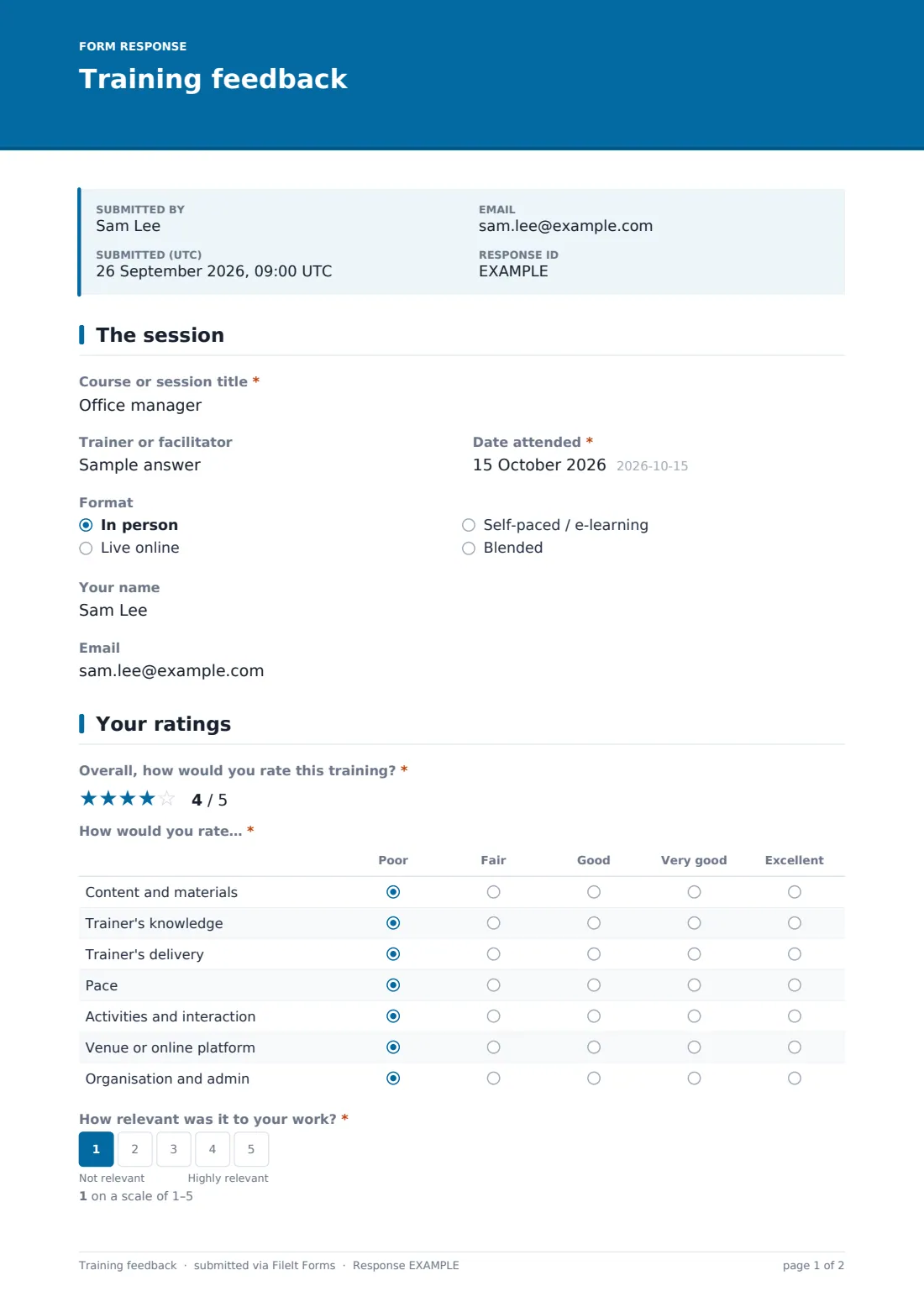
The form records the course or session title, the trainer or facilitator, the date attended, and the format — in person, live online, self-paced e-learning, or blended. The participant's name is optional, with a note that leaving it blank keeps the response anonymous; giving a name reveals an optional email field for anyone who'd like a copy of their own feedback.
2 Your ratings
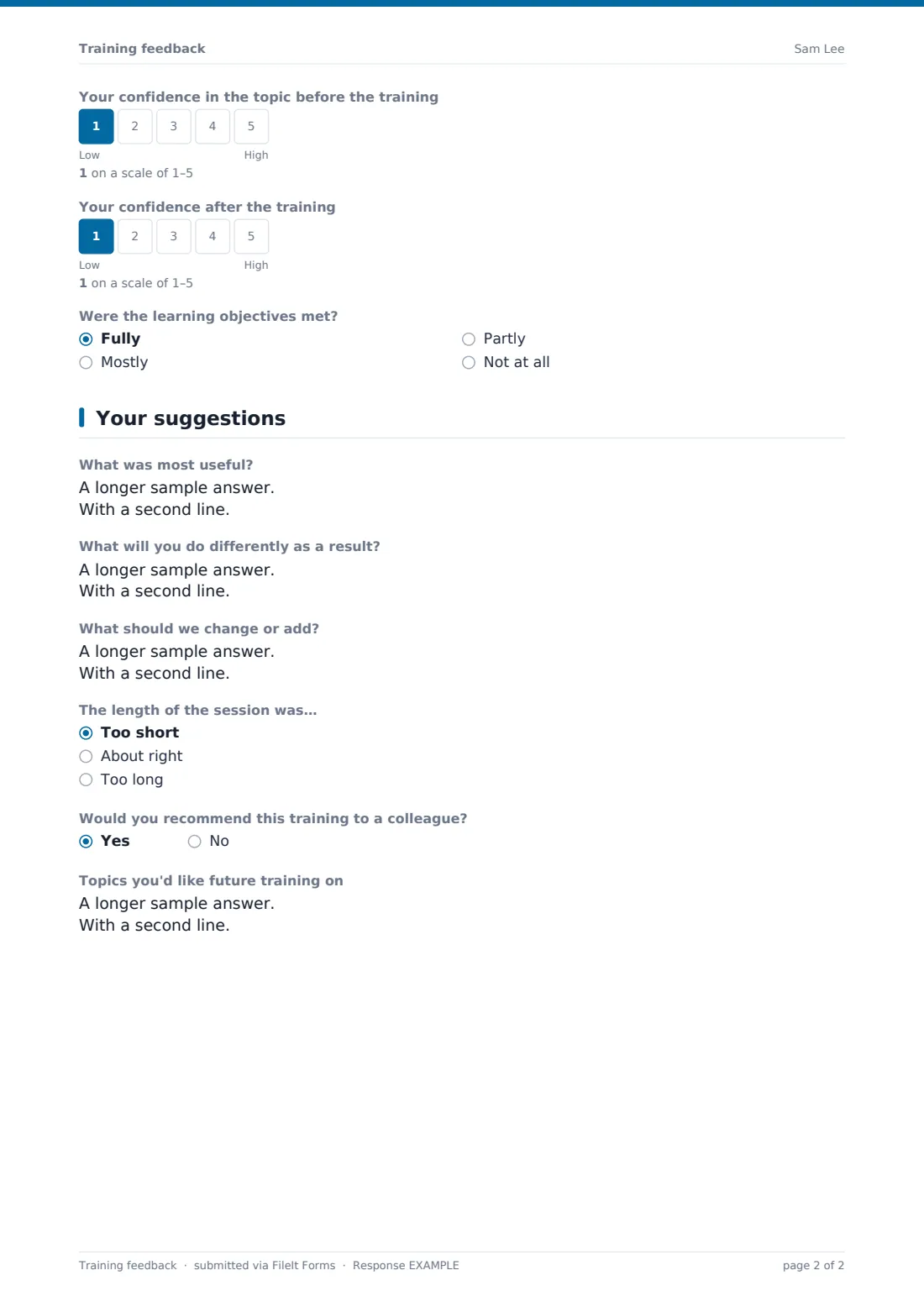
Participants give an overall star rating, then a more detailed comparison — poor to excellent — across content and materials, the trainer's knowledge, the trainer's delivery, pace, activities and interaction, the venue or platform, and organisation and admin. They also rate how relevant the session was to their work, and their confidence in the topic before and after the training side by side, which makes the actual impact of the session visible at a glance.
The form asks whether the learning objectives were met — fully, mostly, partly, or not at all — and if the overall rating comes in below 3, it opens a question asking specifically what didn't work, so low scores come with the context needed to act on them.
3 Your suggestions
This page asks what was most useful, what the participant will do differently as a result, and what should change or be added next time. It also covers whether the session length felt right, whether the participant would recommend the training to a colleague, and what topics they'd like future training to cover.
Make the template yours
- Adjust the rated items in the comparison grid to match what matters most for your training programme
- Add a specific course code or cohort field if you run the same session multiple times a year
- Set the vault folder so feedback files by course, making year-on-year comparisons easier
- Remove the optional name field entirely if you want every response to stay strictly anonymous
- Turn off the emailed copy to the respondent if you're prioritising anonymity over a personal record
- Add a certification or completion question if the training leads to a formal qualification
Tips for a better training feedback form
- Send the form immediately after the session, while the experience is still fresh
- Make clear whether feedback is anonymous or not, since it changes how honestly people answer
- Look at the before/after confidence ratings together — a session can score well overall but still show little actual improvement
- Read low-score explanations carefully rather than dismissing them as one-off complaints
- Share a summary of changes made as a result of feedback with future participants — it builds trust in the process
Every response becomes a PDF in your vault
As soon as a participant submits their feedback, FileIt saves it as a PDF in your vault, and you receive an email notification. If a participant provided their email and you've turned on a copy for the respondent, they also receive their own PDF.
From there, most L&D teams use the Responses table to see ratings for a specific session at a glance, and export the full set to CSV when comparing multiple deliveries of the same course or reporting training outcomes more broadly.
- Start from this template. It opens in the FileIt Forms designer — change any question, add pages, set the rules for when questions appear.
- Share it. Turn on a public link, or send it to people by email, each with their own link. They don’t need a FileIt account.
- Get the answers as PDFs. Each response is saved as a PDF in the vault folder you choose, with uploaded files attached — and listed in a Responses table you can export to CSV.
Training feedback form: frequently asked questions
Is this training feedback form template free?
Yes — it's included with the Forms app on every FileIt account, including the free plan, along with more than 160 other ready-made templates.
Do participants need a FileIt account to give feedback?
No. Share the form as a link straight after the session, and participants complete and submit it without creating any account.
Can participants stay anonymous?
Yes — the name field is optional and clearly marked as such, so participants can leave it blank if they'd prefer their feedback to be anonymous.
Where does the feedback go once submitted?
Every response is saved automatically as a PDF in your FileIt vault, and you can review, filter and export all feedback from the Responses table.
Does the form ask for more detail when a rating is low?
Yes — an overall rating below 3 automatically opens a question asking what specifically didn't work, using conditional logic already built into the template.
Can I measure how much a training session actually helped?
The form asks participants to rate their confidence in the topic both before and after the session, which gives you a simple side-by-side view of perceived improvement.
Can I use this for both in-person and online training?
Yes — the format question covers in-person, live online, self-paced and blended sessions, so one template works across different delivery styles.