
What is the hotel guest registration form template?
A guest standing at the front desk filling in a paper registration card, while others wait behind them, is one of the most avoidable delays in hospitality. This hotel guest registration template moves the whole card online — contact and ID details, stay dates, vehicle information, requests and hotel policy agreement — so it's done before the guest even arrives.
Doing this online rather than on paper also helps with the practical side of running a hotel: many places require an ID record for every guest, and a typed form with a document number and expiry date is far more reliable than handwriting captured in a rush at a busy desk. Conditional logic reveals company details only for business travellers, and vehicle details only when a guest confirms they'll be parking with you.
Every completed registration, with the guest's signature, becomes a PDF saved automatically to your FileIt vault, giving your front desk a searchable, dated record for every stay — a lot easier to find again than a card in a filing box.
- Best for
- Hotels, B&Bs and other guest accommodation
- Filled in by
- The guest, ideally before arrival
- Time to complete
- About 3 minutes
- Includes
- ID document details, vehicle registration, room requests, signed hotel policies
Who uses a hotel guest registration form?
- A hotel emails a registration link ahead of arrival to speed up check-in
- A B&B collects ID details required for guests staying in the country
- A hotel records a guest's vehicle registration for a car park
- A business traveller registers with their company name and tax number for invoicing
- A hotel notes allergies or dietary needs ahead of breakfast service
- A front desk prepares a room in advance based on requests like an early check-in or a quiet room
Questions on this hotel guest registration form
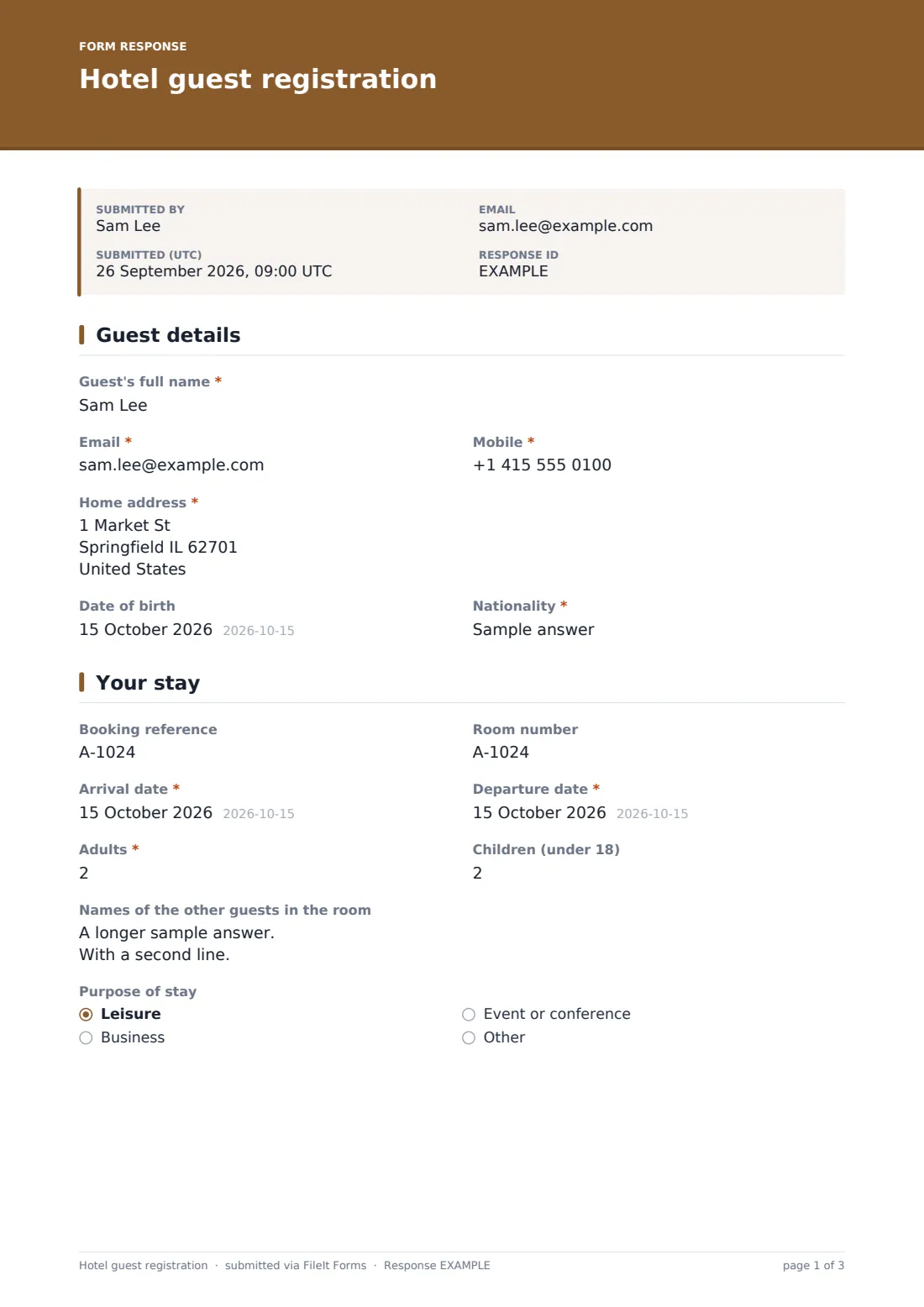
32 questions over 4 pages · includes signature, file upload, conditional questions, multiple pages, consent checkbox.
1 Guest details
- Guest's full name*
- Email*
- Mobile*
- Home address*
- Date of birth
- Nationality*
2 Your stay
- Booking reference
- Room number
- Arrival date*
- Departure date*
- Adults*
- Children (under 18)
- Names of the other guests in the room
- Purpose of stay Leisure · Business · Event or conference · Other
- Company name asked only when it applies
- Company tax / VAT number asked only when it applies
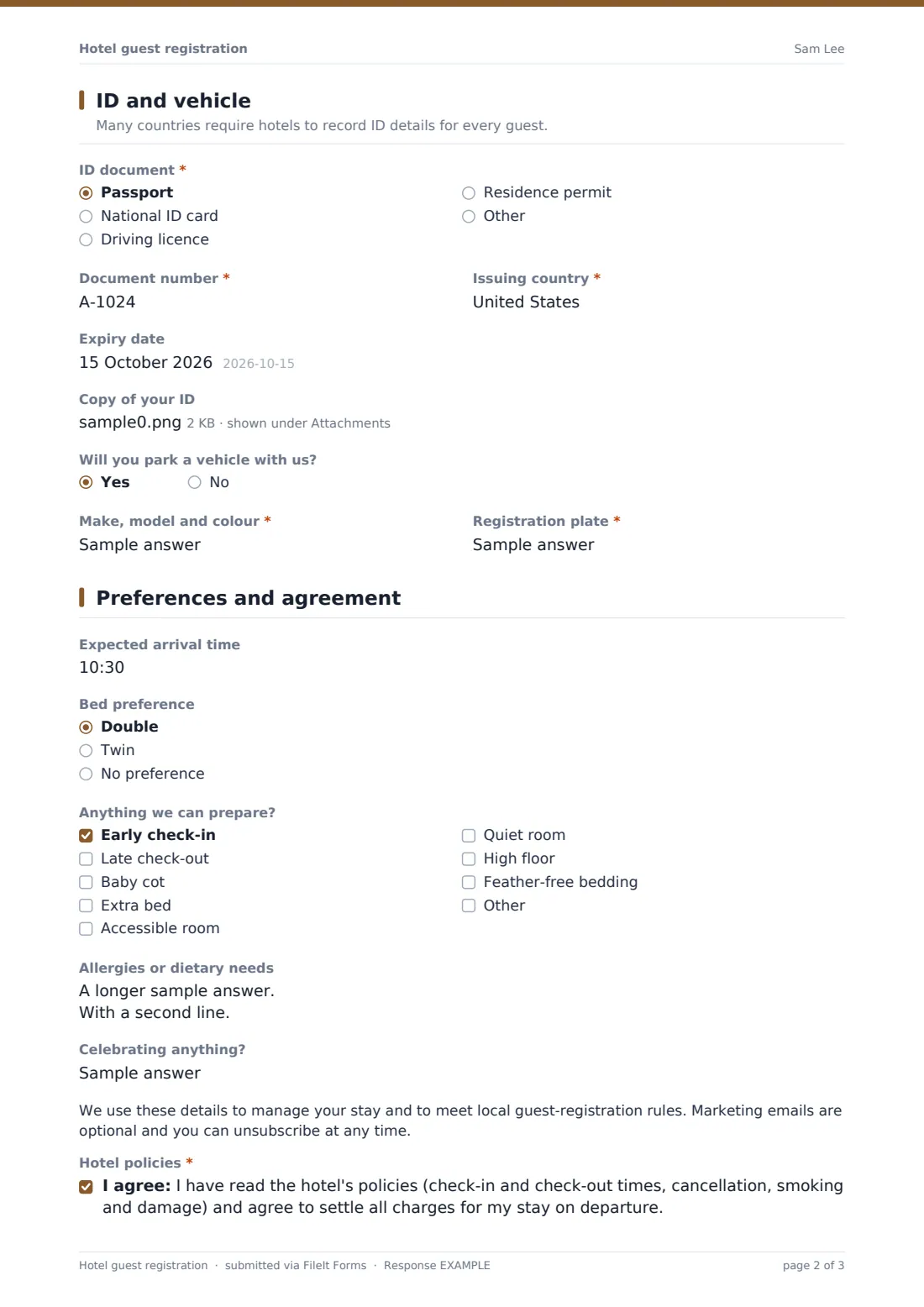
3 ID and vehicle
- ID document* Passport · National ID card · Driving licence · Residence permit · Other
- Document number*
- Issuing country*
- Expiry date
- Copy of your ID
- Will you park a vehicle with us?
- Make, model and colour* asked only when it applies
- Registration plate* asked only when it applies
4 Preferences and agreement
- Expected arrival time
- Bed preference Double · Twin · No preference
- Anything we can prepare? Early check-in · Late check-out · Baby cot · Extra bed · Accessible room · Quiet room · High floor · Feather-free bedding
- Allergies or dietary needs
- Celebrating anything?
- Hotel policies*
- News and offers
- Guest's signature*
The hotel guest registration form, page by page
1 Guest details
The card opens with the Guest's full name (as shown on their ID document), Email, Mobile, Home address, an optional Date of birth, and Nationality.
2 Your stay
An optional Booking reference and Room number sit alongside required Arrival and Departure dates and the number of Adults and Children in the room, plus an optional list of Names of the other guests staying. A Purpose of stay choice (leisure, business, event or conference, or other) reveals Company name and tax/VAT number fields when 'business' is chosen, useful for invoicing.
3 ID and vehicle
A note explains that many countries require hotels to record ID details for every guest. A required ID document type (passport, national ID card, driving licence, residence permit, or other), Document number, Issuing country, and an optional Expiry date and photo-page upload follow. A yes/no on parking a vehicle reveals required fields for the make, model, colour and registration plate.
4 Preferences and agreement
An optional Expected arrival time and Bed preference (double, twin or no preference) help the front desk prepare the room, alongside a checklist of requests — early check-in, late check-out, a baby cot, an extra bed, an accessible or quiet room, a high floor, or feather-free bedding — and optional notes on Allergies or dietary needs and any Occasion being celebrated. A privacy note explains the details are used to manage the stay and meet local guest-registration rules, and marketing emails are optional. A required agreement to the hotel's policies (check-in and check-out times, cancellation, smoking and damage, and settling charges on departure), an optional marketing opt-in, and the guest's Signature complete the card.
Make the template yours
- Adjust the requests checklist to match the amenities and room features your property actually offers
- Add a loyalty programme number field if your hotel runs its own membership scheme
- Set the vault folder by month or by room type to keep registrations easy to find later
- Add your own cancellation and damage policy wording in place of the placeholder statement
- Turn on an email copy to the guest so they have their own record of what they agreed to
- Add a question about estimated check-out time if that helps housekeeping plan their day
Tips for a better hotel guest registration form
- Send the registration link with the booking confirmation so guests can complete it well before arrival
- Keep the requests checklist realistic — only list things your property can reliably provide
- Check local rules on what ID information hotels are required to record and retain for guests from abroad
- Flag allergy and dietary notes to the kitchen ahead of breakfast service, not just to the front desk
- Review vehicle details before a guest arrives if your car park has limited space or requires a permit
Every response becomes a PDF in your vault
As soon as a guest submits their registration and signature, FileIt saves it as a PDF in the vault folder you've set up, and your front desk gets an immediate email notification, so the room and any requests can be prepared before the guest arrives.
Most properties check the Responses table each morning for that day's arrivals, confirming ID details, vehicle information and any special requests before check-in begins. Because each registration is kept as its own signed PDF, it's easy to pull up a past guest's stay details again if they return or if a question comes up after check-out.
- Start from this template. It opens in the FileIt Forms designer — change any question, add pages, set the rules for when questions appear.
- Share it. Turn on a public link, or send it to people by email, each with their own link. They don’t need a FileIt account.
- Get the answers as PDFs. Each response is saved as a PDF in the vault folder you choose, with uploaded files attached — and listed in a Responses table you can export to CSV.
Hotel guest registration form: frequently asked questions
Is this hotel guest registration form template free?
Yes, it's included in the Forms app on every FileIt account, including the free plan, and every question can be edited.
Does a guest need a FileIt account to register?
No. They complete and sign the form from a link sent with their booking confirmation, with no account needed.
How do we get guest registrations as PDFs?
Every submission, including the signature and any uploaded ID copy, is automatically saved as a PDF in the vault folder you set up for this form.
Does this form store a guest's ID document securely?
Any uploaded ID copy is attached to the response and encrypted at rest, the same as all other FileIt form data; only keep what your local rules actually require.
Can guests register before they arrive at the hotel?
Yes — that's the main benefit of this template. Sending the link ahead of arrival lets guests complete it in advance so check-in is quicker.
Can we collect a guest's vehicle details for the car park?
Yes, a yes/no question reveals fields for the vehicle's make, model, colour and registration plate when a guest confirms they'll be parking with you.
Are the hotel policies on this form legally binding?
The consent statement is a plain-language agreement to your policies, not a legal contract; adapt the wording to reflect your actual terms and conditions.