What is the tour booking form template?
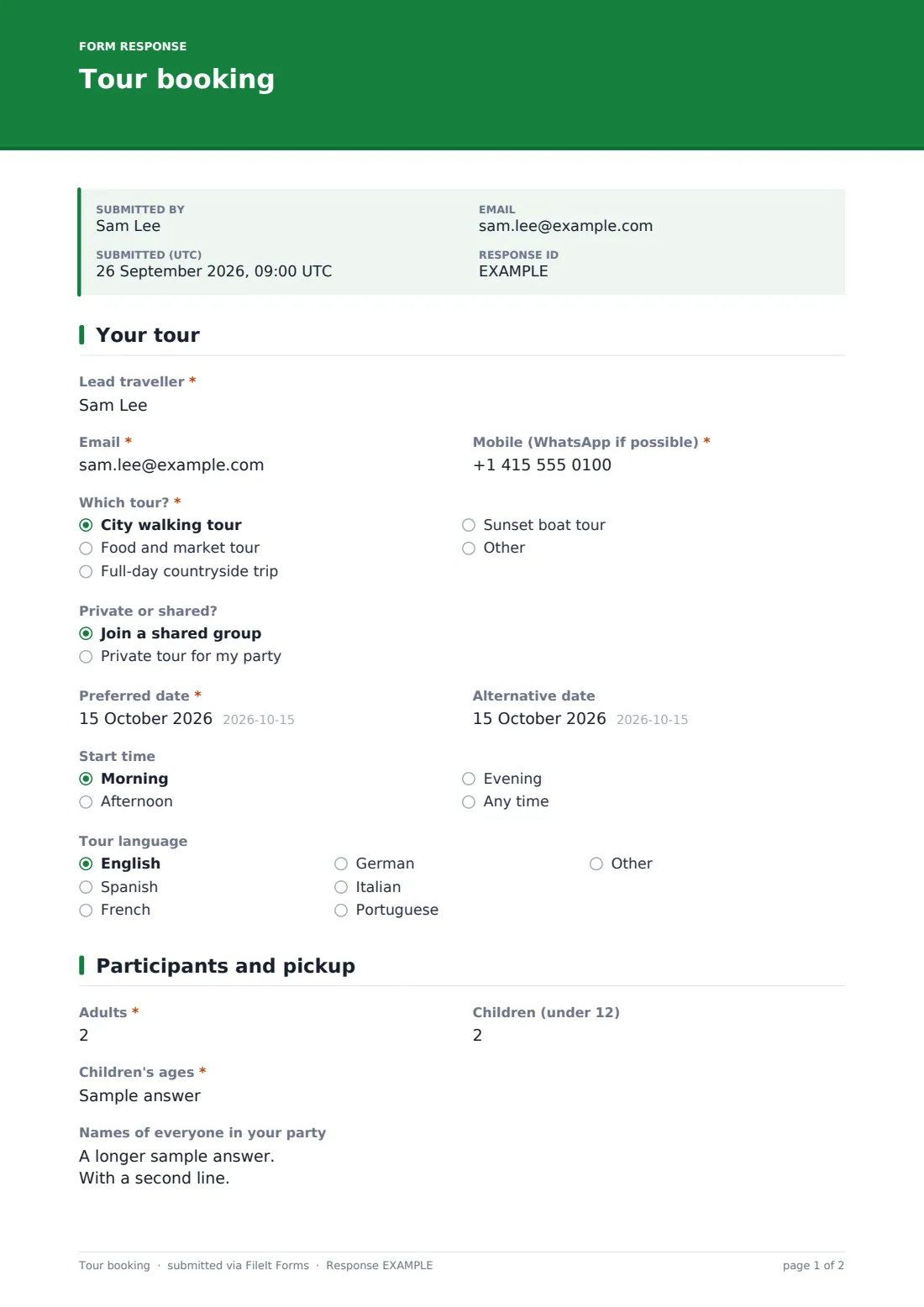
Booking a tour by phone or email usually means the same back-and-forth every time: which tour, how many people, where to pick them up, any dietary needs. This tour booking form template collects it all in one request, so a guest can tell you exactly what they're after — a city walk, a food tour, a countryside day trip or a sunset boat tour — without a round of messages first.
The form only asks what's relevant to the booking: children in the party opens a question for their ages, wanting a pickup opens fields for the hotel address and how to find them, and picking a tour with food shows a dietary requirements checklist. Whether you run a small local tour company or a single guide taking bookings between seasons, guests get a clear, complete request the first time.
Every booking request becomes a PDF in your FileIt vault as soon as it's submitted, so you have a proper, filed record of who asked for what and when — handy when you're juggling several tours and dates at once.
- Best for
- Tour guides, excursion operators and small travel businesses taking booking requests
- Filled in by
- The lead traveller booking the tour
- Time to complete
- About 5 minutes
- Includes
- Conditional questions for children, pickup and accessibility, a booking-terms consent
Who uses a tour booking form?
- A city walking tour or food and market tour taking booking requests online
- A full-day countryside excursion company managing pickups across several hotels
- A boat tour operator collecting group size and timing preferences before confirming availability
- Offering private tours alongside shared group departures from the same booking form
- Recording accessibility needs in advance so a route can be planned properly
- Building a filed record of every booking request, separate from the confirmed bookings calendar
Questions on this tour booking form
21 questions over 2 pages · includes conditional questions, multiple pages, consent checkbox.
1 Your tour
- Lead traveller*
- Email*
- Mobile (WhatsApp if possible)*
- Which tour?* City walking tour · Food and market tour · Full-day countryside trip · Sunset boat tour
- Private or shared? Join a shared group · Private tour for my party
- Preferred date*
- Alternative date
- Start time Morning · Afternoon · Evening · Any time
- Tour language English · Spanish · French · German · Italian · Portuguese · Other
2 Participants and pickup
- Adults*
- Children (under 12)
- Children's ages* asked only when it applies
- Names of everyone in your party
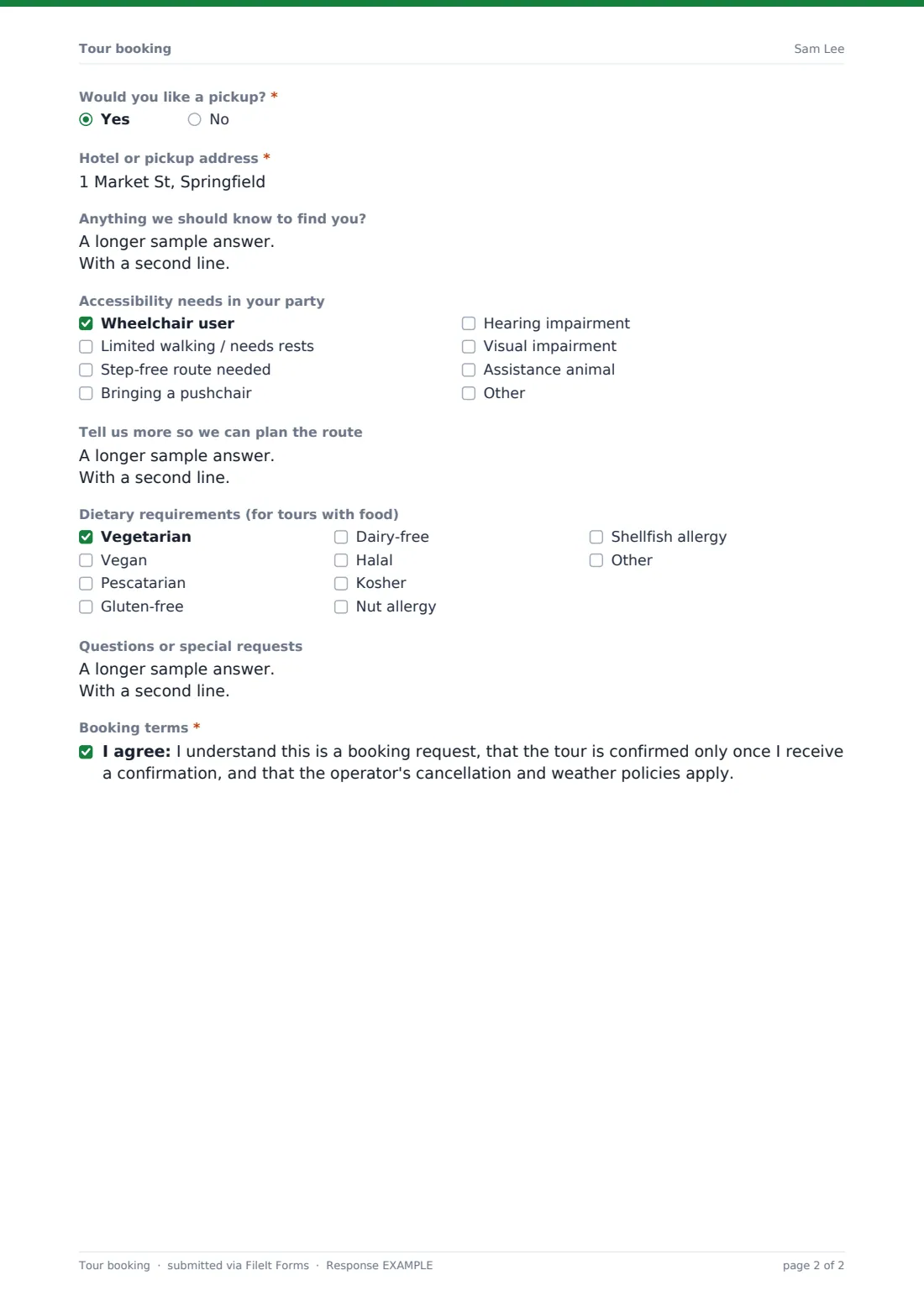
- Would you like a pickup?*
- Hotel or pickup address* asked only when it applies
- Anything we should know to find you? asked only when it applies
- Accessibility needs in your party Wheelchair user · Limited walking / needs rests · Step-free route needed · Bringing a pushchair · Hearing impairment · Visual impairment · Assistance animal
- Tell us more so we can plan the route asked only when it applies
- Dietary requirements (for tours with food) Vegetarian · Vegan · Pescatarian · Gluten-free · Dairy-free · Halal · Kosher · Nut allergy · Shellfish allergy
- Questions or special requests
- Booking terms*
The tour booking form, page by page
1 Your tour
The form starts with the lead traveller's name, email and mobile number (ideally one that takes WhatsApp), then asks which tour they'd like — a city walking tour, a food and market tour, a full-day countryside trip, a sunset boat tour, or their own request — and whether they'd prefer a shared group or a private tour just for their party. Guests give a preferred date, an optional alternative date, a preferred start time (morning, afternoon, evening or any), and their preferred tour language.
2 Participants and pickup
This page records the number of adults and children in the party; adding children opens a field for their ages, since some tours have age or safety considerations. There's a space to list the names of everyone in the party, useful for tours where sites require names on tickets.
Guests then say whether they'd like a pickup — if so, the form asks for the hotel or pickup address and anything useful for finding them. A checklist covers accessibility needs across the party, from wheelchair access to a step-free route, an assistance animal, or bringing a pushchair, with room for more detail. For tours that include food, a dietary requirements checklist covers common needs like vegetarian, gluten-free, halal or specific allergies. The booking finishes with a space for questions or special requests, and a consent statement confirming the booking is a request, only confirmed once the guest receives confirmation, and that the operator's cancellation and weather policies apply.
Make the template yours
- Replace the tour options with your own actual tours and their real names
- Add a party size limit if a particular tour, like a private boat trip, has a maximum capacity
- Set a closing date or maximum responses for tours that run on a fixed schedule with limited spots
- Add a pricing note or link if you want guests to see rates before requesting a booking
- File responses into a vault folder per tour or per season for easier planning
- Adjust the booking terms statement to reflect your own cancellation and weather policy
Tips for a better tour booking form
- Confirm availability and send an actual booking confirmation promptly — the form itself only records a request
- Ask for accessibility needs early enough to actually adjust the route or timing if needed
- Keep pickup instructions specific; a vague hotel name can cost real time on a tight schedule
- Note down alternative dates in case the first choice isn't available, rather than starting a new conversation from scratch
- Review dietary requirements ahead of any food-based stops so partners and vendors can be told in advance
Every response becomes a PDF in your vault
As soon as a guest submits a booking request, FileIt saves it as a PDF in your vault and sends you an email notification, so nothing sits unseen between other tasks. If you've turned on a copy for the respondent, the guest also receives their own PDF summarising what they requested.
From there, most operators use the Responses table to see requests by tour and date, open individual PDFs when confirming availability, and export the list to CSV to plan guide schedules, transport, or catering for group tours.
- Start from this template. It opens in the FileIt Forms designer — change any question, add pages, set the rules for when questions appear.
- Share it. Turn on a public link, or send it to people by email, each with their own link. They don’t need a FileIt account.
- Get the answers as PDFs. Each response is saved as a PDF in the vault folder you choose, with uploaded files attached — and listed in a Responses table you can export to CSV.
Tour booking form: frequently asked questions
Is this tour booking form template free?
Yes — it's included with the Forms app on every FileIt account, including the free plan, along with more than 160 other ready-made templates.
Do guests need a FileIt account to book?
No. Share the form as a link on your website or social media, and guests complete and submit it without creating any account.
Does this form take payment for the tour?
No. It collects the booking request and details; you confirm availability and arrange payment separately through your own process.
Where do booking requests go once submitted?
Every request is saved automatically as a PDF in your FileIt vault, and you can review, filter and export all requests from the Responses table.
Does the form only ask for children's ages if there are children in the party?
Yes — that question only appears if the guest enters at least one child, using conditional logic already built into the template.
Is a submitted request automatically confirmed?
No — the form makes this clear to guests too, stating the booking is a request and is confirmed only once they receive an actual confirmation from you.
Can I limit how many bookings I take for a specific date?
You can set a maximum number of responses or a closing date on the form overall, though for date-specific limits you'll want to check availability manually before confirming each request.