What is the airport transfer booking form template?
Booking an airport transfer by phone or email usually means chasing the same handful of details every time: which flight, which airport, how many bags, whether a child seat is needed. This template puts all of that on one form so a customer can book in a couple of minutes and a driver gets everything they need without a follow-up call.
Because the form adapts to whether someone needs a pickup, a drop-off, or both, nobody has to scroll past questions that don't apply to their trip. Someone booking a one-way drop-off to the airport never sees the arrival questions, and vice versa — the form only asks what's relevant to the transfer they've chosen.
Every booking submitted becomes a PDF in the vault folder you set up in FileIt, so you have a dated, searchable record of every transfer — useful for confirming details with a driver, checking a customer's original request, or keeping records for your own business.
- Best for
- Car services, chauffeur companies, hotels and independent drivers taking airport bookings
- Filled in by
- The traveler or lead passenger booking the transfer
- Time to complete
- About 4–6 minutes
- Includes
- Conditional questions by transfer type, child seat logic, terms consent
Who uses a airport transfer booking form?
- A hotel or short-let host offering guests an airport pickup or drop-off
- An independent driver or small car service taking direct bookings without a call center
- A travel agent or tour operator collecting transfer details ahead of a client's trip
- A corporate travel coordinator booking transfers for visiting staff or clients
- A family trip booking transfers with child seats and extra luggage for skis or golf clubs
- A wedding or event planner arranging transport for guests arriving by air
- Collecting return transfer details in one submission instead of two separate bookings
Questions on this airport transfer booking form
25 questions over 3 pages · includes conditional questions, multiple pages, consent checkbox.
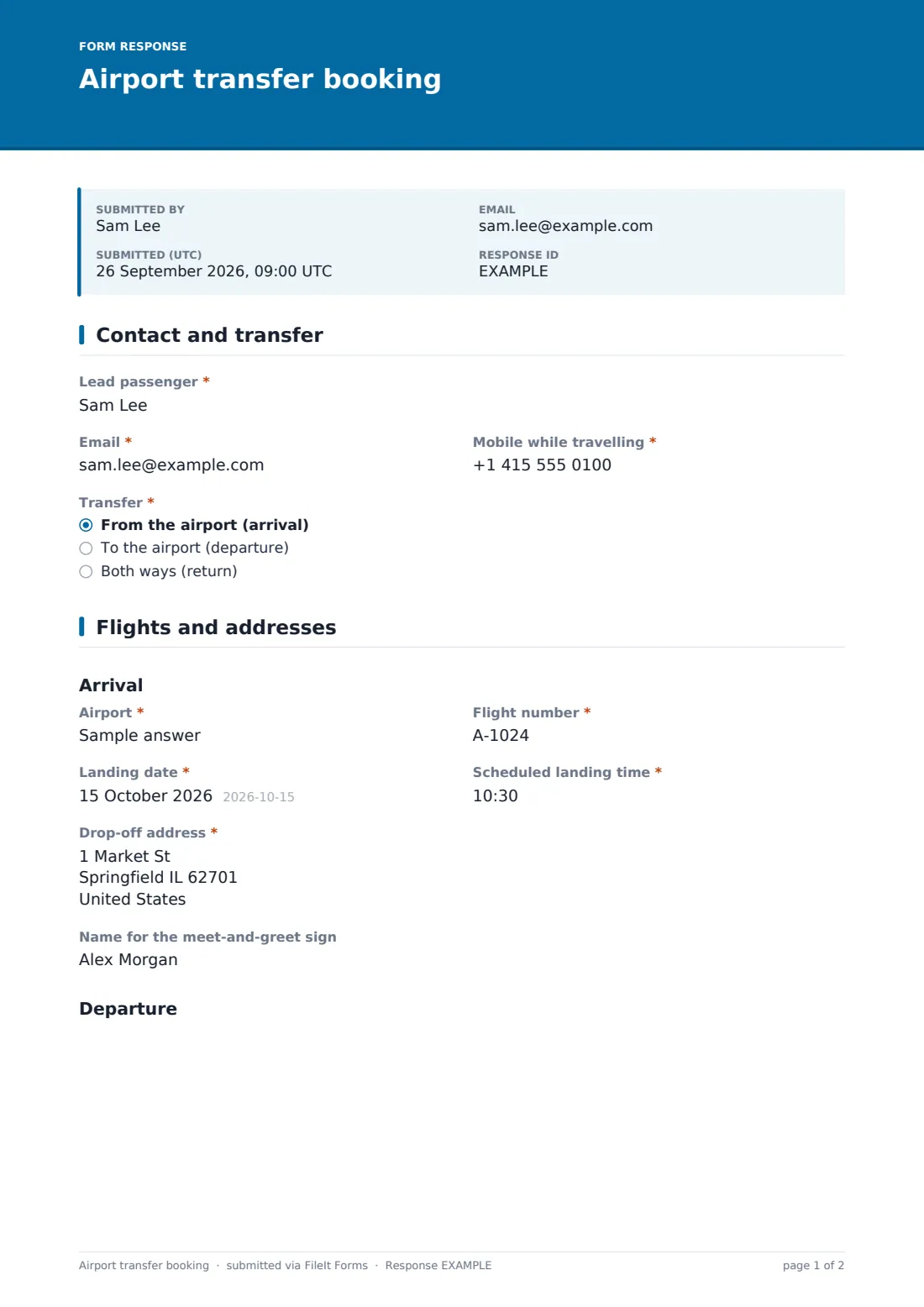
1 Contact and transfer
- Lead passenger*
- Email*
- Mobile while travelling*
- Transfer* From the airport (arrival) · To the airport (departure) · Both ways (return)
2 Flights and addresses
- Airport* asked only when it applies
- Flight number* asked only when it applies
- Landing date* asked only when it applies
- Scheduled landing time* asked only when it applies
- Drop-off address* asked only when it applies
- Name for the meet-and-greet sign asked only when it applies
- Pickup address* asked only when it applies
- Airport* asked only when it applies
- Flight number* asked only when it applies
- Flight date* asked only when it applies
- Departure time* asked only when it applies
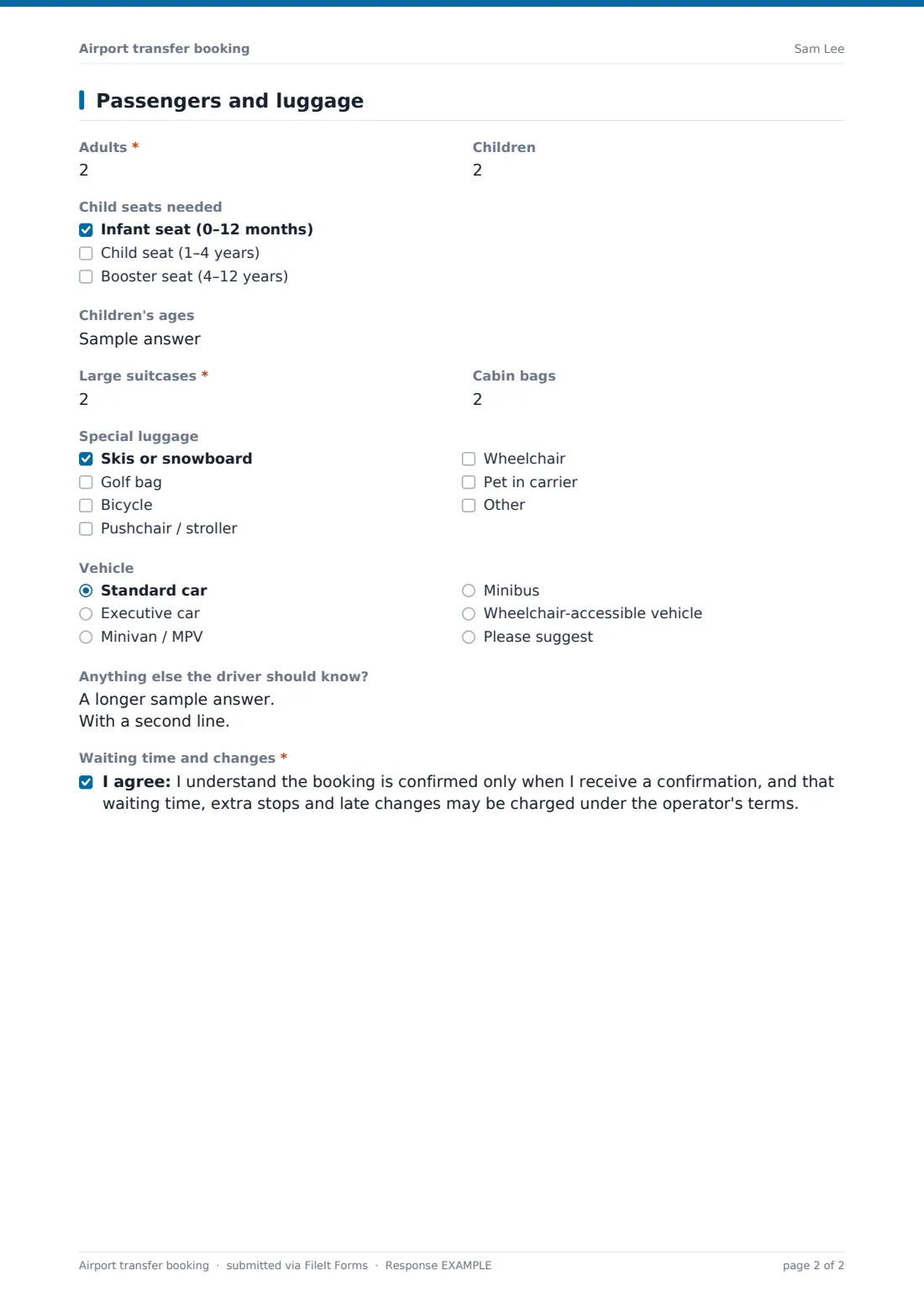
3 Passengers and luggage
- Adults*
- Children
- Child seats needed asked only when it applies Infant seat (0–12 months) · Child seat (1–4 years) · Booster seat (4–12 years)
- Children's ages asked only when it applies
- Large suitcases*
- Cabin bags
- Special luggage Skis or snowboard · Golf bag · Bicycle · Pushchair / stroller · Wheelchair · Pet in carrier
- Vehicle Standard car · Executive car · Minivan / MPV · Minibus · Wheelchair-accessible vehicle · Please suggest
- Anything else the driver should know?
- Waiting time and changes*
The airport transfer booking form, page by page
1 Contact and transfer
The form opens with the lead passenger's name, email and the mobile number they'll be reachable on while traveling — a detail specifically flagged as the number the driver will use to make contact. A single required question, "Transfer," asks whether the booking is from the airport (arrival), to the airport (departure), or both ways (return), and this answer controls which questions appear next.
2 Flights and addresses
This page splits into an Arrival section and a Departure section, and only shows the one (or both) that match the transfer type chosen earlier. The Arrival section asks for the airport, flight number, landing date, scheduled landing time, and the drop-off address, plus an optional name for a meet-and-greet sign at arrivals.
The Departure section mirrors this for the outbound leg: pickup address, airport, flight number, flight date and departure time. Because the form only shows the fields relevant to the transfer type — arrival questions hide entirely for a departure-only booking, and vice versa — a one-way customer isn't stuck scrolling past questions about a flight they're not taking.
3 Passengers and luggage
The last page counts adults and children, and — only if the number of children is greater than zero — reveals a checklist for child seats (infant, child, or booster) and a field for children's ages, so a solo traveler never sees child seat questions at all.
From there it covers the number of large suitcases and cabin bags, a checklist for special luggage like skis, a golf bag, a bicycle, a pushchair, a wheelchair or a pet in a carrier, and a preferred vehicle type (standard, executive, minivan, minibus, wheelchair-accessible, or "please suggest"). An open notes field lets a passenger flag anything else the driver should know. The form ends with a consent statement confirming the booking is only confirmed once the customer receives confirmation, and that waiting time, extra stops or late changes may be charged under the operator's terms.
Make the template yours
- Adjust the vehicle options to match the fleet you actually operate
- Add a question for a preferred payment method if you take bookings before arranging payment separately
- Set a closing date around a specific event if you're only taking bookings for a fixed window of transfers
- Add extra luggage or accessibility options specific to your market, like surfboards or medical equipment
- File confirmed bookings into a folder per day or per driver so your team can see the day's transfers at a glance
- Turn on an emailed PDF copy so the customer has their own record of the booking details they submitted
- Add a short-text question for a specific terminal if the airports you serve have more than one
Tips for a better airport transfer booking form
- Keep the flight number field prominent — it's the single most useful detail for adjusting a pickup time around delays
- Ask for a mobile number reachable while traveling, not just a home number, since that's when contact actually matters
- Make luggage and child seat questions specific rather than generic, so drivers arrive with the right vehicle
- State your waiting-time and change policy clearly in the consent statement so there's no dispute after the fact
- Review new bookings promptly since flight times and dates are time-sensitive compared to other kinds of forms
- Keep a habit of confirming each booking back to the customer, even though the form doesn't send that automatically
Every response becomes a PDF in your vault
Once a customer submits the form, FileIt saves the booking as a PDF in the vault folder you've chosen, and you receive an email notification right away. If you've turned on a PDF copy for respondents, the customer also gets their own copy of what they submitted.
From there, most operators check the flight details against live flight-tracking themselves, assign a driver and vehicle, and send the customer a confirmation with the driver's details — the form's built-in confirmation message tells the customer to expect exactly that. The Responses table with CSV export makes it easy to see the day's or week's bookings at a glance and hand a roster to your driving team.
- Start from this template. It opens in the FileIt Forms designer — change any question, add pages, set the rules for when questions appear.
- Share it. Turn on a public link, or send it to people by email, each with their own link. They don’t need a FileIt account.
- Get the answers as PDFs. Each response is saved as a PDF in the vault folder you choose, with uploaded files attached — and listed in a Responses table you can export to CSV.
Airport transfer booking form: frequently asked questions
Is this airport transfer booking form template free?
Yes — it's one of the ready-made templates included with the Forms app on every FileIt account, including the free plan, and you can edit every question.
Do customers need a FileIt account to book a transfer?
No. Customers fill in the form from a public link or an emailed request with no account needed, and the booking is submitted directly to you.
How do I get each booking as a PDF?
Every submission is automatically saved as a PDF in the vault folder you choose in the form's settings, so you have a record of each transfer without any extra steps.
Does the form show different questions for pickups and drop-offs?
Yes. Choosing arrival, departure, or return in the Transfer question shows only the flight and address fields relevant to that type of trip.
Can I limit the number of bookings I take in a day?
Yes, set a maximum number of responses or a closing date in the form's settings if you need to cap how many transfers you accept.
How do I create an airport transfer booking form like this from scratch?
Use the FileIt Forms designer to build one from a blank form with drag-and-drop questions and conditional logic, or start from this template and adjust it.
Does FileIt track flights or confirm bookings automatically?
No — the form only collects the booking details the customer enters. Checking flight status, confirming the booking and assigning a driver are steps you handle yourself.
Can I ask for a return transfer in the same booking?
Yes — selecting "Both ways (return)" on the Transfer question reveals both the arrival and departure sections in the same submission.