What is the board member nomination form template?
Nominating someone for a board or committee seat usually means gathering the same handful of things: who they are, why they'd be a good fit, what they bring, and a declaration that they don't have an undisclosed conflict of interest. Doing this by email chains or paper forms means chasing missing details, retyping statements for the voting pack, and hoping nobody's conflict-of-interest answer gets lost in an inbox.
This board member nomination form template turns that into a single online form. It works whether someone is nominating themselves or putting forward a colleague or fellow member, and it walks through the nominee's experience, a conflicts-of-interest declaration, and a formal sign-off from the nominator — all before the nomination even reaches your nominations committee.
Every completed nomination is saved automatically as a PDF in your FileIt vault, so your committee has one place to see every candidate together ahead of an AGM or election, rather than a scatter of emails and attachments.
- Best for
- Nonprofits, charities, HOAs, clubs and membership associations running a board or trustee election
- Filled in by
- The nominee themselves, or a member nominating someone else
- Time to complete
- About 6-8 minutes
- Includes
- Conditional questions for self- vs other-nomination, a signature field, two consent statements
Who uses a board member nomination form?
- A charity collecting trustee nominations ahead of its AGM
- A homeowners association running an election for board seats
- A membership club filling committee positions like treasurer or secretary
- A congregation or faith group nominating elders, deacons or council members
- A professional association gathering candidates for its executive committee
- A cooperative or credit union running a director nomination process
Questions on this board member nomination form
27 questions over 4 pages · includes signature, file upload, conditional questions, multiple pages, consent checkbox.
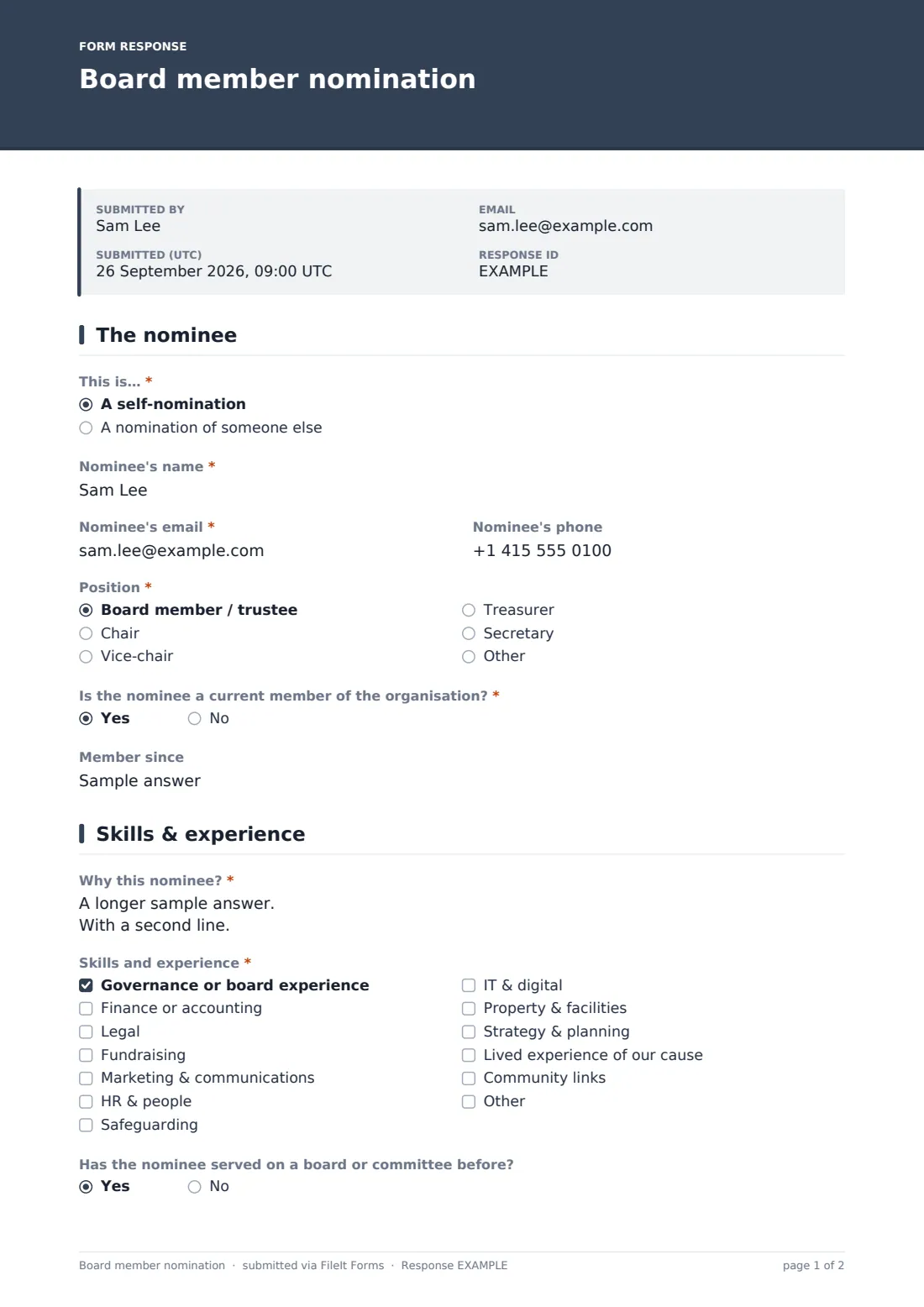
1 The nominee
- This is…* A self-nomination · A nomination of someone else
- Nominee's name*
- Nominee's email*
- Nominee's phone
- Has the nominee agreed to be nominated?* asked only when it applies
- Position* Board member / trustee · Chair · Vice-chair · Treasurer · Secretary
- Is the nominee a current member of the organisation?*
- Member since asked only when it applies
2 Skills & experience
- Why this nominee?*
- Skills and experience* Governance or board experience · Finance or accounting · Legal · Fundraising · Marketing & communications · HR & people · Safeguarding · IT & digital · Property & facilities · Strategy & planning · Lived experience of our cause · Community links
- Has the nominee served on a board or committee before?
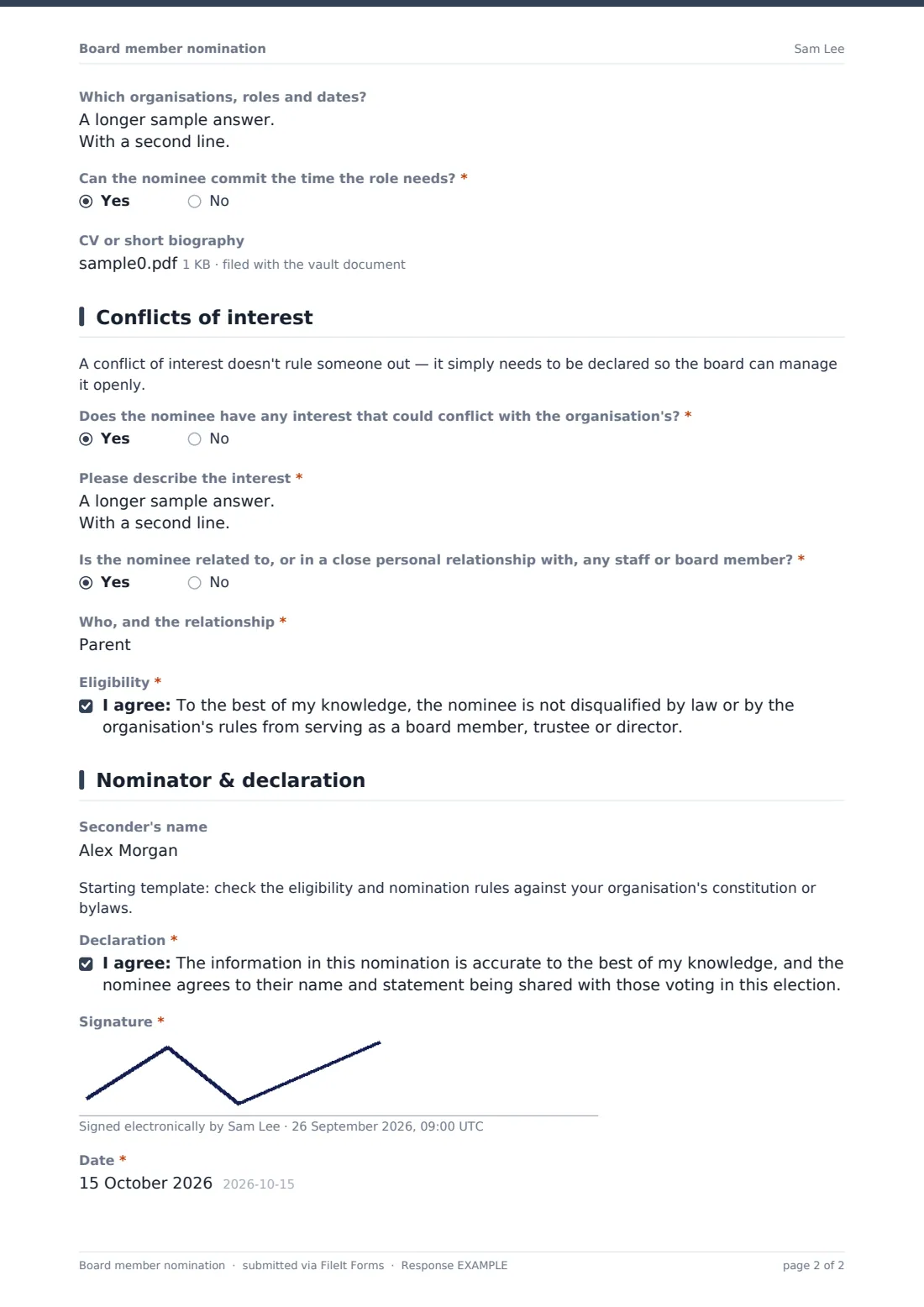
- Which organisations, roles and dates? asked only when it applies
- Can the nominee commit the time the role needs?*
- Tell us about any limits on availability* asked only when it applies
- CV or short biography
3 Conflicts of interest
- Does the nominee have any interest that could conflict with the organisation's?*
- Please describe the interest* asked only when it applies
- Is the nominee related to, or in a close personal relationship with, any staff or board member?*
- Who, and the relationship* asked only when it applies
- Eligibility*
4 Nominator & declaration
- Your name (nominator)* asked only when it applies
- Your email* asked only when it applies
- Are you a current member? asked only when it applies
- Seconder's name
- Declaration*
- Signature*
- Date*
The board member nomination form, page by page
1 The nominee
The form starts by asking whether This is a self-nomination or A nomination of someone else, which changes what's asked later. It then collects the Nominee's name, email and phone, and — only when someone else is doing the nominating — a required yes/no question asking Has the nominee agreed to be nominated?, so a name can't be put forward without their knowledge.
A Position radio button lets the nominee (or nominator) pick board member/trustee, chair, vice-chair, treasurer or secretary, with room to type another title if your organisation uses different names for its roles. Is the nominee a current member of the organisation? is asked next, and answering yes reveals a short Member since field, which is handy if your rules require a minimum length of membership to stand.
2 Skills & experience
This page asks the open question Why this nominee?, with a note that the answer may be shared with voting members — useful for the short candidate statements that typically go out before a vote. A Skills and experience checklist covers governance, finance, legal, fundraising, marketing, HR, safeguarding, IT, property, strategy, lived experience of the cause, and community links, with an "other" option for anything not listed.
Has the nominee served on a board or committee before? opens a follow-up for previous organisations, roles and dates when answered yes. A required Can the nominee commit the time the role needs? question is paired with a Tell us about any limits on availability box that only appears if the answer is no, so the committee sees any scheduling concerns up front rather than discovering them after the vote. An optional CV or short biography file upload rounds out the page.
3 Conflicts of interest
A short explanatory note reassures nominees that having a conflict of interest doesn't rule them out — it just needs to be declared so the board can manage it openly. The form then asks Does the nominee have any interest that could conflict with the organisation's?, giving examples like a paid role, contract, shareholding or directorship connected to the organisation, its suppliers or funders; answering yes opens a required box to describe the interest in the nominee's own words.
A second question, Is the nominee related to, or in a close personal relationship with, any staff or board member?, works the same way, with a follow-up asking who and what the relationship is. The page closes with an Eligibility consent statement confirming that, to the best of the nominator's knowledge, the nominee isn't disqualified by law or by the organisation's own rules from serving.
4 Nominator & declaration
When the nomination is for someone else, this page collects the nominator's own name, email and whether they're a current member, and an optional Seconder's name field is available if your organisation's rules call for a nomination to be seconded. A short template note reminds whoever sets the form up to check the eligibility and nomination rules against the organisation's own constitution or bylaws, since these vary widely between organisations.
The form finishes with a Declaration consent statement confirming the information is accurate and that the nominee agrees their name and statement can be shared with those voting, followed by a required Signature and Date. That signed sign-off gives your nominations committee a clean, complete record for every candidate before ballots go out.
Make the template yours
- Update the Position options and the eligibility wording to match your own constitution, bylaws or election rules
- Add a closing date in the form settings so nominations automatically stop once your nomination period ends
- Set a maximum number of responses if your rules cap the number of nominations that can be accepted
- Turn on an email notification to your nominations committee so nobody has to check manually for new nominations
- File responses into a dedicated "Board elections" folder in your vault, separate from day-to-day paperwork
- Add or remove skills in the Skills and experience checklist to reflect what your board actually needs this cycle
Tips for a better board member nomination form
- Give nominees a heads-up before someone nominates them, so the "has the nominee agreed" question is never a surprise
- Keep the candidate statement question focused — a short, clear answer is easier for members to compare at a glance
- Make sure whoever reviews conflict-of-interest answers has the authority (and discretion) to follow up privately if needed
- Set a clear closing date well before your AGM so there's time to prepare ballots and candidate statements
- Review nominations as they come in rather than waiting until the deadline, in case anything needs clarifying
- Keep a consistent record of every election cycle in its own vault folder, so past nominations are easy to find later
Every response becomes a PDF in your vault
As soon as a nomination is submitted, FileIt saves it as a PDF in your chosen vault folder, capturing the nominee's details, skills, conflict-of-interest answers and the nominator's signed declaration in one document. With owner notifications turned on, someone on your nominations committee is emailed right away, so nominations don't sit unseen until the closing date.
From the Responses table, your committee can review every nomination side by side, open each PDF for the full detail, and export the list as a CSV to build a candidate slate or ballot paper. Because the conflict-of-interest answers are captured on the same form, there's no separate step to chase that information down before your board meets to review the nominees.
- Start from this template. It opens in the FileIt Forms designer — change any question, add pages, set the rules for when questions appear.
- Share it. Turn on a public link, or send it to people by email, each with their own link. They don’t need a FileIt account.
- Get the answers as PDFs. Each response is saved as a PDF in the vault folder you choose, with uploaded files attached — and listed in a Responses table you can export to CSV.
Board member nomination form: frequently asked questions
Is this board member nomination form template free?
Yes. It's included with the Forms app on every FileIt account, including the free plan, and you can edit any question before you publish it.
Does the nominee or nominator need a FileIt account to fill it in?
No. Anyone with the form's link can submit a nomination without creating an account.
How do we collect all the nominations once the deadline passes?
Each nomination is saved as a PDF in your vault automatically, and you can also see, filter and export every response as a CSV from the Responses table.
Does completing this form make a nomination legally valid?
No. This template is a starting point, not legal advice — check its questions and eligibility wording against your own constitution, bylaws or election rules before you rely on it.
Can we stop accepting nominations automatically after a certain date?
Yes, set a closing date in the form's settings and it will stop accepting new submissions once that date passes.
Can we require a seconder for each nomination?
There's a seconder's name field built in; if your rules require it, you can also mark it as required in the designer.
What happens if a nominee hasn't agreed to be nominated?
The form asks the nominator directly whether the nominee has agreed, so your committee can follow up before treating the nomination as valid.
Can we send this form only to current members instead of making it public?
Yes — you can email personal links to your member list, each prefilled with that person's name and email, instead of or alongside a public link.