
What is the grievance form form template?
Raising a formal grievance at work is stressful enough without also having to guess what information HR actually needs. This grievance form template walks an employee through the same structure a well-run HR process expects: whether they've already tried to resolve things informally, what the concern is about, the people and dates involved, any evidence, and what outcome would put things right for them.
An online form works better here than an email because it prompts for details that are easy to leave out under stress — dates, witnesses, whether the grievance involves the employee's own manager — and keeps everything the employee wants to say in one organised place rather than scattered across several messages. Conditional logic quietly adapts: if the grievance involves the employee's line manager, the form reassures them it will, where possible, be heard by someone else.
Every submission, including the employee's signature and any attached evidence, becomes a PDF saved straight into your FileIt vault, giving HR a complete, confidential record from the moment it's raised.
- Best for
- Employers providing a formal route to raise a workplace concern
- Filled in by
- An employee raising a grievance
- Time to complete
- About 15–20 minutes
- Includes
- Evidence upload, conditional manager-involvement note, signature
Who uses a grievance form form?
- An employee raises a concern about how they've been treated by a colleague
- A team member formally reports bullying or harassment they've experienced
- An employee disputes a decision about their pay, benefits or contract terms
- Someone raises a health and safety concern that hasn't been resolved informally
- An employee reports a grievance that involves their own line manager directly
- HR standardises how formal concerns are captured across a growing organisation
Questions on this grievance form form
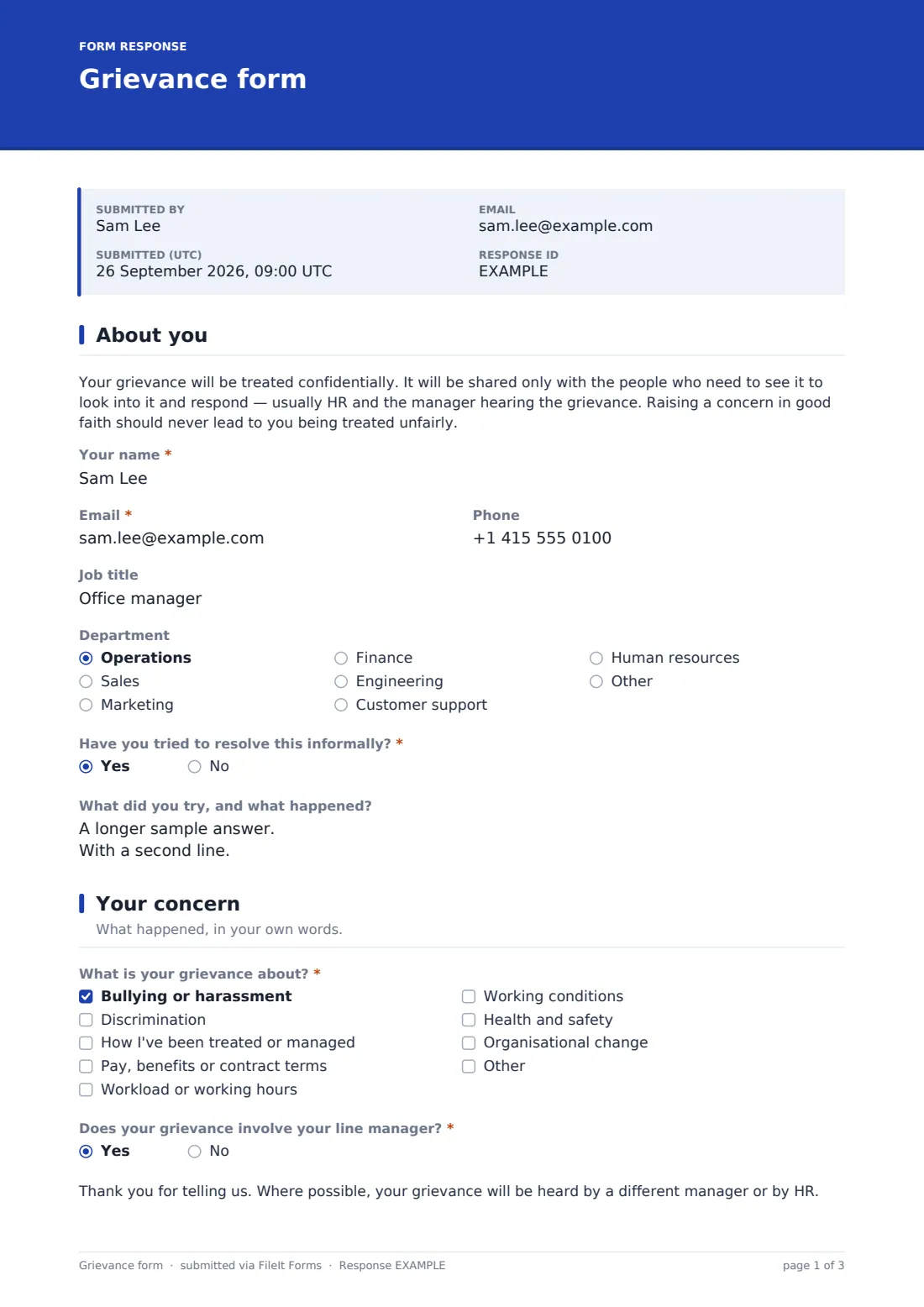
23 questions over 4 pages · includes signature, file upload, conditional questions, multiple pages, consent checkbox.
1 About you
- Your name*
- Email*
- Phone
- Job title
- Department Operations · Sales · Marketing · Finance · Engineering · Customer support · Human resources · Other
- Have you tried to resolve this informally?*
- What did you try, and what happened? asked only when it applies
- Is there a reason it couldn't be dealt with informally? (optional) asked only when it applies
2 Your concern
- What is your grievance about?* Bullying or harassment · Discrimination · How I've been treated or managed · Pay, benefits or contract terms · Workload or working hours · Working conditions · Health and safety · Organisational change
- Does your grievance involve your line manager?*
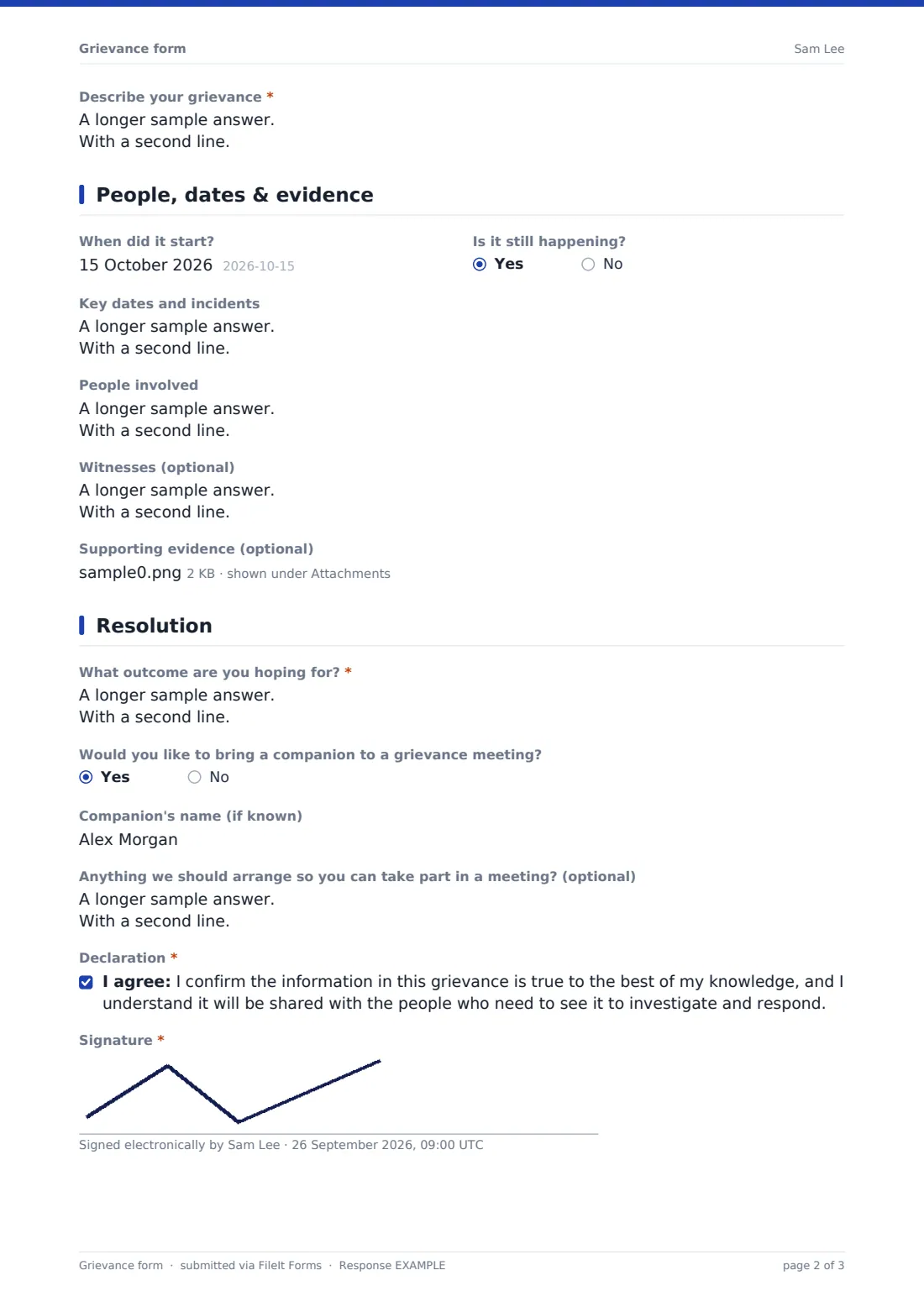
- Describe your grievance*
3 People, dates & evidence
- When did it start?
- Is it still happening?
- Key dates and incidents
- People involved
- Witnesses (optional)
- Supporting evidence (optional)
4 Resolution
- What outcome are you hoping for?*
- Would you like to bring a companion to a grievance meeting?
- Companion's name (if known) asked only when it applies
- Anything we should arrange so you can take part in a meeting? (optional)
- Declaration*
- Signature*
The grievance form form, page by page
1 About you
A confidentiality note opens the form, explaining the grievance will be shared only with the people who need to see it to investigate and respond, and that raising a concern in good faith shouldn't lead to unfair treatment. The employee then gives their Name, Email (with a note that a personal address is fine if they'd rather keep this out of their work inbox), optional Phone, Job title and Department. A required Have you tried to resolve this informally question reveals either what was tried and what happened, or, if not, an optional note on why not.
2 Your concern
A checklist covers What is your grievance about — bullying or harassment, discrimination, how they've been treated or managed, pay or contract terms, workload, working conditions, health and safety, or organisational change, with room to add another category. A required Does your grievance involve your line manager question, when answered yes, shows a reassuring note that the grievance will, where possible, be heard by a different manager or by HR. A large Describe your grievance box, with room for up to 8,000 characters, asks for what happened, how it's affected the employee, and why they feel it's wrong.
3 People, dates & evidence
Optional fields cover When did it start, whether it's Still happening, a free-text list of Key dates and incidents, People involved with their names and roles, and any Witnesses. An optional evidence upload accepts emails, messages, notes, photos or documents, up to five files.
4 Resolution
A required What outcome are you hoping for box asks what would put things right for the employee. A yes/no question about bringing a Companion to a grievance meeting reveals a field for their name if known, and an optional box lets the employee flag anything needed to take part in a meeting, such as accessibility needs, an interpreter or a remote option. A closing declaration confirms the information is true to the best of the employee's knowledge and that it will be shared with those who need to see it, followed by a signature.
Make the template yours
- Adjust the grievance categories to match your own policy's terminology
- Add a routing rule so grievances involving a particular manager are automatically flagged for a different reviewer
- Set strict access controls on the vault folder this form files into, given the sensitivity of the content
- Add a field for whether the employee has raised this with their trade union representative, if relevant to your policy
- Adjust the companion question's wording to match what your own grievance policy allows
- Add an expected response timeframe to the confirmation message, matching your policy
Tips for a better grievance form form
- Acknowledge receipt of a grievance quickly, even if the full investigation will take longer
- Keep access to submitted grievances tightly limited to those who genuinely need to see them
- Take the informal-resolution answers seriously — they often explain why a concern has escalated to a formal grievance
- Never let the person the grievance is about be involved in deciding how it's handled
- This form structures how a grievance is raised; it doesn't replace a properly documented investigation process or legal advice on how to handle the outcome
Every response becomes a PDF in your vault
The moment an employee submits a grievance, FileIt saves the entire thing — including their signature and any evidence — as a PDF in the tightly controlled vault folder you've set up, and sends an immediate email notification so HR can acknowledge it without delay.
From there, most HR teams review the submission in the Responses table, arrange the grievance meeting the employee is entitled to, and refer back to the exact wording and evidence submitted throughout the investigation. Because the record is a signed PDF, it stands as a clear, dated account of what was raised and when, useful if the matter is ever escalated or appealed.
- Start from this template. It opens in the FileIt Forms designer — change any question, add pages, set the rules for when questions appear.
- Share it. Turn on a public link, or send it to people by email, each with their own link. They don’t need a FileIt account.
- Get the answers as PDFs. Each response is saved as a PDF in the vault folder you choose, with uploaded files attached — and listed in a Responses table you can export to CSV.
Grievance form form: frequently asked questions
Is this grievance form template free?
Yes — it's included in the Forms app on every FileIt account, including the free plan, and every question can be edited to match your policy.
Does an employee need a FileIt account to submit a grievance?
No. They complete and sign it from a shared link or emailed invitation, with no account needed.
How do we get grievances as PDFs?
Every submission, including the signature and any evidence, is automatically saved as a PDF in the vault folder you set up for this form.
Is a grievance submitted through this form kept confidential?
The form itself explains it will be shared only with people who need to see it to investigate and respond; you control who has access to the vault folder it's filed in.
What happens if the grievance involves the employee's own manager?
The form shows a note reassuring the employee that, where possible, it will be heard by a different manager or by HR instead.
Can employees attach evidence like emails or messages?
Yes, there's an optional upload accepting emails, messages, notes, photos or documents, up to five files.
Does this form replace a formal grievance investigation process?
No — it only structures how the concern is raised. The investigation, meeting and outcome still need to follow your own grievance policy and any applicable employment law.