What is the whistleblowing report form template?
Speaking up about fraud, safety risks or other serious wrongdoing is hard enough without also worrying about how to phrase it, who sees it, or whether an email might get forwarded to the wrong person. This template gives people a structured, private way to raise a concern — with a genuine choice between reporting confidentially or completely anonymously — so the barrier to reporting is as low as it can be.
The form is deliberately built around facts rather than opinions: what happened, when, where, who's involved, and how the reporter knows about it, kept separate from anything they were just told by someone else. That structure makes a report far more useful to whoever investigates it, and it gently guides reporters toward the kind of detail an investigation actually needs.
Every report becomes a PDF filed straight into your FileIt vault, with any supporting evidence attached, so from the first submission there's a clear, dated record — something that matters a great deal if a concern is later escalated or reviewed externally.
- Best for
- Employers, nonprofits and other organisations offering a way to report wrongdoing
- Filled in by
- Employees, former employees, contractors, volunteers, suppliers or members of the public
- Time to complete
- About 8-12 minutes
- Includes
- Anonymous or confidential reporting choice, evidence upload, retaliation question
Who uses a whistleblowing report form?
- A company gives employees a formal, confidential channel to report suspected fraud or financial misconduct
- A nonprofit or charity sets up a way for volunteers and staff to raise safety or safeguarding concerns
- An organisation offers a genuinely anonymous option for people who fear retaliation if their identity were known
- A compliance team collects reports of suspected bribery, data misuse or breaches of policy in one consistent format
- A supplier or contractor raises a concern about practices they witnessed while working with an organisation
- A former employee reports something they observed before leaving, using the same channel current staff would use
Questions on this whistleblowing report form
20 questions over 3 pages · includes file upload, conditional questions, multiple pages, consent checkbox.
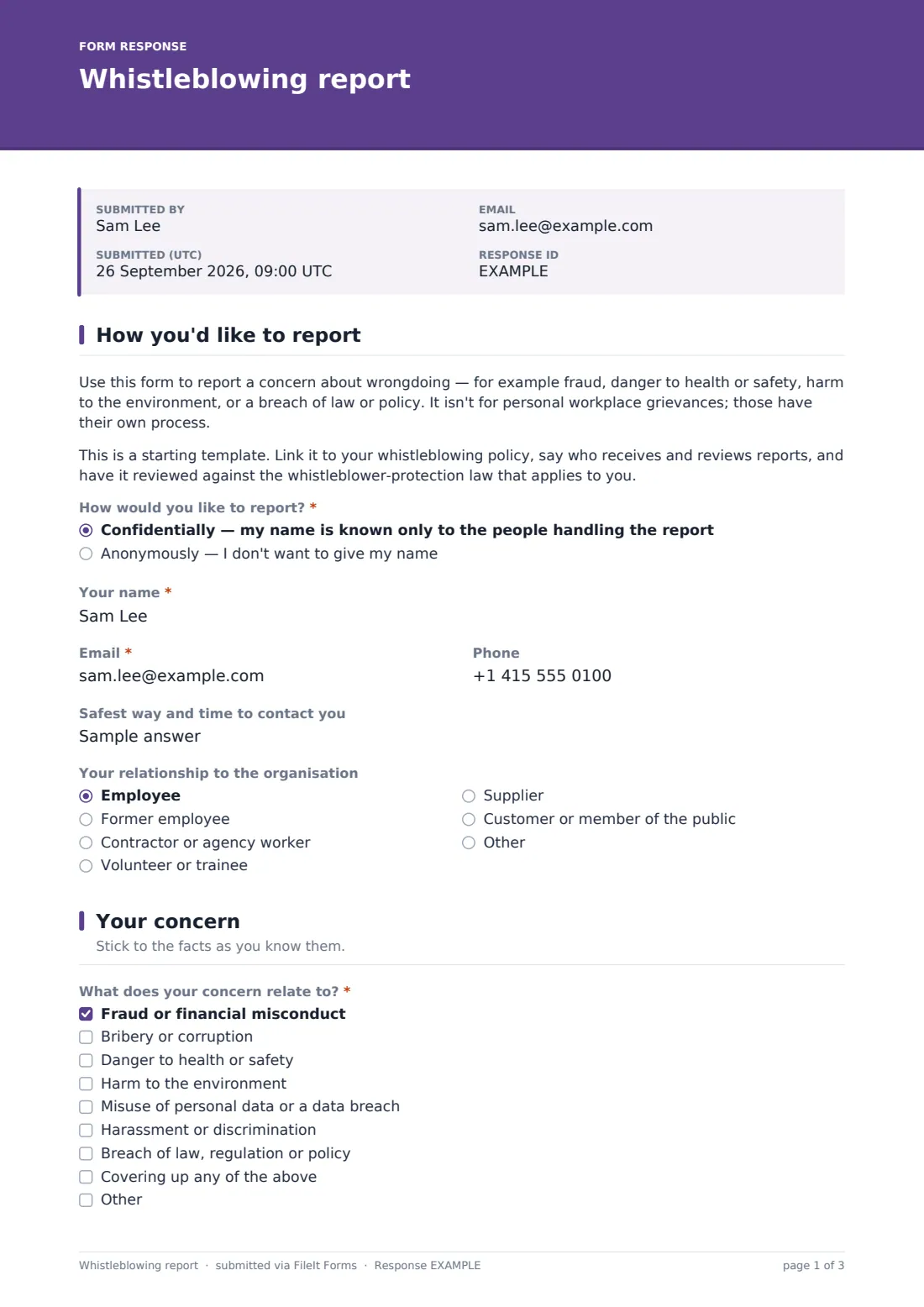
1 How you'd like to report
- How would you like to report?* Confidentially — my name is known only to the people handling the report · Anonymously — I don't want to give my name
- Your name* asked only when it applies
- Email* asked only when it applies
- Phone asked only when it applies
- Safest way and time to contact you asked only when it applies
- Your relationship to the organisation Employee · Former employee · Contractor or agency worker · Volunteer or trainee · Supplier · Customer or member of the public · Other
2 Your concern
- What does your concern relate to?* Fraud or financial misconduct · Bribery or corruption · Danger to health or safety · Harm to the environment · Misuse of personal data or a data breach · Harassment or discrimination · Breach of law, regulation or policy · Covering up any of the above
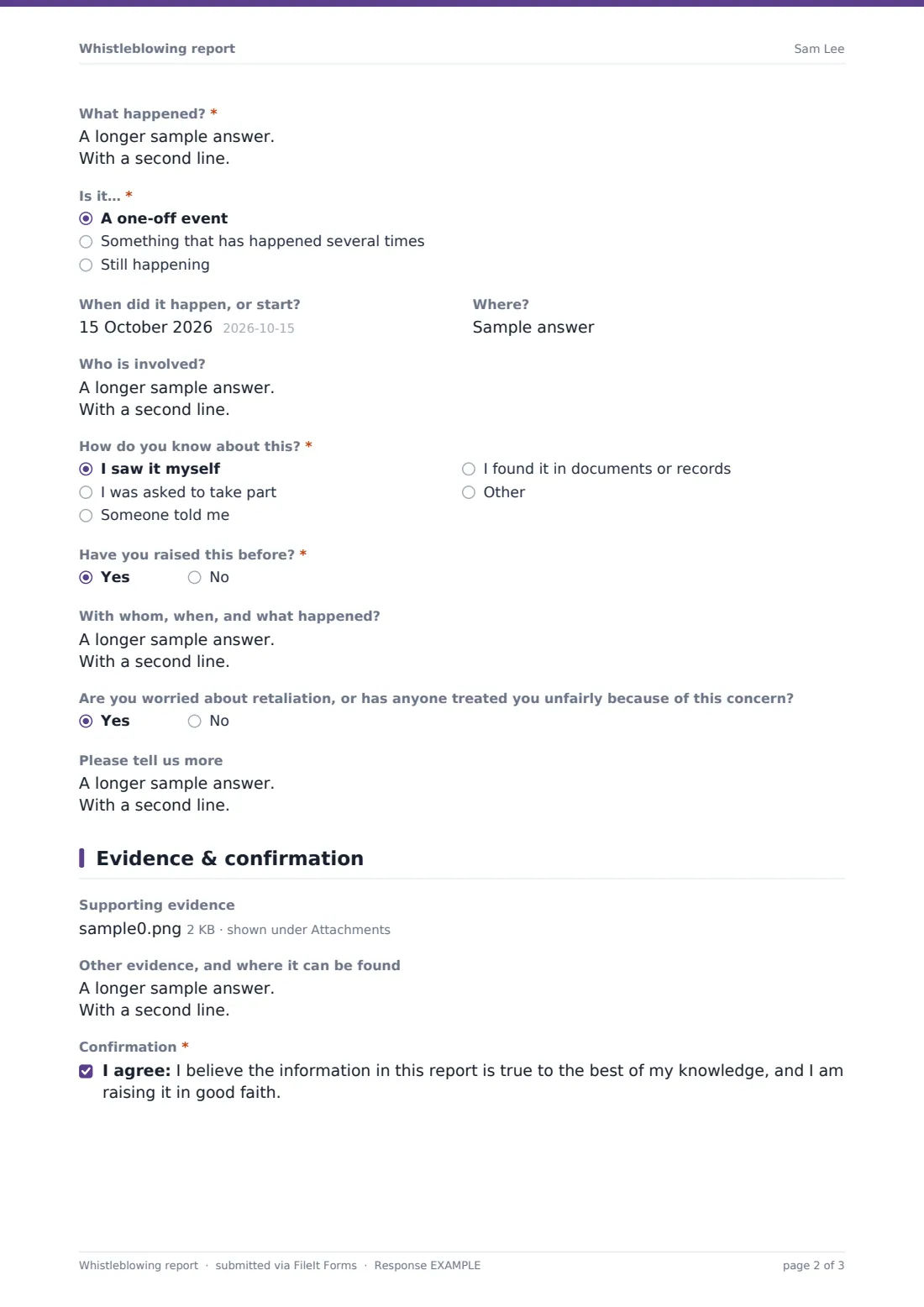
- What happened?*
- Is it…* A one-off event · Something that has happened several times · Still happening
- When did it happen, or start?
- Where?
- Who is involved?
- How do you know about this?* I saw it myself · I was asked to take part · Someone told me · I found it in documents or records
- Have you raised this before?*
- With whom, when, and what happened? asked only when it applies
- Are you worried about retaliation, or has anyone treated you unfairly because of this concern?
- Please tell us more asked only when it applies
3 Evidence & confirmation
- Supporting evidence
- Other evidence, and where it can be found
- Confirmation*
The whistleblowing report form, page by page
1 How you'd like to report
An introductory note explains what the form is for — wrongdoing like fraud, danger to health or safety, harm to the environment, or a breach of law or policy — and clarifies it isn't for personal workplace grievances, which have their own process. A radio question then offers a genuine choice: reporting confidentially, where the reporter's name is known only to the people handling the report, or reporting anonymously, where no name is given at all.
Choosing anything other than anonymous reveals fields for the reporter's name, email, phone and the safest way and time to contact them. Choosing anonymous instead reveals a note warning that the organisation can't follow up for more detail or provide updates, and that technical details like an IP address may still be recorded, as with most websites — so the reporter should be as thorough as possible and avoid details that could identify them. An optional relationship-to-the-organisation dropdown rounds out the page.
2 Your concern
A checklist covers the type of wrongdoing — fraud or financial misconduct, bribery or corruption, danger to health or safety, harm to the environment, misuse of personal data or a data breach, harassment or discrimination, breach of law or policy, or a cover-up of any of these — with an "Other" option. A required long-text field asks what happened, encouraging a description of what the reporter personally observed and why it concerns them.
Further questions establish whether it's a one-off, repeated, or still ongoing, when and where it happened, who's involved, and — importantly — how the reporter knows about it: whether they saw it themselves, were asked to take part, were told by someone else, or found it in documents or records. Two final questions ask whether the concern has been raised before, revealing a detail field if so, and whether the reporter is worried about retaliation or has already experienced unfair treatment because of the concern.
3 Evidence & confirmation
An optional file upload lets the reporter attach documents, photos or screenshots, with a note reminding anonymous reporters to check files don't contain their name. A further field lets them describe other evidence and where it can be found, even if they can't upload it directly — for example, invoices sitting in a shared drive. A final consent statement confirms the reporter believes the information given is true to the best of their knowledge and that they're raising it in good faith.
Make the template yours
- Link the form to your organisation's own whistleblowing policy, and say clearly who receives and reviews reports
- Adjust the wrongdoing categories to match the types of concern most relevant to your organisation or sector
- Have your whistleblower-protection wording reviewed against the law that applies in your jurisdiction before you publish it
- Set notification emails to go only to a small, trusted group responsible for handling sensitive reports
- File reports into a restricted-access folder, separate from your general vault structure, given how sensitive they are
- Add a case reference number field if your investigation process assigns one that a reporter might later refer to
- Adjust the confirmation message to state realistic next steps and, if possible, an approximate response timeframe
Tips for a better whistleblowing report form
- Make the anonymous option genuinely anonymous — don't ask for details elsewhere in the form that could identify someone indirectly
- Take every report seriously regardless of how it's phrased; concerns raised in frustration are still often factually valid
- Separate what someone witnessed themselves from what they were told, since the form already encourages that distinction
- Limit who can access whistleblowing reports to the smallest group necessary, given how sensitive the content usually is
- Take retaliation concerns seriously and address them directly, even when the underlying concern turns out to be unfounded
- Review and refresh your whistleblowing policy periodically, and make sure this form's wording stays consistent with it
Every response becomes a PDF in your vault
As soon as a report is submitted, FileIt saves it as a PDF in your vault, with any evidence attached, in a folder you control access to. Whoever you've set as a notification recipient is alerted by email straight away, and the confirmation message tells the reporter their report has been received and will be passed to the people responsible for reviewing concerns.
From there, handling the report — investigating, following up on evidence, and deciding on any action — happens entirely outside the form, according to your organisation's own whistleblowing process. Because anonymous reports can't be replied to directly, many organisations use the report's own detail, plus any evidence attached, as the starting point for an investigation rather than relying on further questions to the reporter.
- Start from this template. It opens in the FileIt Forms designer — change any question, add pages, set the rules for when questions appear.
- Share it. Turn on a public link, or send it to people by email, each with their own link. They don’t need a FileIt account.
- Get the answers as PDFs. Each response is saved as a PDF in the vault folder you choose, with uploaded files attached — and listed in a Responses table you can export to CSV.
Whistleblowing report form: frequently asked questions
Is this whistleblowing report form template free?
Yes. It's included in FileIt's Forms app on every plan, including the free plan, and every question can be edited to match your policy.
Do reporters need a FileIt account to submit a report?
No. You share a public link, and reporters submit their concern without creating an account, whether they choose to give their name or not.
Is an anonymous report actually anonymous?
Choosing the anonymous option means no name or contact details are collected on the form. Like most websites, technical details such as an IP address may still be recorded, and the form tells reporters this directly.
How do we receive whistleblowing reports?
Each report is saved automatically as a PDF in your FileIt vault, with any evidence attached, and you can review the full list of reports from the Responses table.
Is this form a substitute for a proper whistleblowing policy?
No. This template is a starting point for collecting reports clearly — it should be linked to, and consistent with, your organisation's own whistleblowing policy and reviewed against the law that applies to you.
Can we follow up with someone who reported anonymously?
No, because no contact details are collected for anonymous reports, which is why the form encourages anonymous reporters to be as thorough as possible in their initial submission.
Can reporters upload supporting documents?
Yes, up to ten files including PDFs, images, Word and Excel documents, screenshots and text files, up to 10 MB each.
Does the form protect reporters from retaliation?
The form itself doesn't provide legal protection — it collects the report and asks whether the reporter has concerns about retaliation, but actual protections depend on your organisation's policy and the law that applies to you.