What is the personal data breach report form template?
When someone suspects a personal data breach — a misdirected email, a lost laptop, an account that shouldn't have been accessed — the first few minutes matter. This template gives everyone in your organization one place to report it: what happened, what kind of data was involved, roughly how many people are affected, and what's already been done to contain it.
An online form beats a hurried email or a hallway conversation for one simple reason: it asks the same questions every time, in the same order, so nothing gets missed because someone was rushed or unsure what to include. The person reporting doesn't need to know all the answers up front — several questions are optional, and the form is built so a first report can go in quickly, even while the full picture is still coming together.
Once submitted, FileIt turns the report straight into a PDF and files it in the vault folder you choose, so your data protection lead has a dated record of exactly when and how the report came in, along with any screenshots or documents attached as evidence.
- Best for
- IT, security and data-protection teams handling suspected breaches
- Filled in by
- Any staff member who discovers or suspects an incident
- Time to complete
- About 8 minutes
- Includes
- Conditional questions, evidence file upload, consent declaration
Who uses a personal data breach report form?
- IT and security teams who need a single, consistent way for staff to report suspected data incidents
- Data protection leads or privacy officers who need enough detail, right away, to judge how serious an incident is
- Small and mid-sized organizations without a dedicated incident-response tool who want a lightweight way to catch every report
- Managers who want a timestamped record of exactly when they first learned about a possible breach
- Organizations that want non-technical staff — reception, sales, support — to feel comfortable reporting something that looks wrong
- Teams handling a live incident who need to log containment steps as they happen, not from memory afterward
Questions on this personal data breach report form
24 questions over 4 pages · includes file upload, conditional questions, multiple pages, consent checkbox.
1 About you
- Your name*
- Email*
- Phone
- Your role and team
- How do you know about it? I was involved · I discovered it · Someone told me
2 What happened
- When was it discovered?*
- Time
- Do you know when it actually happened?
- When it happened asked only when it applies
- What kind of incident?* Sent to the wrong person (email, post, file share) · Lost or stolen device, papers or storage · Someone accessed data they shouldn't have · Hacking, malware or phishing · Published or shared publicly by mistake · Data changed or deleted without authority · Data unavailable (e.g. ransomware, outage)
- What happened?*
- Is it still happening?* Yes · No, it has stopped · Not sure
3 The data and the people
- What data is involved?* Names and contact details · ID documents or numbers · Bank, payment or salary details · Usernames or login details · Health information · Other sensitive data (e.g. ethnicity, religion, beliefs, sexuality, criminal records) · Data about children · Employee / HR records · Not known yet
- Roughly how many people's data?* 1 · 2–10 · 11–100 · 101–1,000 · More than 1,000 · Not known yet
- Whose data is it? Customers / clients · Employees · Patients / service users · Students / children · Suppliers or partners · Members of the public
- Approximate number of records
- Was the data encrypted or otherwise protected? Yes · Partly · No · Don't know
- What harm could this cause the people involved?
4 Containment
- Has anything been done to contain it?*
- What was done, and when?* asked only when it applies
- Has the data been recovered or confirmed deleted? Yes · Partly · No · Not applicable
- Who else has been told so far? My manager · IT / security · Data protection lead · Affected people · Police · Nobody yet
- Evidence
- Declaration*
The personal data breach report form, page by page
1 About you
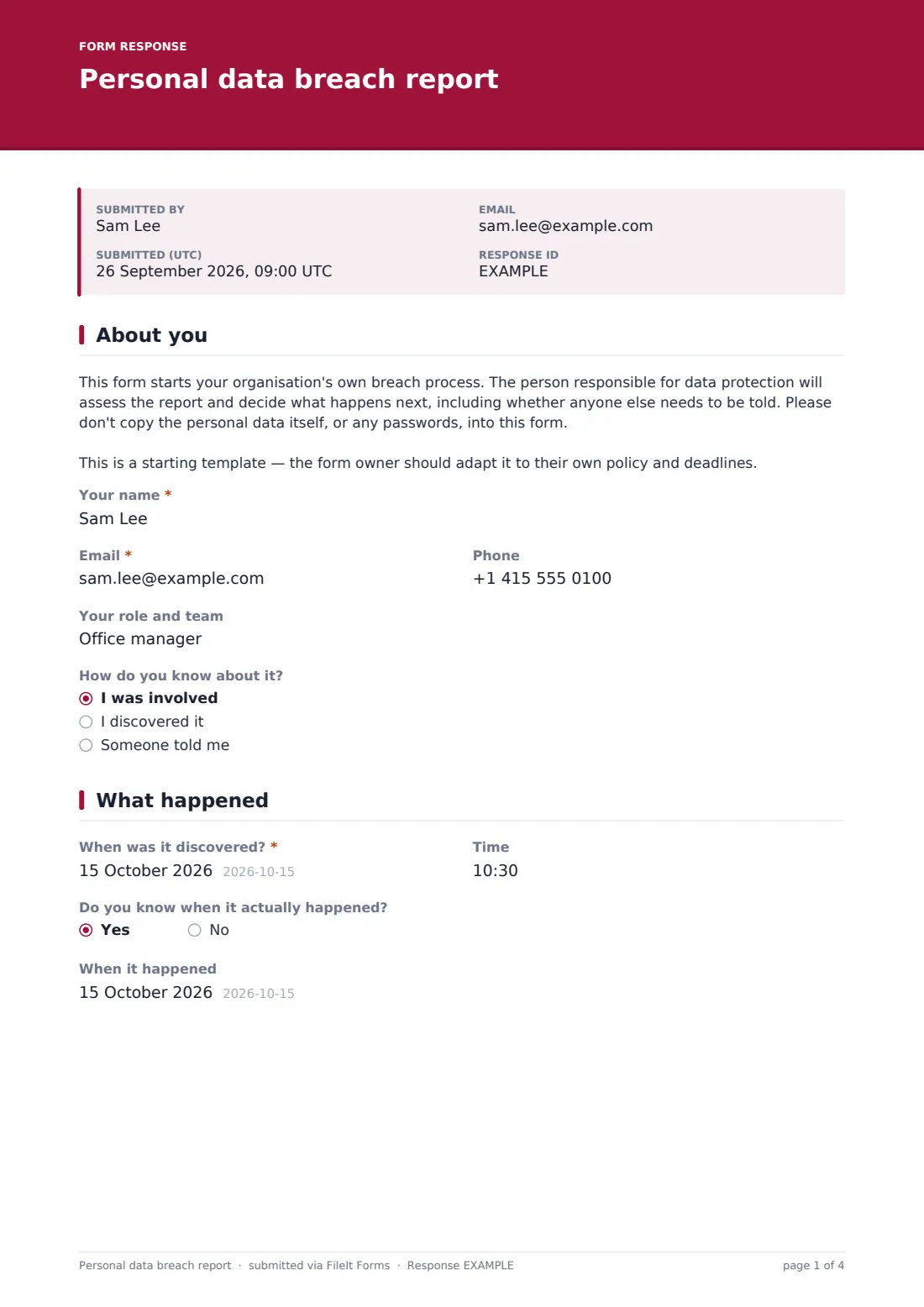
The first page collects who is reporting and how they know about it. Besides the reporter's name, email and phone, it asks for their role and team, and then "How do you know about it?" — a simple choice between I was involved, I discovered it, or Someone told me, which helps the reviewer judge how directly the reporter witnessed events.
A short instruction sits at the top of this page reminding the reporter not to copy the personal data itself, or any passwords, into the form — only to describe what happened. That's a deliberate design choice: the report should document the incident without becoming a second copy of the data at risk.
2 What happened
This page asks when the breach was discovered (date and time), and — because discovery and occurrence are often different moments — a follow-up question, "Do you know when it actually happened?". Answering yes reveals a second date field, When it happened, so the record captures both timelines where they're known.
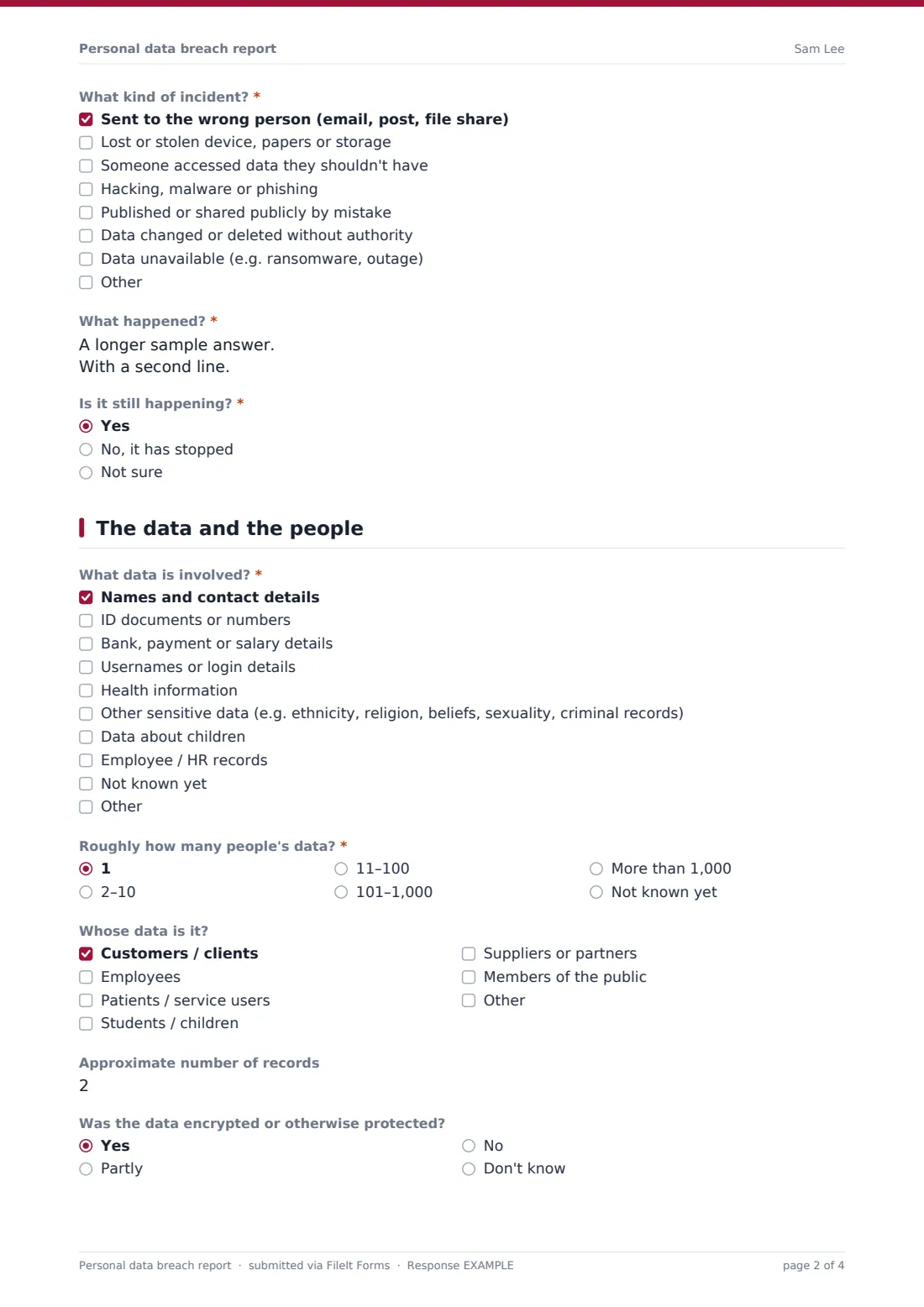
The reporter then picks what kind of incident it was from a checklist — sent to the wrong person, a lost or stolen device, unauthorized access, hacking or phishing, accidental publication, unauthorized changes, or data simply being unavailable — with room to add another option if none fit. A required long-text question, What happened?, asks for a plain factual account, and a final question checks whether the incident is still ongoing, has stopped, or that's not yet known.
3 The data and the people
Here the form narrows in on impact. What data is involved? lists categories from names and contact details up to health information, other sensitive data, and data about children, so the reviewer can immediately see if anything high-risk is in scope. Roughly how many people's data? uses ranges — from a single person up to more than 1,000 — because an exact count is rarely known this early, and Whose data is it? separates customers, employees, patients, students, suppliers and the general public.
Two more questions round out the picture: whether the data was encrypted or otherwise protected, and, in a longer free-text answer, what harm this could realistically cause the people involved — for example fraud, distress or discrimination. Neither question replaces a proper risk assessment; they simply give whoever reviews the report a head start.
4 Containment
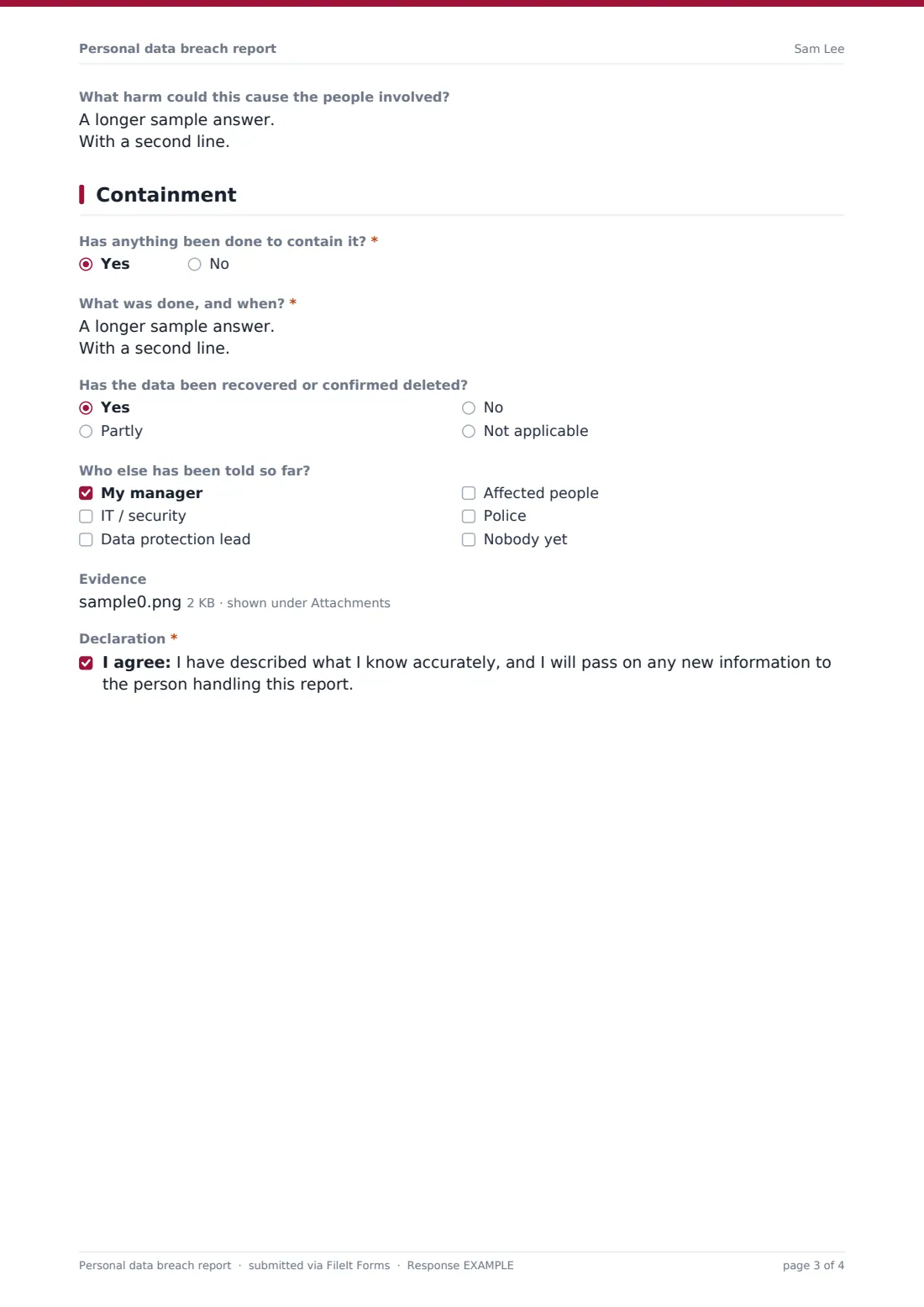
The last page is about response. Has anything been done to contain it? branches: answering yes opens a required field describing exactly what was done and when — for instance asking a recipient to delete a misdirected email, remotely wiping a lost device, or resetting a compromised account. A follow-up question records whether the data has since been recovered or confirmed deleted.
Who else has been told so far? lets the reporter tick off a manager, IT or security, the data protection lead, the affected people, or the police — or note that nobody has been told yet. An evidence file upload accepts screenshots or documents, and the page closes with a plain consent statement confirming the account is accurate and that the reporter will pass on anything new they learn.
Make the template yours
- Add a field for an internal case or ticket number if you track incidents in another system
- Extend the "What kind of incident?" or "What data is involved?" checklists with categories specific to your organization
- File responses into an IT & Security or Compliance folder in the vault, kept separate from everyday documents
- Add your data protection lead's address under notification emails so they're alerted the moment a report comes in
- Adjust the confirmation message shown to the reporter after they submit
- Add a dropdown for which system, application or department was affected, useful once you're past a handful of reports
Tips for a better personal data breach report form
- Make it easy to report early and incompletely — a report that turns out to be nothing costs far less than one that arrives too late
- Remind staff, in the form itself, not to paste the personal data at risk, or any passwords, into their answers — this template already does that
- Keep evidence to what's genuinely needed, and redact personal details in screenshots where you can
- Review every report against your own written incident-response process, not against how serious it initially sounds
- Follow up directly with the reporter if the account leaves out details you need — don't assume more information will arrive unprompted
Every response becomes a PDF in your vault
As soon as someone submits the form, FileIt saves their answers as a PDF in the vault folder you've set up for incident reports, with any evidence files attached, and sends a notification to the addresses you've configured — typically the data protection lead or IT security team. Because the record is a PDF from the moment it's created, there's a clear copy of exactly what was reported and when, even if the details are later found to be incomplete.
From there, the usual next step is to open the Responses table, review the new entry alongside any others, and begin your organization's own assessment process — deciding what needs containing further, who else needs telling, and whether the incident meets any threshold you've set internally. Filters and CSV export make it straightforward to review several reports together if more than one comes in around the same event.
- Start from this template. It opens in the FileIt Forms designer — change any question, add pages, set the rules for when questions appear.
- Share it. Turn on a public link, or send it to people by email, each with their own link. They don’t need a FileIt account.
- Get the answers as PDFs. Each response is saved as a PDF in the vault folder you choose, with uploaded files attached — and listed in a Responses table you can export to CSV.
Personal data breach report form: frequently asked questions
Is this data breach report template free to use?
Yes. It's one of FileIt's ready-made templates, and building or using forms is included on every FileIt account, including the free plan — there's no extra charge for this template or for using the Forms designer.
Does the person reporting a breach need a FileIt account?
No. Anyone with the link can fill in and submit the form without signing up for anything. Only you, as the form owner, need a FileIt account to create the form and see the responses.
How do I get the reports as PDFs?
Every submission is automatically converted into a PDF and saved in the vault folder you choose when you set up the form. You can open any response from the Responses table, and export the whole list to CSV if you need to work with several reports at once.
What if the reporter doesn't know all the details yet?
That's expected with breach reports — several fields, like the exact number of records or whether data has been recovered, are optional or offer a "not known yet" choice. Encourage staff to submit what they know now rather than wait; you can follow up separately for anything missing.
Can I stop the form from collecting the personal data that was exposed?
You can't force people to follow instructions, but the template's opening text already asks reporters not to copy the affected personal data or any passwords into their answers, and you can strengthen that wording as you see fit.
Will FileIt report the breach to a regulator or authority for us?
No. FileIt never submits anything on your behalf — this form only creates an internal record for your own team. Whether and how to notify a regulator, or the people affected, is entirely your organization's decision, made through your own process.
Can I limit who sees these reports once they're submitted?
You choose which vault folder each response is filed into when you set up the form, so you can route breach reports to a folder set aside for your IT, security or data-protection team.
Can I add more incident types or data categories to the checklists?
Yes. Every question in the template, including the incident-type and data-category checklists, can be edited, reordered or removed in the designer to match how your organization talks about incidents.