What is the vendor security questionnaire form template?
Before handing data to a supplier — or letting them connect to your systems — most organisations want a clear picture of how seriously that supplier takes security. Doing this over a shared spreadsheet or an email chain of questions tends to produce inconsistent, hard-to-compare answers. This template turns the assessment into one structured online questionnaire, so every vendor answers the same questions in the same order.
The design follows a simple logic: a yes/no question for each control, and a required explanation field that only appears if the vendor answers no — so gaps are surfaced with an explanation rather than just a blank box. That keeps the form quick for a vendor with solid practices in place, while still capturing detail where it's needed most.
Every submission becomes a signed PDF in your FileIt vault, with any attached certificates or audit reports, so your security or procurement team has a complete, dated record of what each vendor said — useful if you ever need to revisit an assessment after an incident or a renewal.
- Best for
- Procurement, IT security and vendor risk management teams
- Filled in by
- A vendor's security lead or a person with knowledge of their controls
- Time to complete
- About 10-15 minutes
- Includes
- Conditional follow-ups on every 'no' answer, file upload, five pages
Who uses a vendor security questionnaire form?
- A company reviews a new SaaS vendor's security controls before signing a contract that involves customer data
- A procurement team standardises third-party risk assessments across every new supplier, regardless of size
- An IT security function re-issues this questionnaire annually to existing vendors as part of ongoing due diligence
- A business collects a vendor's incident response plan status and past incident history before granting system access
- A company records which certifications (ISO 27001, SOC 2, PCI DSS) a supplier currently holds and requests supporting documents
- A finance or legal team uses the completed questionnaire as supporting evidence during a vendor contract review
Questions on this vendor security questionnaire form
38 questions over 5 pages · includes file upload, conditional questions, multiple pages, consent checkbox.
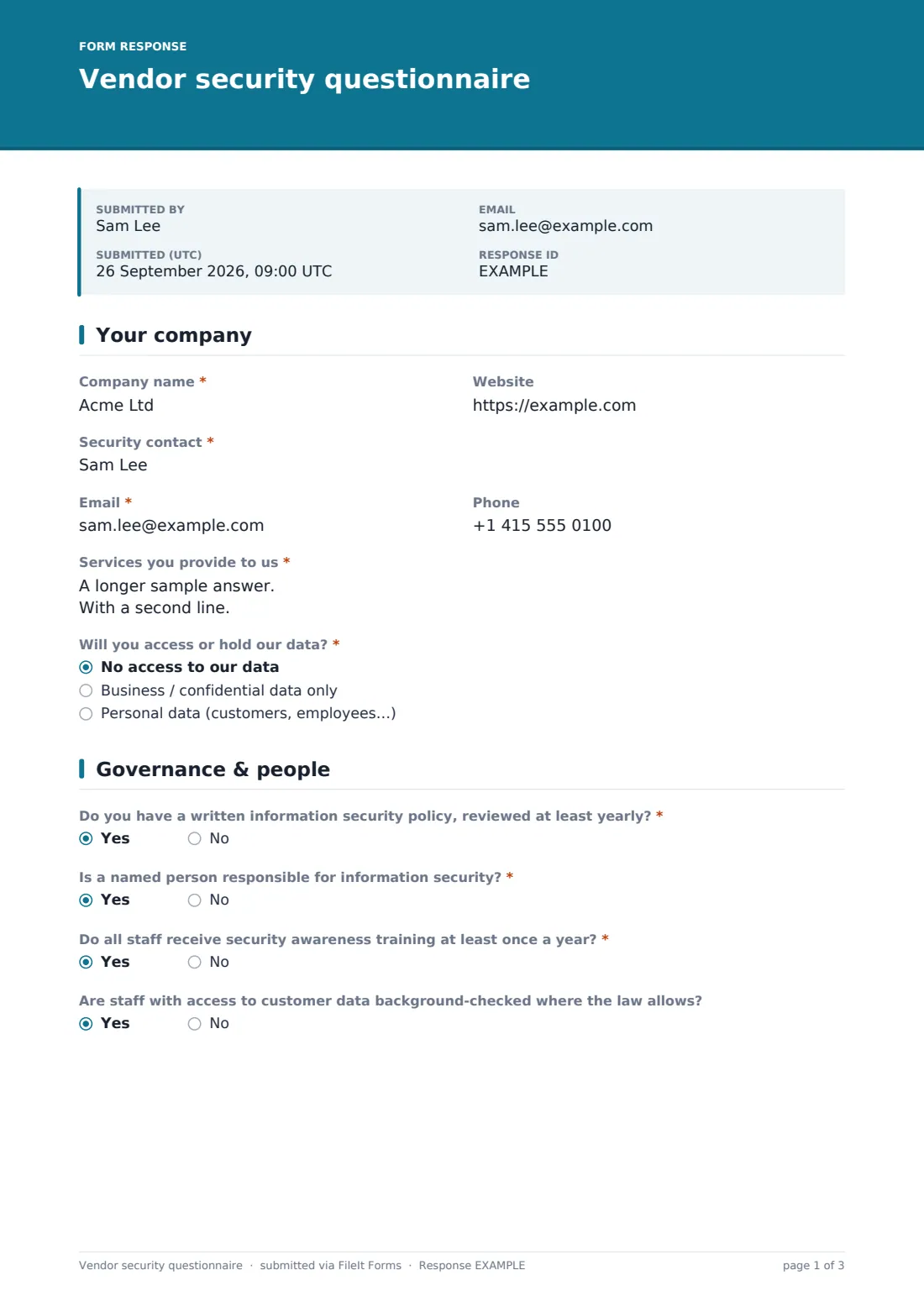
1 Your company
- Company name*
- Website
- Security contact*
- Email*
- Phone
- Services you provide to us*
- Will you access or hold our data?* No access to our data · Business / confidential data only · Personal data (customers, employees…)
2 Governance & people
- Do you have a written information security policy, reviewed at least yearly?*
- If no, please explain* asked only when it applies
- Is a named person responsible for information security?*
- Do all staff receive security awareness training at least once a year?*
- If no, please explain* asked only when it applies
- Are staff with access to customer data background-checked where the law allows?
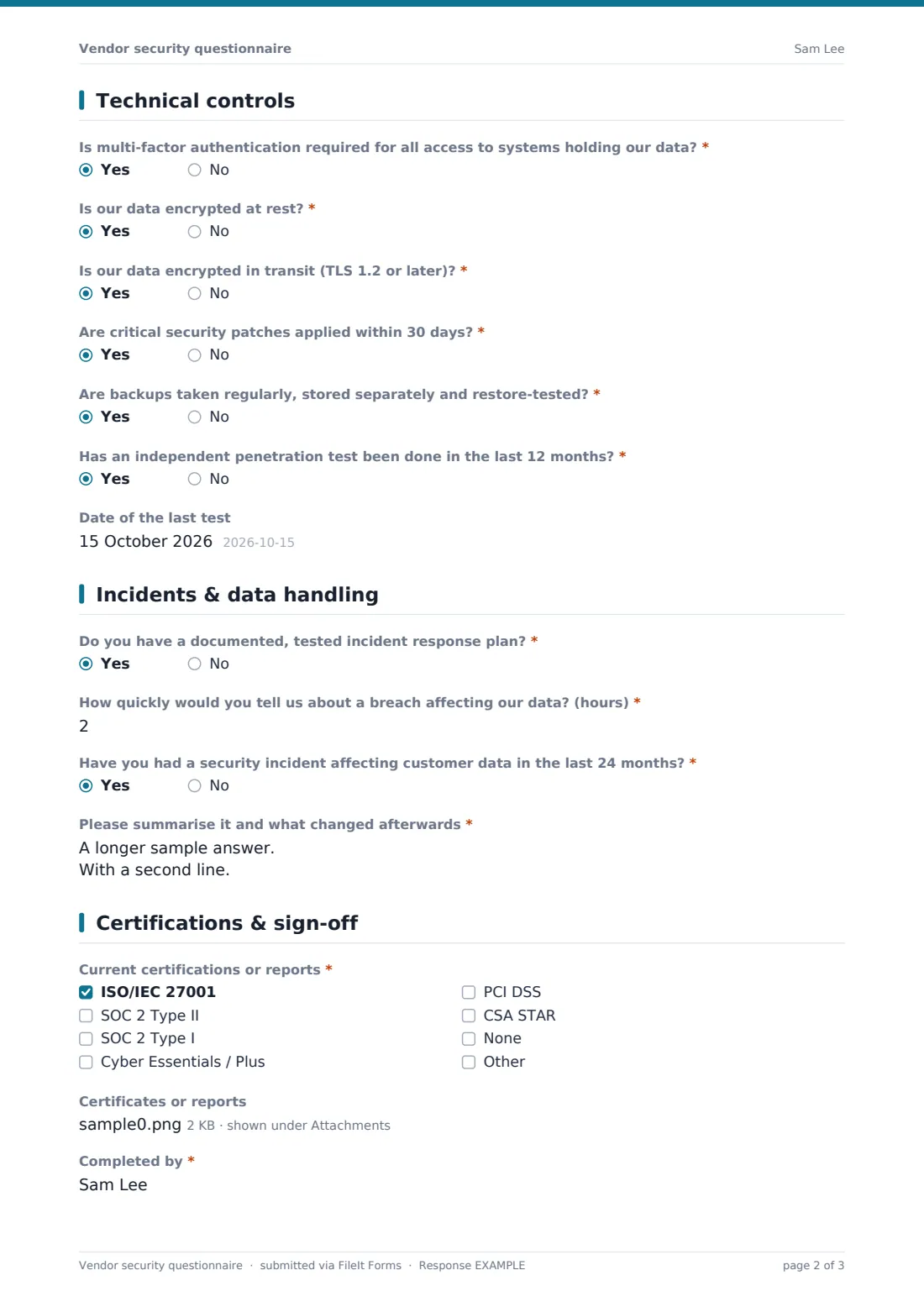
3 Technical controls
- Is multi-factor authentication required for all access to systems holding our data?*
- If no, please explain* asked only when it applies
- Is our data encrypted at rest?*
- If no, please explain* asked only when it applies
- Is our data encrypted in transit (TLS 1.2 or later)?*
- If no, please explain* asked only when it applies
- Are critical security patches applied within 30 days?*
- If no, please explain* asked only when it applies
- Are backups taken regularly, stored separately and restore-tested?*
- If no, please explain* asked only when it applies
- Has an independent penetration test been done in the last 12 months?*
- Date of the last test asked only when it applies
4 Incidents & data handling
- Do you have a documented, tested incident response plan?*
- If no, please explain* asked only when it applies
- How quickly would you tell us about a breach affecting our data? (hours)*
- Have you had a security incident affecting customer data in the last 24 months?*
- Please summarise it and what changed afterwards* asked only when it applies
- Where will our data be stored and processed? asked only when it applies
- Do subcontractors or sub-processors access our data? asked only when it applies
- List them and what they do* asked only when it applies
5 Certifications & sign-off
- Current certifications or reports* ISO/IEC 27001 · SOC 2 Type II · SOC 2 Type I · Cyber Essentials / Plus · PCI DSS · CSA STAR · None
- Certificates or reports asked only when it applies
- Completed by*
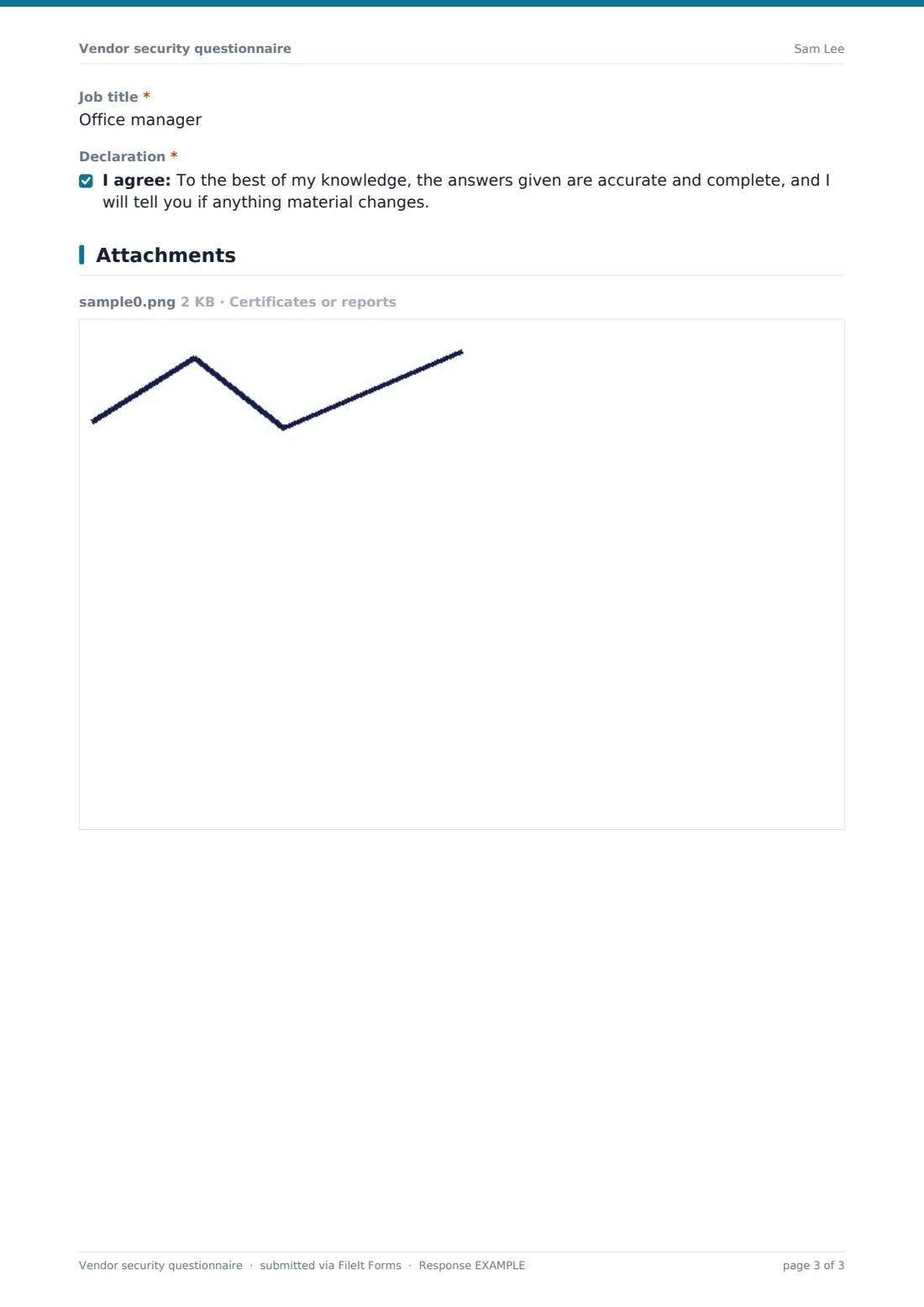
- Job title*
- Declaration*
The vendor security questionnaire form, page by page
1 Your company
The vendor starts with basic identifying details — company name, website, and a named security contact with email and phone. A required long-text field asks them to describe the services they provide, and a radio question, Will you access or hold our data?, sets the tone for the rest of the form by establishing how much data exposure is actually involved (none, business/confidential data, or personal data).
2 Governance & people
This page checks the organisational basics behind good security: a written information security policy reviewed at least yearly, a named person responsible for security, annual security awareness training for staff, and background checks where the law allows for staff with access to customer data. Each of the first three questions reveals a required explanation field — asking for compensating controls or a dated plan — whenever the vendor answers no, rather than simply recording a gap with no context.
3 Technical controls
The heart of the questionnaire covers the controls that actually protect data day to day: multi-factor authentication for all access to systems holding your data, encryption at rest and in transit (TLS 1.2 or later), critical patches applied within 30 days, regular restore-tested backups, and an independent penetration test within the last 12 months, with a date field if one has been done. As with governance, every 'no' answer opens a required explanation field, so a missing control is never left unexplained.
4 Incidents & data handling
Vendors confirm whether they have a documented, tested incident response plan, and how quickly (in hours) they'd notify you of a breach affecting your data. A yes/no question about any security incident affecting customer data in the last 24 months reveals a required summary of what happened and what changed afterwards if the answer is yes. If the vendor indicated earlier that they'll access your data, two further questions appear: where the data will be stored and processed, and whether sub-processors will access it, with a required list of who they are if so.
5 Certifications & sign-off
A checklist covers common certifications and reports — ISO/IEC 27001, SOC 2 Type I or II, Cyber Essentials, PCI DSS, CSA STAR, or none — with a file upload for supporting certificates, audit reports or a security overview, which only appears once at least one option is selected. The vendor's completer signs off with their name, job title and a declaration that their answers are accurate and complete, and that they'll flag any material change.
Make the template yours
- Add or remove certification options in the checklist to match the standards most relevant to your industry
- Adjust the notify-hours question to reflect the breach notification window in your own vendor contracts
- Add a specific data residency requirement question if your organisation only allows certain regions for data storage
- Make the penetration test question required rather than optional if it's a hard requirement for vendors handling sensitive data
- File each vendor's completed questionnaire into a folder named for that vendor, alongside their contract and other due diligence records
- Set a re-assessment reminder outside the form (for example annually) and reuse the same template each time
- Add a scoring or risk-tier note internally after reviewing the PDF, since the form itself doesn't calculate a risk score
Tips for a better vendor security questionnaire form
- Read every explanation field carefully — a 'no' with a solid compensating control can be perfectly acceptable depending on your risk appetite
- Ask for supporting evidence (a policy document, an audit report) rather than relying on self-reported answers alone for higher-risk vendors
- Re-run the questionnaire periodically, since a vendor's security posture can change significantly between contract renewals
- Treat any uploaded certificates or audit reports as confidential, and limit access to the people actually reviewing vendor risk
- Follow up directly with vendors who flag a past security incident — the summary field is a starting point, not the full picture
- Keep the list of certification options current, since new frameworks and standards appear regularly in this space
Every response becomes a PDF in your vault
As soon as a vendor submits the questionnaire, FileIt saves their answers as a PDF in your vault, filed under the folder you've set up for that vendor, with any uploaded certificates or reports attached. You're notified by email immediately, and the vendor's confirmation message lets them know their submission will be reviewed with any follow-up questions to come.
Your security or procurement team then works through the Responses table, paying particular attention to any 'no' answers and their explanations, before deciding whether to proceed, request more evidence, or set conditions in the contract. Because responses are filterable and exportable to CSV, comparing several vendors' answers side by side is straightforward.
- Start from this template. It opens in the FileIt Forms designer — change any question, add pages, set the rules for when questions appear.
- Share it. Turn on a public link, or send it to people by email, each with their own link. They don’t need a FileIt account.
- Get the answers as PDFs. Each response is saved as a PDF in the vault folder you choose, with uploaded files attached — and listed in a Responses table you can export to CSV.
Vendor security questionnaire form: frequently asked questions
Is this vendor security questionnaire template free?
Yes. It's included in FileIt's Forms app on every plan, including the free plan, and every question can be edited to match your own risk framework.
Do vendors need a FileIt account to complete it?
No. Send it as a public link or a personal emailed invitation, and the vendor's security contact fills it in without creating an account.
How do we receive completed questionnaires?
Every submission is saved automatically as a PDF in your FileIt vault, with attachments included, and the Responses table lets you filter and export the full list to CSV.
Does FileIt score or rate a vendor's security automatically?
No. The form collects and organises the vendor's answers; deciding how to weigh or score them against your own risk criteria is done by your team afterwards.
Can vendors upload their SOC 2 report or ISO certificate?
Yes, once at least one certification is selected, a file upload appears for certificates, audit reports or a security overview, up to five files.
What happens if a vendor answers 'no' to a control question?
The form automatically reveals a required explanation field, so the vendor has to describe a compensating control or a plan with dates rather than leaving the gap unexplained.
Can we reuse this questionnaire for an annual reassessment?
Yes, you can share the same form link again each year, or duplicate the template if you want to track responses separately by year.
Is this questionnaire legally sufficient for our due diligence obligations?
This template is a practical starting point for structured vendor questions — it isn't legal advice, and you should confirm with your own compliance or legal team that it covers what your obligations require.