
What is the vendor information form template?
Setting up a new vendor usually means chasing the same handful of details by email: legal company name, tax ID, bank account for payment, and a W-9 or VAT certificate. This template gathers all of it in one structured request, so your accounts payable team gets a complete, consistent record for every new supplier instead of a scattered inbox thread.
An online vendor form is also easier for the supplier — they fill it in once, at their own pace, rather than replying to a chain of follow-up questions. Because the form separates company details, contacts, payment details and documents into clear sections, it's obvious to a new supplier exactly what's expected and why.
Every completed form becomes a PDF saved directly into your FileIt vault, with the supplier's tax certificate and insurance documents attached, so a single folder holds everything you need before the first invoice is raised.
- Best for
- Procurement, finance and accounts payable teams onboarding new suppliers
- Filled in by
- A representative of the vendor company, authorised to provide payment details
- Time to complete
- About 6-8 minutes
- Includes
- File uploads for tax and insurance documents, signature, declaration
Who uses a vendor information form?
- A finance team asks every new supplier to complete this form before adding them to the accounting system
- A procurement department standardises the bank details it collects, reducing payment errors from ad-hoc email requests
- A growing business replaces a paper or spreadsheet-based vendor setup process with one online form
- A company requires a current tax certificate and insurance document to be attached before a supplier is approved
- An organisation working with sole traders, partnerships and limited companies uses one form that adapts its questions by company type
- A business tracks which category of goods or services each vendor supplies for reporting purposes
Questions on this vendor information form
23 questions over 4 pages · includes signature, file upload, multiple pages, consent checkbox.
1 Company
- Legal company name*
- Trading name (if different)
- Company registration number
- VAT / tax ID*
- Website
- Company type Sole trader · Partnership · Limited company · Corporation · Non-profit · Other
- Registered address*
- What do you supply?* Goods · Services · Software · Consulting · Logistics · Facilities
2 Contacts
- Main contact*
- Job title
- Email*
- Phone
- Accounts / invoicing email
3 Payment
- Bank name*
- Account holder*
- IBAN / account number*
- SWIFT / BIC
- Invoice currency USD · EUR · GBP · CAD · AUD · CHF · Other
- Payment terms On receipt · 14 days · 30 days · 60 days
4 Documents & sign-off
- Tax certificate (W-9, VAT certificate or similar)*
- Insurance certificate
- Declaration*
- Signature*
The vendor information form, page by page
1 Company
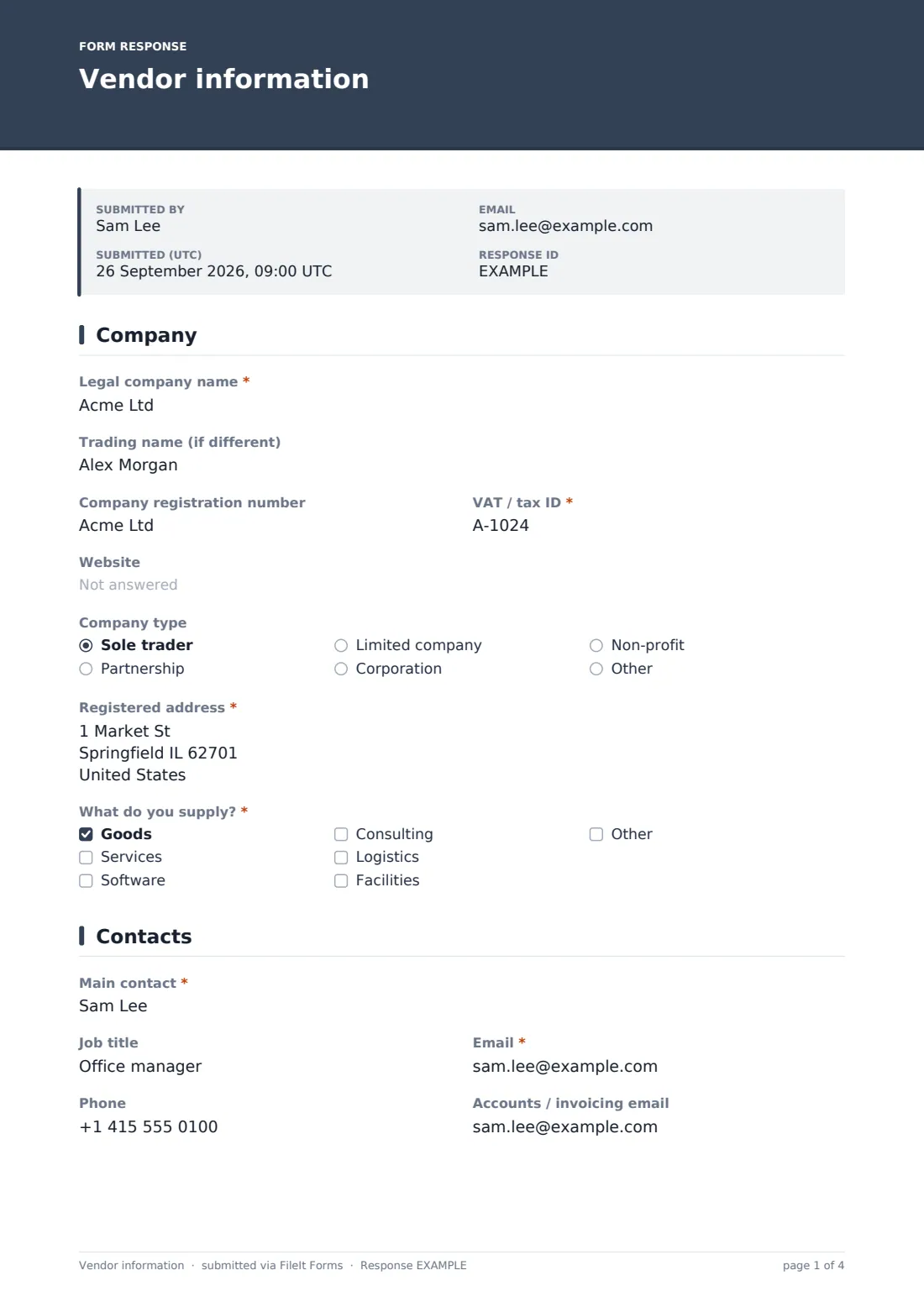
The form opens with the vendor's legal company name, an optional trading name if different, and its company registration and VAT/tax IDs. A website field and a company type dropdown (sole trader, partnership, limited company, corporation, non-profit or other) sit alongside the registered address. A checkbox list — What do you supply? — covers goods, services, software, consulting, logistics and facilities, with an "Other" option for anything outside those categories.
2 Contacts
This short page records the main point of contact — name, job title, email and phone — plus a separate accounts or invoicing email if that's a different person or inbox. Keeping these apart from the start avoids invoices being sent to the wrong contact later on.
3 Payment
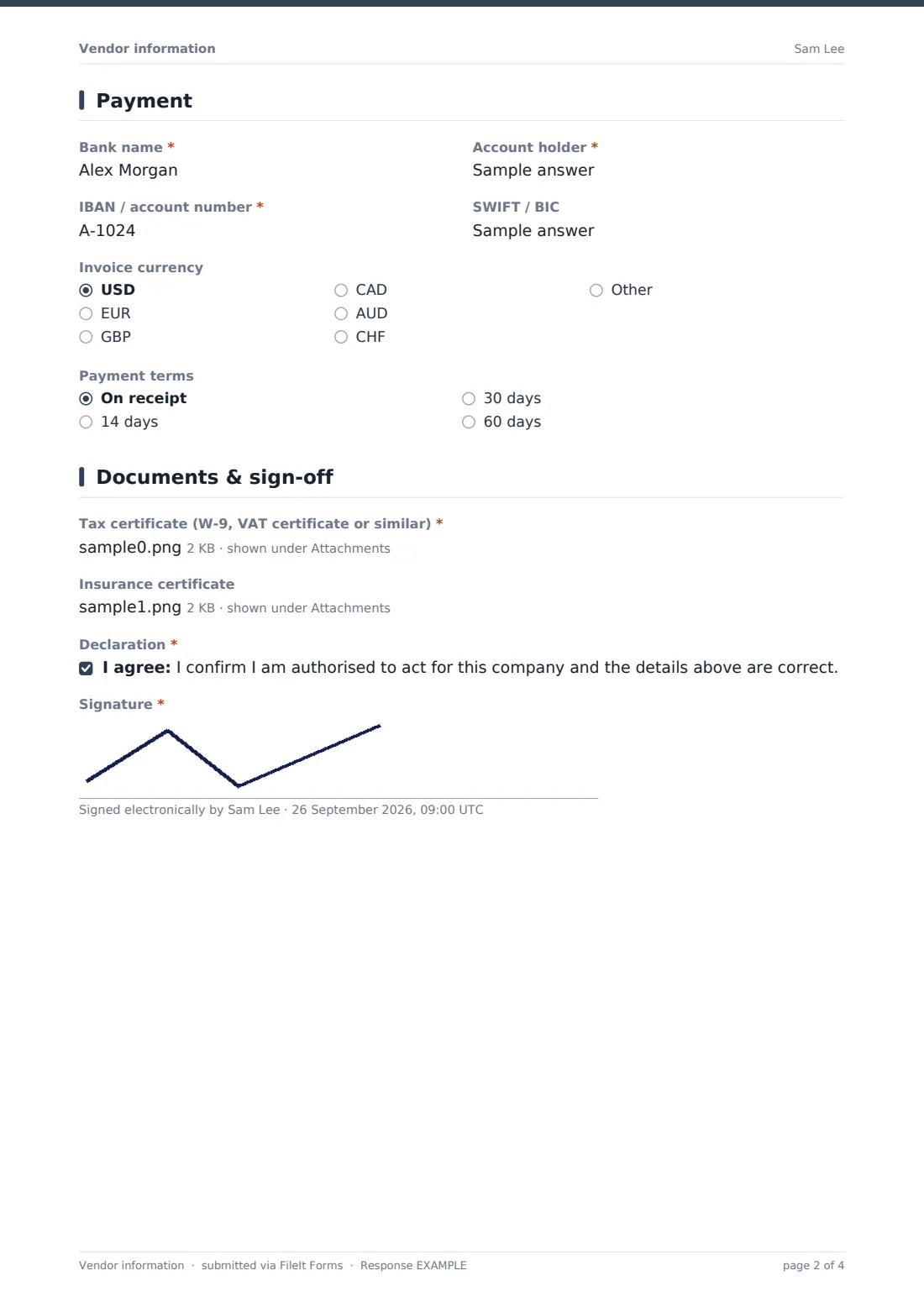
Here the vendor provides the details your accounts payable team needs to actually pay them: bank name, account holder, IBAN or account number, and an optional SWIFT/BIC code. A currency dropdown covers the major invoicing currencies with an "Other" option, and a payment terms question (on receipt, 14, 30 or 60 days) records what's been agreed for how quickly invoices should be paid.
4 Documents & sign-off
The vendor uploads a tax certificate — a W-9, VAT certificate or similar — which is required, plus an optional insurance certificate. A final declaration confirms the person completing the form is authorised to act for the company and that the details given are correct, followed by a signature captured on screen. Nothing on this page processes a payment; it only records the information your finance system needs before the vendor is set up.
Make the template yours
- Add a question for preferred purchase order process if your procurement team requires a PO number on every invoice
- Remove the SWIFT/BIC field if you only work with domestic suppliers and never need international transfer details
- Make the insurance certificate required instead of optional for vendor categories where you need proof of cover, like contractors
- Add a diversity or small-business classification question if your organisation reports on supplier diversity
- File each vendor's PDF into its own folder, named after the company, so future invoices and correspondence can sit alongside it
- Set up extra notification emails so both procurement and finance are alerted whenever a new vendor form is submitted
- Add a renewal reminder question asking when the tax certificate expires, so you know when to request an updated one
Tips for a better vendor information form
- Ask new vendors to complete this form before you place a first order, not after the first invoice arrives
- Store bank details and tax documents with the same care as any other sensitive financial record
- Double-check IBAN or account numbers against the uploaded documents before making a first payment
- Keep a simple internal process for who reviews and approves a new vendor form before it's added to your accounting system
- Periodically ask long-standing vendors to reconfirm their bank details, since payment fraud often targets outdated records
- Use the declaration and signature as a lightweight check that the person completing the form is actually authorised to do so
Every response becomes a PDF in your vault
The moment a vendor submits the form, FileIt saves it as a PDF in your vault, filed in whichever folder you've set up — typically one per supplier — with their tax certificate and insurance document attached. You're notified by email straight away, and the vendor can receive their own copy if you've turned that setting on.
From there, your accounts payable or procurement team reviews the submission in the Responses table before adding the supplier to your accounting system. Because every field arrives in the same structure every time, cross-checking bank details, tax IDs and documents against your internal approval process is far quicker than working through an email thread.
- Start from this template. It opens in the FileIt Forms designer — change any question, add pages, set the rules for when questions appear.
- Share it. Turn on a public link, or send it to people by email, each with their own link. They don’t need a FileIt account.
- Get the answers as PDFs. Each response is saved as a PDF in the vault folder you choose, with uploaded files attached — and listed in a Responses table you can export to CSV.
Vendor information form: frequently asked questions
Is this vendor information form template free?
Yes. It's included in FileIt's Forms app on every plan, including the free plan, and you can edit any question to match your onboarding process.
Do vendors need a FileIt account to complete the form?
No. Share it as a public link or a personal emailed invitation, and the vendor submits it without creating an account.
Where does the vendor's information end up?
Each submission is saved automatically as a PDF in your FileIt vault, with any uploaded documents attached, and you can browse or export all responses from the Responses table.
Can vendors upload their tax certificate directly?
Yes, a required file upload accepts PDF, JPG or PNG files up to 10 MB, for a W-9, VAT certificate or similar document.
Is the bank information collected here secure?
Answers submitted through the form are encrypted at rest in FileIt, but you're still responsible for who on your team can view sensitive vendor data once it's filed.
Can we require different information for sole traders versus limited companies?
The form records a company type, and you can add further conditional questions in the designer if certain company types need extra fields.
Can we track which category of goods or services each vendor supplies?
Yes, there's a checkbox question for that, with an "Other" option for anything not listed.
Can we limit this form to invited vendors only?
Yes, you can send personal emailed links to specific vendors instead of sharing a public link, or use both depending on how you recruit new suppliers.