What is the data processing consent form template?
Blanket consent boxes — one tick for everything — don't give people a real choice, and they don't give you a clear record of what someone actually agreed to. This template asks separately about each purpose you might use someone's data for, from marketing emails to using their name in a case study, so the person answering only agrees to what they're comfortable with.
Putting this online, rather than on a paper form filed in a drawer, means every answer is captured the same way, time-stamped, and easy to find again later if someone asks what they agreed to — or asks you to change it. Conditional questions only ask for extra detail, like which channels to use for marketing, when it's actually relevant to what the person ticked.
Each time someone completes the form, FileIt saves their answers as a PDF in the vault folder you choose, so you have a dated copy of exactly what was agreed, alongside anyone else's consent records.
- Best for
- Businesses and organizations collecting granular data-use consent
- Filled in by
- The individual whose data is used, or a parent/guardian for a minor
- Time to complete
- About 3 minutes
- Includes
- Conditional questions, purpose-by-purpose checkboxes, two consent declarations
Who uses a data processing consent form?
- Businesses updating how they collect marketing and personalization consent from customers
- Membership organizations, clubs or charities recording what supporters have agreed to
- Anyone who needs a dated record that consent was freely given, purpose by purpose
- Organizations that occasionally use member photos, names or stories and want explicit sign-off first
- Teams handling under-16 sign-ups who need a parent or guardian's consent alongside the young person's own details
- Businesses replacing a single "I agree to everything" checkbox with real, separable choices
Questions on this data processing consent form
13 questions over 3 pages · includes conditional questions, multiple pages, consent checkbox.
1 About you
- Your name*
- Email*
- Phone
- Your relationship with us Customer or client · Member or supporter · Participant or attendee · Supplier or partner
- Are you under 16?*
- Parent or guardian's name* asked only when it applies
- Parent or guardian's email* asked only when it applies
2 Your choices
- I agree to you using my personal data to… Send me news, offers and marketing · Personalise offers based on what I've bought or used · Invite me to surveys and feedback requests · Include my data, de-identified where possible, in research and statistics · Share my contact details with carefully selected partners · Use my name or photo in stories, case studies or publications
- How may we send you marketing?* asked only when it applies Email · Text message · Phone call · Post
- Any limits on using your name or photo? asked only when it applies
3 Your rights & confirmation
- Privacy notice*
- Confirmation*
- Parent or guardian* asked only when it applies
The data processing consent form, page by page
1 About you
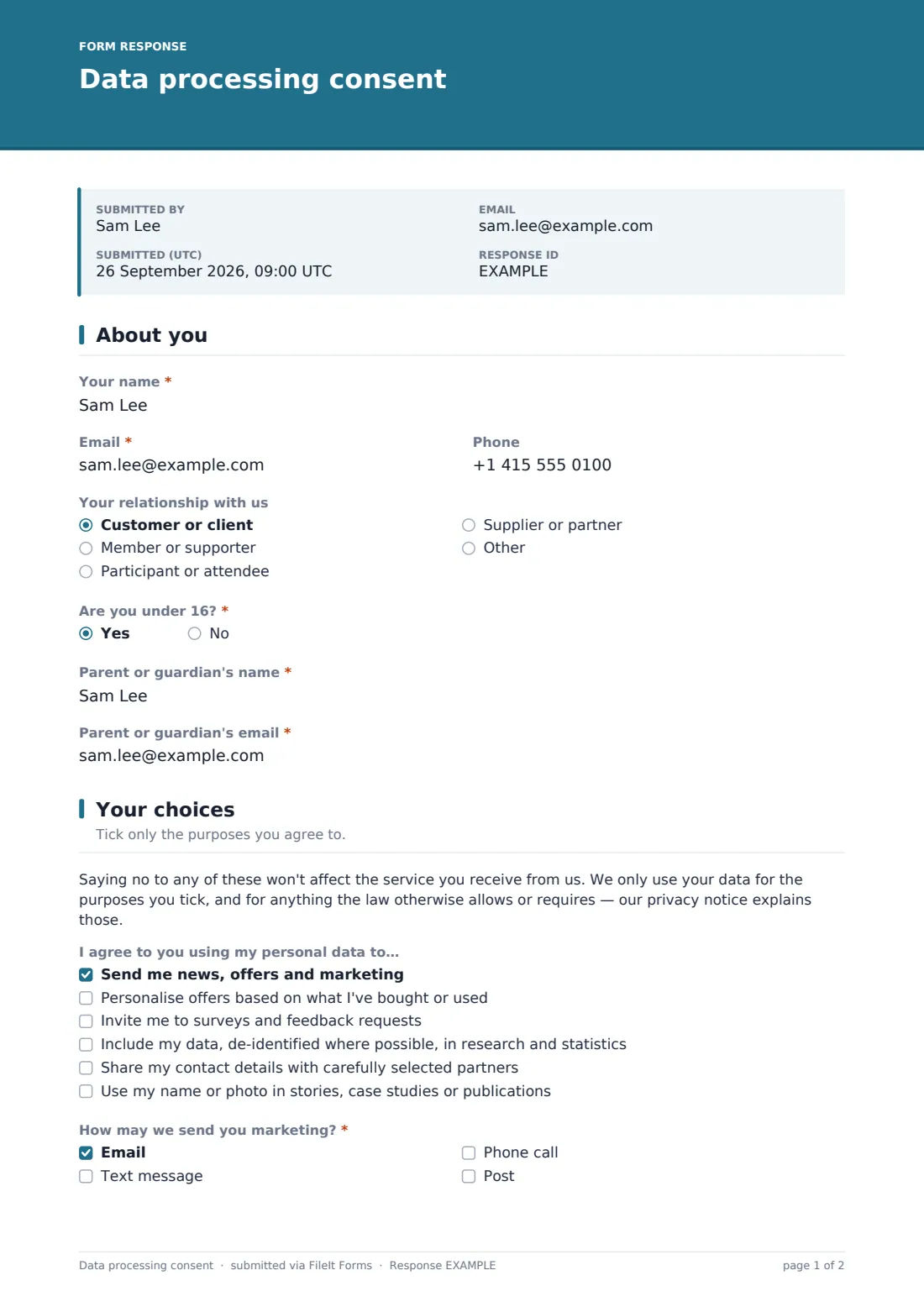
This page collects the basics — name, email and an optional phone number, kept only if the person later agrees to be contacted by phone or text. A relationship question (customer or client, member or supporter, participant or attendee, supplier or partner, or another option they can type in) helps you see at a glance who your consent records belong to.
Because consent rules for under-16s work differently in many countries, the form asks Are you under 16? first. Answering yes reveals two more required fields — a parent or guardian's name and email — so a young person's data choices are always backed by an adult, before anything on the following pages is answered.
2 Your choices
The form is upfront that saying no won't change the service someone receives, then lists each purpose as a separate item under I agree to you using my personal data to…: sending news and offers, personalizing offers based on past activity, inviting them to surveys, including their data — de-identified where possible — in research, sharing contact details with partners, or using their name or photo in stories and publications. None of these are pre-ticked and none are required, so the person only agrees to what they actually want.
Two questions only appear when they're relevant: if marketing is ticked, How may we send you marketing? asks which channels — email, text, phone or post — are acceptable, and at least one must be picked. If sharing with partners is ticked, a short note reminds the person that your privacy notice lists who those partners are. If media use is ticked, an optional field lets them set limits, for example "first name only" or "no photos of my children".
3 Your rights & confirmation
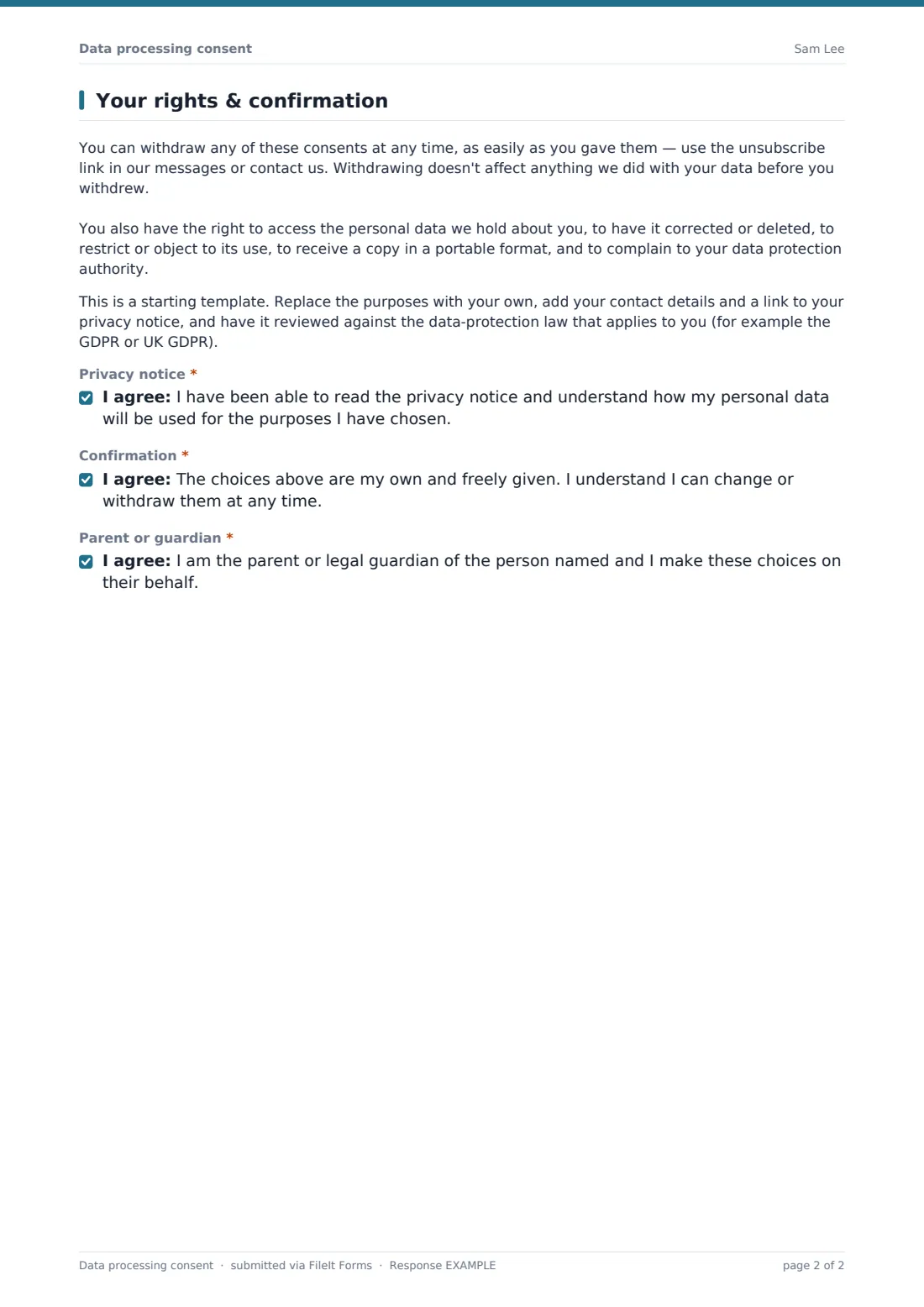
Before asking for a final confirmation, the form explains in plain terms that any of these choices can be withdrawn at any time, as easily as they were given, and lists the person's other rights — to access, correct, delete, restrict, or receive a portable copy of their data, and to complain to their data protection authority. A second note reminds the form's owner that this is a starting template, to be adapted with their own purposes, contact details, a link to their privacy notice, and checked against whichever data-protection law applies to them.
Two consent statements close the form: one confirming the person has been able to read the privacy notice, and one confirming their choices are their own and freely given. If they said they're under 16, a third statement asks the parent or guardian to confirm they're making these choices on the young person's behalf.
Make the template yours
- Replace the six sample purposes with the actual ways your organization uses personal data
- Add a link, or the text, of your own privacy notice near the top of the choices page
- Adjust the age threshold and guardian wording to match the digital-consent age where you operate
- Add your own logo and accent color so the form matches your other communications
- Set a closing date if you're running this as part of a time-limited re-consent campaign
- Route responses to a dedicated vault folder so consent records are easy to find and kept separate from other documents
Tips for a better data processing consent form
- Ask for consent purpose by purpose rather than as one blanket agreement — it respects people's actual preferences
- Keep a copy of the privacy notice that was current when someone gave consent, since notices change over time
- Make withdrawing consent at least as easy as giving it, and act on withdrawal requests promptly
- Only ask for the contact channels you actually plan to use — an unused phone number on file is just extra risk
- Review and refresh consent records periodically rather than assuming an old tick box still reflects someone's wishes
- Have this template's wording checked against the data-protection law that applies to you before relying on it — it's a starting point, not legal advice
Every response becomes a PDF in your vault
When someone submits their choices, FileIt converts the answers into a PDF and files it in the vault folder you've set up for consent records, giving you a dated copy of exactly what was agreed and by whom. If you've turned on owner notifications, you'll also get an email each time a new consent form comes in.
From there, most organizations use the Responses table to check who has agreed to what before sending marketing, using a testimonial, or including someone in a report — filtering the list, or exporting it to CSV to cross-reference against a mailing list or membership database.
- Start from this template. It opens in the FileIt Forms designer — change any question, add pages, set the rules for when questions appear.
- Share it. Turn on a public link, or send it to people by email, each with their own link. They don’t need a FileIt account.
- Get the answers as PDFs. Each response is saved as a PDF in the vault folder you choose, with uploaded files attached — and listed in a Responses table you can export to CSV.
Data processing consent form: frequently asked questions
Is this data processing consent template free to use?
Yes. It's one of FileIt's ready-made templates, and every FileIt account, including the free plan, includes the Forms app and its full library of templates.
Do people filling in this form need a FileIt account?
No. Anyone with the link, or an emailed request, can complete and submit the form without creating a FileIt account. Only the form owner needs one.
How do I keep proof of what someone agreed to?
Every submission is saved automatically as a PDF in your vault, so you have a dated copy of the exact choices someone made. The Responses table lets you find any record again, and you can export the whole list to CSV.
Does using this form make my data collection GDPR-compliant?
No. This template is a plain-English starting point that follows common good practice, like separating purposes and explaining how to withdraw consent, but it isn't legal advice and using it doesn't by itself make your organization compliant with the GDPR or any other law. Have the wording checked against the rules that apply to you.
Can I add or remove the purposes people can consent to?
Yes. Every purpose, question and consent statement in the template can be edited, added to or removed in the designer so it matches exactly how your organization uses personal data.
What happens if someone filling this in is under 16?
The form asks their age first. If they're under 16, it asks for a parent or guardian's name and email, and later asks that parent or guardian to confirm the choices on the young person's behalf.
How does someone withdraw their consent later?
The form itself tells people how — through your unsubscribe link or by contacting you directly. FileIt doesn't automatically update other systems for you, so you'll still need your own process for acting on a withdrawal request.
Does this form replace my organization's privacy notice?
No. It's designed to work alongside your privacy notice, not instead of it — the confirmation statements assume the person has been able to read that notice separately.