What is the biometric data consent form template?
Fingerprint time clocks and face-scanning door readers are increasingly common, and biometric data is treated as especially sensitive in many privacy laws. Before enrolling anyone, organisations generally need to explain what's collected and why, how long it's kept, and — in many cases — get written consent and offer another way in.
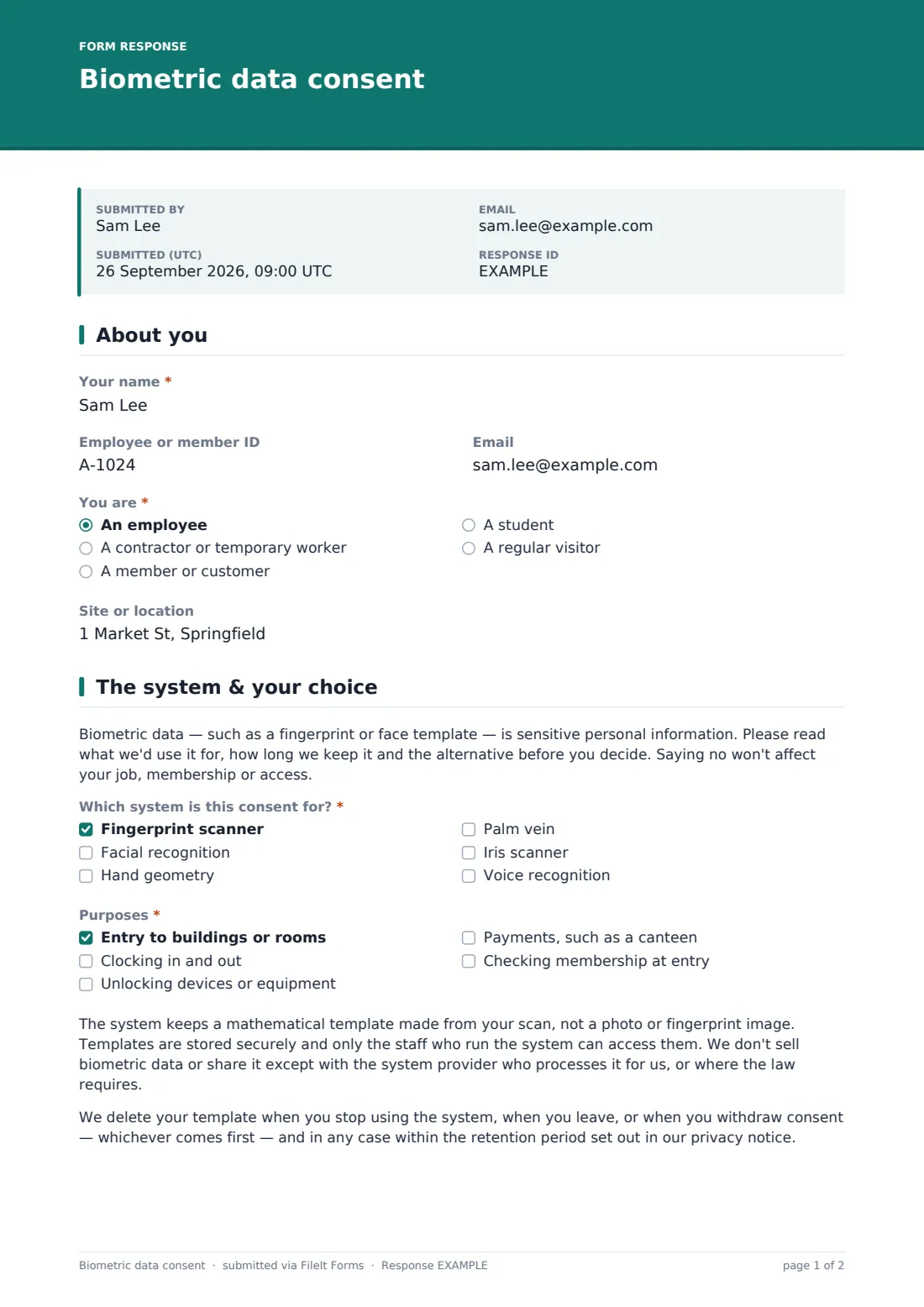
This three-page form does that in plain language. The person gives their name, ID and how they're connected to the organisation. The next page explains that biometric data is sensitive and that saying no has no consequences, asks which system and purposes the consent covers, and includes short paragraphs on how templates are stored and when they're deleted. The person then chooses: consent, or an alternative such as a card, PIN, manual sign-in or app.
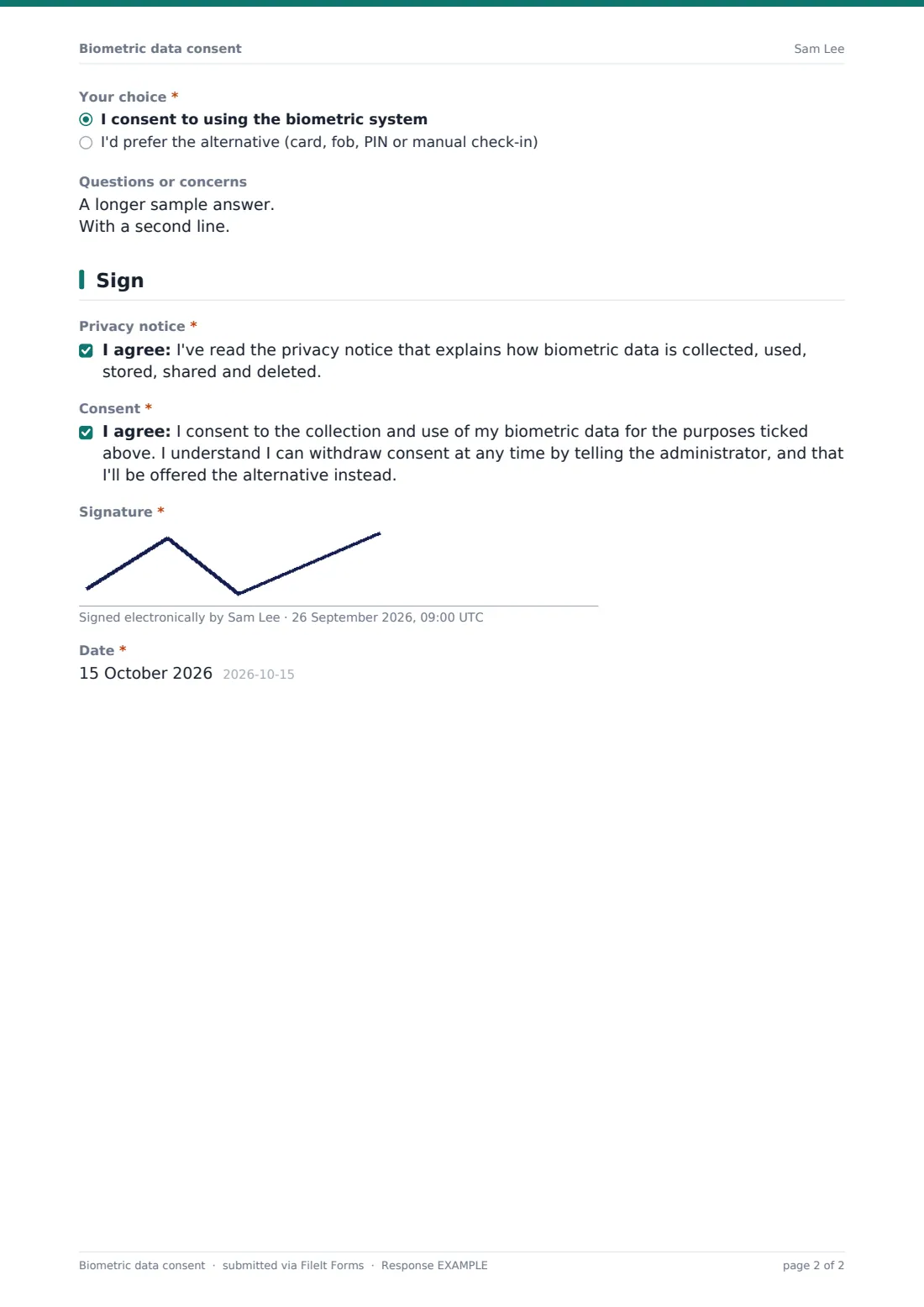
Those who consent acknowledge the privacy notice and give consent with a right to withdraw; those who don't confirm their choice of alternative. Everyone signs and dates. Each signed form is saved as a PDF in your FileIt vault. Have your adviser check the wording against the laws that apply to you.
- Best for
- Employers, gyms, schools, clubs and building managers using biometric systems
- Filled in by
- Employees, contractors, members, students and regular visitors
- Time to complete
- About 3 minutes
- Includes
- System and purposes, storage and deletion notes, alternative option, signature
Who uses a biometric data consent form?
- An employer introducing fingerprint clock-in on a factory floor
- A gym switching from membership cards to face recognition at the door
- An office building enrolling tenants' staff in a biometric access system
- A school canteen using fingerprint payment
- Re-collecting consent when a system or provider changes
- Recording that someone chose an access card instead
Questions on this biometric data consent form
15 questions over 3 pages · includes signature, conditional questions, multiple pages, consent checkbox.
1 About you
- Your name*
- Employee or member ID
- You are* An employee · A contractor or temporary worker · A member or customer · A student · A regular visitor
- Site or location
2 The system & your choice
- Which system is this consent for?* Fingerprint scanner · Facial recognition · Hand geometry · Palm vein · Iris scanner · Voice recognition
- Purposes* Entry to buildings or rooms · Clocking in and out · Unlocking devices or equipment · Payments, such as a canteen · Checking membership at entry
- Your choice* I consent to using the biometric system · I'd prefer the alternative (card, fob, PIN or manual check-in)
- Which alternative would you like?* asked only when it applies Access card or fob · PIN code · Manual sign-in or timesheet · App or QR code
- Questions or concerns
3 Sign
- Privacy notice* asked only when it applies
- Consent* asked only when it applies
- Confirmation* asked only when it applies
- Signature*
- Date*
The biometric data consent form, page by page
1 About you
The person gives Your name, Employee or member ID, Email and You are: an employee, contractor or temporary worker, member or customer, student, or regular visitor. Site or location is optional.
2 The system & your choice
An opening note explains that biometric data is sensitive and that saying no won't affect the person. Which system is this consent for? lists fingerprint, facial recognition, hand geometry, palm vein, iris and voice. Purposes lists building entry, clocking in and out, unlocking devices, payments and membership checks. Two paragraphs explain storage and retention. Your choice is consent or the alternative; choosing the alternative asks which one. A box takes questions or concerns.
3 Sign
People who consent tick the privacy notice acknowledgement and the consent statement, which includes the right to withdraw. People who chose the alternative tick a confirmation instead. Everyone signs and dates the form.
Make the template yours
- Replace the storage and retention paragraphs with the exact details from your privacy notice
- Remove systems and purposes you don't use, so consent is specific
- Add a link to your full privacy notice in the opening paragraph
- Add the name of your system provider if your policy requires it to be disclosed
- Send personal links to each employee so their details are prefilled
- File signed forms in an HR folder with restricted access
Tips for a better biometric data consent form
- Collect consent before anyone is enrolled, not after
- Make the alternative genuinely available, and don't pressure people to choose the biometric option
- Delete templates promptly when someone leaves or withdraws
- Keep your retention policy and privacy notice in writing — some laws require a public policy
- Have an employment or privacy adviser review the wording for your location
Every response becomes a PDF in your vault
Each signed form is saved as a PDF in the vault folder you choose, and the person can receive a copy. You're notified by email.
The Responses table shows who consented and who chose an alternative, so your administrator knows who to enrol. Keep the PDFs for as long as your retention policy requires.
- Start from this template. It opens in the FileIt Forms designer — change any question, add pages, set the rules for when questions appear.
- Share it. Turn on a public link, or send it to people by email, each with their own link. They don’t need a FileIt account.
- Get the answers as PDFs. Each response is saved as a PDF in the vault folder you choose, with uploaded files attached — and listed in a Responses table you can export to CSV.
Biometric data consent form: frequently asked questions
Is this biometric consent form template free?
Yes. It's a starter template in the FileIt Forms app on every account.
Does this form make us compliant with biometric privacy laws?
No form can do that on its own. Requirements differ by place. Use it as a starting point and have an adviser check it, together with your privacy notice and retention policy.
Why offer an alternative?
Consent is generally only meaningful if people can say no without losing out. Offering a card, PIN or manual option makes that real.
How do people withdraw consent?
The consent statement tells them to contact the administrator. You can also share a short withdrawal form, such as FileIt's consent withdrawal template.
Does FileIt store anyone's fingerprints?
No. The form records the person's choice and signature. Biometric templates stay in your access or time system.
Can minors use this form?
If you enrol under-18s, such as in a school, add a parent or guardian consent and signature.