What is the privacy impact assessment form template?
The cheapest time to fix a privacy problem is before the system is built. Once a database schema, a vendor contract and a launch date are fixed, collecting less or keeping data for a shorter time becomes a project of its own. A privacy impact assessment asks the awkward questions while change is still easy.
This template walks a project team through it in three pages. The first describes the project in plain words, whose data is involved and roughly how many people. The second maps the data: what's collected, why, the basis for using it, where it comes from, whether every item is needed, who it's shared with, whether it leaves the country, how long it's kept and how it's deleted. Ticking sensitive data, such as health, biometric or criminal records information, asks why it's needed and which extra safeguards apply.
The third page rates seven common privacy risks as low, medium or high, records mitigations and the overall risk that remains, and ends with a recommendation and a review date. Each assessment is signed and filed in your FileIt vault, where your privacy lead can find it later.
- Best for
- Project teams, product managers and privacy or data protection leads
- Filled in by
- The project owner, with input from the team
- Time to complete
- 30–45 minutes
- Includes
- Data mapping, sensitive-data safeguards, sharing and transfer questions, a seven-row risk grid and a recommendation
Who uses a privacy impact assessment form?
- A new CRM or HR system before procurement is signed off
- Adding location tracking or analytics to an app
- Starting CCTV or employee monitoring
- Sharing customer data with a new marketing partner
- Reusing existing data for a new purpose, such as AI training
- Annual review of a system that holds health data
Questions on this privacy impact assessment form
31 questions over 3 pages · includes signature, conditional questions, multiple pages, ratings.
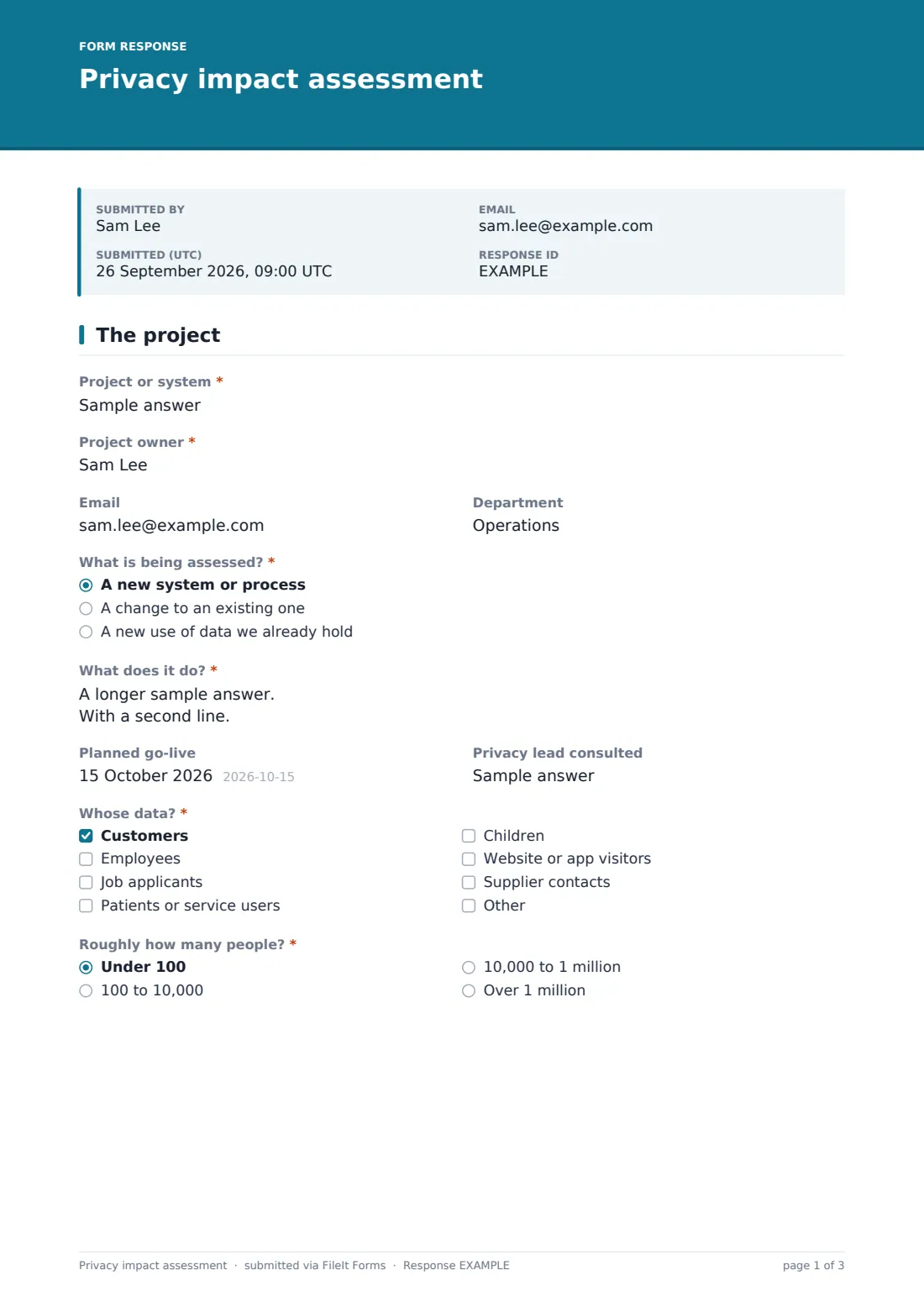
1 The project
- Project or system*
- Project owner*
- Department
- What is being assessed?* A new system or process · A change to an existing one · A new use of data we already hold
- What does it do?*
- Planned go-live
- Privacy lead consulted
- Whose data?* Customers · Employees · Job applicants · Patients or service users · Children · Website or app visitors · Supplier contacts
- Roughly how many people?* Under 100 · 100 to 10,000 · 10,000 to 1 million · Over 1 million
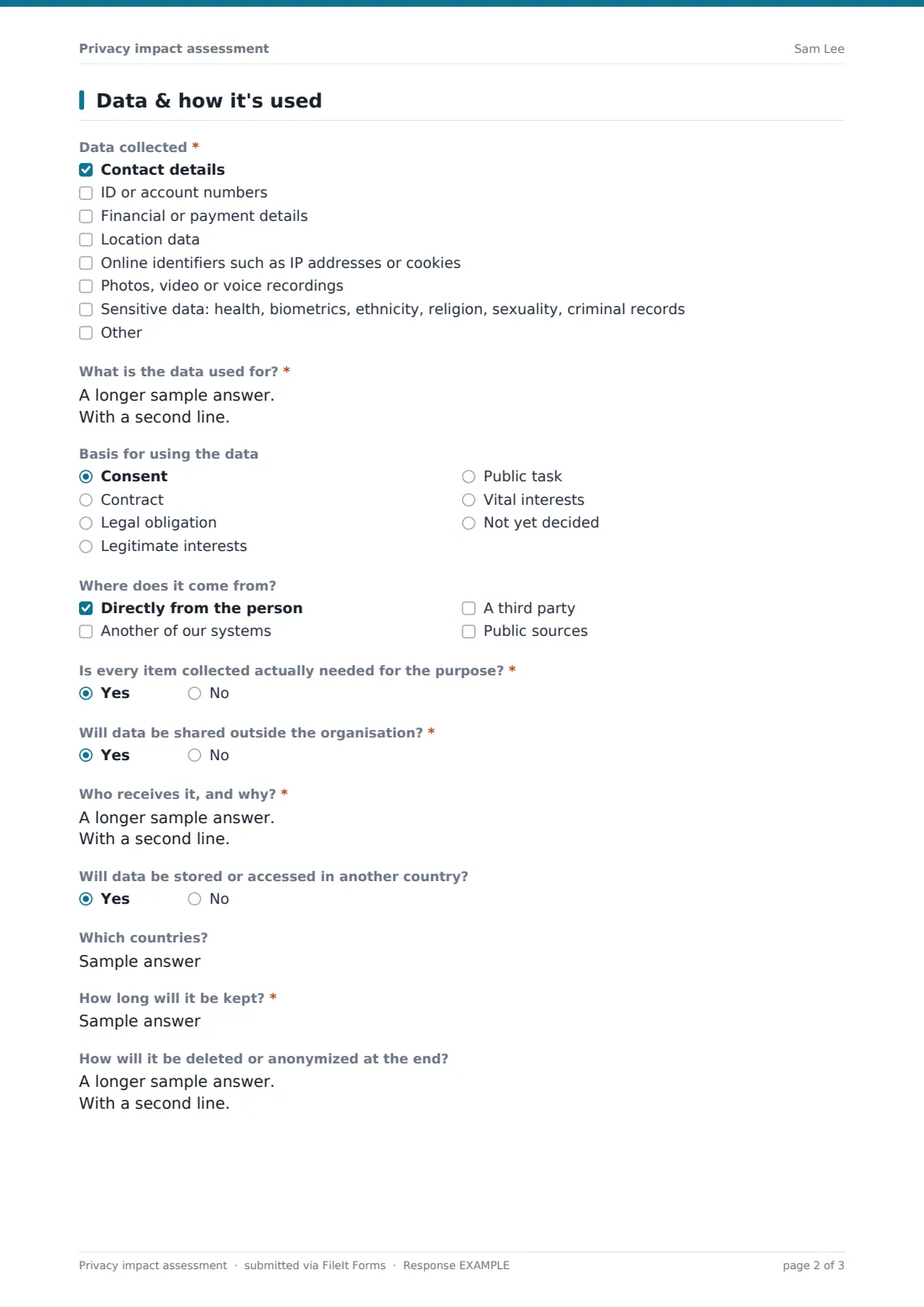
2 Data & how it's used
- Data collected* Contact details · ID or account numbers · Financial or payment details · Location data · Online identifiers such as IP addresses or cookies · Photos, video or voice recordings · Sensitive data: health, biometrics, ethnicity, religion, sexuality, criminal records
- Which sensitive data, and why is it needed?* asked only when it applies
- Extra safeguards for sensitive data* asked only when it applies Encrypted at rest and in transit · Access limited to named roles · Stored separately · Explicit consent recorded · Access logged and reviewed · Pseudonymized where possible
- What is the data used for?*
- Basis for using the data Consent · Contract · Legal obligation · Legitimate interests · Public task · Vital interests · Not yet decided
- Where does it come from? Directly from the person · Another of our systems · A third party · Public sources
- Is every item collected actually needed for the purpose?*
- Will data be shared outside the organisation?*
- Who receives it, and why?* asked only when it applies
- Will data be stored or accessed in another country?
- Which countries? asked only when it applies
- How long will it be kept?*
- How will it be deleted or anonymized at the end?
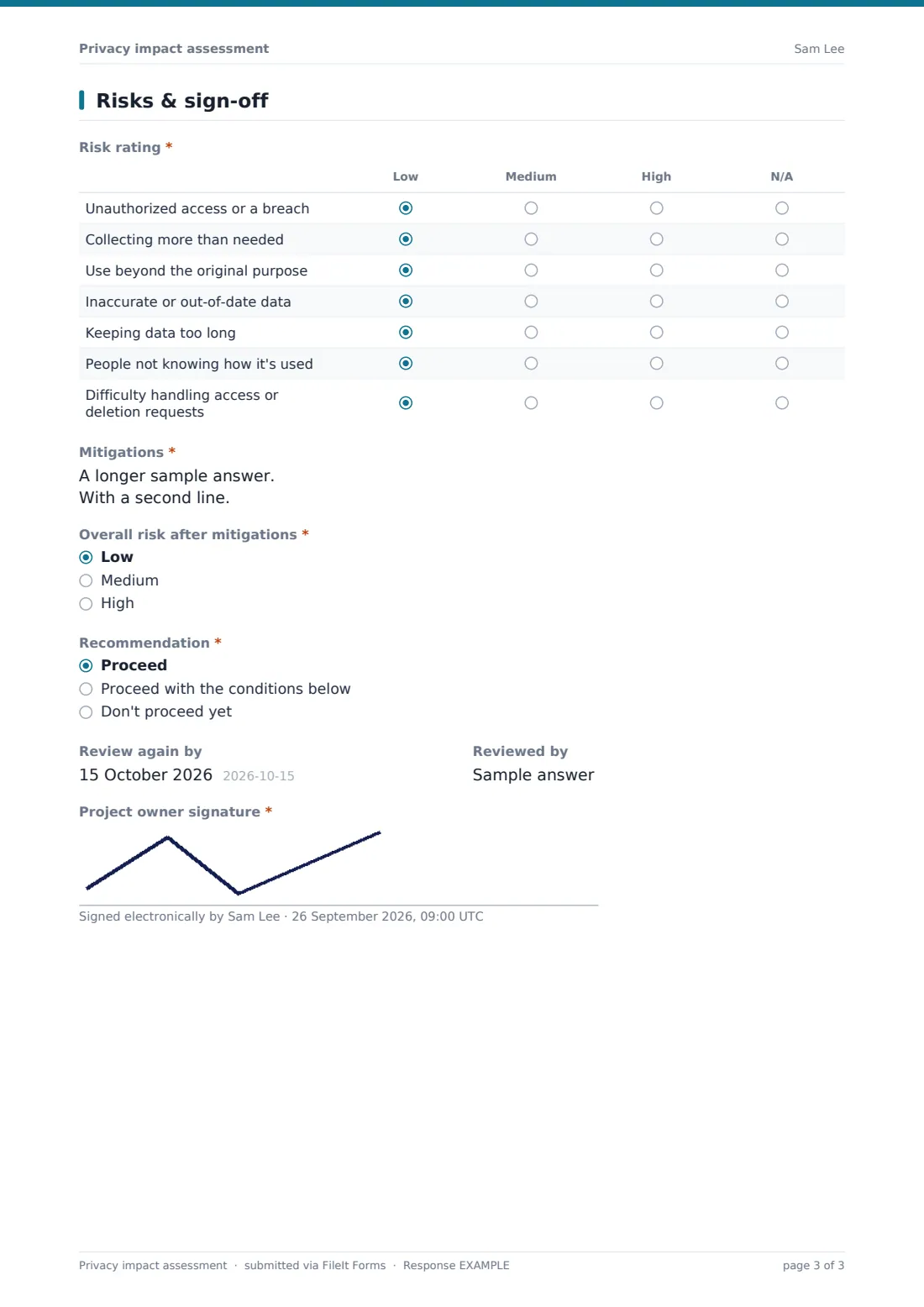
3 Risks & sign-off
- Risk rating* Low · Medium · High · N/A
- Mitigations*
- Overall risk after mitigations* Low · Medium · High
- Recommendation* Proceed · Proceed with the conditions below · Don't proceed yet
- Conditions* asked only when it applies
- Review again by
- Reviewed by
- Project owner signature*
The privacy impact assessment form, page by page
1 The project
The project or system, the project owner, email, department and What is being assessed?: something new, a change to something existing, or a new use of data already held. What does it do? asks for a plain-language description. A planned go-live date and the privacy lead consulted sit side by side. Whose data? lists customers, employees, applicants, patients, children, visitors and supplier contacts, and Roughly how many people? sets the scale.
2 Data & how it's used
Data collected runs from contact details and ID numbers to financial, location, online identifiers, photos or recordings and sensitive data. Ticking sensitive data adds why it's needed and the Extra safeguards checklist. Then come the purpose, the basis for using the data, the sources, and Is every item collected actually needed? A Yes to sharing outside the organisation asks who receives it and why. International storage or access asks which countries. Retention and deletion close the page.
3 Risks & sign-off
The Risk rating grid covers breaches, collecting too much, use beyond the original purpose, inaccurate data, keeping it too long, transparency, and handling access or deletion requests. Mitigations takes one line per risk. A High answer to Overall risk after mitigations shows a note about further review. The recommendation (proceed, proceed with conditions, or not yet) asks for the conditions where they apply, then a review date, the reviewer and a signature.
Make the template yours
- Rename the basis options to match the law your privacy lead works under
- Add risks specific to your sector to the grid
- Add your privacy lead's address to the notification emails
- Make the privacy lead consulted question required
- File assessments into a vault folder per system
Tips for a better privacy impact assessment form
- Start the assessment at design stage, and update it before launch
- Describe the system so someone outside the team understands it
- Challenge every data item: what breaks if you don't collect it?
- Give each mitigation an owner
- Set a review date and keep it, especially when the system changes
Every response becomes a PDF in your vault
The signed assessment is filed as a PDF in your FileIt vault and the form owner is emailed. Add your privacy lead as an extra recipient so they see each one as it arrives.
The Responses table and CSV export give you a register of assessments: which systems have one, their overall risk and when each is due for review.
- Start from this template. It opens in the FileIt Forms designer — change any question, add pages, set the rules for when questions appear.
- Share it. Turn on a public link, or send it to people by email, each with their own link. They don’t need a FileIt account.
- Get the answers as PDFs. Each response is saved as a PDF in the vault folder you choose, with uploaded files attached — and listed in a Responses table you can export to CSV.
Privacy impact assessment form: frequently asked questions
Is this PIA template free?
Yes. It's a starter template in the FileIt Forms app, available on every plan.
Is this the same as a DPIA?
It covers the same ground many data protection impact assessments do, and the questions can be edited to match the format your regulator or policy expects. It isn't legal advice, so check the requirements that apply to you.
When do the sensitive data questions appear?
When sensitive data is ticked under Data collected. They ask why it's needed and which extra safeguards apply.
Does it score the risk automatically?
No. The team rates each risk and the overall risk after mitigations. The form records their judgement.
Can several people contribute?
One person submits the assessment. Many teams work through it together in a meeting, with the project owner entering the answers and submitting.