What is the records destruction request form template?
Keeping records forever costs money and adds risk, but destroying the wrong ones can be far worse. A clear request, checked against the retention schedule and signed off by the right people, is what turns a box of old files into a decision someone can stand behind.
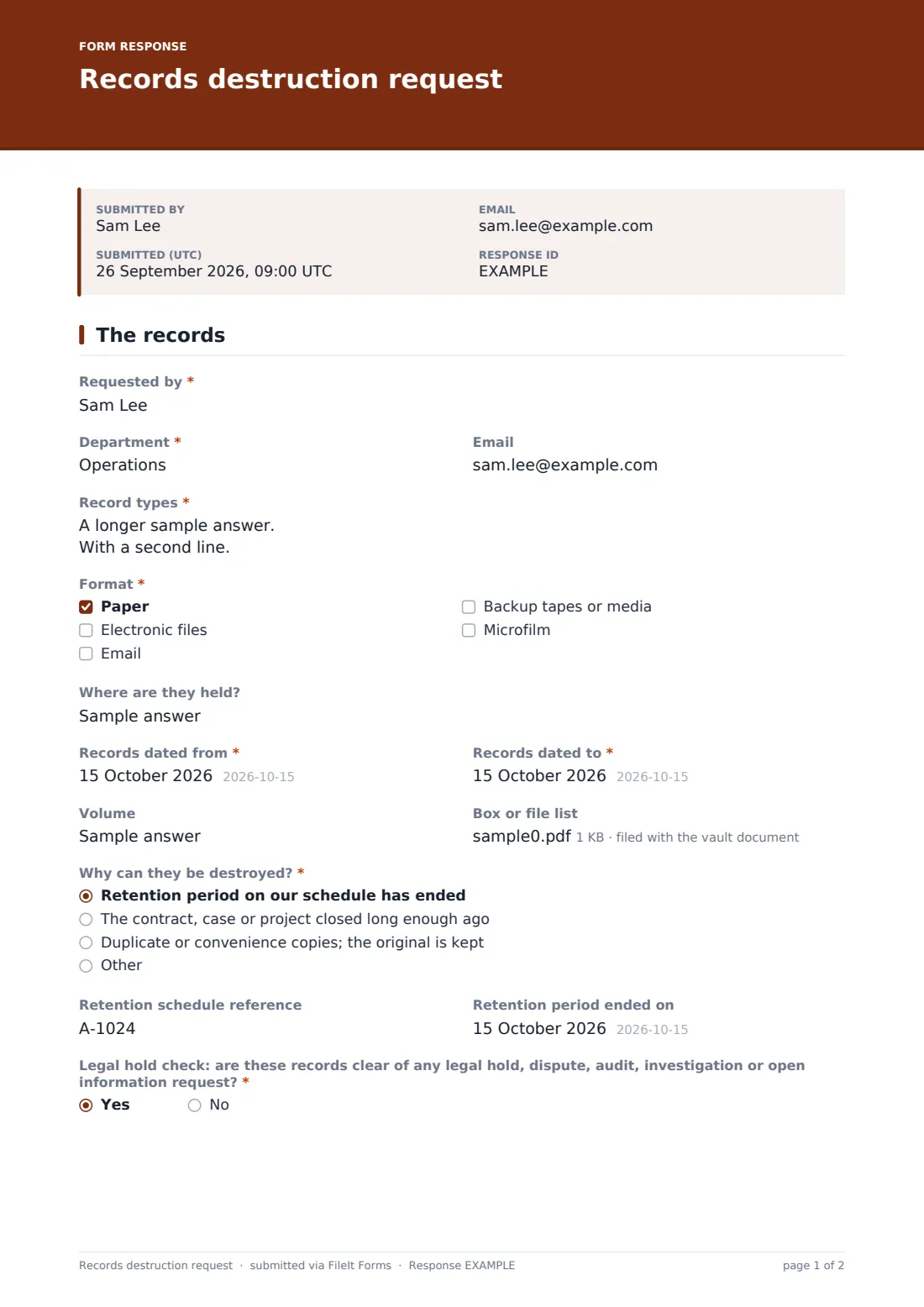
This form asks the department to describe the records: types, format, where they are held, the date range and volume, with a box or file list attached if there is one. They state why the records can go, give the retention schedule reference and the date the retention period ended, then answer the legal hold check. If the answer is no, the form shows a clear stop message and asks what the hold or open matter is and who is handling it.
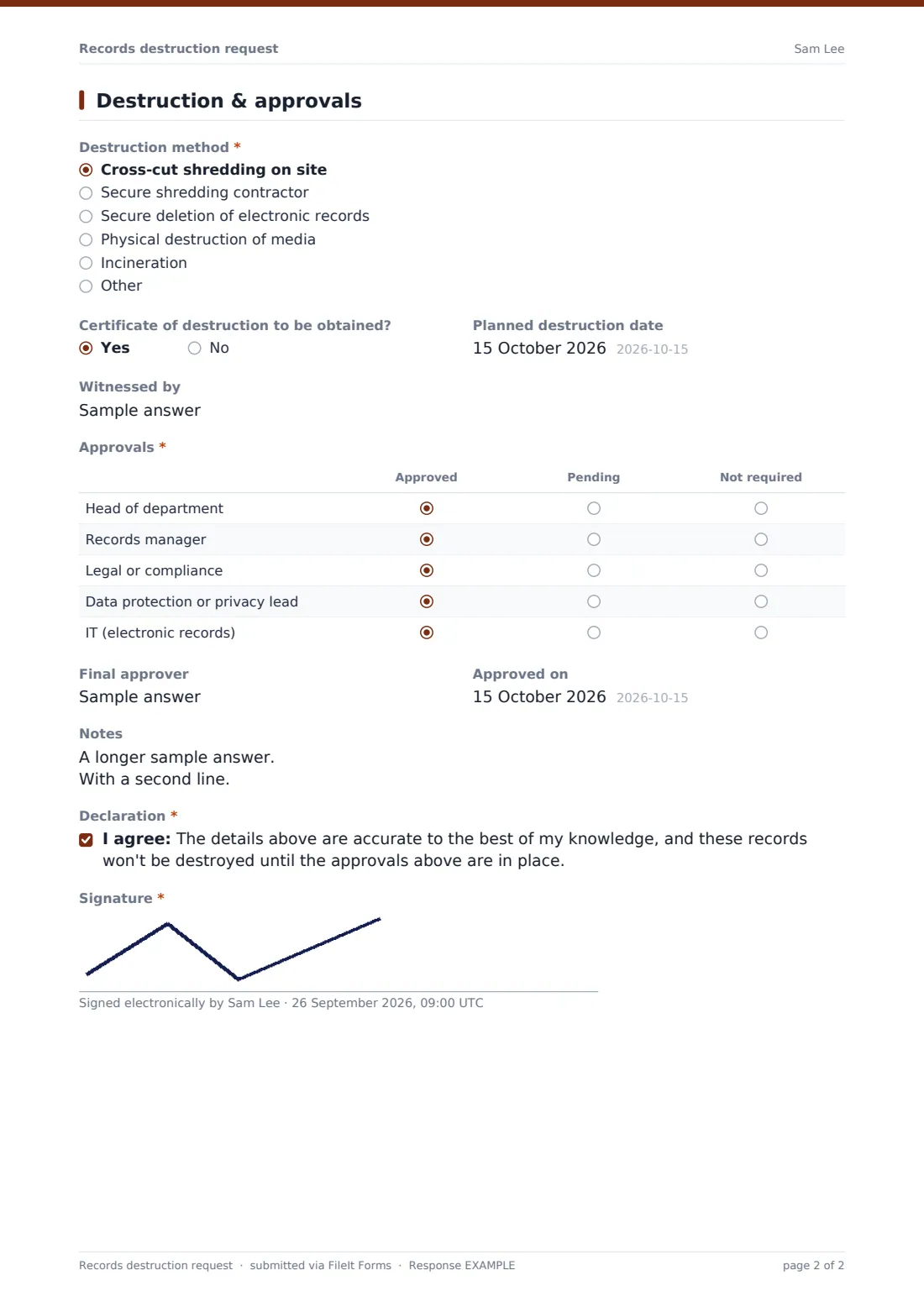
Page two covers the destruction method, a certificate of destruction, systems and backups to clear for electronic records, the planned date, a witness and an approvals grid. The request is signed and filed as a PDF in your FileIt vault, building a disposal history you can show later.
- Best for
- Records managers, compliance teams, finance and HR departments
- Filled in by
- The department asking to dispose of the records
- Time to complete
- About 10 minutes
- Includes
- Retention basis, legal hold check with a stop message, destruction method, approvals grid and signature
Who uses a records destruction request form?
- Annual clear-out of finance records past their retention period
- Disposing of unsuccessful candidates' recruitment files
- Clearing an old project share before decommissioning a server
- Booking a shredding contractor for archive boxes
- Destroying backup tapes at the end of their life
- Recording disposal of duplicate copies after scanning
Questions on this records destruction request form
28 questions over 2 pages · includes signature, file upload, conditional questions, multiple pages, consent checkbox, ratings.
1 The records
- Requested by*
- Department*
- Record types*
- Format* Paper · Electronic files · Email · Backup tapes or media · Microfilm
- Where are they held?
- Records dated from*
- Records dated to*
- Volume
- Box or file list
- Why can they be destroyed?* Retention period on our schedule has ended · The contract, case or project closed long enough ago · Duplicate or convenience copies; the original is kept
- Retention schedule reference
- Retention period ended on
- Legal hold check: are these records clear of any legal hold, dispute, audit, investigation or open information request?*
- What is the hold or open matter?* asked only when it applies
- Who is handling it? asked only when it applies
2 Destruction & approvals
- Destruction method* Cross-cut shredding on site · Secure shredding contractor · Secure deletion of electronic records · Physical destruction of media · Incineration
- Contractor asked only when it applies
- Certificate of destruction to be obtained?
- Systems, shares and backups to clear asked only when it applies
- Planned destruction date
- Witnessed by
- Approvals* Approved · Pending · Not required
- Final approver
- Approved on
- Notes
- Declaration*
- Signature*
The records destruction request form, page by page
1 The records
The requester gives their name, department and email, then the record types, format (paper, electronic files, email, backup media or microfilm), location and the dates the records run from and to. Volume and a box or file list help the records team check what's included. Why can they be destroyed? covers an ended retention period, a closed contract or project, or duplicate copies. The legal hold check asks whether the records are clear of any legal hold, dispute, audit, investigation or open information request. A No shows the stop message and asks for details of the hold.
2 Destruction & approvals
Destruction method runs from on-site cross-cut shredding and secure contractors to secure deletion, media destruction and incineration. Choosing a contractor asks which one. If electronic files are included, the form asks which systems, shares and backups need clearing. The planned date, a witness, the Approvals grid (head of department, records manager, legal or compliance, privacy lead and IT), the final approver, notes, a declaration and a signature complete the request.
Make the template yours
- Replace the retention basis options with the categories in your own schedule
- Add or remove approval rows to match who signs off in your organisation
- Make the box or file list required for paper records
- Add your records team as a notification email
- File approved requests into a vault folder per year
Tips for a better records destruction request form
- Check the legal hold list every time, even for routine disposals
- Get a certificate of destruction from contractors and keep it with the request
- Remember copies in email, backups and personal drives
- Destroy records in date order so the remaining set is easy to describe
- Keep the request itself; it's the evidence the records were handled properly
Every response becomes a PDF in your vault
Each request is filed as a signed PDF in the vault folder you choose, with any file list attached, and the form owner is emailed.
Use the Responses table and CSV export to see which disposals are still waiting on approvals and to keep a register of what was destroyed and when.
- Start from this template. It opens in the FileIt Forms designer — change any question, add pages, set the rules for when questions appear.
- Share it. Turn on a public link, or send it to people by email, each with their own link. They don’t need a FileIt account.
- Get the answers as PDFs. Each response is saved as a PDF in the vault folder you choose, with uploaded files attached — and listed in a Responses table you can export to CSV.
Records destruction request form: frequently asked questions
Is this records destruction form free?
Yes. It's a starter template in FileIt Forms, available on every plan.
What happens if the legal hold check is answered no?
The form shows a message saying not to destroy the records, and asks what the hold or open matter is and who is handling it. The request can still be submitted so it's on file.
Does the form tell me how long to keep records?
No. It records the retention basis you're relying on. Retention periods come from your own schedule and advisers.
Can it cover electronic records?
Yes. Ticking electronic files asks which systems, shares and backups need to be cleared.
Can I attach the certificate of destruction?
The form records whether one will be obtained. When it arrives, you can upload it to your FileIt vault and keep it in the same folder as the request.