What is the data subject access request form template?
Access requests arrive in every shape: a one-line email, a letter, a comment in a support chat. Each one then needs follow-up to work out who the person is, which accounts they've had, what they actually want and whether they're who they say they are — while the response clock is already running.
This template collects all of that up front. It covers requests made on someone else's behalf, the ways the person has dealt with you, the period and information they're interested in, how they'd like to receive it, and an ID upload. Requests about another person ask for proof of authority automatically.
Every request is saved as a dated PDF in the vault folder you choose, giving you a clear record of when it arrived and exactly what was asked.
- Best for
- Businesses, charities and employers handling privacy access requests
- Filled in by
- The individual, or someone authorized to act for them
- Time to complete
- About 5 minutes
- Includes
- On-behalf logic with proof of authority, scope and delivery choices, ID upload, declaration
Who uses a data subject access request form?
- Linking from your privacy notice as the easy way to make an access request
- Handling requests from former employees who want their HR file
- Parents requesting a child's records from a school, club or clinic
- Solicitors requesting data on a client's behalf
- Turning emailed requests into a consistent, dated record
- Tracking the date each request arrived so responses go out on time
Questions on this data subject access request form
23 questions over 4 pages · includes signature, file upload, conditional questions, multiple pages, consent checkbox.
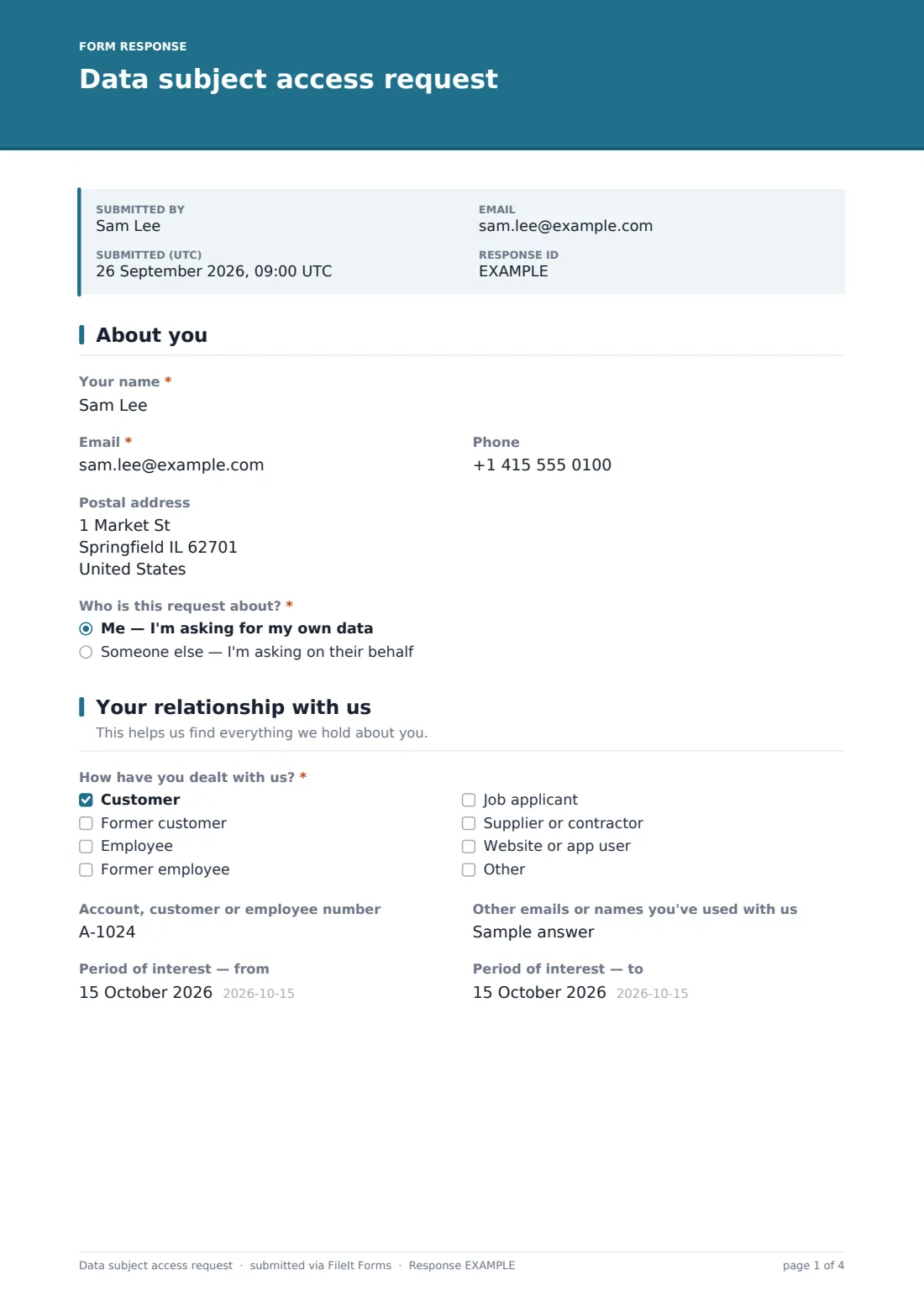
1 About you
- Your name*
- Email*
- Phone
- Postal address
- Who is this request about?* Me — I'm asking for my own data · Someone else — I'm asking on their behalf
- Name of the person the data is about* asked only when it applies
- Your authority to act for them* asked only when it applies Parent or guardian of a child · Solicitor or legal representative · Power of attorney · Their written permission
- Proof of your authority* asked only when it applies
2 Your relationship with us
- How have you dealt with us?* Customer · Former customer · Employee · Former employee · Job applicant · Supplier or contractor · Website or app user
- Account, customer or employee number
- Other emails or names you've used with us
- Period of interest — from
- Period of interest — to
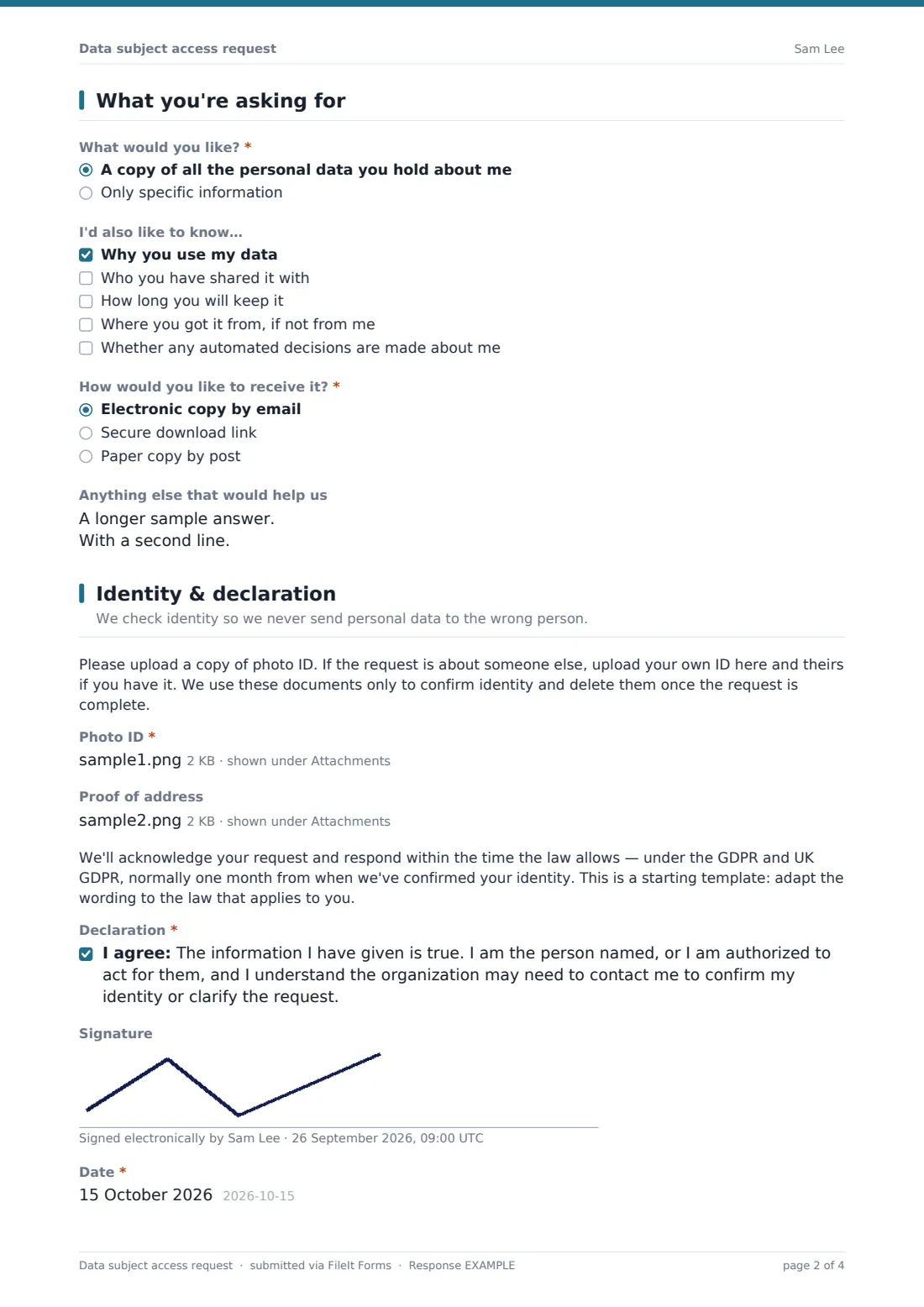
3 What you're asking for
- What would you like?* A copy of all the personal data you hold about me · Only specific information
- Describe the information you want* asked only when it applies
- I'd also like to know… Why you use my data · Who you have shared it with · How long you will keep it · Where you got it from, if not from me · Whether any automated decisions are made about me
- How would you like to receive it?* Electronic copy by email · Secure download link · Paper copy by post
- Anything else that would help us
4 Identity & declaration
- Photo ID*
- Proof of address
- Declaration*
- Signature
- Date*
The data subject access request form, page by page
1 About you
Name and email are required; phone and postal address are optional, with a note that the address is needed for a paper copy. The person then says whether the request is about themselves or someone else. Choosing someone else reveals three required questions: that person's name, the requester's authority (parent or guardian, legal representative, power of attorney, written permission, or something else they can type) and an upload of proof — up to three files.
2 Your relationship with us
A required checklist asks how they've dealt with you — customer, former customer, employee, former employee, job applicant, supplier or contractor, website or app user, or another relationship. Optional fields collect an account or employee number, other emails or names they've used, and a date range, left blank for all time. These are the details that make a thorough search possible.
3 What you're asking for
The person chooses a copy of all their data or only specific information; the specific option requires a description, such as call recordings from a given month. A checklist lets them also ask why their data is used, who it's shared with, how long it's kept, where it came from and whether automated decisions are made. They pick delivery by email, secure download link or post, and can add notes.
4 Identity & declaration
A short note explains why ID is needed and that it will be deleted once the request is complete. Photo ID is required (up to three files); proof of address is optional. A timing note — to be adapted to your law — states that under the GDPR and UK GDPR the response is normally due within one month. The person confirms the declaration, may sign, and dates the request.
Make the template yours
- Add your data protection contact details and a link to your privacy notice
- Edit the relationship options to match the people you actually hold data about
- Change the timing paragraph if you're covered by a different law, such as a US state privacy law
- Remove the paper-copy option if you only respond electronically
- Route requests to a restricted privacy folder and add your data protection lead to the notification emails
- Keep the form public so anyone can use it without an account
Tips for a better data subject access request form
- Don't make the form the only way to ask — requests made by email or phone are generally still valid
- Only ask for as much ID as you reasonably need; you can't use verification to delay a request
- Log the date each request arrived and when identity was confirmed, since deadlines usually run from one of these
- Search every system — email, chat, CRM, backups — not just your main database
- Delete the ID documents once the request is closed
- Have this template reviewed against the privacy law that applies to you — it's a starting point, not legal advice
Every response becomes a PDF in your vault
Each request is filed as a PDF in the vault folder you've chosen, with the ID and authority documents attached to the response, and your team is notified by email. The requester receives a copy of what they submitted.
From the Responses table you can see every open request and when it arrived, filter by relationship or scope, and export the list to track response deadlines in your own log.
- Start from this template. It opens in the FileIt Forms designer — change any question, add pages, set the rules for when questions appear.
- Share it. Turn on a public link, or send it to people by email, each with their own link. They don’t need a FileIt account.
- Get the answers as PDFs. Each response is saved as a PDF in the vault folder you choose, with uploaded files attached — and listed in a Responses table you can export to CSV.
Data subject access request form: frequently asked questions
Is this data subject access request template free to use?
Yes. It's one of FileIt's ready-made templates, and every FileIt account, including the free plan, includes the Forms app and its full library of templates.
Do people filling in this form need a FileIt account?
No. Anyone with the link, or an emailed request, can complete and submit the form without creating a FileIt account. Only the form owner needs one.
Does using this form make us GDPR-compliant?
No. It helps you collect access requests consistently, but it isn't legal advice and doesn't by itself make you compliant with the GDPR, UK GDPR or any other law. You still need a process for searching, reviewing and responding.
Can I require people to use this form?
Generally no — under laws like the GDPR, a request made another way is usually still valid. Offer the form as the easiest route, not the only one.
What happens to the ID documents people upload?
They're stored with the response in your FileIt vault. The form tells people you'll delete them when the request is complete, so make sure your team does.
Does it work for US privacy requests too?
Yes, with a few edits. Change the timing paragraph and wording to match the state law you're dealing with, such as the California Consumer Privacy Act.
Can someone make a request for their child?
Yes. Choosing someone else reveals questions for the child's name, the parent's authority and proof of that authority.