
What is the medical records release form template?
Asking a doctor's office or hospital to release medical records usually means finding the right form, filling it in by hand, and either mailing or dropping it off in person. This template moves that request online: who the patient is, which records and from what date range, who should receive them and why, and how long the authorization lasts — everything a record holder typically needs to process the request.
The form adjusts to the situation: choosing "specific records only" opens a checklist of exactly which types to include, and a separate checklist for specially protected categories — mental health, sexual health, substance use treatment, HIV status, or genetic testing — stays unticked by default, since many places require explicit permission before these can be released. If someone other than the patient is signing on their behalf, the form asks for their name, their authority to act, and optional proof such as a guardianship document.
Once signed, FileIt saves the completed authorization as a PDF in the vault, giving both the patient and the record holder the same clear, dated document to work from.
- Best for
- Patients authorizing a healthcare provider to release their records
- Filled in by
- The patient, or a parent, guardian or legal representative
- Time to complete
- About 5-8 minutes
- Includes
- Conditional record-scope questions, a specially protected information checklist, and a signature
Who uses a medical records release form?
- A patient requesting their complete record, or records from a specific date range, be sent to a new provider
- Authorizing records to be shared with an insurance company as part of a claim
- Sharing records with a lawyer for a legal matter, with a clear end date on the authorization
- A parent or legal guardian signing on behalf of a patient who can't sign for themselves
- Requesting records be excluded from specially protected categories unless explicitly authorized, such as mental health or substance use treatment notes
- A patient who wants a personal copy of their own records for their files
Questions on this medical records release form
30 questions over 4 pages · includes signature, file upload, conditional questions, multiple pages, consent checkbox.
1 Patient
- Patient name*
- Other names the records may be under
- Date of birth*
- Patient / record number
- Email*
- Phone*
- Address*
2 Records
- Release records held by*
- Which records?* My complete record · Records from a date range · Specific records only
- From* asked only when it applies
- To* asked only when it applies
- Records to include* asked only when it applies Consultation notes · Test results · Imaging reports · Imaging (X-rays, scans) · Discharge summaries · Vaccination record · Medication list · Letters and referrals · Billing records
- Specially protected information to include Mental health · Sexual and reproductive health · Alcohol or drug treatment · HIV / infectious disease · Genetic testing
- Format Electronic copy · Paper copy · Online portal access
3 Recipient & purpose
- Release the records to* Me (the patient) · Another doctor or healthcare provider · An insurance company · A lawyer · Another person
- Recipient name* asked only when it applies
- Recipient address asked only when it applies
- Recipient email asked only when it applies
- Recipient phone asked only when it applies
- Purpose of the release* Continuing care · Personal copy · Insurance · Legal matter · Employment
4 Authorisation
- This authorisation ends* On a specific date · One year after I sign it · When the purpose above has been fulfilled
- End date* asked only when it applies
- Authorisation*
- Withdrawing*
- Who is signing?* The patient · A parent, guardian or legal representative
- Representative's name* asked only when it applies
- Your authority to act* asked only when it applies
- Proof of authority asked only when it applies
- Copy of photo ID
- Signature*
The medical records release form, page by page
1 Patient
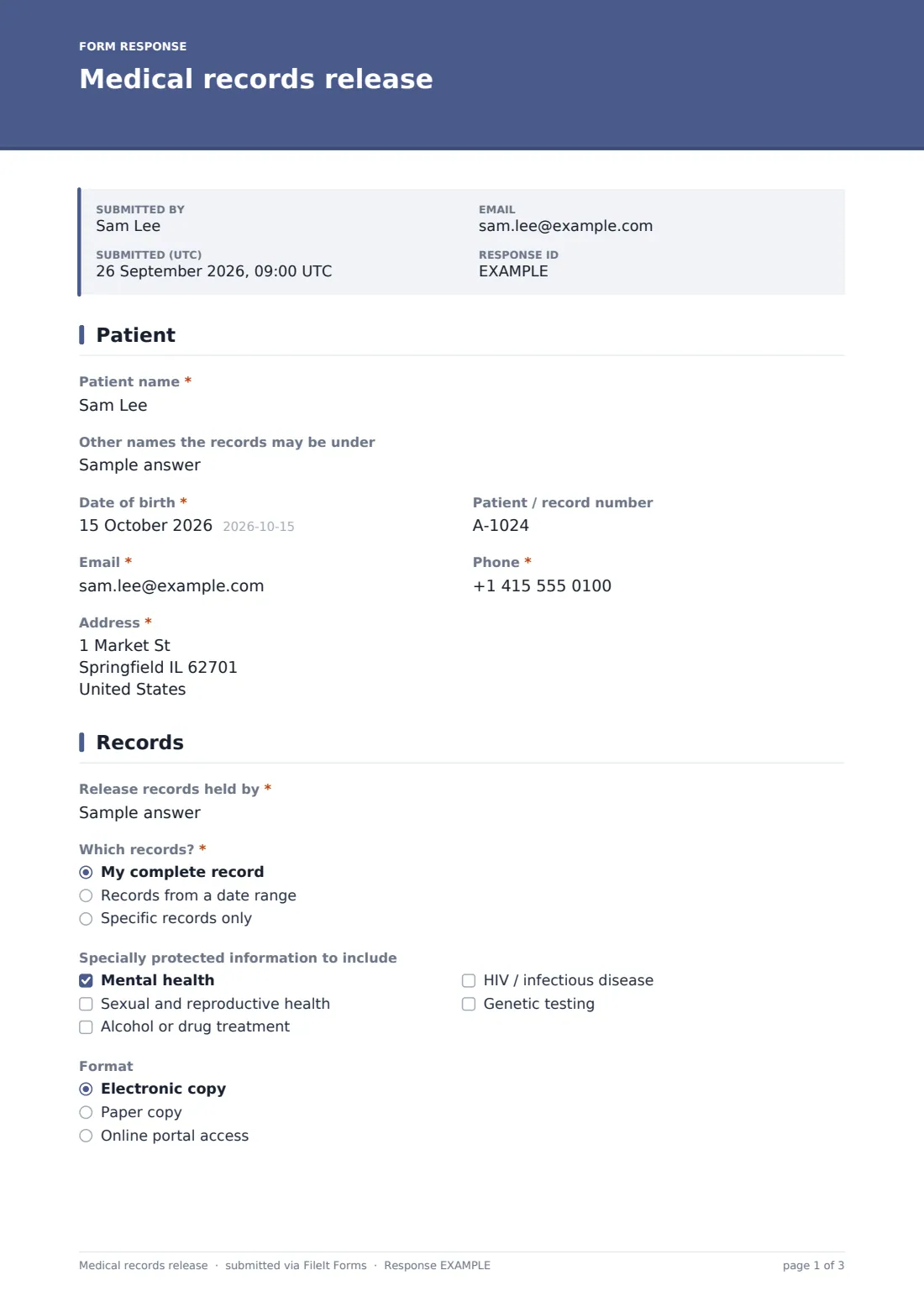
The form collects the patient's name, any other names the records might be under (such as a maiden name), date of birth, patient or record number if known, email, phone and address.
2 Records
The patient names the practice, hospital or clinician holding the records, then chooses the scope: their complete record, records from a specific date range, or specific records only. Choosing a date range opens from-and-to date fields, and choosing specific records opens a checklist covering consultation notes, test results, imaging and imaging reports, discharge summaries, vaccination records, medication lists, letters and referrals, or billing records.
A separate checklist for specially protected information — mental health, sexual and reproductive health, alcohol or drug treatment, HIV or infectious disease, and genetic testing — explains that these often need explicit permission and stays unticked unless the patient chooses to include them. A format question lets the patient request an electronic copy, a paper copy, or online portal access.
3 Recipient & purpose
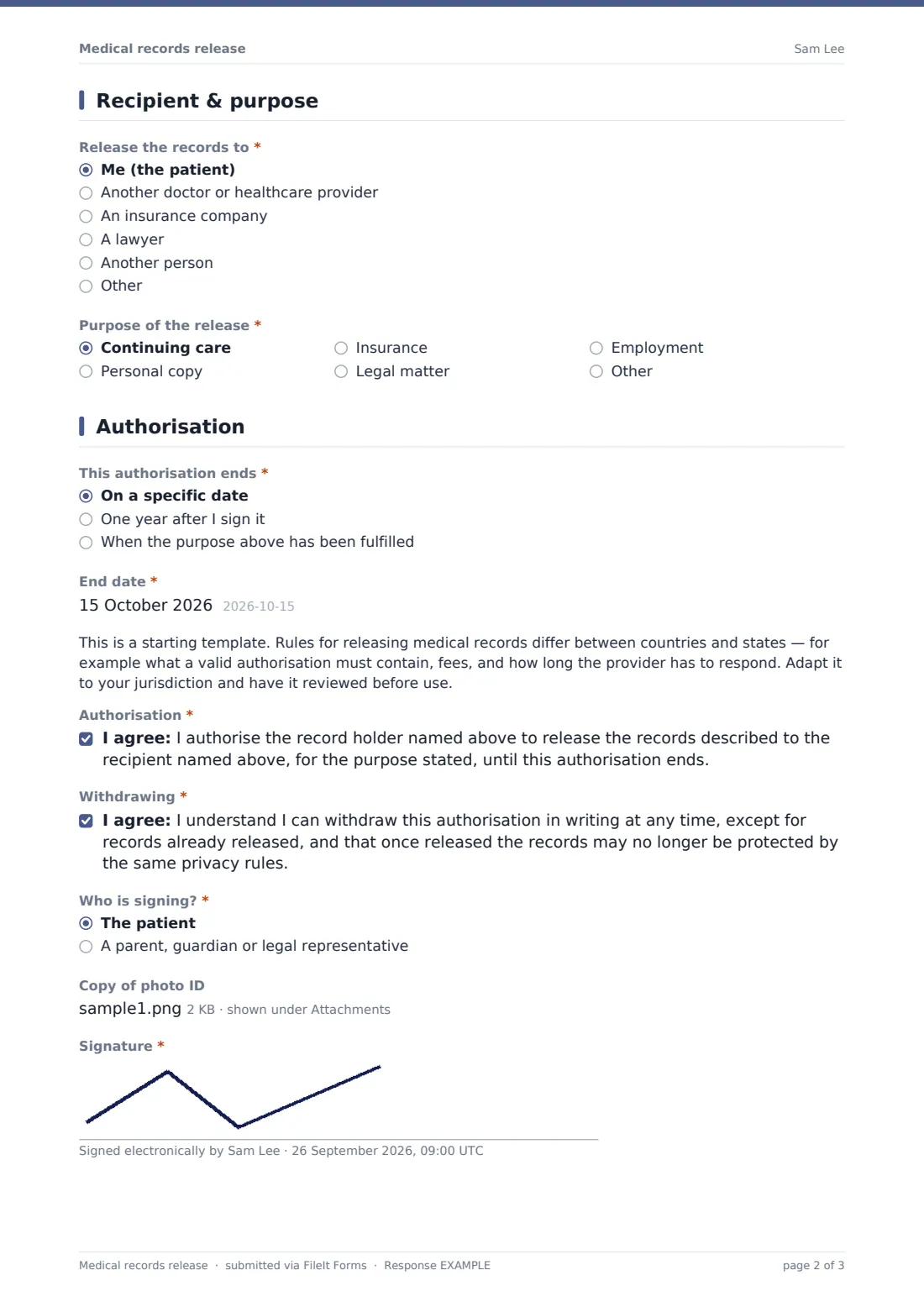
The patient chooses who should receive the records — themselves, another provider, an insurance company, a lawyer, or another person — with recipient name, address, email and phone fields appearing for anyone other than the patient. A purpose question covers continuing care, a personal copy, insurance, a legal matter, or employment, with room to specify something else.
4 Authorization
The patient chooses when the authorization ends — on a specific date, one year after signing, or once the stated purpose has been fulfilled — with an end-date field appearing if a specific date is chosen. A clear note explains that rules for releasing medical records differ between countries and states, including what a valid authorization must contain, fees, and response times, and that the template should be adapted to the relevant jurisdiction and reviewed before use.
The patient authorizes the release for the purpose and duration stated, and separately confirms they understand they can withdraw the authorization in writing at any time (except for records already released), and that once released, records may no longer be protected by the same privacy rules. A "who is signing" question distinguishes the patient from a parent, guardian or legal representative, opening fields for the representative's name, their authority to act, and an optional proof-of-authority upload. An optional photo ID upload and a signature close the form.
Make the template yours
- Adapt the record-holder field and purpose options to match how your organization typically processes requests
- Add jurisdiction-specific wording required for a valid authorization where you operate
- Route notifications to your health information management or records team
- File completed authorizations into a vault folder per patient for quick retrieval when a request needs to be actioned
- Turn on an emailed PDF copy to the patient so they have their own signed record of the authorization
- Add a fee-disclosure note if your organization charges for processing records requests
- Set a confirmation message that tells patients how long processing typically takes
Tips for a better medical records release form
- Always adapt the wording and any timeframes to the specific rules that apply in your country or state before relying on this template
- Keep the specially protected information checklist unticked by default so nothing sensitive is released without explicit, informed choice
- Ask for photo ID and, where someone signs on a patient's behalf, proof of their authority, to confirm the request is legitimate
- Be clear with patients about how long an authorization lasts and that it can be withdrawn in writing at any time
- Explain to patients that once records are released to a third party, they may no longer be protected by the same privacy rules that applied while held by the provider
- Process requests within a clear, stated timeframe so patients and other providers aren't left waiting unnecessarily
Every response becomes a PDF in your vault
As soon as the authorization is signed, FileIt saves it as a PDF in the vault, along with any ID or proof-of-authority documents attached, and the record holder is notified by email. If an emailed copy to the respondent is switched on, the patient also receives their own signed PDF for their records.
From there, most record holders use the Responses table to track outstanding requests and confirm once records have been released, referring back to the signed authorization to confirm what was agreed if a question comes up later.
- Start from this template. It opens in the FileIt Forms designer — change any question, add pages, set the rules for when questions appear.
- Share it. Turn on a public link, or send it to people by email, each with their own link. They don’t need a FileIt account.
- Get the answers as PDFs. Each response is saved as a PDF in the vault folder you choose, with uploaded files attached — and listed in a Responses table you can export to CSV.
Medical records release form: frequently asked questions
Is this medical records release form template free?
Yes. It's included in FileIt's Forms app on every plan, including free, and every question can be edited.
Does the patient need a FileIt account to sign an authorization?
No. Share the form by public link or send it by email — the patient or their representative doesn't need a FileIt account.
Is this template compliant with privacy laws like HIPAA?
This is a starting point, not legal advice. Rules for a valid medical records authorization differ by country and state, so adapt the wording and have it reviewed before relying on it.
How do I get a copy of a signed authorization?
Every submission is saved automatically as a PDF in the vault, and you can turn on an emailed PDF copy sent to the patient.
What if a parent or guardian needs to sign on the patient's behalf?
The form has a "who is signing" question that opens fields for the representative's name, their authority to act, and an optional proof-of-authority upload.
Can a patient limit which records are released?
Yes — choosing "specific records only" opens a checklist so the patient can select exactly which types of records to include, and specially protected categories stay excluded unless explicitly chosen.
Can the patient withdraw the authorization later?
The authorization itself states that it can be withdrawn in writing at any time, except for records already released.