What is the vaccination consent form template?
Before giving any vaccine, a clinician needs to ask a set of screening questions and get informed consent — usually on paper, on a clipboard, in a queue. This template moves that step online, so the person receiving the vaccine (or their parent or guardian) can answer in their own time, and the vaccinator arrives at the appointment with the answers already in hand, ready to talk through anything that needs a closer look.
An online form doesn't replace the conversation with a clinician — it makes that conversation faster and more focused, because the basic screening (allergies, recent illness, previous reactions) is already answered. The form is explicit about this throughout: a 'yes' to a screening question doesn't mean the vaccine can't be given, it just tells the vaccinator what to check before they do.
Once submitted, the form becomes a signed PDF in your FileIt vault, filed however you organise your patients or clients, with a copy also available to email straight to the person who filled it in.
- Best for
- Clinics, pharmacies, travel health services and workplace vaccination programmes
- Filled in by
- The person being vaccinated, or a parent, guardian or authorised representative
- Time to complete
- About 5 minutes
- Includes
- Conditional screening questions, signature, two consent statements
Who uses a vaccination consent form?
- A pharmacy running seasonal flu clinics collects screening answers and consent before each appointment slot
- A travel health clinic records destination and departure date for travel-specific vaccines alongside standard screening
- A workplace occupational health programme gathers consent ahead of an on-site vaccination day
- A paediatric practice lets a parent or legal guardian complete the form on behalf of a child
- A community immunisation drive uses the form to record which dose (first, second or booster) is being given
- A clinic documents a patient's decision to decline a vaccine, along with their reason, for their own records
Questions on this vaccination consent form
30 questions over 4 pages · includes signature, conditional questions, multiple pages, consent checkbox.
1 Who is being vaccinated
- Name of the person receiving the vaccine*
- Date of birth*
- Health / patient number
- Email*
- Phone*
- Who is completing this form?* The person receiving the vaccine · Their parent or legal guardian · Someone else legally able to consent for them
- Your name* asked only when it applies
- Your relationship to them* asked only when it applies
- Your phone asked only when it applies
2 Vaccine
- Vaccine* Influenza (flu) · COVID-19 · Pneumococcal · Shingles (herpes zoster) · HPV · Hepatitis B · Tetanus / diphtheria / pertussis · Measles, mumps and rubella (MMR) · Travel vaccine · Other
- Which vaccine?* asked only when it applies
- Destination(s) and departure date asked only when it applies
- Which dose is this? First dose · Second or later dose · Booster · Not sure
- Appointment date
3 Screening questions
- Are they unwell today, or do they have a fever?*
- Have they ever had a serious allergic reaction (anaphylaxis) to anything, including a vaccine, medicine or food?*
- What caused it and what happened?* asked only when it applies
- Have they had a reaction after a previous vaccine?*
- Which vaccine, and what was the reaction? asked only when it applies
- Is their immune system weakened by an illness or a treatment (for example chemotherapy or high-dose steroids)?*
- Do they have a bleeding disorder or take blood-thinning medicine?*
- Are they pregnant, or could they be? No · Yes · Not sure · Not applicable
- Have they had any other vaccine in the last 4 weeks?*
- Which vaccine, and when? asked only when it applies
- Anything else the vaccinator should know?
4 Consent
- Information*
- Your decision* I consent to this vaccination · I do not consent to this vaccination
- If you'd like to, tell us why asked only when it applies
- Declaration*
- Signature*
The vaccination consent form, page by page
1 Who is being vaccinated
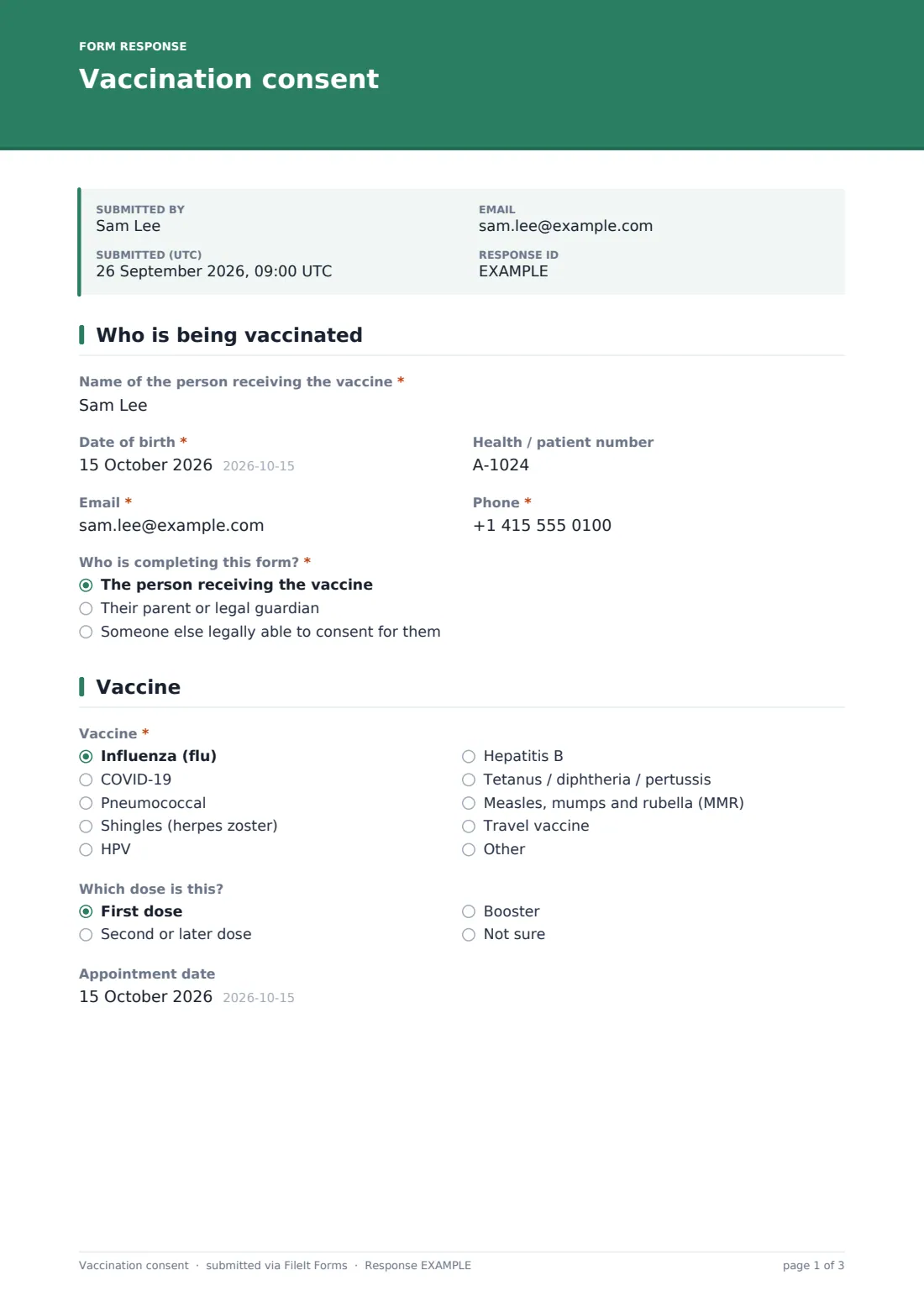
The form opens with the recipient's name, date of birth, an optional health or patient number, and contact details. A radio question — Who is completing this form? — determines whether the recipient answers for themselves or a parent, guardian, or other authorised representative does; choosing anything other than "the person receiving the vaccine" reveals fields for that person's own name, relationship, and phone number, so the clinic knows exactly who gave consent.
2 Vaccine
A dropdown covers common vaccines — influenza, COVID-19, pneumococcal, shingles, HPV, hepatitis B, tetanus/diphtheria/pertussis, MMR, a travel vaccine, or Other with its own free-text field. Choosing "travel vaccine" reveals a field for the destination and departure date, since that detail affects which vaccines are recommended and when. A dose question (first, second or later, booster, or not sure) and an appointment date round out the page.
3 Screening questions
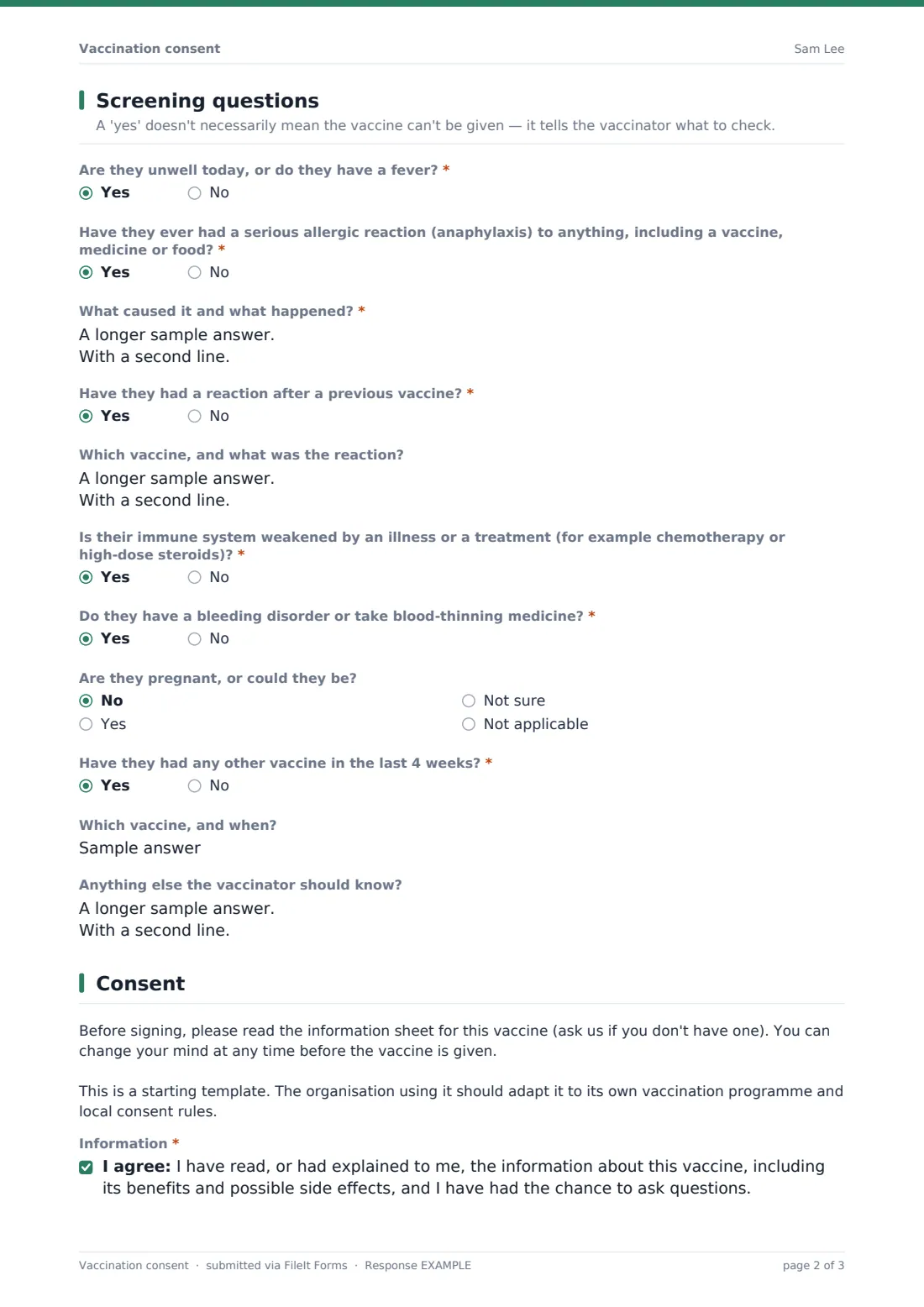
This page walks through the standard pre-vaccination checks: whether the recipient is unwell or has a fever today, any history of serious allergic reaction, any reaction after a previous vaccine, a weakened immune system, a bleeding disorder or blood-thinning medicine, pregnancy status, and any other vaccine in the last four weeks. Each 'yes' answer reveals a follow-up asking for more detail — for example, what caused a previous allergic reaction and what happened. The page description reminds everyone up front that a 'yes' here isn't a barrier, just information for the vaccinator to review. A final open question catches anything else worth mentioning, like a fear of needles.
4 Consent
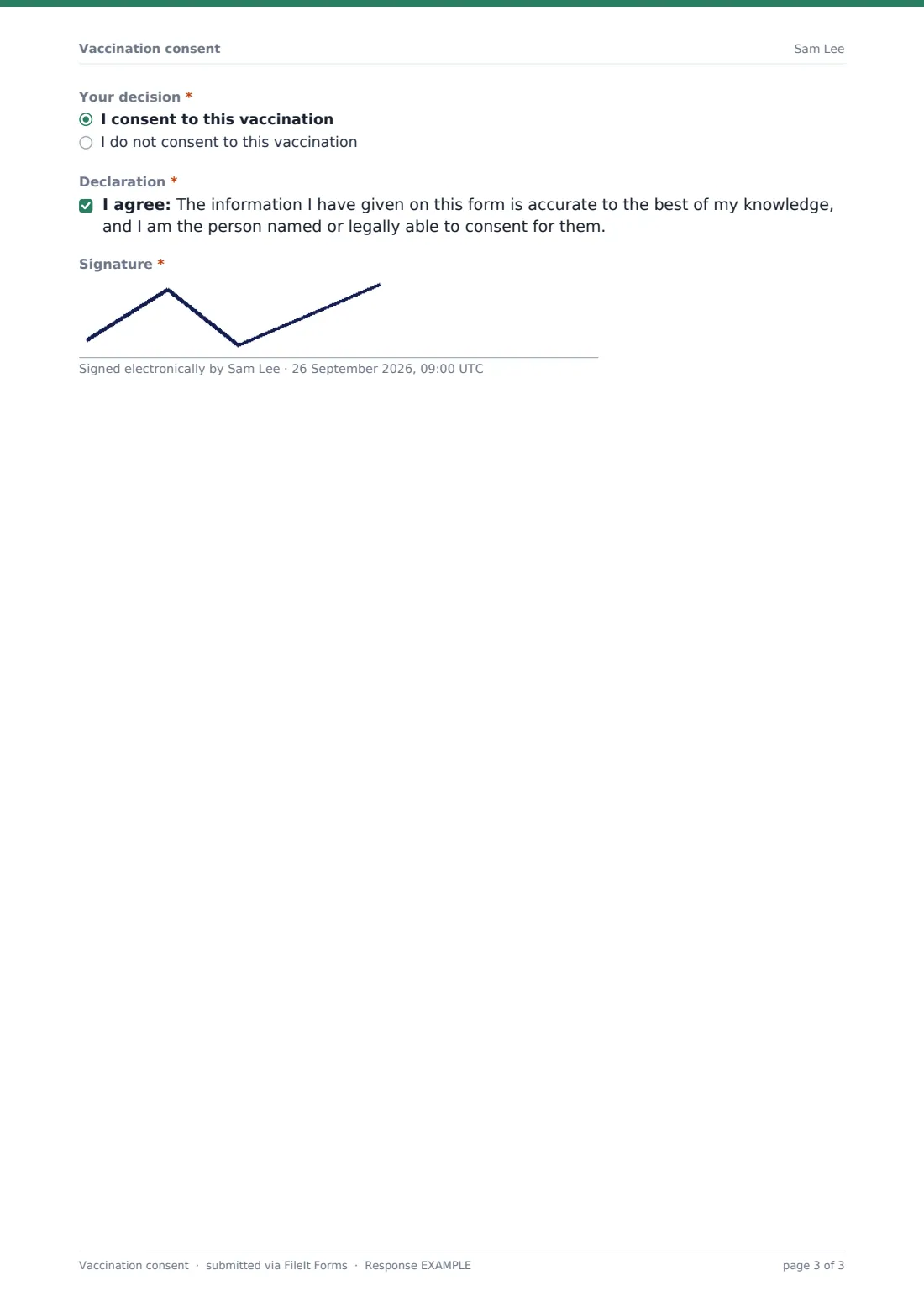
Before the decision, a note reminds the person to read (or have explained to them) the vaccine information sheet, and that they can change their mind any time before the vaccine is actually given. A consent checkbox confirms they've had that information and the chance to ask questions. The Your decision question lets someone consent to or decline the vaccination — choosing to decline reveals an optional field to share why, which the clinic can use to answer any concerns. A final declaration confirms the information given is accurate and that the person is either the recipient or legally able to consent for them, followed by a signature.
Make the template yours
- Adjust the vaccine dropdown to match exactly what your clinic or programme offers, removing options you don't provide
- Add a question for batch or lot number if your clinical workflow records that separately from this consent step
- Set a closing date tied to a specific clinic day or vaccination event so the form only accepts responses while it's relevant
- File responses into a folder per patient, or per vaccination clinic date, depending on how your records are organised
- Add your own information sheet as a linked reference in the confirmation message so patients can review it again afterwards
- Turn on the maximum responses setting if a clinic session has a fixed number of vaccine doses available
- Rework the screening questions with input from your clinical team so they match your actual pre-vaccination protocol
Tips for a better vaccination consent form
- Always have a clinician review the screening answers before the vaccine is given — this form supports that conversation, it doesn't replace it
- Ask about allergies and previous reactions in plain, specific language rather than clinical terms the recipient may not recognise
- Make it easy to decline without pressure — the decline option and optional reason field are there so people can say no comfortably
- Keep vaccine-specific detail, like batch numbers, in your clinical system rather than this consent form if it changes clinic to clinic
- Review declined-consent responses periodically to see if there's a common concern you could address with better information
- Remind parents or guardians completing this on behalf of a child that they're confirming they're legally able to consent for them
Every response becomes a PDF in your vault
Once someone submits the form, FileIt saves the answers as a signed PDF in your vault, filed in whichever folder you use for that patient or clinic session. You're notified by email straight away, and the person who filled it in can receive their own PDF copy if you've turned that setting on.
The vaccinator then reviews the screening answers and consent decision with the person at the appointment, as the confirmation message explains, before anything is given. Clinics running multiple sessions typically use the Responses table (with CSV export) to see how many consents — and how many declines — are on file ahead of a clinic day.
- Start from this template. It opens in the FileIt Forms designer — change any question, add pages, set the rules for when questions appear.
- Share it. Turn on a public link, or send it to people by email, each with their own link. They don’t need a FileIt account.
- Get the answers as PDFs. Each response is saved as a PDF in the vault folder you choose, with uploaded files attached — and listed in a Responses table you can export to CSV.
Vaccination consent form: frequently asked questions
Is this vaccination consent form template free?
Yes. It's included in FileIt's Forms app on every account, including the free plan, and every question can be edited to match your own protocol.
Do patients need a FileIt account to complete the form?
No. You share a public link or send a personal emailed link, and the patient or their parent/guardian fills it in without creating an account.
How do we receive completed consent forms?
Each one is saved automatically as a PDF in your FileIt vault, and you can browse, filter or export the full list of responses from the Responses table.
Does a 'yes' answer to a screening question mean the vaccine can't be given?
No — the form explains this directly. A 'yes' simply tells the vaccinator what to check with the patient before deciding whether and how to proceed.
Is this form legally sufficient for informed consent?
This template is a starting point for collecting screening answers and a signed decision — it isn't medical or legal advice, and you should have your own consent wording reviewed against your clinical protocol and local requirements.
Can a parent complete this for a child?
Yes, the form has a question for who is completing it, and reveals the right fields depending on whether it's the recipient or a parent, guardian or representative.
Can someone use this form to decline a vaccine?
Yes, the decision question includes an option to decline, with an optional field to explain why, which is recorded the same as a consent decision.
Can we track which dose someone is receiving?
Yes, there's a dedicated question for first dose, second or later dose, or booster.