What is the telehealth consent form template?
The first video appointment often goes wrong for reasons that have nothing to do with the actual consultation — a microphone that isn't working, a patient calling in from a busy waiting room, no one having asked where they'd be if something urgent came up. This telehealth consent form template covers all three at once: informed consent, a short technology check, and the safety details a clinician needs before starting remote care.
It's written in plain language rather than clinical jargon, and it's honest about the limits of remote care — it tells patients clearly that a video or phone consultation can't replace a physical exam, and that they can ask for an in-person appointment instead. If a patient says they won't have privacy for the call, the form doesn't just note it and move on; it offers practical alternatives like headphones or a different time.
Once signed, the form is saved as a PDF in the practice's FileIt vault straight away, giving staff a dated record that consent was properly given and understood before remote care began.
- Best for
- Clinics, therapists and telehealth services offering video or phone consultations
- Filled in by
- The patient, ahead of their first remote appointment
- Time to complete
- About 4 minutes
- Includes
- A device and connection check, conditional privacy follow-up, four consent statements, signature
Who uses a telehealth consent form?
- A GP practice or clinic introducing video consultations for the first time
- A therapist or counsellor confirming consent before starting remote sessions
- A specialist service checking a patient's setup before a scheduled video call
- Recording where a patient will usually be during calls, for emergency planning
- Documenting a patient's recording preference before any consultation is recorded
- Building a one-time consent record that covers every future telehealth appointment with that patient
Questions on this telehealth consent form
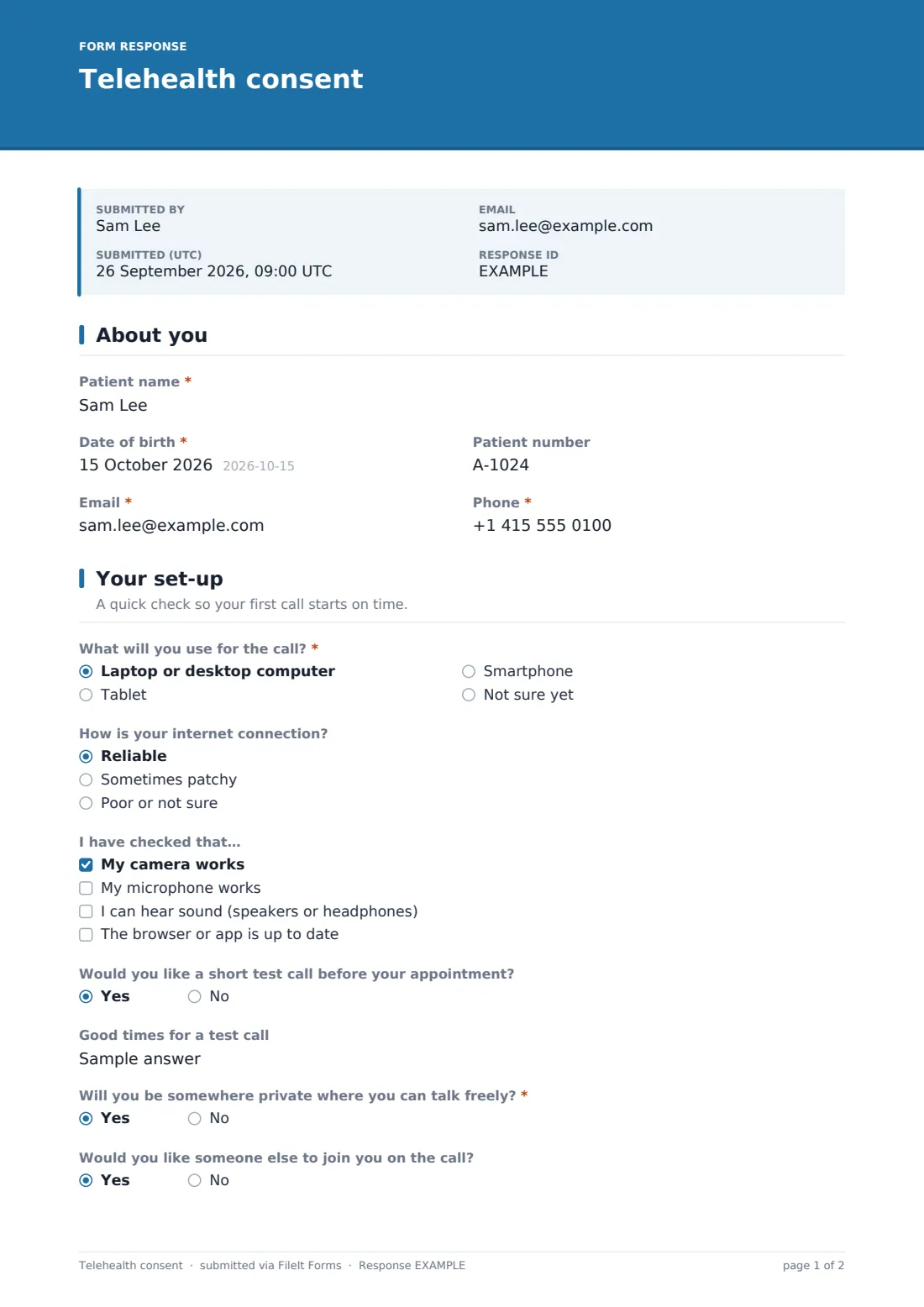
21 questions over 4 pages · includes signature, conditional questions, multiple pages, consent checkbox.
1 About you
- Patient name*
- Date of birth*
- Patient number
- Email*
- Phone*
2 Your set-up
- What will you use for the call?* Laptop or desktop computer · Tablet · Smartphone · Not sure yet
- How is your internet connection? Reliable · Sometimes patchy · Poor or not sure
- I have checked that… My camera works · My microphone works · I can hear sound (speakers or headphones) · The browser or app is up to date
- Would you like a short test call before your appointment?
- Good times for a test call asked only when it applies
- Will you be somewhere private where you can talk freely?*
- Would you like someone else to join you on the call?
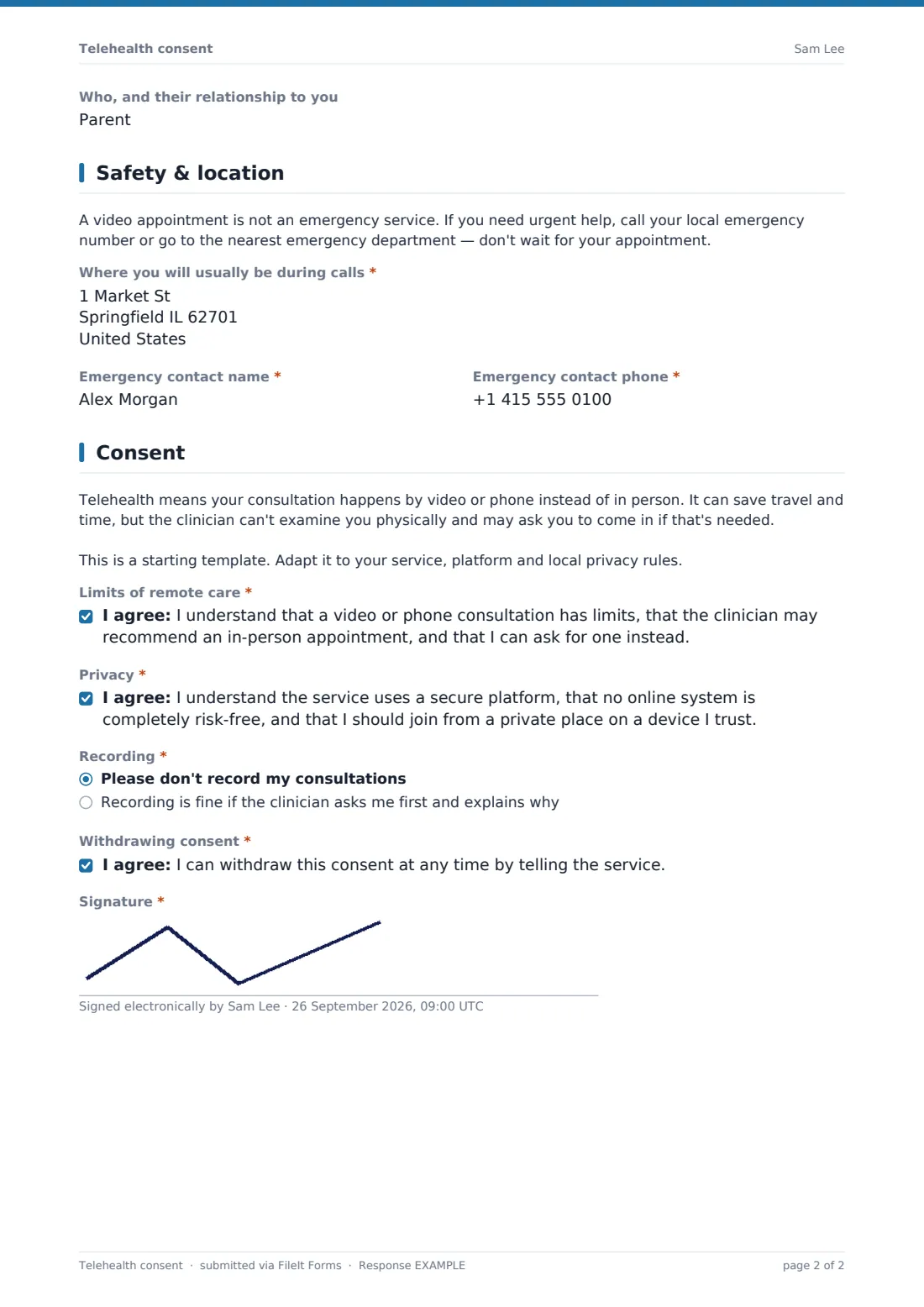
- Who, and their relationship to you asked only when it applies
3 Safety & location
- Where you will usually be during calls*
- Emergency contact name*
- Emergency contact phone*
4 Consent
- Limits of remote care*
- Privacy*
- Recording* Please don't record my consultations · Recording is fine if the clinician asks me first and explains why
- Withdrawing consent*
- Signature*
The telehealth consent form, page by page
1 About you
The form starts with the patient's name, date of birth, patient number if known, email — where appointment links are sent — and a phone number the clinic can call if the video connection drops.
2 Your set-up
This page is a practical tech check rather than a medical question: what device the patient will use (computer, tablet, smartphone, or not sure yet), how reliable their internet connection is, and which basics they've already checked — camera, microphone, audio, and an up-to-date browser or app. Patients can request a short test call before their real appointment and suggest good times for one.
It then asks whether the patient will be somewhere private to talk freely. Answering "No" doesn't end the conversation — it shows a note offering practical alternatives, like using headphones and yes/no questions, switching to a phone call, or rescheduling. A final question asks whether the patient would like someone else, such as a family member, carer or interpreter, to join the call.
3 Safety & location
A clear note reminds patients that a video appointment isn't an emergency service, and that they should call their local emergency number or go to the nearest emergency department for anything urgent rather than waiting for an appointment. The form then records the address where the patient will usually be during calls — so help could be sent there if something urgent happened mid-call — along with an emergency contact name and phone number.
4 Consent
An explanatory note describes what telehealth means in plain terms, including that the clinician can't examine the patient physically and may recommend an in-person visit. Patients then agree to four things: understanding the limits of remote care and that they can ask for an in-person appointment; understanding that the platform is secure but no online system is completely risk-free; a recording preference — no recording, or only if the clinician asks first and explains why; and that they can withdraw consent at any time by telling the service. A signature completes the form.
Make the template yours
- Name your specific video platform in the consent text so patients know what to expect
- Add your practice's local emergency number directly into the safety note for clarity
- Adjust the device and connection questions if your service has specific technical requirements
- Set the vault folder so consent forms file alongside each patient's other records
- Add a question about preferred appointment times if scheduling is handled through the same intake
- Have your own clinical and legal advisers review the consent wording for your service and jurisdiction before relying on it
Tips for a better telehealth consent form
- Send this well before the first appointment, so any tech problems can be sorted out ahead of time, not during the visit
- Take a patient's privacy concerns seriously and follow up personally if they've flagged that they won't have private space
- Always confirm the patient's current location verbally at the start of a call if there's any doubt it's changed since the form was signed
- Be transparent about recording — ask before you record, every time, even if consent was given generally on this form
- This template is a starting point, not legal or medical advice — check it fits your service, your platform's own terms, and local telehealth and privacy rules.
Every response becomes a PDF in your vault
As soon as a patient signs and submits the form, FileIt saves it as a PDF in your vault and sends an email notification, so staff know a patient is ready for remote appointments. If you've turned on a copy for the respondent, the patient also receives their own signed PDF.
From there, most practices use the Responses table to confirm a patient's consent is on file before scheduling a video visit, and open the individual PDF quickly if a question comes up about a patient's location, tech setup, or recording preference.
- Start from this template. It opens in the FileIt Forms designer — change any question, add pages, set the rules for when questions appear.
- Share it. Turn on a public link, or send it to people by email, each with their own link. They don’t need a FileIt account.
- Get the answers as PDFs. Each response is saved as a PDF in the vault folder you choose, with uploaded files attached — and listed in a Responses table you can export to CSV.
Telehealth consent form: frequently asked questions
Is this telehealth consent form template free?
Yes — it's included with the Forms app on every FileIt account, including the free plan, along with more than 160 other ready-made templates.
Does the patient need a FileIt account to sign it?
No. You send the patient a link or an email invitation, and they complete and sign the form without creating any account.
Where is the signed consent stored?
Each signed form is saved automatically as a PDF in your FileIt vault, and you can review or export every response from the Responses table.
Does the form handle patients who won't have privacy for the call?
Yes — saying they won't have a private space shows a note with practical alternatives, using conditional logic already built into the template, rather than simply recording the answer and moving on.
Is this form a substitute for medical advice or emergency care?
No. The form itself tells patients that telehealth isn't an emergency service and to contact local emergency services or go to the nearest emergency department for anything urgent.
Can patients say no to being recorded?
Yes — the form asks patients directly for their recording preference, and "Please don't record my consultations" is one of the two available options.
Does this consent cover every future telehealth appointment, or just one?
That depends on your own policy — many services treat one signed consent as covering ongoing telehealth care, but you may prefer to send it again periodically or when circumstances change.