What is the prescription refill request form template?
A prescription refill request form gives patients a clear, structured way to ask for more of a medicine they already take, instead of a rushed phone call or a message left with reception. It asks for exactly what a prescriber needs — the medication name and strength, how much supply is left, and whether anything has changed — before the request ever reaches a clinician's desk.
Phone lines get busy, sticky notes go missing, and a voicemail can leave out a crucial detail like the dose or which pharmacy to send it to. A form captures the same information every time, in writing, so nothing has to be guessed or chased up with a callback.
This template lives in FileIt's Forms app, part of every FileIt account including the free plan. Patients fill it in and submit it with no FileIt account of their own. Each request becomes a PDF that's automatically filed in your vault, so your team has a dated, searchable record of exactly what was asked for and when.
- Best for
- Medical practices, clinics and pharmacies handling repeat prescriptions
- Filled in by
- Existing patients requesting more of a medicine they already take
- Time to complete
- About 5 minutes
- Includes
- Conditional questions on supply left, changes since last prescription, and delivery method
Who uses a prescription refill request form?
- A patient on a long-term medication needs a repeat before their supply runs out
- Someone requests refills for several regular medications in one go
- A patient flags a new side effect or a medicine started elsewhere since their last prescription
- A practice asks patients whose medication hasn't been reviewed in over a year to book an appointment first
- A patient chooses to have their prescription sent straight to a named pharmacy rather than collecting it in person
- Reception staff triage refill requests by urgency using the supply-left answer
Questions on this prescription refill request form
21 questions over 3 pages · includes conditional questions, multiple pages, consent checkbox.
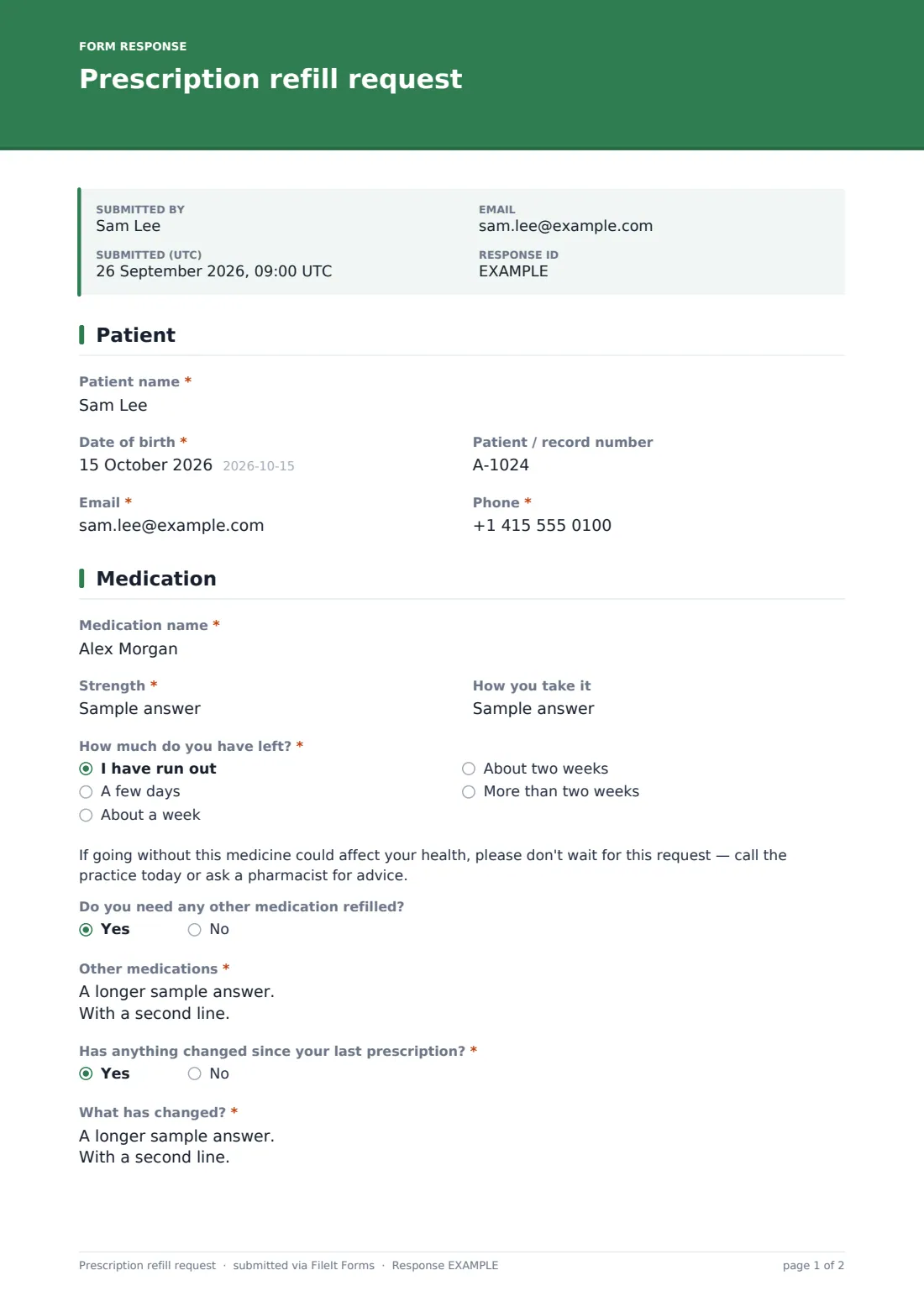
1 Patient
- Patient name*
- Date of birth*
- Patient / record number
- Email*
- Phone*
2 Medication
- Medication name*
- Strength*
- How you take it
- How much do you have left?* I have run out · A few days · About a week · About two weeks · More than two weeks
- Do you need any other medication refilled?
- Other medications* asked only when it applies
- Has anything changed since your last prescription?*
- What has changed?* asked only when it applies
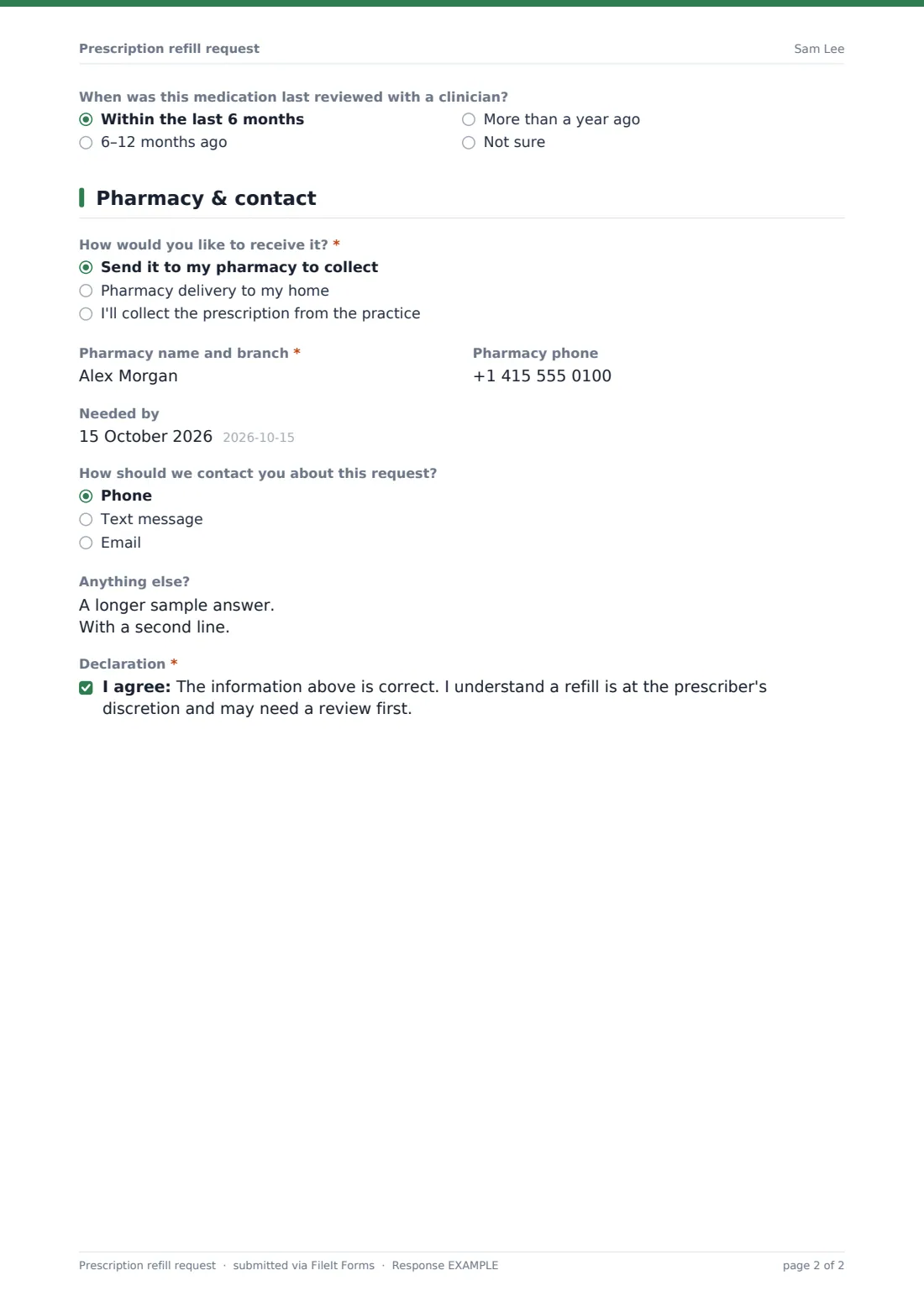
- When was this medication last reviewed with a clinician? Within the last 6 months · 6–12 months ago · More than a year ago · Not sure
3 Pharmacy & contact
- How would you like to receive it?* Send it to my pharmacy to collect · Pharmacy delivery to my home · I'll collect the prescription from the practice
- Pharmacy name and branch* asked only when it applies
- Pharmacy phone asked only when it applies
- Needed by
- How should we contact you about this request? Phone · Text message · Email
- Anything else?
- Declaration*
The prescription refill request form, page by page
1 Patient
The form starts with Patient name, Date of birth and an optional Patient / record number, so staff can quickly match the request to the right chart even in a busy practice. Email and Phone are both required, giving the practice two ways to reach the patient if a prescriber has a question.
2 Medication
Medication name and Strength capture exactly what's needed, with How you take it as an optional field for context. How much do you have left? is the key triage question — if a patient selects "I have run out," the form immediately shows a message urging them to call the practice today or speak to a pharmacist rather than wait for the request to be processed.
Do you need any other medication refilled? opens a field for listing further medicines in one submission, and Has anything changed since your last prescription? — covering new side effects, a new medicine from elsewhere, or taking it differently — prompts a required explanation whenever the answer is yes. Finally, When was this medication last reviewed with a clinician? flags anything over a year old with a note that a review may be needed before the refill is issued.
3 Pharmacy & contact
How would you like to receive it? offers pharmacy collection, pharmacy delivery, or collection from the practice itself, with pharmacy name and phone fields appearing whenever delivery isn't set to "collect from the practice." Needed by lets the patient flag a date, with a reminder to allow the practice's usual processing time. The form closes with a required declaration that the information given is correct and that a refill is issued at the prescriber's discretion.
Make the template yours
- Add your practice's typical processing time directly into the form's cover message
- Remove the pharmacy delivery option if your practice only supports collection
- Set the vault folder so refill requests file straight into each patient's or the clinic's records folder
- Turn on an emailed PDF copy to the patient as a receipt of their request
- Add a maximum number of responses per day if your team wants to cap volume during busy periods
- Adjust the run-out warning message to match your practice's own urgent-care guidance
Tips for a better prescription refill request form
- Ask for exactly what's needed to process the request safely — avoid collecting unrelated medical history here
- Make the run-out and last-review questions prominent, since they carry the most clinical risk
- Set a clear expectation for turnaround time so patients don't call in on top of submitting the form
- Keep the declaration simple and honest about the fact a refill isn't guaranteed
- Review pharmacy details periodically, since patients sometimes change chemists without telling the practice
- Route the notification email to whichever team actually processes refills, not just a general inbox
Every response becomes a PDF in your vault
When a patient submits the form, FileIt saves the answers as a PDF titled with the patient's name and files it in the vault folder you've set up — typically a shared clinical inbox folder. Because SendCopy is on by default in this template, the patient also receives their own copy by email as a record of what they asked for.
Your practice team then works from the Responses table, filtering for anything marked as run out or flagged with a change since the last prescription, and opens each PDF to review before a prescriber signs off. CSV export makes it easy to hand a day's worth of requests to a duty clinician or pull them into your practice management system.
- Start from this template. It opens in the FileIt Forms designer — change any question, add pages, set the rules for when questions appear.
- Share it. Turn on a public link, or send it to people by email, each with their own link. They don’t need a FileIt account.
- Get the answers as PDFs. Each response is saved as a PDF in the vault folder you choose, with uploaded files attached — and listed in a Responses table you can export to CSV.
Prescription refill request form: frequently asked questions
Is this prescription refill request form template free?
Yes. It's included with the Forms app on every FileIt account, including the free plan, so there's no extra cost to set it up.
Do patients need a FileIt account to request a refill?
No. Patients fill in and submit the form using just the link you share — they never need to create a FileIt account.
How do I get the requests as PDFs?
Every submission is automatically saved as a PDF in the vault folder you choose, and you can open, download or export the full list to CSV from the Responses table at any time.
Does this form dispense medical advice?
No. FileIt does not provide medical advice, and this template is only a way to collect a structured request — all clinical decisions, including whether to issue a refill, remain with your prescriber.
Can I ask about more than one medication in one request?
Yes. If a patient answers yes to "Do you need any other medication refilled?" the form opens a field to list every additional medicine, strength and dosing instruction.
What happens if a patient has run out of medication?
The form immediately shows a message advising them to call the practice today or speak to a pharmacist, rather than waiting for the online request to be processed.
Can I change the pharmacy delivery options?
Yes. Every field, option and page in the designer can be edited, so you can adjust the delivery choices to match how your practice actually dispatches prescriptions.
Can I require patients to book a review before refilling?
The template already flags medications not reviewed with a clinician in over a year with a note that a review may be needed — you can adapt the wording or add extra logic to fit your own policy.