What is the counselling intake form template?
A first counselling session often spends its opening minutes on paperwork that a client could have completed calmly at home. This therapy intake form template lets someone share what's bringing them to counselling, a little of their background, and routine wellbeing questions before they ever sit down with their counsellor — so that first session can start with the conversation itself.
The form is written with care: it reassures clients there are no right or wrong answers, and that they can share as much or as little as feels comfortable. Questions only appear where they're relevant — mentioning past therapy opens a question about what helped or didn't, and answering that self-harm thoughts happen "often" gently checks whether the client feels safe right now. A clear note at the top of the wellbeing section explains that these questions are routine for everyone the practice sees, and won't stop anyone receiving support.
Once a client submits the form, FileIt saves it as a PDF in the counsellor's vault straight away, giving the practice a filed, confidential record ready to read before the first appointment.
- Best for
- Counsellors, therapists and psychotherapy practices onboarding a new client
- Filled in by
- The client, before their first session
- Time to complete
- About 12 minutes
- Includes
- Routine wellbeing and safety questions, conditional follow-ups, confidentiality consent, signature
Who uses a counselling intake form?
- A private counselling or psychotherapy practice preparing for a client's first session
- A telehealth counselling service collecting intake information ahead of a first video call
- An employee assistance programme gathering background before matching a client with a counsellor
- A student counselling service standardising how new clients are onboarded
- Recording a client's goals for counselling to revisit later in treatment
- Building a consistent, confidential intake record across a multi-counsellor practice
Questions on this counselling intake form
26 questions over 5 pages · includes signature, conditional questions, multiple pages, consent checkbox, ratings.
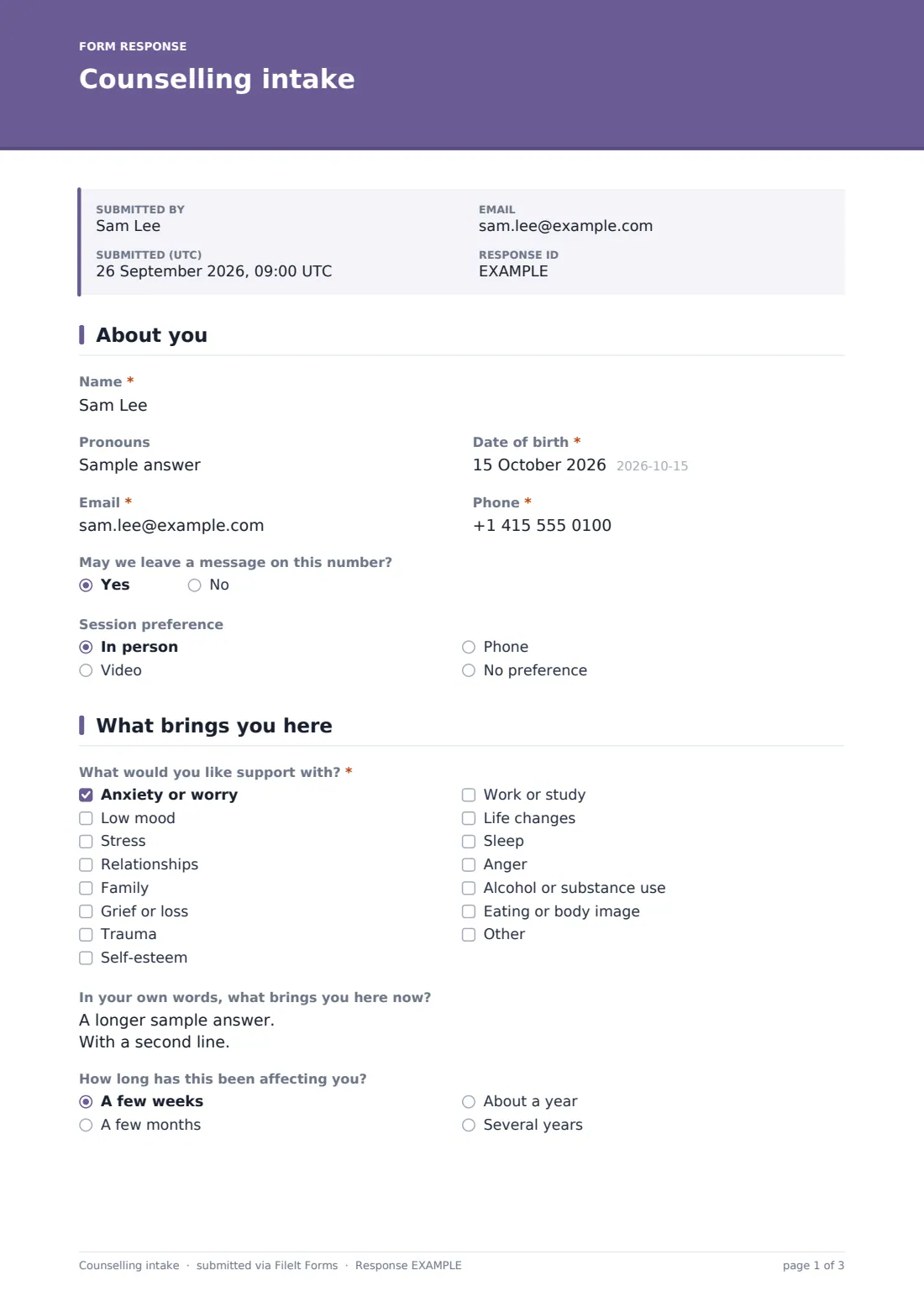
1 About you
- Name*
- Pronouns
- Date of birth*
- Email*
- Phone*
- May we leave a message on this number?
- Session preference In person · Video · Phone · No preference
2 What brings you here
- What would you like support with?* Anxiety or worry · Low mood · Stress · Relationships · Family · Grief or loss · Trauma · Self-esteem · Work or study · Life changes · Sleep · Anger
- In your own words, what brings you here now?
- How long has this been affecting you? A few weeks · A few months · About a year · Several years
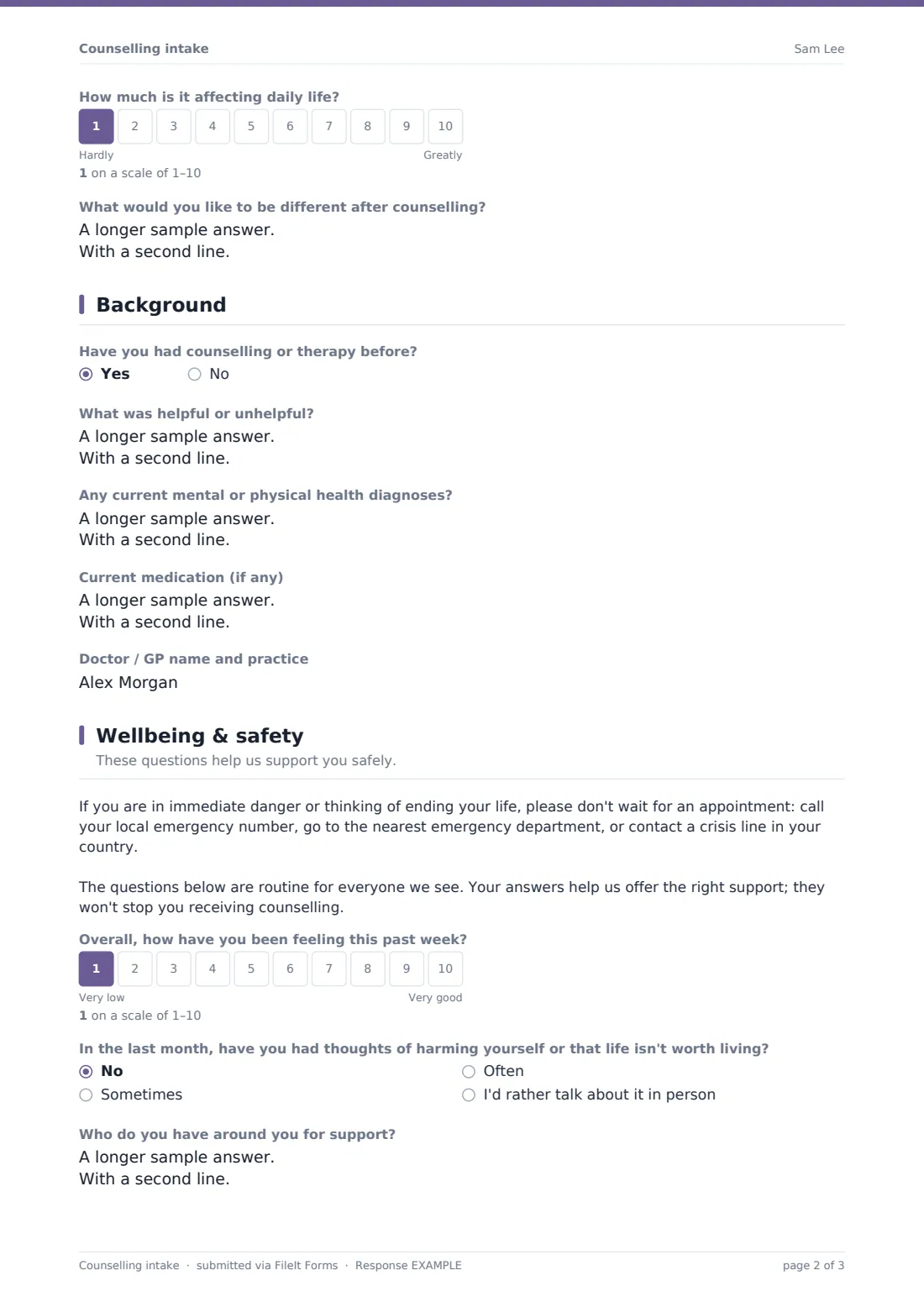
- How much is it affecting daily life?
- What would you like to be different after counselling?
3 Background
- Have you had counselling or therapy before?
- What was helpful or unhelpful? asked only when it applies
- Any current mental or physical health diagnoses?
- Current medication (if any)
- Doctor / GP name and practice
4 Wellbeing & safety
- Overall, how have you been feeling this past week?
- In the last month, have you had thoughts of harming yourself or that life isn't worth living? No · Sometimes · Often · I'd rather talk about it in person
- Do you feel safe at the moment? asked only when it applies
- Who do you have around you for support?
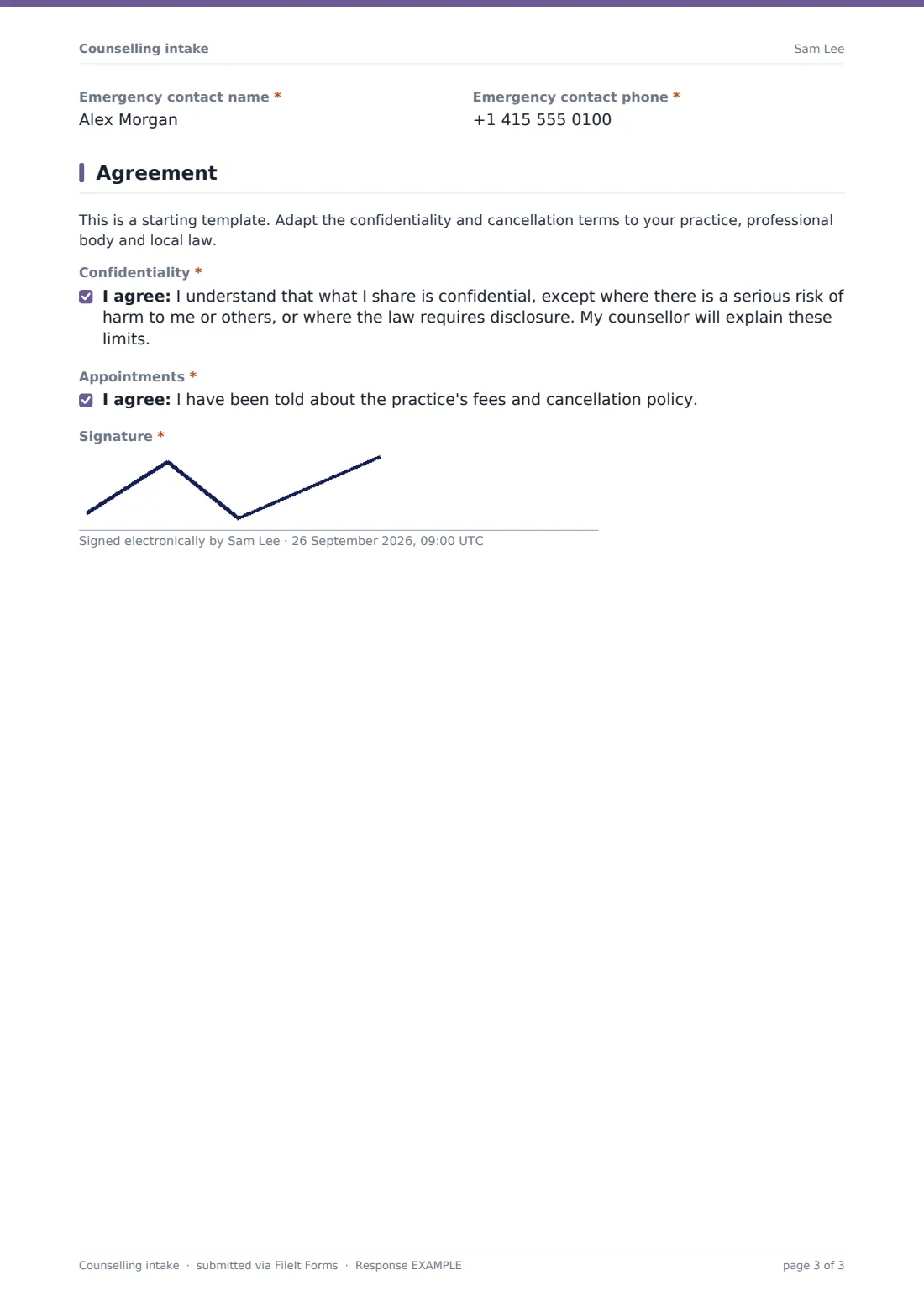
- Emergency contact name*
- Emergency contact phone*
5 Agreement
- Confidentiality*
- Appointments*
- Signature*
The counselling intake form, page by page
1 About you
The form opens gently, asking for the client's name, pronouns (optional), date of birth, email and phone, whether a voicemail can be left, and their preferred session format — in person, video, phone, or no preference.
2 What brings you here
Clients tick what they'd like support with — anxiety, low mood, stress, relationships, family, grief, trauma, self-esteem, work, life changes, sleep, anger, substance use, eating or body image, or their own option — then, if they'd like, describe in their own words what brings them here now. Follow-up questions ask how long it's been affecting them, how much it's affecting daily life on a simple scale, and what they'd like to be different after counselling.
3 Background
This page asks whether the client has had counselling or therapy before; answering "Yes" opens a question about what was helpful or unhelpful last time. It also covers any current diagnoses, medication, and — optionally — the name of their doctor or GP, with a note that this is only contacted with the client's permission, except in an emergency.
4 Wellbeing & safety
A clear note opens this page: if the client is in immediate danger, they shouldn't wait for an appointment, and should call their local emergency number, go to the nearest emergency department, or contact a crisis line. It explains that the questions here are routine for everyone the practice sees, and won't stop the client receiving counselling.
Clients then rate how they've been feeling over the past week, and answer a direct question about thoughts of harming themselves or that life isn't worth living in the last month — with an option to say they'd rather discuss it in person. Answering "Often" opens a gentle check on whether the client feels safe right now. The page finishes with who the client has around them for support, and a required emergency contact name and phone number.
5 Agreement
A note explains this is a starting template the practice should adapt to its own confidentiality and cancellation terms. The client then agrees to two things: understanding that what they share is confidential except where there's a serious risk of harm or a legal requirement to disclose (with the specifics to be explained by their counsellor), and that they've been told about fees and the cancellation policy — signed to complete the intake.
Make the template yours
- Adjust the list of concerns to reflect the specialties your practice actually offers
- Add your practice's specific fees and cancellation policy directly into the agreement text
- Route notifications to the specific counsellor a client has been matched with, if your practice has more than one
- Set the vault folder so intake forms file into each client's individual record
- Add a question about referral source if you track how clients find your practice
- Have your own clinical and legal advisers review the confidentiality wording for your practice, professional body and jurisdiction
Tips for a better counselling intake form
- Read a new intake before the first session so time together starts with the client, not the paperwork
- Take the routine safety questions seriously every time, even when a client seems to be doing well
- Reassure clients clearly, as the form does, that honesty here won't stop them getting support
- Follow up personally and promptly if a client's answers raise any safety concern, rather than waiting for the next session
- This form is not a crisis service or medical diagnosis tool — keep clear, visible information about emergency and crisis support separate from routine intake.
Every response becomes a PDF in your vault
As soon as a client submits the intake form, FileIt saves it as a signed, confidential PDF in your vault, and you receive an email notification so it's ready to read before the first session. If you've turned on a copy for the respondent, the client also gets their own PDF for their records.
From there, most practices review the PDF ahead of the first appointment, use the Responses table to keep track of new client intakes waiting to be scheduled, and export data to CSV only when needed for administrative purposes, keeping the sensitive detail within individual client PDFs.
- Start from this template. It opens in the FileIt Forms designer — change any question, add pages, set the rules for when questions appear.
- Share it. Turn on a public link, or send it to people by email, each with their own link. They don’t need a FileIt account.
- Get the answers as PDFs. Each response is saved as a PDF in the vault folder you choose, with uploaded files attached — and listed in a Responses table you can export to CSV.
Counselling intake form: frequently asked questions
Is this therapy intake form template free?
Yes — it's included with the Forms app on every FileIt account, including the free plan, along with more than 160 other ready-made templates.
Does the client need a FileIt account to fill it in?
No. You send them a link or an email invitation, and they complete and submit it without creating an account.
Where is the completed intake stored?
Each submission is saved automatically as a PDF in your FileIt vault, and you can review individual PDFs or manage all responses from the Responses table.
Does the form only ask follow-up safety questions when needed?
Yes — for example, a question about feeling safe right now only appears if a client says they've often had thoughts of self-harm, using conditional logic already built into the template.
Is this form suitable for handling a mental health crisis?
No. It's an intake form for routine information before a first session, not a crisis or emergency service, and it directs clients in immediate danger to emergency services or a crisis line instead.
Is the confidentiality wording in this form legally binding?
It's a plain-language starting point. Have your practice's confidentiality and disclosure wording reviewed by your professional body or legal adviser to make sure it fits your jurisdiction.
Can I customize which concerns or topics clients can select?
Yes — the checklist of concerns can be edited in the designer to reflect the specific areas your practice specializes in.