What is the wellbeing check-in form template?
A wellbeing check-in only works if it's quick enough that people actually do it, and honest enough to be useful. This template keeps it to a handful of simple scale questions — mood, sleep, stress, energy and connection — that take about two minutes, rather than a long survey that starts to feel like an assessment. It's built as a regular check-in, not a one-off form, so the same short set of questions can be used week after week.
The form is careful about its limits from the very first line: it isn't monitored around the clock, and if someone feels unsafe or at risk of harming themselves or others, it tells them clearly to contact emergency services or a crisis line rather than wait for a reply. A low mood score triggers a gentle, supportive note rather than any kind of automated intervention — the form checks in, it doesn't diagnose or treat.
Every check-in becomes a PDF saved in your FileIt vault, so if someone requests a follow-up chat, whoever's responsible for wellbeing support has the full context — including their own words about what's on their mind — before they reach out.
- Best for
- Employers, schools, sports teams and community groups running regular wellbeing check-ins
- Filled in by
- The individual, about their own wellbeing
- Time to complete
- About 2 minutes
- Includes
- 1-10 wellbeing scales, conditional support prompts, opt-in follow-up request
Who uses a wellbeing check-in form?
- An employer sends a short weekly or monthly check-in to staff as part of a wider wellbeing programme
- A school offers this as an optional check-in for older students during a busy exam period
- A sports team uses it alongside training to catch signs of burnout or overtraining early
- A community or faith group offers members a private way to check in between in-person meetings
- A manager reviews check-ins from their direct reports (with consent) to spot when someone might need extra support
- An HR team tracks aggregate trends in mood and stress across a department, without needing to read every individual response
Questions on this wellbeing check-in form
15 questions over 2 pages · includes conditional questions, multiple pages, ratings.
1 How you've been
- Your name*
- Date
- Overall, how has your mood been this week?*
- How well have you been sleeping?*
- How stressed have you felt?*
- How has your energy been?
- How connected have you felt to people around you?
2 What's helping
- What has helped this week? Exercise or movement · Time outdoors · Friends or family · Rest · Hobbies · A regular routine · Not much, honestly
- Is anything weighing on you?
- One small thing you'd like to do for yourself next week
- Would you like someone to get in touch for a chat?*
- How should we contact you?* asked only when it applies Phone call · Email · In person
- Phone* asked only when it applies
- Best time to reach you asked only when it applies
The wellbeing check-in form, page by page
1 How you've been
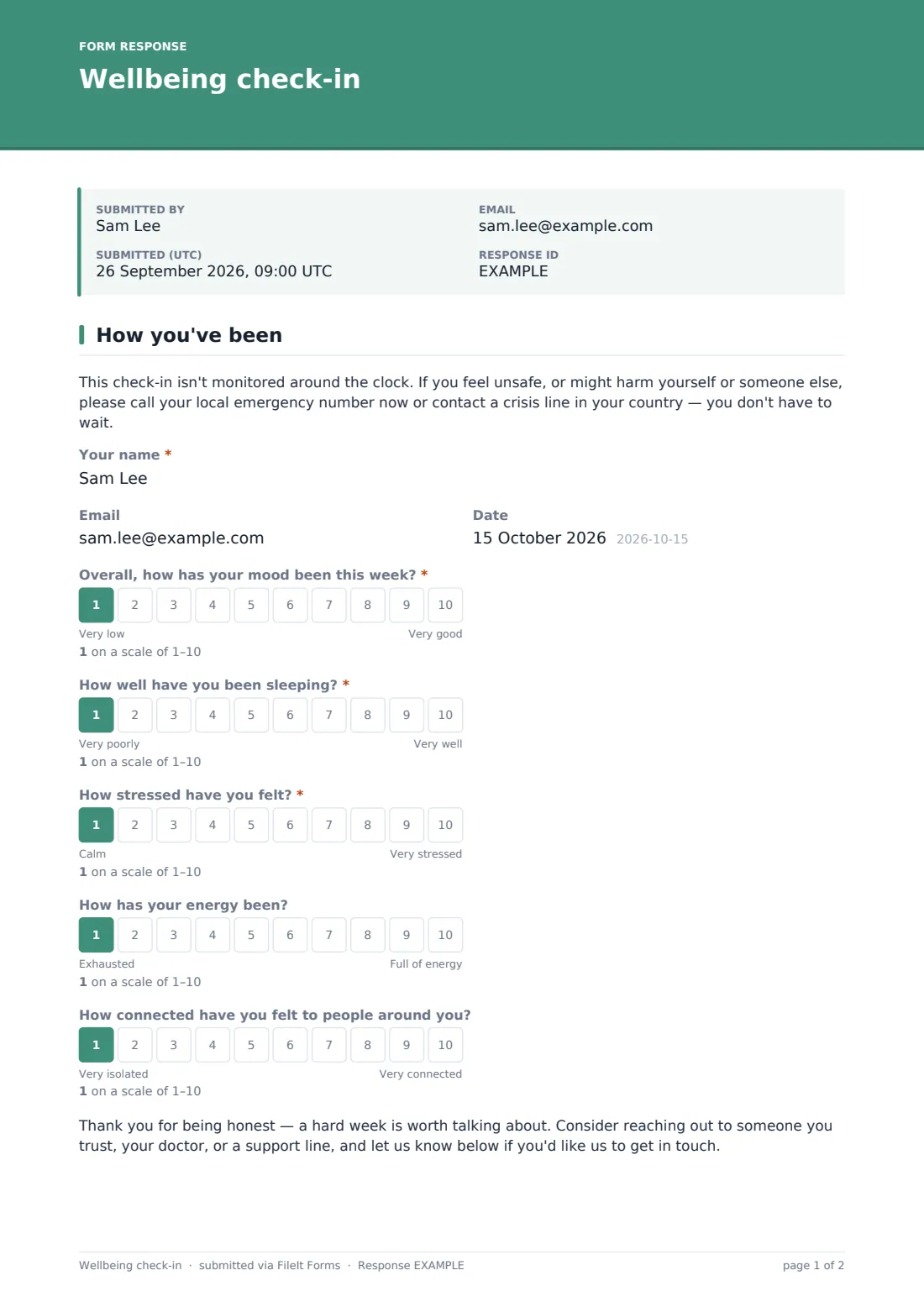
The form opens with a clear safety note: it's not monitored around the clock, and anyone who feels unsafe should contact their local emergency number or a crisis line immediately rather than rely on this form. After that, the person gives their name, an optional email if they'd like a reply, and the date, before rating four to five areas on a 1-10 scale: overall mood, how well they've been sleeping, how stressed they've felt, their energy levels, and how connected they've felt to people around them — the last two are optional.
If someone rates their mood below 4, a supportive note appears immediately, acknowledging that a hard week is worth talking about and gently suggesting they reach out to someone they trust, their doctor, or a support line, alongside a reminder that they can ask for a follow-up further down the form.
2 What's helping
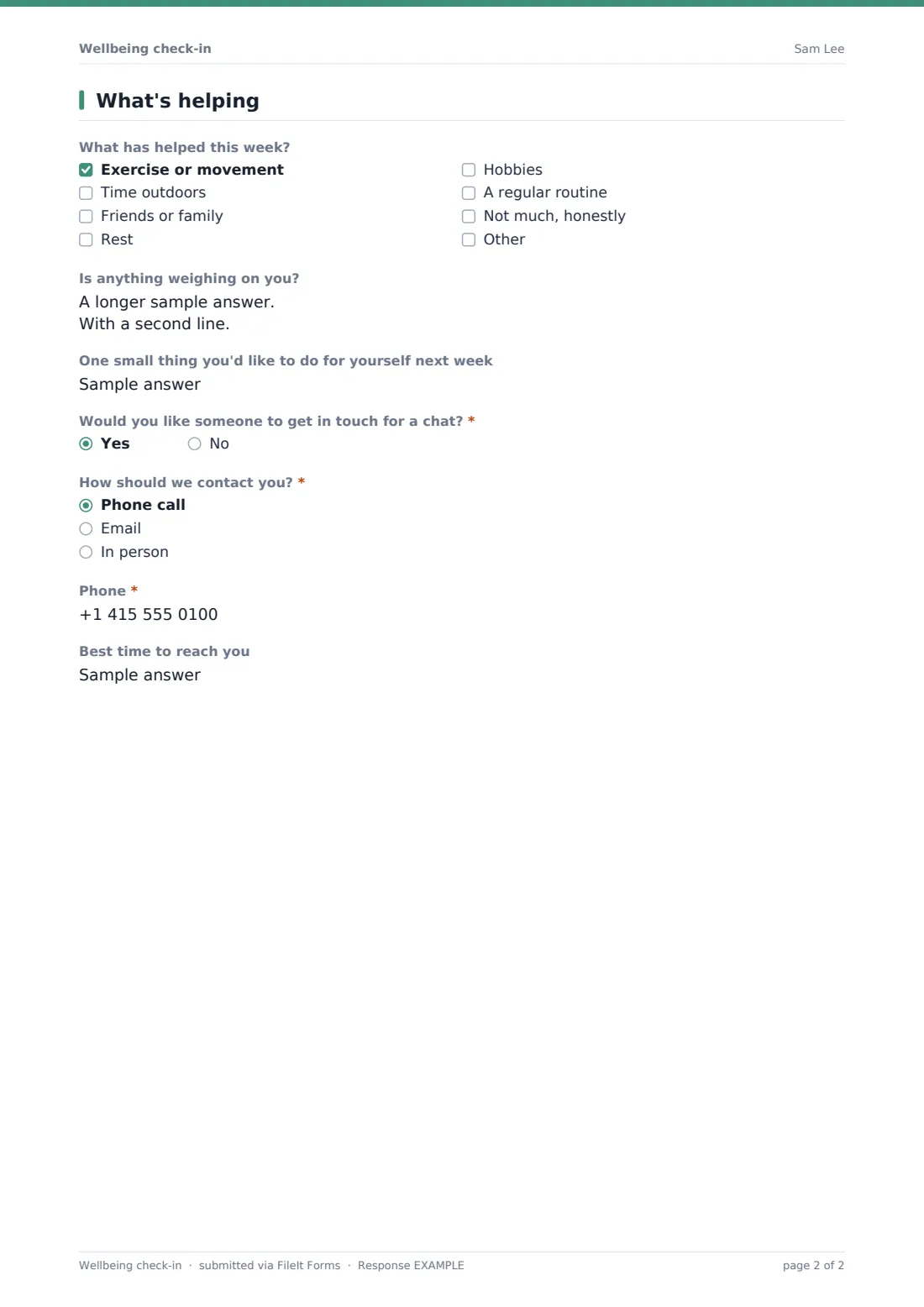
A checklist covers what's been helping lately — exercise, time outdoors, friends or family, rest, hobbies, a regular routine, or an honest "not much" option, plus an "Other" field. An optional open question, Is anything weighing on you?, gives space to share as much or as little as feels comfortable, and a short field lets the person name one small thing they'd like to do for themselves next week.
A yes/no question — Would you like someone to get in touch for a chat? — is the form's one actionable outcome: answering yes reveals how they'd prefer to be contacted (phone, email or in person), a phone field if applicable, and a best time to reach them, so a follow-up conversation can be arranged without any awkwardness about how to ask.
Make the template yours
- Adjust the wellbeing scales to match categories that matter most in your context, such as workload instead of general stress
- Change the frequency you send this out — weekly during a busy period, monthly as a general pulse check
- Add your organisation's specific support resources or an internal helpline number to the confirmation message
- Make the email field required if you need to follow up on every response rather than only ones that request contact
- Route check-ins into a folder per person or per team, depending on how your wellbeing support is organised
- Set up a notification email so the right person is alerted immediately whenever someone requests a follow-up chat
- Keep responses anonymous by removing the name field entirely if you're only interested in aggregate trends
Tips for a better wellbeing check-in form
- Never rely on this form as your only channel for someone in crisis — always point clearly to emergency services or a crisis line, as the template does
- Respond to every follow-up request promptly; asking for a chat can take courage, and a slow reply undermines the whole exercise
- Keep questions consistent over time if you're using this as a regular check-in, so trends are actually comparable
- Be transparent with people about who reads their answers and how the information will be used before you launch it
- Avoid treating a single low score as an emergency — look at patterns over several check-ins, and always follow up directly rather than assuming
- Make participation genuinely optional wherever possible, since a check-in someone feels forced to complete tends to produce less honest answers
Every response becomes a PDF in your vault
As soon as someone submits a check-in, FileIt saves it as a PDF in your vault, in the folder you've set up, and you're notified by email — which matters most for a response that requests a follow-up chat. If the person entered an email and you've turned on the optional copy, they can also receive their own PDF.
Whoever is responsible for wellbeing support then reviews check-ins in the Responses table, following up directly with anyone who asked for a chat, in the way they said they'd prefer to be contacted. The confirmation message reassures the person their check-in has been received, while repeating that anything urgent shouldn't wait for a reply.
- Start from this template. It opens in the FileIt Forms designer — change any question, add pages, set the rules for when questions appear.
- Share it. Turn on a public link, or send it to people by email, each with their own link. They don’t need a FileIt account.
- Get the answers as PDFs. Each response is saved as a PDF in the vault folder you choose, with uploaded files attached — and listed in a Responses table you can export to CSV.
Wellbeing check-in form: frequently asked questions
Is this wellbeing check-in form template free?
Yes. It's included in FileIt's Forms app on every plan, including the free plan, and every question can be edited.
Do people need a FileIt account to complete a check-in?
No. Share a public link or a personal emailed invitation, and people submit a check-in without creating an account.
Is this check-in monitored in real time?
No, and the form says so clearly. It isn't a crisis service — anyone who feels unsafe is told directly to contact emergency services or a crisis line rather than wait for a response.
Can someone stay anonymous when they check in?
You can remove the name field in the designer if you want fully anonymous check-ins, though that also means you can't personally follow up on a request for a chat.
How do we see the check-ins that come in?
Each one is saved automatically as a PDF in your FileIt vault, and you can review, filter or export the full list from the Responses table.
Is this a substitute for professional mental health support?
No, and it isn't intended to be. This template is a short, informal check-in, not a clinical assessment — it can't diagnose anything and doesn't replace advice from a qualified professional.
What happens if someone asks for a follow-up chat?
The form records how and when they'd prefer to be contacted, and it's then up to your organisation to actually reach out — the form itself doesn't send a reply automatically.
Can we run this check-in on a regular schedule?
Yes, you can reuse the same form link every week or month, or duplicate it if you want to track responses separately by period.