What is the data erasure request form template?
"Please delete my data" is easy to write and hard to act on. Which account? Which email address did they use three years ago? Do they want the whole account closed, or just their phone number removed? And can you still stop sending them marketing once everything's gone?
This template asks those questions up front. It collects every account, username and reference to search, lets the person choose between deleting everything or specific data, asks why they're asking, and explains honestly that some records may have to be kept. Requests made on someone else's behalf ask for proof of authority automatically.
Each request is saved as a dated PDF in the vault folder you choose, so you have a clear record of what was asked for and when.
- Best for
- Businesses, apps and organizations handling deletion requests
- Filled in by
- The individual, or someone authorized to act for them
- Time to complete
- About 4 minutes
- Includes
- On-behalf logic, full or specific deletion, grounds checklist, retention note, suppression choice, two confirmations
Who uses a data erasure request form?
- A "delete my data" link from your privacy notice or account settings
- Customers leaving a subscription service who want everything removed
- Former job applicants asking for their application to be deleted
- Parents asking for a child's data to be removed
- Newsletter subscribers who want to be forgotten, not just unsubscribed
- Keeping a dated record that each deletion request was received and handled
Questions on this data erasure request form
20 questions over 4 pages · includes file upload, conditional questions, multiple pages, consent checkbox.
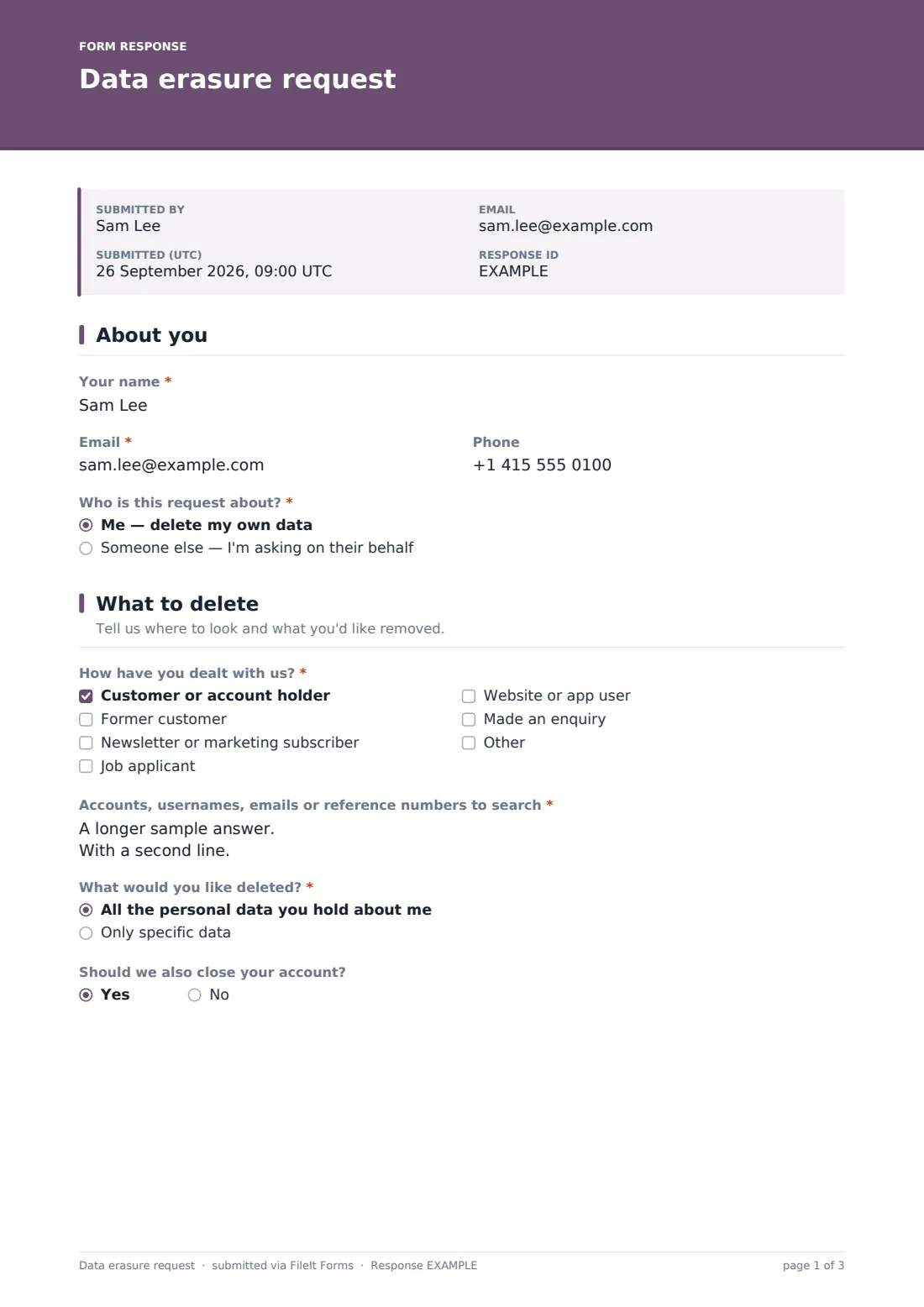
1 About you
- Your name*
- Email*
- Phone
- Who is this request about?* Me — delete my own data · Someone else — I'm asking on their behalf
- Name of the person the data is about* asked only when it applies
- Proof you may act for them* asked only when it applies
2 What to delete
- How have you dealt with us?* Customer or account holder · Former customer · Newsletter or marketing subscriber · Job applicant · Website or app user · Made an enquiry
- Accounts, usernames, emails or reference numbers to search*
- What would you like deleted?* All the personal data you hold about me · Only specific data
- Which data should be deleted?* asked only when it applies
- Should we also close your account? asked only when it applies
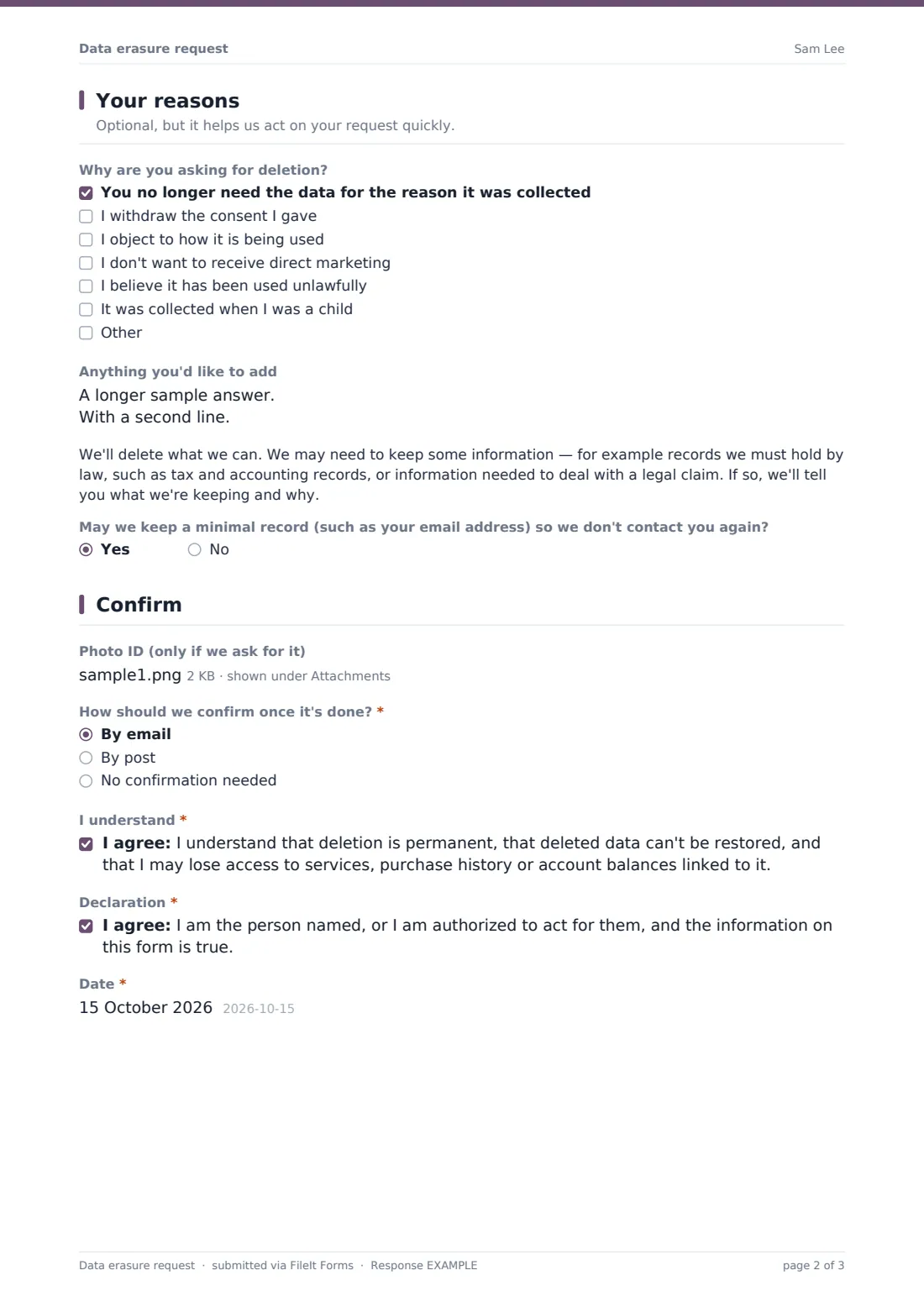
3 Your reasons
- Why are you asking for deletion? You no longer need the data for the reason it was collected · I withdraw the consent I gave · I object to how it is being used · I don't want to receive direct marketing · I believe it has been used unlawfully · It was collected when I was a child
- Anything you'd like to add
- May we keep a minimal record (such as your email address) so we don't contact you again?
4 Confirm
- Photo ID (only if we ask for it)
- How should we confirm once it's done?* By email · By post · No confirmation needed
- Postal address for the confirmation* asked only when it applies
- I understand*
- Declaration*
- Date*
The data erasure request form, page by page
1 About you
Name and email are required, phone optional. The person says whether the request is about themselves or someone else; someone else reveals the other person's name and a required upload proving authority, such as a letter of authority or proof of guardianship.
2 What to delete
A checklist of relationships (customer, former customer, subscriber, job applicant, website or app user, enquiry, or other) is followed by a required box for every account, username, email and reference number to search — the detail that makes a complete deletion possible. The person chooses all their data or only specific data; specific requires a description. Choosing all asks whether the account should be closed too.
3 Your reasons
An optional checklist lists common grounds for erasure — the data is no longer needed, consent is withdrawn, an objection to its use or to direct marketing, unlawful use, or data collected in childhood — with a note that some laws such as the GDPR apply the right on particular grounds. A plain-language paragraph explains that some records may have to be kept, for example for tax or legal claims. The person can also allow a minimal suppression record so they aren't contacted again.
4 Confirm
Photo ID is optional and only needed if you ask for it. The person chooses confirmation by email or post (post asks for an address) or no confirmation, then ticks two statements: that deletion is permanent and may cost them access to history or balances, and that they're entitled to make the request.
Make the template yours
- Edit the relationship options to match the people whose data you hold
- Add examples of the records you're legally required to keep to the retention paragraph
- Remove the grounds checklist if the law that applies to you doesn't require a reason
- Add your privacy team to the notification emails so each request is picked up quickly
- Route requests to a restricted privacy folder
- Link to the form from your account settings page as well as your privacy notice
Tips for a better data erasure request form
- Search backups, email, support tools and spreadsheets — not just your main database
- Tell the person what you've kept and why, rather than just saying "done"
- Keep a minimal suppression record where the person agrees, so marketing doesn't restart from another list
- Pass the request on to processors and partners you've shared the data with where required
- Only ask for ID when you genuinely can't verify the person another way
- Have your process reviewed against the privacy law that applies to you — this is a starting template, not legal advice
Every response becomes a PDF in your vault
Each request is filed as a PDF in your chosen vault folder, with any authority or ID documents attached to the response, and you're notified by email. The requester receives a copy of what they submitted.
Use the Responses table to see open requests, filter by whether a full or partial deletion was asked for, and export the list to track completion. FileIt records the request; deleting the data in your own systems is still up to your team.
- Start from this template. It opens in the FileIt Forms designer — change any question, add pages, set the rules for when questions appear.
- Share it. Turn on a public link, or send it to people by email, each with their own link. They don’t need a FileIt account.
- Get the answers as PDFs. Each response is saved as a PDF in the vault folder you choose, with uploaded files attached — and listed in a Responses table you can export to CSV.
Data erasure request form: frequently asked questions
Is this data erasure request template free to use?
Yes. It's one of FileIt's ready-made templates, and every FileIt account, including the free plan, includes the Forms app and its full library of templates.
Do people filling in this form need a FileIt account?
No. Anyone with the link, or an emailed request, can complete and submit the form without creating a FileIt account. Only the form owner needs one.
Does submitting this form delete anything automatically?
No. The form records the request and files it in your vault. Your team then needs to find and delete the data in your own systems.
Do we have to delete everything someone asks for?
Not always. Laws like the GDPR allow some data to be kept, for example to meet a legal obligation. The form tells people this may happen, but you should check what applies to you.
Why ask whether we can keep a suppression record?
If every trace of someone is deleted, they can end up back on a marketing list from another source. Keeping just enough to recognise them — with their agreement — prevents that.
Can a parent ask for a child's data to be deleted?
Yes. Choosing someone else asks for the child's name and proof of the parent's authority.
Is this legal advice?
No. It's a plain-English starting template. Have it reviewed against the GDPR, UK GDPR, a US state privacy law or whichever rules apply to you.