What is the key or access card request form template?
Building access tends to grow quietly. Someone needs the warehouse once, gets permanent access, then keeps it after changing roles. Keys are handed over in corridors and never written down. When a card goes missing, nobody can say which doors it opened.
This template makes every access change a written request: what's needed (a new card, extra permissions, a replacement, a physical key or removal of access), which areas, which hours, and for how long. Contractors and temporary staff must give an end date, out-of-hours access needs a reason, and the requester signs up to basic responsibilities before a manager approves.
Each request is saved as a PDF in your FileIt vault, giving facilities and security a dated record of who asked for what access and who approved it.
- Best for
- Facilities, security and office managers issuing keys and access cards
- Filled in by
- The employee or contractor who needs access, then their manager
- Time to complete
- About 3–4 minutes
- Includes
- Lost-card and key questions, out-of-hours reason, end dates for non-employees, two signatures
Who uses a key or access card request form?
- An office issuing access cards to new starters on their first day
- A facilities team handling replacement cards for lost or damaged badges
- A warehouse or lab restricting sensitive areas to approved staff
- A school or community centre keeping track of who holds physical keys
- Giving contractors time-limited access with a clear end date
- Recording the removal of access when someone changes role
Questions on this key or access card request form
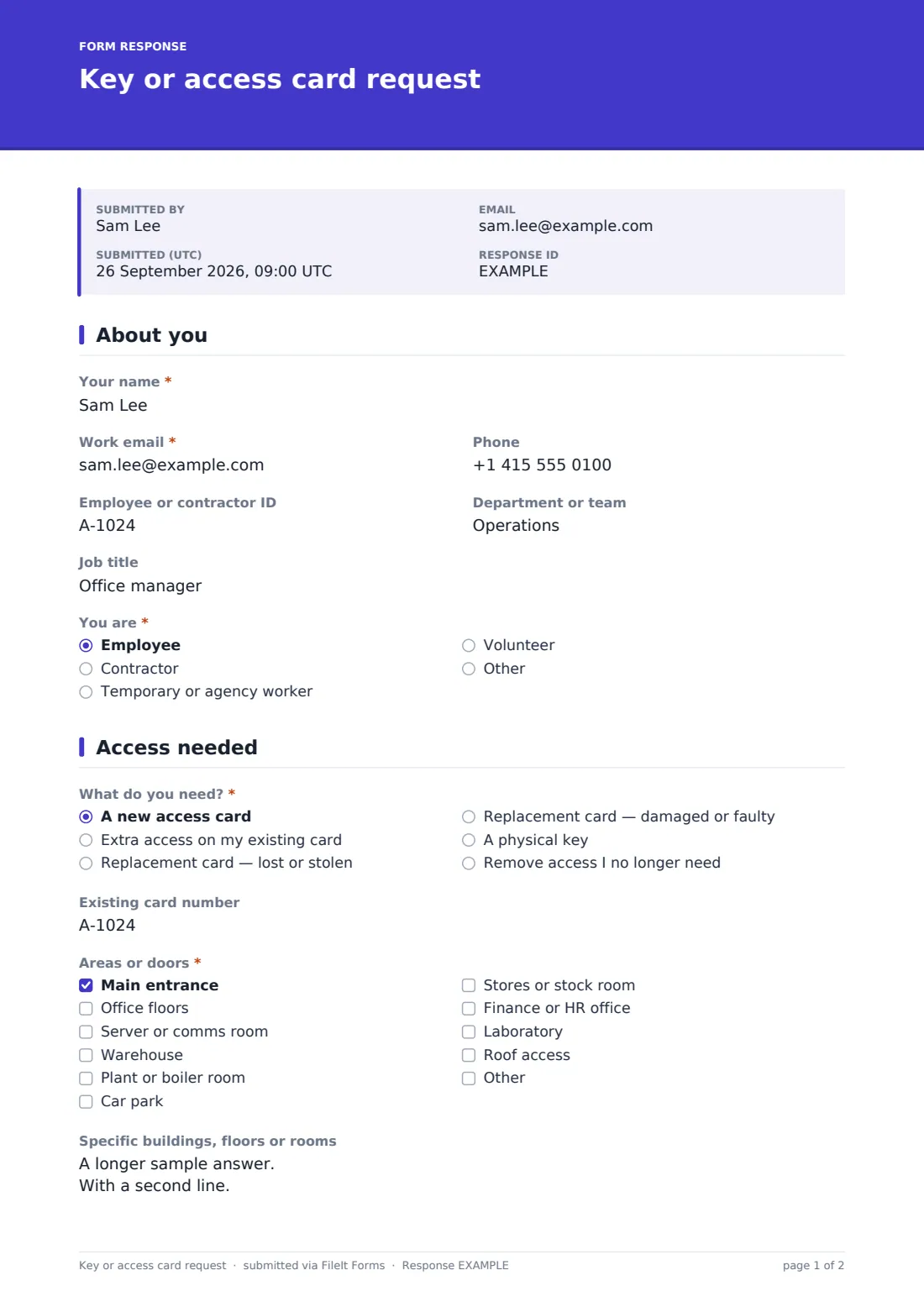
26 questions over 3 pages · includes signature, conditional questions, multiple pages, consent checkbox.
1 About you
- Your name*
- Work email*
- Phone
- Employee or contractor ID
- Department or team
- Job title
- You are* Employee · Contractor · Temporary or agency worker · Volunteer · Other
- Contract or assignment end date* asked only when it applies
2 Access needed
- What do you need?* A new access card · Extra access on my existing card · Replacement card — lost or stolen · Replacement card — damaged or faulty · A physical key · Remove access I no longer need
- When did you last have it? asked only when it applies
- Existing card number
- Key, lock or door numbers* asked only when it applies
- Areas or doors* Main entrance · Office floors · Server or comms room · Warehouse · Plant or boiler room · Car park · Stores or stock room · Finance or HR office · Laboratory · Roof access
- Specific buildings, floors or rooms
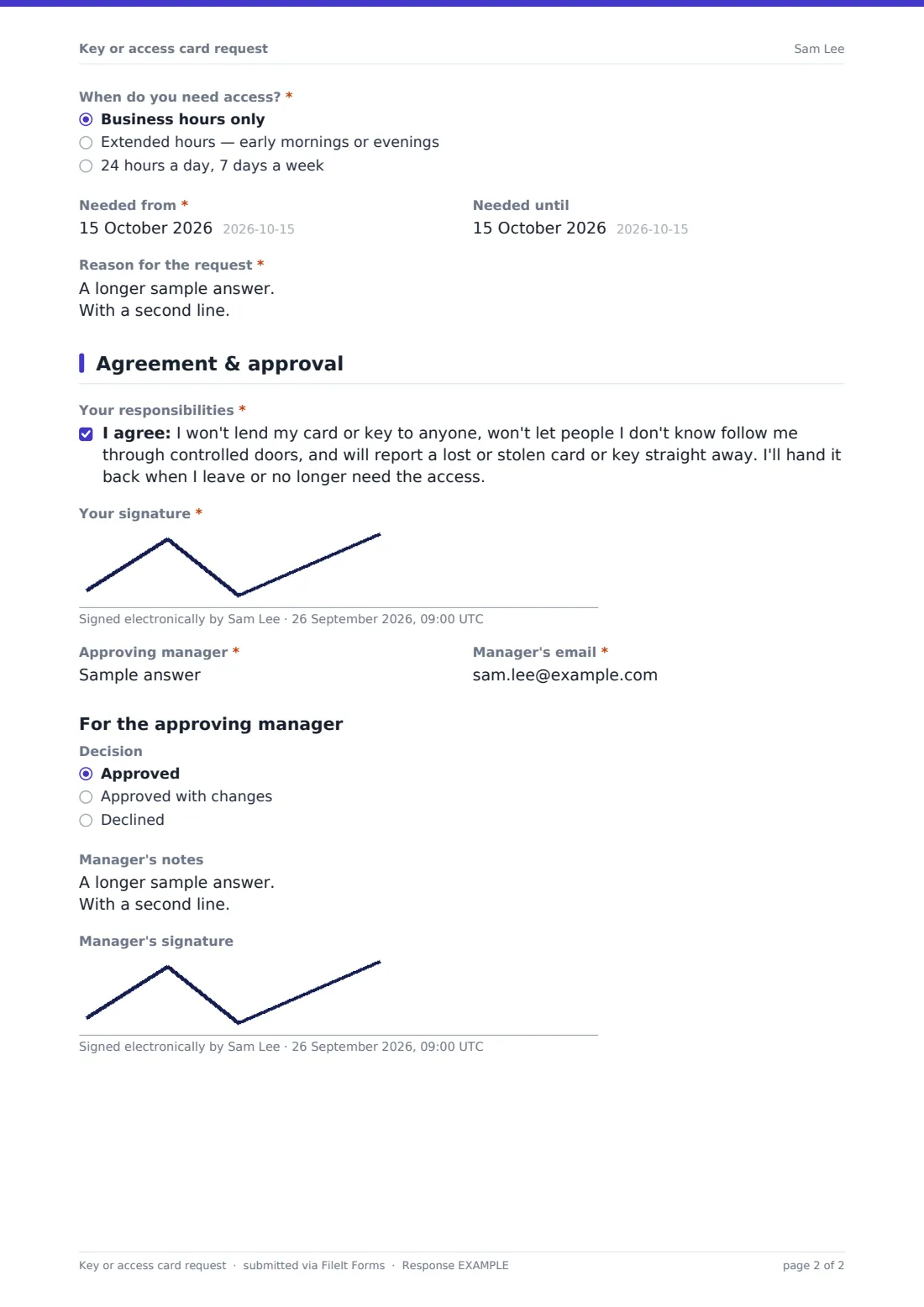
- When do you need access?* asked only when it applies Business hours only · Extended hours — early mornings or evenings · 24 hours a day, 7 days a week
- Why do you need out-of-hours access?* asked only when it applies
- Needed from*
- Needed until
- Reason for the request*
3 Agreement & approval
- Your responsibilities*
- Your signature*
- Approving manager*
- Manager's email*
- Decision Approved · Approved with changes · Declined
- Manager's notes
- Manager's signature
The key or access card request form, page by page
1 About you
The requester gives their name, work email, phone, employee or contractor ID, department and job title, and says whether they're an employee, contractor, temporary or agency worker, volunteer or other. Anyone who isn't an employee must give the end date of their contract or assignment, so access can be set to expire.
2 Access needed
A required choice sets the type of request: a new card, extra access on an existing card, a replacement for a lost or stolen card, a replacement for a damaged one, a physical key, or removing access no longer needed. Lost cards show a note that the old card will be switched off, plus a question about when it was last seen. Asking for a key opens a required field for the key, lock or door numbers.
A checklist of common areas — main entrance, office floors, server room, warehouse, plant room, car park, stores, finance or HR office, laboratory, roof access, or other — is followed by space for specific buildings or floors. The requester chooses business hours, extended hours or 24/7; anything beyond business hours asks why. The hours question is skipped when access is being removed. Start and end dates and a reason for the request complete the page.
3 Agreement & approval
The requester agrees not to lend their card or key, not to let strangers follow them through controlled doors, to report losses straight away and to hand access back when it's no longer needed, then signs. They name their approving manager and the manager's email.
The last section is for the manager: an optional decision (approved, approved with changes or declined), notes and a signature. It can be completed on the same device, or you can use the saved PDF as the basis for approval by email.
Make the template yours
- Replace the area checklist with your actual buildings, zones or door groups
- Add a deposit or replacement fee notice for lost cards if your organisation charges one
- Make the manager section a separate form if managers approve from their own inbox
- Add security or facilities addresses to the notification emails
- Add a photo upload if your access cards carry the holder's photo
- Remove the physical key option if your site only uses cards
Tips for a better key or access card request form
- Give the minimum access needed for the role, and add more later on request
- Always set an end date for contractors and temporary staff so access expires with the contract
- Treat "remove access" requests with the same priority as new ones
- Review high-risk areas like server rooms regularly against the saved requests
- Deactivate lost cards as soon as they're reported, before the replacement is ready
- Use the export to reconcile who holds physical keys at least once a year
Every response becomes a PDF in your vault
When a request is submitted it's saved as a signed PDF in your vault and the form owner is notified by email, so facilities or security can act on it. The requester can receive a copy for their own records.
The Responses table gives you a running record of access changes that you can filter by request type or area, and export to CSV to check against your access control system or key register.
- Start from this template. It opens in the FileIt Forms designer — change any question, add pages, set the rules for when questions appear.
- Share it. Turn on a public link, or send it to people by email, each with their own link. They don’t need a FileIt account.
- Get the answers as PDFs. Each response is saved as a PDF in the vault folder you choose, with uploaded files attached — and listed in a Responses table you can export to CSV.
Key or access card request form: frequently asked questions
Is this access card request template free?
Yes. It's included with the Forms app on every FileIt account, including the free plan, and you can change any question.
Does the form change access in our door system?
No. FileIt doesn't connect to access control systems. The form collects and files the approved request, and your security or facilities team makes the change.
Do requesters need a FileIt account?
No. They can fill it in from a public link or a personal link you email them.
How does the manager approve the request?
The last section has a decision, notes and signature for the manager. They can complete it alongside the requester, or you can adapt it into a separate approval form.
Can we use it to report a lost access card?
Yes. Choosing the lost or stolen replacement option records when the card was last seen and reminds the requester the old card will be switched off.
Can we require a reason for out-of-hours access?
It's already built in — choosing extended hours or 24/7 access makes the reason question required.
Can contractors use the same form?
Yes. Anyone who isn't an employee must give a contract or assignment end date so their access can be time-limited.
Can the form handle removing access when someone leaves?
Yes, there's a "remove access" option. For leavers, many teams also use an offboarding checklist to cover keys, cards and equipment together.