What is the visitor sign-in form template?
A paper visitor book on the reception desk does a basic job, but it's hard to read, anyone can see who came before them, and when the fire alarm goes off nobody is quite sure who is still in the building. It also rarely records whether a visitor actually read the site rules.
This template replaces the book with a short online sign-in that visitors can complete on a reception tablet or their own phone. It asks who they are, who they're visiting and when they arrived, then shows your site rules and asks for a signed acknowledgement. Contractors get extra questions about the work they're doing and whether they've been inducted.
Every sign-in becomes a PDF in your FileIt vault, so you build a dated, private visitor log without a single page of the visitor book on show at the front desk.
- Best for
- Offices, warehouses, schools, clinics and any site with a reception desk
- Filled in by
- The visitor, on a reception tablet or their own phone
- Time to complete
- About 2 minutes
- Includes
- Contractor induction questions, emergency help question, site rules acknowledgement, signature
Who uses a visitor sign-in form?
- An office replacing a paper visitor book with a tablet at the front desk
- A warehouse or factory signing in contractors and checking they've been inducted
- A school or nursery keeping a record of visitors and their host
- A coworking space logging guests of members
- A clinic or care home recording visitors for security and emergency roll-call
- A site with a QR code at the gate so visitors can sign in on their own phones
Questions on this visitor sign-in form
22 questions over 3 pages · includes signature, conditional questions, multiple pages, consent checkbox.
1 Your details
- Your name*
- Company or organisation
- Mobile number*
- Vehicle registration
- Reason for visit* Business meeting · Interview · Contractor or maintenance work · Delivery or collection · Guest or personal visit · Other
2 Your visit
- Who are you visiting?*
- Their department
- Date*
- Arrival time*
- Expected departure time
- Purpose of your visit asked only when it applies
- Work you'll be carrying out* asked only when it applies
- Have you completed this site's induction or been issued a permit to work?* asked only when it applies
- Are you bringing tools, laptops or other equipment on site?
- What are you bringing? asked only when it applies
- Visitor badge number
3 Site rules & sign-in
- Would you need help to leave the building in an emergency?
- What help would you need? asked only when it applies
- Site rules*
- Visitor log*
- Signature*
The visitor sign-in form, page by page
1 Your details
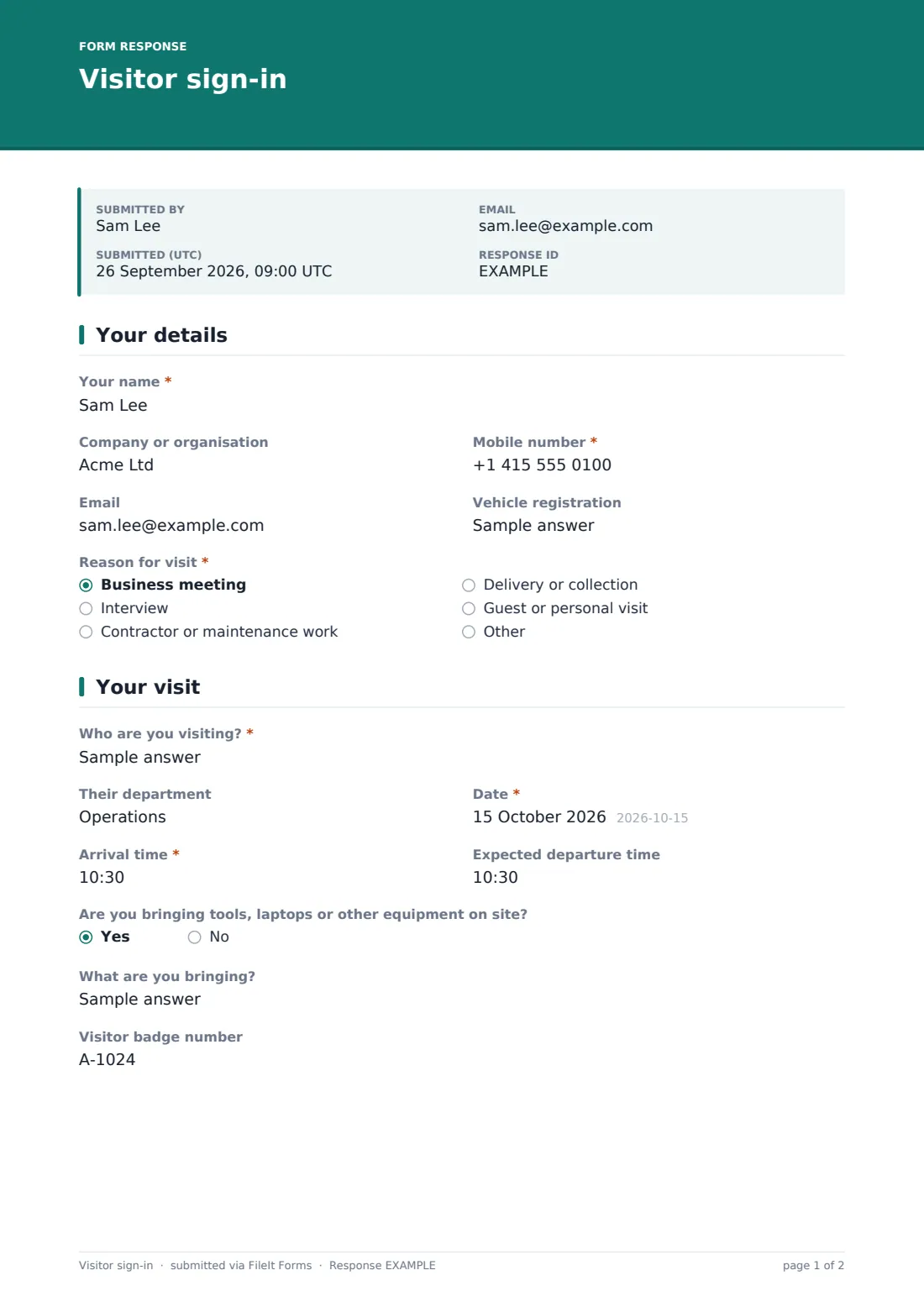
Visitors give their name, company or organisation, a required mobile number, an optional email and — only if they've parked on site — their vehicle registration. They then choose a reason for the visit: business meeting, interview, contractor or maintenance work, delivery or collection, guest or personal visit, or other.
2 Your visit
This page records who the visitor is seeing (and their department), the date, the arrival time and an expected departure time. Picking "Other" as the reason asks for the purpose of the visit.
Contractors are asked to describe the work they'll carry out and whether they've completed the site induction or been issued a permit to work. Answering no shows a note asking them to tell reception before starting. Anyone can say whether they're bringing tools, laptops or other equipment and list them, and a Visitor badge number field is left for reception to fill in.
3 Site rules & sign-in
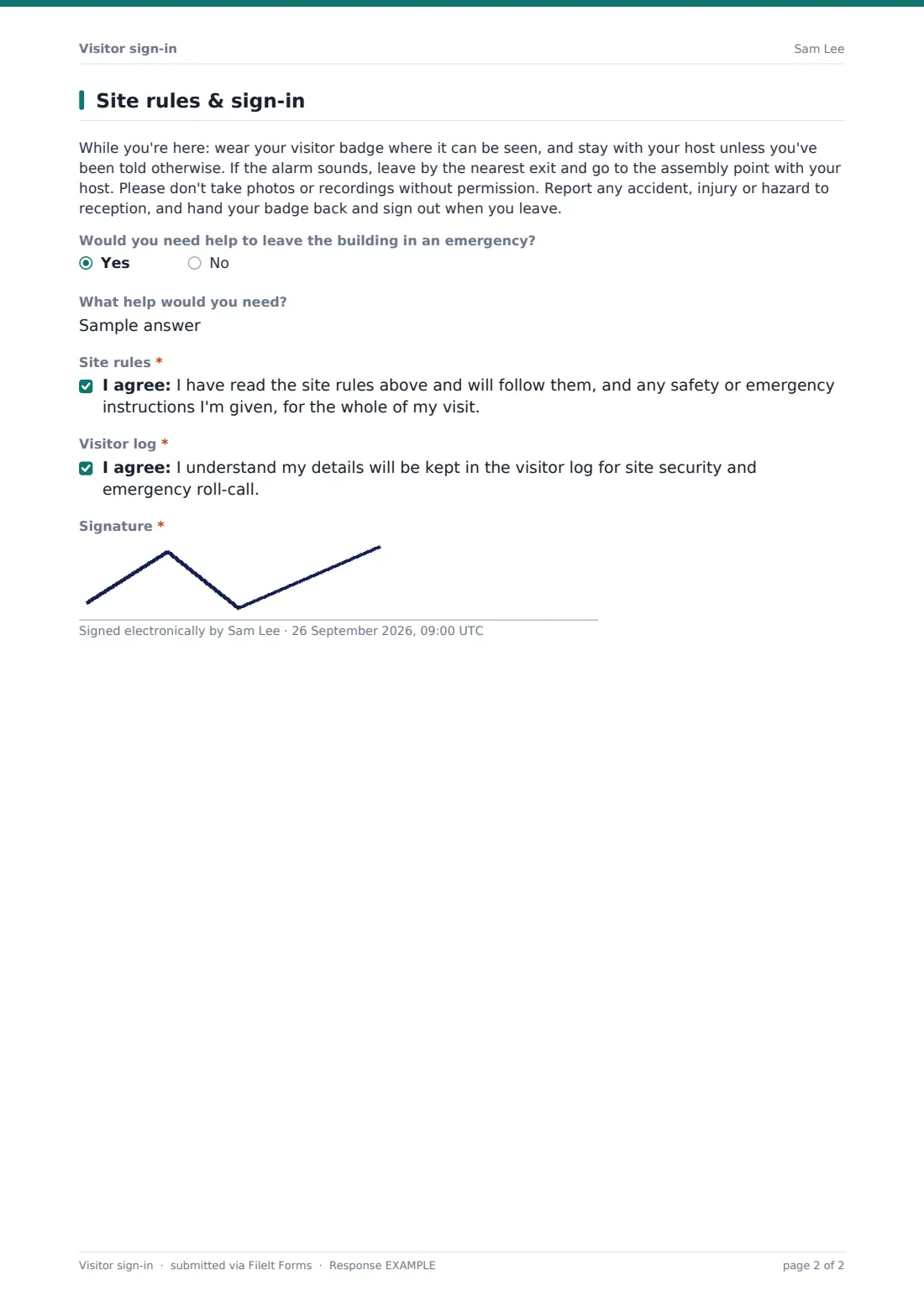
Your site rules are shown in plain language: wear the badge, stay with the host, what to do if the alarm sounds, no photos without permission, report hazards, and sign out on leaving. Visitors can say whether they'd need help leaving the building in an emergency and what help, so hosts and fire wardens can plan for it.
Two required statements follow — agreeing to the site rules, and acknowledging that their details are kept in the visitor log for security and roll-call — and the visitor signs on screen.
Make the template yours
- Rewrite the site rules paragraph with your own safety, confidentiality and emergency instructions
- Add a health declaration or PPE question if your site needs one
- Add a non-disclosure statement for visitors to areas with confidential work
- Put your hosts in a dropdown instead of a free-text field so names are always spelled the same
- Add reception or security staff to the notification emails so hosts can be told someone has arrived
- Turn off the emailed copy if visitors don't need their own record
Tips for a better visitor sign-in form
- Put a QR code for the form at the entrance so visitors can sign in on their own phone while reception is busy
- Keep the questions short — people sign in standing up, often in a hurry
- Match the badge number to the badge you hand out so you can check every badge comes back
- Check today's sign-ins in the Responses table during an evacuation roll-call
- Review the evacuation help answers each day so hosts know who may need assistance
- Update the site rules whenever your emergency procedures change
Every response becomes a PDF in your vault
Each sign-in is saved as a signed PDF in the vault folder you've chosen, and the form owner is notified by email — useful if reception wants an alert as visitors arrive. Visitors can receive a copy of their sign-in too.
The Responses table works as your visitor log: filter by date to see who has signed in today, and export to CSV for a monthly record. The form doesn't record sign-outs on its own, so many sites note departure times at the desk or add a separate short sign-out form.
- Start from this template. It opens in the FileIt Forms designer — change any question, add pages, set the rules for when questions appear.
- Share it. Turn on a public link, or send it to people by email, each with their own link. They don’t need a FileIt account.
- Get the answers as PDFs. Each response is saved as a PDF in the vault folder you choose, with uploaded files attached — and listed in a Responses table you can export to CSV.
Visitor sign-in form: frequently asked questions
Is this visitor sign-in template free?
Yes. It's included in the FileIt Forms app on every account, including the free plan, and every question can be edited.
Do visitors need an account to sign in?
No. Visitors fill it in from the form's public link — on a reception tablet, or on their own phone via a QR code.
Can visitors see who else has signed in?
No. Each visitor only sees their own form. Past sign-ins are only visible to you in the Responses table and your vault.
Does the form sign visitors out?
Not automatically. It records an expected departure time. For actual sign-out times, add a short sign-out form or note departures at reception.
Can it print a visitor badge?
No, FileIt doesn't print badges. Reception can note the number of the badge handed over in the Visitor badge number field.
Can we use this for contractors too?
Yes. Choosing contractor or maintenance work asks what work they'll be doing and whether they've been inducted or issued a permit.
Can our host be notified when their visitor arrives?
Owner notifications email the addresses you set for every sign-in. The form doesn't message individual hosts automatically, so reception usually calls the host directly.
How long are visitor records kept?
They stay in your vault until you delete them. Set your own retention period in line with your privacy policy and delete older records when they're no longer needed.