What is the meeting room booking form template?
Booking a room is rarely just booking a room. There's the projector that needs setting up, the lunch that has to arrive at 12:30, the guests reception needs badges for, and the chairs that should be in a U-shape rather than rows. When those details arrive in separate emails, something usually gets missed.
This template collects the whole booking in one request: organiser and cost centre, the room, date, times and attendee count, external guests, and whether the meeting repeats. The last page covers layout, AV equipment, IT help, catering with dietary needs, and accessibility.
Each request is saved as a PDF in your FileIt vault, so whoever manages rooms, catering or reception has everything in one place. It's a request form, not a live calendar, so it suits teams where someone confirms bookings by hand.
- Best for
- Office managers, receptionists and facilities teams handling room requests
- Filled in by
- The meeting organiser
- Time to complete
- About 2–3 minutes
- Includes
- Recurring meeting options, guest list, layout and equipment choices, catering with dietary needs
Who uses a meeting room booking form?
- An office where reception manages a small number of shared meeting rooms
- A company that orders catering for meetings and needs numbers and dietary needs in advance
- A training team booking a room with a classroom layout and projector
- A coworking space taking room requests from members
- A school or community centre letting rooms to staff or local groups
- Organising a board meeting with external guests who need visitor badges
Questions on this meeting room booking form
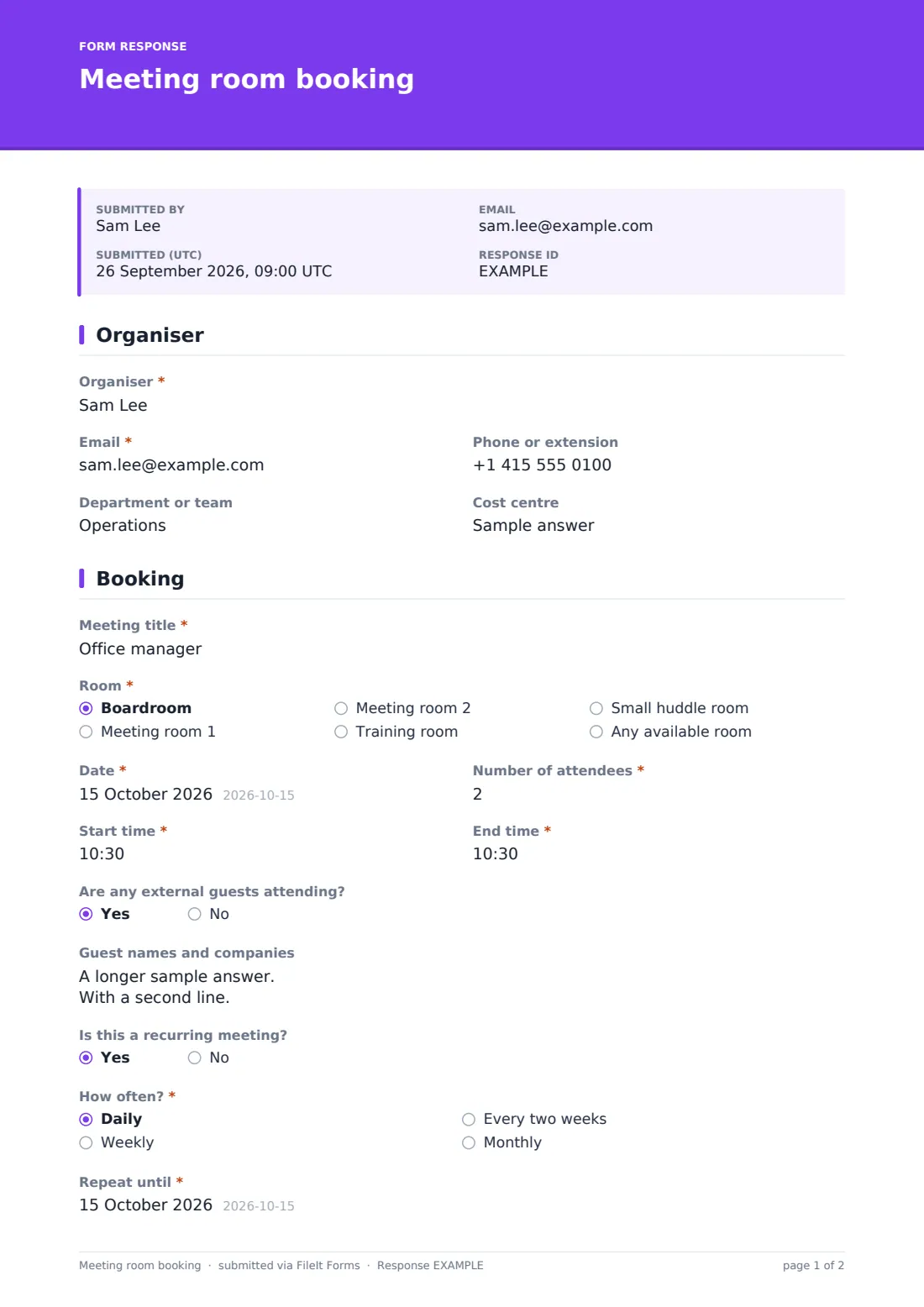
26 questions over 3 pages · includes conditional questions, multiple pages.
1 Organiser
- Organiser*
- Email*
- Phone or extension
- Department or team
- Cost centre
2 Booking
- Meeting title*
- Room* Boardroom · Meeting room 1 · Meeting room 2 · Training room · Small huddle room · Any available room
- Date*
- Number of attendees*
- Start time*
- End time*
- Are any external guests attending?
- Guest names and companies asked only when it applies
- Is this a recurring meeting?
- How often?* asked only when it applies Daily · Weekly · Every two weeks · Monthly
- Repeat until* asked only when it applies
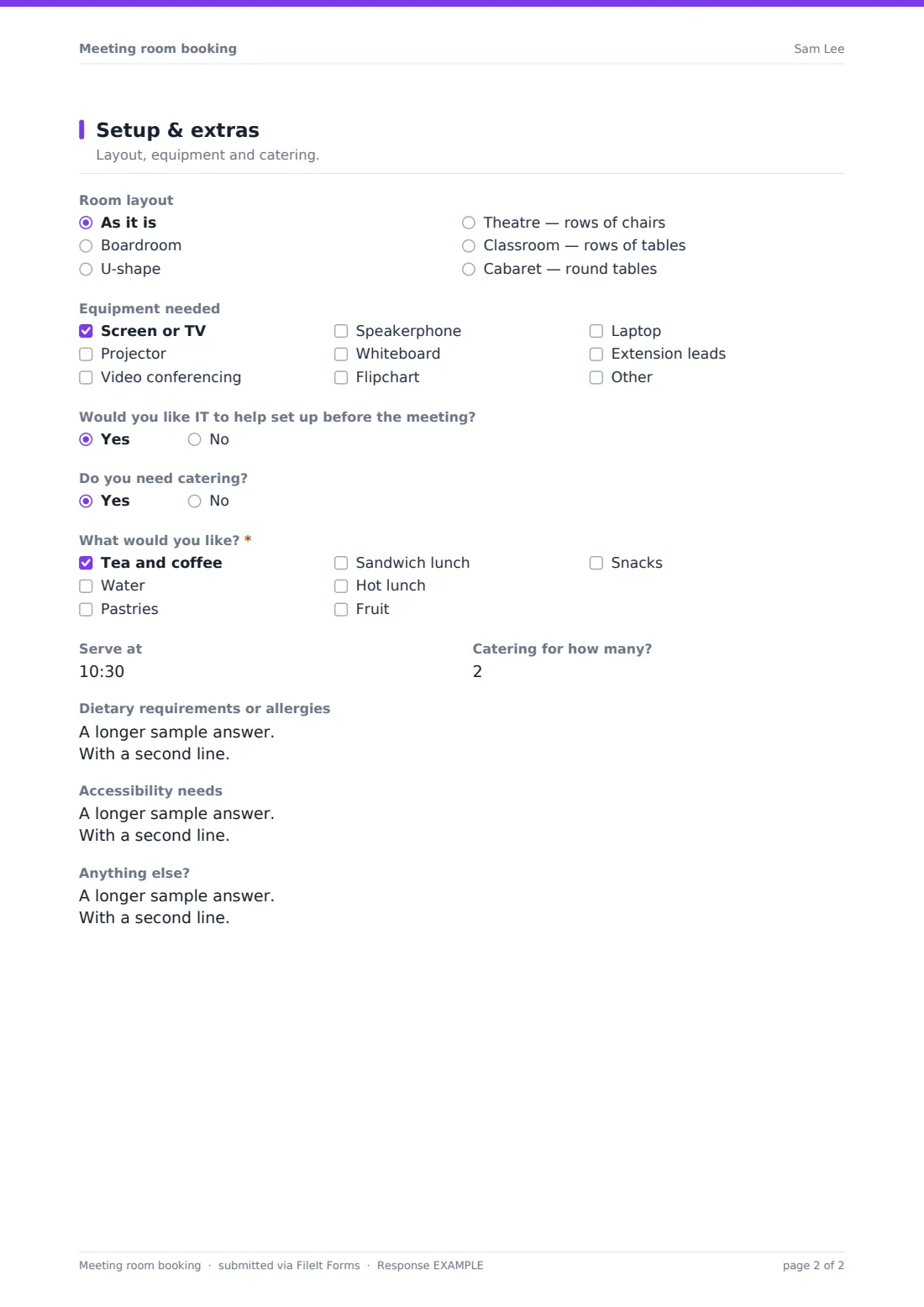
3 Setup & extras
- Room layout As it is · Boardroom · U-shape · Theatre — rows of chairs · Classroom — rows of tables · Cabaret — round tables
- Equipment needed Screen or TV · Projector · Video conferencing · Speakerphone · Whiteboard · Flipchart · Laptop · Extension leads
- Would you like IT to help set up before the meeting?
- Do you need catering?
- What would you like?* asked only when it applies Tea and coffee · Water · Pastries · Sandwich lunch · Hot lunch · Fruit · Snacks
- Serve at asked only when it applies
- Catering for how many? asked only when it applies
- Dietary requirements or allergies asked only when it applies
- Accessibility needs
- Anything else?
The meeting room booking form, page by page
1 Organiser
The organiser gives their name, email, phone or extension, department and an optional cost centre — useful when catering or guest costs are charged back to a budget.
2 Booking
A meeting title and a room (boardroom, two meeting rooms, a training room, a huddle room or any available room) come first, then the date, the number of attendees, and start and end times, with a reminder to allow time for setup.
Saying external guests are coming opens a box for their names and companies so reception can prepare badges. Recurring meetings ask how often — daily, weekly, every two weeks or monthly — and until when.
3 Setup & extras
The organiser picks a room layout — as it is, boardroom, U-shape, theatre, classroom or cabaret — and ticks the equipment they need: screen, projector, video conferencing, speakerphone, whiteboard, flipchart, laptop, extension leads or something else. They can ask IT to help set up beforehand.
Asking for catering opens a list (tea and coffee, water, pastries, sandwich lunch, hot lunch, fruit, snacks), a serving time, a separate headcount if needed, and dietary requirements. Accessibility needs and any other notes close the form.
Make the template yours
- Replace the room list with your own rooms and their capacities in the labels
- Add a catering menu with prices if organisers choose specific items
- Remove the catering section if your office doesn't provide it
- Add your reception or catering team to the notification emails
- Change the confirmation message to include your booking cancellation policy
- Add a minimum-notice reminder to the cover text, such as 48 hours for catering
Tips for a better meeting room booking form
- Check requests against your room calendar before confirming — the form doesn't block double bookings
- Ask for bookings early enough to order catering from your supplier
- Use the attendee count to check the room is big enough before confirming
- Send guest names to reception on the morning of the meeting
- Keep the dietary answers with the catering order so nothing is lost at handover
- Filter the Responses table by date each morning to plan setups
Every response becomes a PDF in your vault
Each booking request is saved as a PDF in your chosen vault folder and emailed to the form owner, so whoever manages rooms can check availability and confirm. Organisers can get a copy of their request too.
Use the Responses table to see upcoming bookings by date, and export to CSV to share catering orders or plan the week's setups. The form doesn't reserve rooms on a calendar, so confirm each booking in your usual calendar or room system.
- Start from this template. It opens in the FileIt Forms designer — change any question, add pages, set the rules for when questions appear.
- Share it. Turn on a public link, or send it to people by email, each with their own link. They don’t need a FileIt account.
- Get the answers as PDFs. Each response is saved as a PDF in the vault folder you choose, with uploaded files attached — and listed in a Responses table you can export to CSV.
Meeting room booking form: frequently asked questions
Is this meeting room booking template free?
Yes. It's included in the FileIt Forms app on every account, including the free plan.
Does the form check room availability?
No. It collects booking requests. Someone still needs to check your calendar and confirm the room, which suits teams where bookings are approved by hand.
Can people book recurring meetings?
Yes. Saying the meeting repeats asks how often and until what date.
Can we collect catering and dietary needs?
Yes. Asking for catering opens a list of options, a serving time, a headcount and a box for dietary requirements or allergies.
Do organisers need a FileIt account?
No. Anyone with the form's link can submit a booking request.
Can we list our own rooms?
Yes. Edit the Room dropdown in the designer to list your rooms, and add capacities to the labels if that helps people choose.
Can we charge catering to a department?
There's an optional cost centre field for exactly that. The form records it — any recharging happens in your own finance process.
Can reception be notified of each booking?
Yes. Add reception's email to the notification addresses in the form's settings.