What is the equipment request form template?
Whether it's a new laptop, a second monitor, a replacement phone or an ergonomic chair, most equipment requests start the same way: an email to IT or a manager explaining what's needed and why. This template turns that into a structured form covering what's wanted, whether it's new, a replacement or an upgrade, how urgent it is, and who needs to sign off.
Email requests get buried, forgotten, or approved without anyone recording the cost centre they should be charged to. An online form keeps every request in the same format, asks the follow-up questions that matter, like which operating system for a laptop or whether a chair follows an ergonomic assessment, only when they're relevant, and always captures who's approving it.
Each submitted request becomes a PDF that lands straight in your FileIt vault, so procurement or IT has a dated, filed record of what was asked for, why, and who approved it, without digging back through email.
- Best for
- IT and office managers handling employee equipment requests
- Filled in by
- The employee making the request
- Time to complete
- About 3-5 minutes
- Includes
- Multi-select item list, conditional follow-ups, manager approval fields
Who uses a equipment request form?
- IT teams standardizing laptop, phone and accessory requests instead of fielding ad-hoc emails
- Office managers approving furniture requests like chairs and standing desks
- Companies with hybrid or remote staff who need equipment delivered rather than collected in person
- Finance teams wanting every request tagged with a cost centre before it's approved
- Replacing broken or aging equipment with a documented reason and asset reference
Questions on this equipment request form
21 questions over 3 pages · includes file upload, conditional questions, multiple pages, consent checkbox.
1 About you
- Your name*
- Work email*
- Department Operations · Sales · Marketing · Finance · Engineering · Customer support · Human resources · Other
- Where do you work?* In the office · Hybrid · Fully remote
- Delivery address* asked only when it applies
2 What you need
- What do you need?* Laptop · Desktop computer · Monitor · Keyboard and mouse · Headset or webcam · Mobile phone · Tablet · Docking station or adapters · Office chair · Desk or standing desk · Ergonomic accessories
- Laptop operating system asked only when it applies Windows · Mac · Linux · No preference
- Do you also need a mobile plan / SIM? asked only when it applies
- Is the chair following an ergonomic or occupational health assessment? asked only when it applies
- Assessment report asked only when it applies
- Specific models, specs or links
- Is this…* Something new · A replacement for broken or old equipment · An upgrade
- What's wrong with the current item? asked only when it applies
- Needed by
- Estimated cost
3 Justification & approval
- Why do you need it?*
- Urgency* Low — nice to have · Medium — would help soon · High — I can't work properly without it
- Cost centre or budget code
- Approving manager*
- Manager's email
- Company property*
The equipment request form, page by page
1 About you
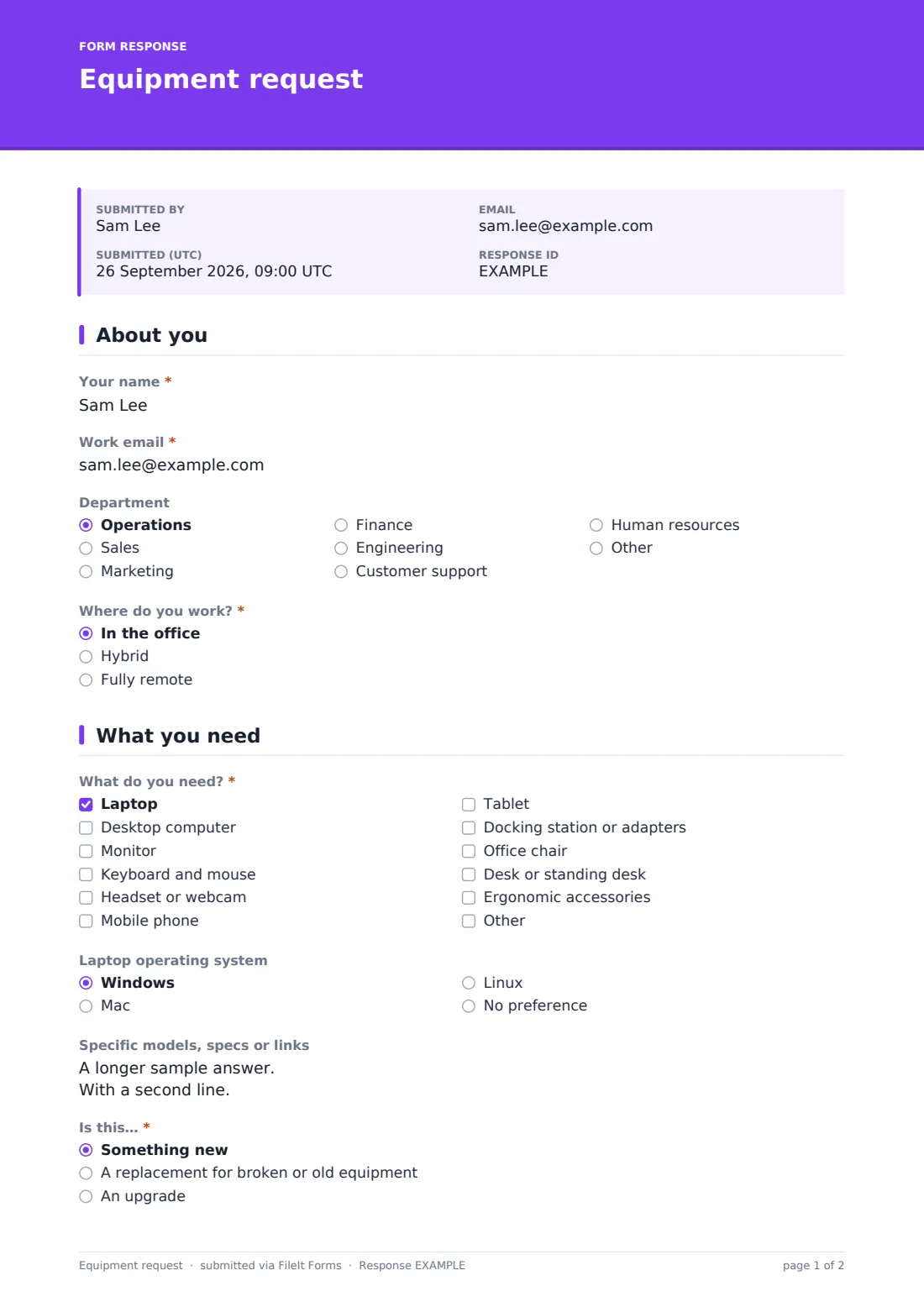
The form opens with Your name, Work email and an optional Department dropdown, then asks Where do you work? — in the office, hybrid or fully remote. Choosing hybrid or fully remote opens a Delivery address question, since anything ordered for someone working from home has to be shipped somewhere rather than left at a desk.
2 What you need
This page starts with What do you need?, a checklist covering laptops, desktops, monitors, keyboards and mice, headsets or webcams, mobile phones, tablets, docking stations, chairs, desks and ergonomic accessories, with an Other option. Ticking laptop opens a Laptop operating system question (Windows, Mac, Linux or no preference); ticking mobile phone opens a yes/no question about needing a mobile plan or SIM; and ticking chair opens a question asking whether it follows an ergonomic or occupational health assessment, with an optional file upload for that assessment report.
The employee also says whether the request is something new, a replacement or an upgrade — choosing replacement opens a question asking what's wrong with the current item, including its asset tag if it has one — plus any specific models, specs or links, a needed-by date and an optional estimated cost.
3 Justification & approval
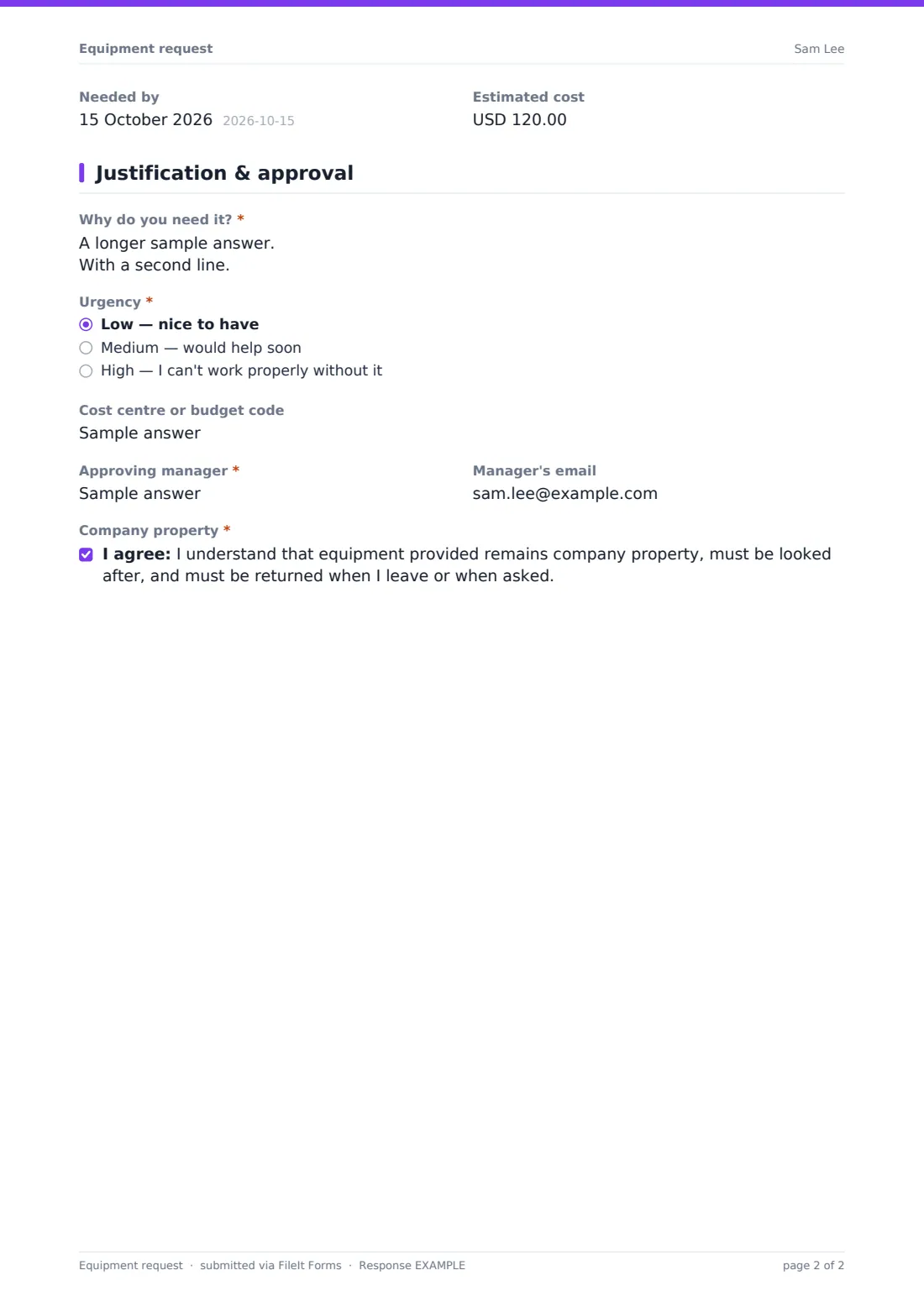
The final page asks why the employee needs it, how urgent the request is (low, medium or high), an optional cost centre or budget code, the approving manager's name and email, and ends with a consent statement confirming the employee understands equipment provided remains company property, must be looked after, and returned when they leave or when asked.
Make the template yours
- Add or remove items from the What do you need? checklist to match what your company actually stocks or approves
- Add your own conditional follow-ups the way the operating system or ergonomic assessment questions work — for example, a screen size question only when someone picks monitor
- Route notification emails to whichever manager or IT inbox should see every new request
- Set a maximum number of responses or a closing date if you're running a one-off equipment refresh for a specific team
- File responses into a dedicated procurement or IT folder in your vault, and adjust the document title to include the department
- Turn off multiple responses if you want to stop the same employee submitting several open requests before the first is resolved
Tips for a better equipment request form
- Ask for a short justification even on small requests — it makes approval and budget tracking faster later
- Keep the item list specific enough to route requests, such as IT items versus furniture, but not so long it's hard to scan
- Set clear expectations in the confirmation message about how long approval usually takes
- Review submissions by urgency first, so anyone who genuinely can't work without something isn't stuck behind lower-priority requests
- Keep a record of what's approved against your cost centres so equipment spend doesn't outrun budget unnoticed
Every response becomes a PDF in your vault
When an employee submits a request, FileIt saves their answers as a PDF, including any ergonomic assessment file they attached, in the vault folder you've set up, and sends a notification to you or whoever else you've added to be alerted. If you've turned on a copy for the respondent, the employee gets their own PDF record of exactly what they asked for.
From there, whoever approves equipment can open the request from the Responses table, check the cost centre and urgency, and follow up with the named approving manager if needed. Filtering the table by department or urgency, or exporting it to CSV, makes it easier to review several outstanding requests together rather than one email at a time.
- Start from this template. It opens in the FileIt Forms designer — change any question, add pages, set the rules for when questions appear.
- Share it. Turn on a public link, or send it to people by email, each with their own link. They don’t need a FileIt account.
- Get the answers as PDFs. Each response is saved as a PDF in the vault folder you choose, with uploaded files attached — and listed in a Responses table you can export to CSV.
Equipment request form: frequently asked questions
Is this equipment request form template free?
Yes. It's one of 160 templates in the Forms app, available on every FileIt account including the free plan, and you can edit every question in it.
Do employees need a FileIt account to submit a request?
No. Share it as a public link on your intranet or send each employee their own emailed link — they fill it in and submit without signing up.
Does this form handle purchasing or ordering equipment?
No. It only collects the request and the approval details — you or your procurement process still place the actual order once it's approved.
How do requests get approved?
The form records the employee's proposed approving manager and cost centre, but approval itself happens outside the form, for example the manager reviewing the submitted PDF or the entry in the Responses table.
Can I see all open requests in one place?
Yes. Every submission appears in the Responses table, which you can filter and export to CSV, alongside each request's individual PDF.
Can I ask for a quote or price before approving?
The template includes an optional estimated cost field the employee can fill in if they know it, but it doesn't fetch live prices — you'd get an actual quote separately if needed.
Can I limit this to certain equipment only?
Yes. Remove any items you don't want employees requesting through this form from the What do you need? checklist in the designer.