What is the equipment checkout form template?
A shared laptop cupboard, a camera kit, or a set of tools only stays organized if someone writes down who took what and when it's due back. A paper sign-out sheet works until it goes missing or someone forgets to note the return date, and then nobody can say for certain who has the projector this week.
This form turns that sign-out sheet into something more reliable: a required set of fields for the item, its condition when it left, its accessories, and a due date, followed by a signed borrower agreement. Because it's online, whoever's borrowing equipment can fill it in from their phone before they walk out the door, and the record is already saved rather than sitting on a clipboard.
Each completed checkout becomes a PDF, filed automatically in your FileIt vault. That gives you a dated history for every loan — handy when a piece of equipment doesn't come back on time, or when you need to check exactly what condition something was in before it left.
- Best for
- Offices, schools, workshops and community organizations lending out shared equipment
- Filled in by
- The person borrowing the equipment
- Time to complete
- About 3–5 minutes
- Includes
- Conditional damage description, photo upload, signed borrower agreement
Who uses a equipment checkout form?
- An office lending out laptops, projectors or mobile hotspots to staff
- A school checking out cameras, tablets or tools to students or teachers for a project
- A makerspace or workshop tracking who has borrowed which tools
- A media or events team keeping tabs on cameras and audio gear between shoots
- Recording an item's pre-existing condition and photos before it leaves, to avoid disputes later
- Tracking loans that go off-site versus equipment that stays on the premises
- Building a searchable history of who has borrowed a specific asset over time
Questions on this equipment checkout form
21 questions over 3 pages · includes signature, file upload, conditional questions, multiple pages, consent checkbox.
1 Borrower
- Your name*
- Email*
- Phone
- Team, department or class
2 Equipment
- Type of equipment* Laptop · Tablet · Phone · Camera · Projector / screen · Audio / microphone · Mobile hotspot · Tools · Other
- What is it?* asked only when it applies
- Make and model
- Asset tag
- Serial number
- Accessories included Charger / power supply · Case or bag · Cables / adapters · Mouse / keyboard · Memory card / storage · Spare batteries
- What is it for?*
- Taken on*
- Due back*
- Will it leave the premises?
- Where will it be kept? asked only when it applies
3 Condition & agreement
- Condition when taken* New / as new · Good — normal wear · Fair — visible marks · Some damage
- Describe the damage* asked only when it applies
- Other notes on condition
- Photos of the item
- Borrower agreement*
- Signature*
The equipment checkout form, page by page
1 Borrower
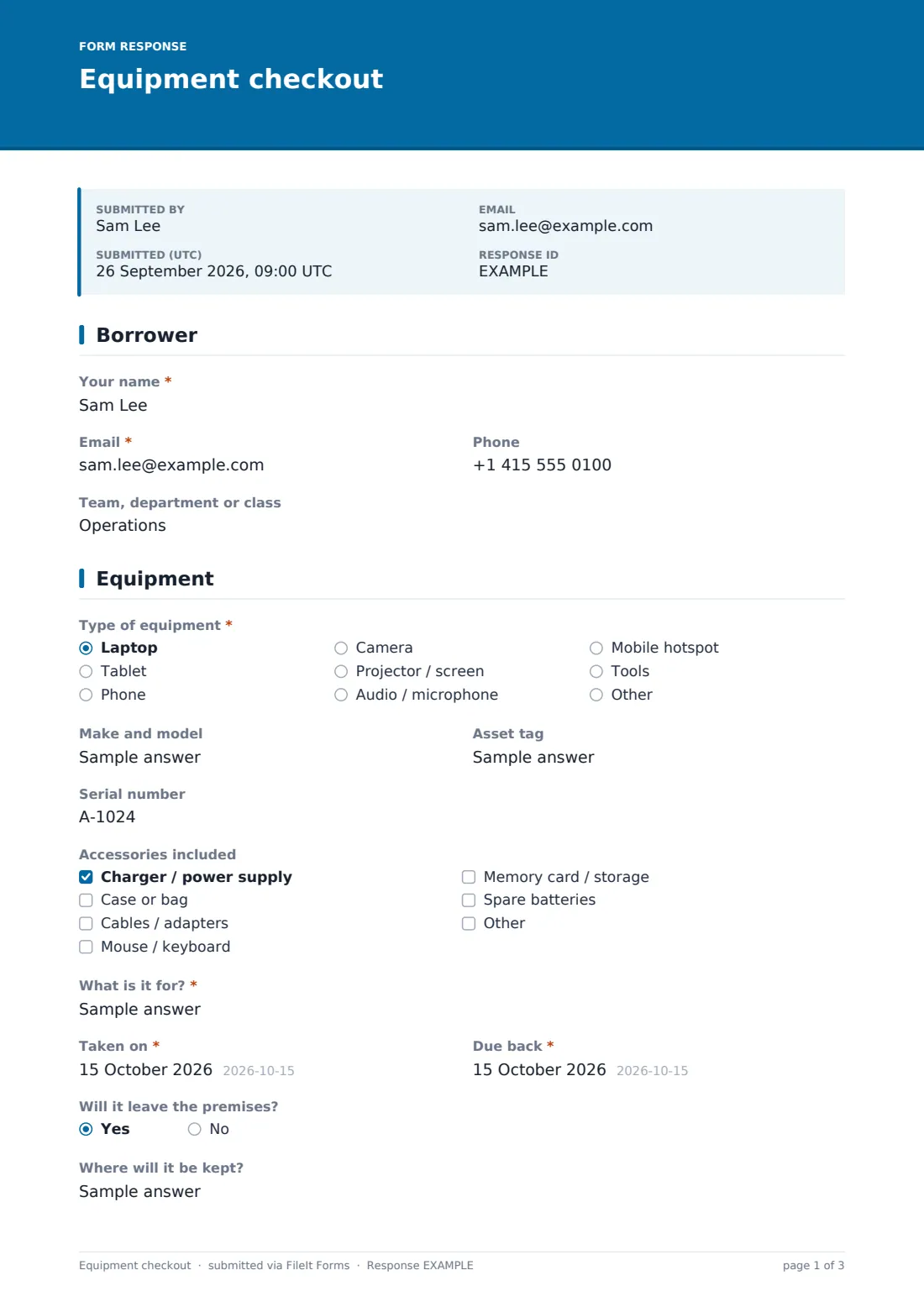
The form starts with who's borrowing: name, email, an optional phone number, and the team, department or class they belong to. It's a short page on purpose — enough to know who to follow up with, without slowing down a quick checkout.
2 Equipment
This page identifies exactly what's being borrowed. A dropdown covers common types — laptop, tablet, phone, camera, projector/screen, audio/microphone, mobile hotspot, tools, or other (which opens a text field to describe it). Optional fields capture the make and model, an asset tag, and a serial number, useful if you're tracking specific numbered items rather than a generic category.
A checklist records which accessories are going out with the item — charger, case, cables, mouse/keyboard, memory card, spare batteries — so nothing gets left behind at return. The borrower states what the equipment is for, then gives a checkout date and a due date. A yes/no question asks whether it will leave the premises, and answering yes reveals a field asking where it will be kept.
3 Condition & agreement
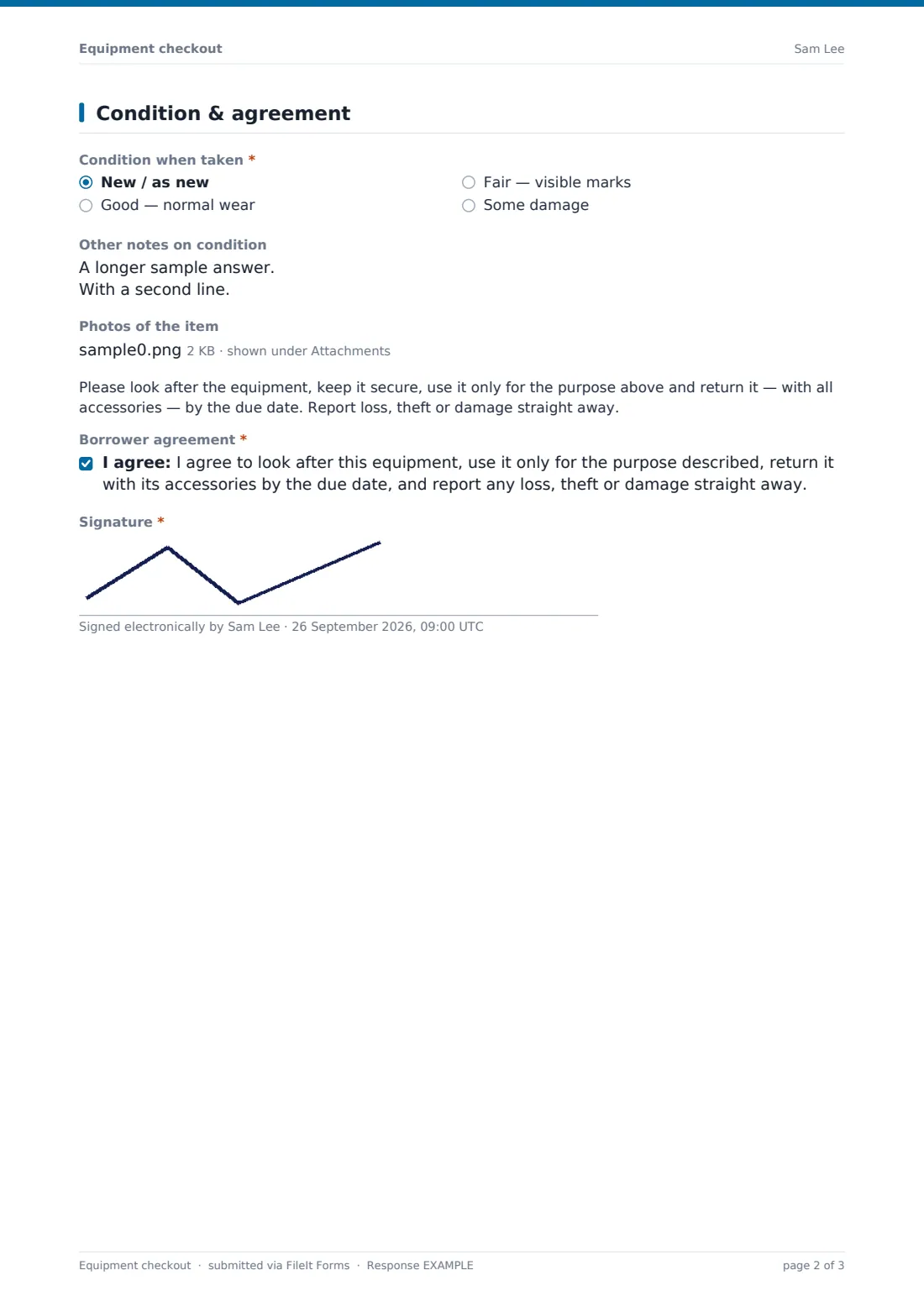
Before anything leaves, the form records its condition: new/as new, good, fair, or some damage. Choosing "some damage" opens a required field asking the borrower to describe it, so there's a record of any existing marks before the loan starts — separate from an optional notes field for anything else worth flagging. An optional photo upload lets the borrower attach pictures of the item, which is especially useful for existing wear or damage.
A plain paragraph reminds the borrower to keep the equipment secure, use it only for the stated purpose, and return it with its accessories by the due date, and to report loss, theft or damage right away. The form closes with a required consent statement covering exactly that, and a signature captured on screen — turning the sign-out into a signed agreement rather than just a note.
Make the template yours
- Replace the generic equipment type list with categories that match what you actually lend out
- Add a question asking for a manager's name if checkouts above a certain value need sign-off
- Set a maximum number of responses if you only have a fixed number of loaner items available at once
- File completed PDFs by asset tag or by borrower so you can search either way later
- Add a reminder in the confirmation message about your specific late-return policy
- Turn on an emailed PDF copy so the borrower has their own record of what they agreed to
- Add extra accessory options specific to a particular item, like lenses for a camera kit
Tips for a better equipment checkout form
- Record condition and photos honestly at checkout — it protects both the borrower and whoever manages the equipment
- Keep the due date required so returns don't drift indefinitely
- Use the asset tag or serial number fields consistently if you manage multiple units of the same item
- Check the Responses table regularly for anything overdue rather than waiting to be asked about a missing item
- Ask borrowers to note accessories accurately — a missing charger is easier to trace back at return if it was logged going out
- Keep the borrower agreement wording matched to your organization's actual equipment policy
Every response becomes a PDF in your vault
As soon as someone submits the checkout form, FileIt saves it as a signed PDF in the vault folder you've set up, and you get an email notification that equipment has gone out. If you've turned on a PDF copy for respondents, the borrower gets their own copy for reference too.
From there, most teams use the Responses table to see what's currently checked out and to whom, filtering by due date to spot anything overdue. When the item comes back, many organizations note the return separately or reuse this same form for a return-condition check — the CSV export makes it easy to keep a running equipment log outside the form itself.
- Start from this template. It opens in the FileIt Forms designer — change any question, add pages, set the rules for when questions appear.
- Share it. Turn on a public link, or send it to people by email, each with their own link. They don’t need a FileIt account.
- Get the answers as PDFs. Each response is saved as a PDF in the vault folder you choose, with uploaded files attached — and listed in a Responses table you can export to CSV.
Equipment checkout form: frequently asked questions
Is this equipment checkout form template free?
Yes — it's included with the Forms app on every FileIt account, including the free plan, and every question can be edited to fit your equipment list.
Do borrowers need a FileIt account to sign equipment out?
No. They fill in the form and sign it from a public link or an emailed request without creating any account.
How do I get a record of each checkout as a PDF?
Every submission automatically becomes a signed PDF, filed in the vault folder you set up in the form's settings, so nothing has to be saved manually.
Can the form require a description of existing damage before an item goes out?
Yes — this template already does that. Selecting "Some damage" on the condition question opens a required field asking for details.
Can I track photos of the equipment's condition?
Yes, there's an optional file upload for photos, useful for documenting existing marks or damage before the loan starts.
How do I build an equipment sign-out form like this from scratch?
Use the FileIt Forms designer to create one from a blank form with drag-and-drop questions and a signature field, or start from this template and adjust it.
Is the signed agreement in this form legally enforceable?
The signature and consent statement record that the borrower agreed to the stated terms, but this template isn't legal advice — check the wording matches your organization's actual policy before relying on it.
Can I limit how many items are checked out at once?
Set a maximum number of responses in the form's settings if you want to cap checkouts to the number of loaner units you actually have.