What is the venue booking request form template?
A venue enquiry that arrives as a one-line email — "Do you have space for 80 people in June?" — usually means several rounds of back-and-forth before you can even put together a quote. This template asks for the details up front: event type, dates, guest numbers, layout preference, catering choice and AV needs, so your first reply can be an actual quote rather than a list of questions.
Putting the enquiry online also makes it easy to compare requests at a glance. Because every enquirer answers the same structured questions, you can scan the Responses table for guest numbers or budget range without opening each message individually — useful when several enquiries come in for the same week.
Each submission is saved as a PDF in your FileIt vault automatically, in whatever folder structure you use for bookings, so the original enquiry is always there to check back against once a booking is confirmed.
- Best for
- Venues, halls, function rooms and event spaces taking booking enquiries
- Filled in by
- Anyone enquiring about hiring the venue — individuals, companies, charities or schools
- Time to complete
- About 4-5 minutes
- Includes
- Conditional questions by event type and catering choice, budget field
Who uses a venue booking request form?
- A function room takes enquiries for weddings, conferences, birthdays and community events through one form
- A conference centre collects AV and layout requirements up front so it can confirm room suitability quickly
- A community hall records whether an enquirer needs in-house catering, so it can route the request to its catering partner
- A venue with variable capacity uses guest numbers and layout preference to check availability before replying
- A wedding venue asks for a preferred and an alternative date to increase the chance of finding a match
- A venue tracks how enquirers found them to understand which marketing channels are driving bookings
Questions on this venue booking request form
24 questions over 3 pages · includes conditional questions, multiple pages.
1 Your details
- Your name*
- Email*
- Phone*
- Booking as An individual · A company · A charity or community group · A school or university
- Organisation name asked only when it applies
- Billing address
2 Your event
- Type of event* Meeting · Conference · Training or workshop · Wedding · Birthday or private party · Corporate party · Community event · Performance or screening · Memorial or wake · Something else
- Tell us what kind of event* asked only when it applies
- Preferred date*
- Alternative date
- Start time*
- Finish time*
- Do you need access beforehand to set up?
- Access needed from asked only when it applies
- Expected number of guests*
- Preferred layout Theatre (rows of chairs) · Classroom (tables facing front) · Banquet (round tables) · Boardroom · Cabaret · Standing reception
3 Services & budget
- Catering* Venue's in-house catering · We'll bring our own caterer · No catering needed · Not sure yet
- What would you like? asked only when it applies Tea, coffee & water · Breakfast · Buffet lunch · Canapés · Sit-down dinner · Bar
- Dietary needs to plan for asked only when it applies
- Audio-visual and equipment Projector & screen · Microphones · PA / sound system · Video-conferencing · Stage or lectern · Stage lighting · Guest Wi-Fi · Flipcharts
- Accessibility requirements
- Approximate budget
- How did you hear about us? Web search · Social media · Recommendation · I've booked before · Venue directory · Other
- Anything else?
The venue booking request form, page by page
1 Your details
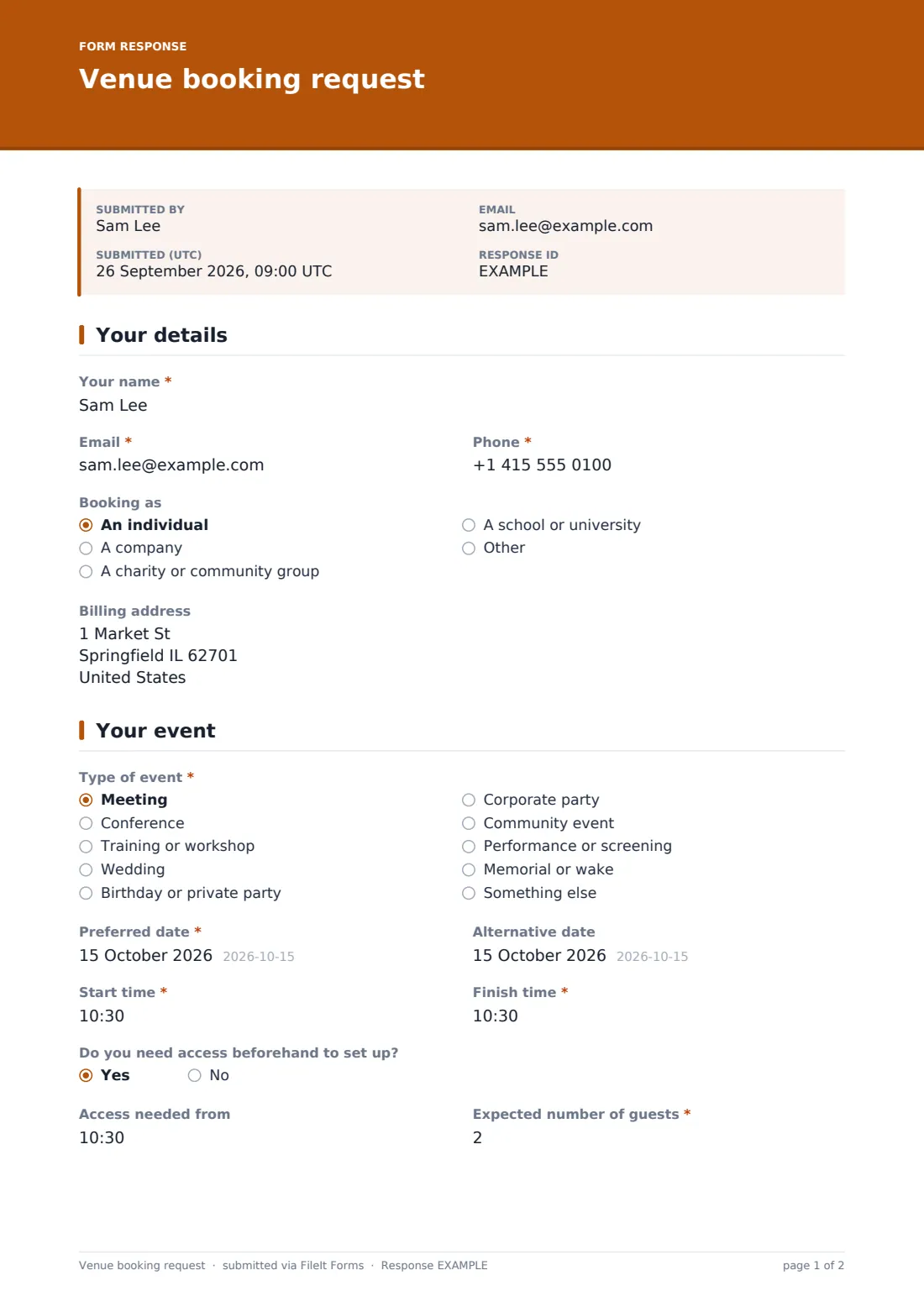
The enquirer gives their name, email and phone, and indicates whether they're booking as an individual, a company, a charity or community group, or a school — choosing anything other than "individual" reveals a field for the organisation's name. An optional billing address is collected here too, ready for a quote or invoice further down the line.
2 Your event
A dropdown of common event types — meeting, conference, training, wedding, birthday, corporate party, community event, performance, memorial, or something else — sets the context for the enquiry; choosing "something else" reveals a field to describe it. The enquirer then gives a preferred date and an optional alternative date, start and finish times, and whether they need access beforehand to set up (which reveals a time field if so).
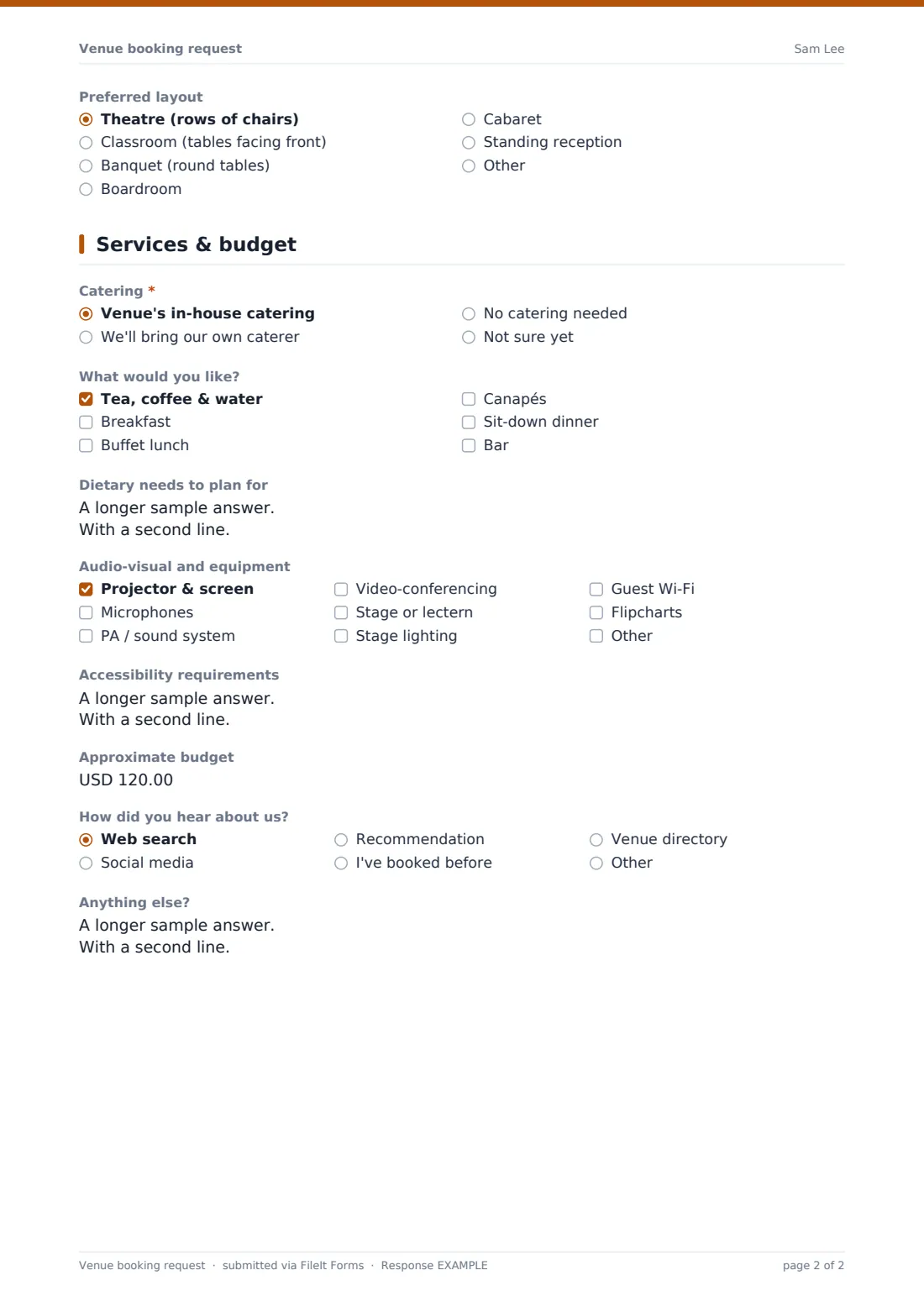
Expected guest numbers and a preferred layout — theatre, classroom, banquet, boardroom, cabaret or standing, with an "Other" option — complete the picture your team needs to check whether the room and layout actually work for the group size.
3 Services & budget
A catering question offers the venue's in-house catering, the enquirer's own caterer, no catering, or not sure yet; choosing in-house catering reveals a checklist of styles (drinks, breakfast, buffet, canapés, dinner, bar) and a field for dietary needs to plan for. A checklist of audio-visual and equipment options — projector, microphones, PA system, video-conferencing, stage, lighting, guest Wi-Fi, flipcharts, plus an "Other" option — captures technical requirements regardless of catering choice.
An accessibility requirements field, an approximate budget, and a how-did-you-hear-about-us dropdown round out the page, along with an open Anything else? field for anything that doesn't fit elsewhere.
Make the template yours
- Adjust the layout options to match the room configurations your venue actually offers
- Add a capacity note or help text next to guest numbers if your space has a hard maximum
- Remove the budget question if you prefer to always quote based on requirements rather than a stated budget
- Route enquiries above a certain guest number to a different notification email, such as your events manager
- Set a closing date or maximum responses if you're only accepting enquiries for a specific season or event window
- Add fields for specific dates you're already fully booked, so enquirers self-select an alternative from the start
- File each enquiry's PDF into a folder by month or by event type, matching how your team plans ahead
Tips for a better venue booking request form
- Reply to every enquiry quickly, even just to confirm you've received it — venues that respond fastest often win the booking
- Ask for an alternative date on every enquiry form, since it noticeably increases the number you can actually accommodate
- Keep the AV and equipment list specific to what you genuinely provide, rather than a generic checklist that raises false expectations
- Use the accessibility field seriously — plan for a hearing loop, step-free access or parking before the day, not on it
- Track "how did you hear about us" over time to see which channels are worth investing more in
- Follow up enquiries that go quiet after a quote, since a gentle nudge often converts a maybe into a booking
Every response becomes a PDF in your vault
As soon as someone submits an enquiry, FileIt saves it as a PDF in your vault, in the folder you've set up for bookings, and sends you an email notification right away. If you've turned on the optional copy, the enquirer also receives a PDF of what they submitted.
Your events team then reviews the enquiry in the Responses table, checks availability for the requested date, and typically replies by email with a tailored quote based on guest numbers, catering and AV needs. Because every enquiry follows the same structure, comparing several requests for a busy week is far quicker than working through a stack of individual emails.
- Start from this template. It opens in the FileIt Forms designer — change any question, add pages, set the rules for when questions appear.
- Share it. Turn on a public link, or send it to people by email, each with their own link. They don’t need a FileIt account.
- Get the answers as PDFs. Each response is saved as a PDF in the vault folder you choose, with uploaded files attached — and listed in a Responses table you can export to CSV.
Venue booking request form: frequently asked questions
Is this venue booking request form template free?
Yes. It's included in FileIt's Forms app on every plan, including the free plan, and every question can be edited to fit your venue.
Do people need a FileIt account to send an enquiry?
No. Share a public link on your website or in your marketing, and enquirers submit the form without creating an account.
How do we see the enquiries that come in?
Each one is saved automatically as a PDF in your FileIt vault, and you can browse, filter or export the full list of enquiries to CSV.
Can we collect a deposit or take payment through this form?
No, the Forms app doesn't process payments — this form only collects the enquiry details so you can follow up with a quote and arrange payment separately.
Can we ask different questions depending on the type of event?
Yes, the template already adapts slightly by event type and catering choice, and you can add further conditional questions in the designer.
Can we limit enquiries to certain dates or a maximum number?
Yes, the Forms app lets you set a closing date or a maximum number of responses if you need to control how many enquiries you accept.
Can the form check whether a date is actually available?
No, the form collects the enquiry only — your team checks availability separately before replying with a quote.
Can we track where our enquiries are coming from?
Yes, there's a how-did-you-hear-about-us question with common options like web search, social media, recommendation or a venue directory.