What is the wedding RSVP form template?
Wedding reply cards have a way of getting lost in the post, filled in illegibly, or simply forgotten in a kitchen drawer until the week before the big day. This template moves the RSVP online: guests reply from their phone, meal choices and dietary needs are recorded clearly rather than scrawled in the margin, and every response is exactly where you left it when the caterer asks for final numbers.
Because the form only shows the questions that apply, guests who decline aren't asked about a plus-one's meal choice, and only guests bringing someone see the plus-one name and meal fields at all — which keeps the reply quick for everyone and avoids the confusing blank fields that paper cards often have.
Every reply becomes a PDF saved automatically to your FileIt vault, so the full guest list — who's coming, who isn't, and every meal choice — sits in one place you can hand to a caterer or venue without retyping a single name.
- Best for
- Couples planning a wedding, and wedding planners managing guest replies on their behalf
- Filled in by
- Invited guests, replying for themselves and any plus-one
- Time to complete
- About 2-3 minutes
- Includes
- Conditional plus-one and meal fields, dietary checklist, song request
Who uses a wedding RSVP form?
- A couple sends personal RSVP links to each invited guest by email so replies come back tagged with their name
- A wedding planner collects final meal counts across a multi-day celebration, including welcome drinks and a farewell brunch
- A couple with a formal dinner asks guests to choose between beef, fish, a vegetarian or a vegan option in advance
- A destination wedding uses the form to confirm which parts of the weekend each guest will actually attend
- A couple builds their reception playlist by collecting a song request from every guest who's coming
- A venue coordinator receives a dietary needs summary ahead of the big day, including any serious allergies flagged for the kitchen
Questions on this wedding RSVP form
14 questions over 2 pages · includes conditional questions, multiple pages.
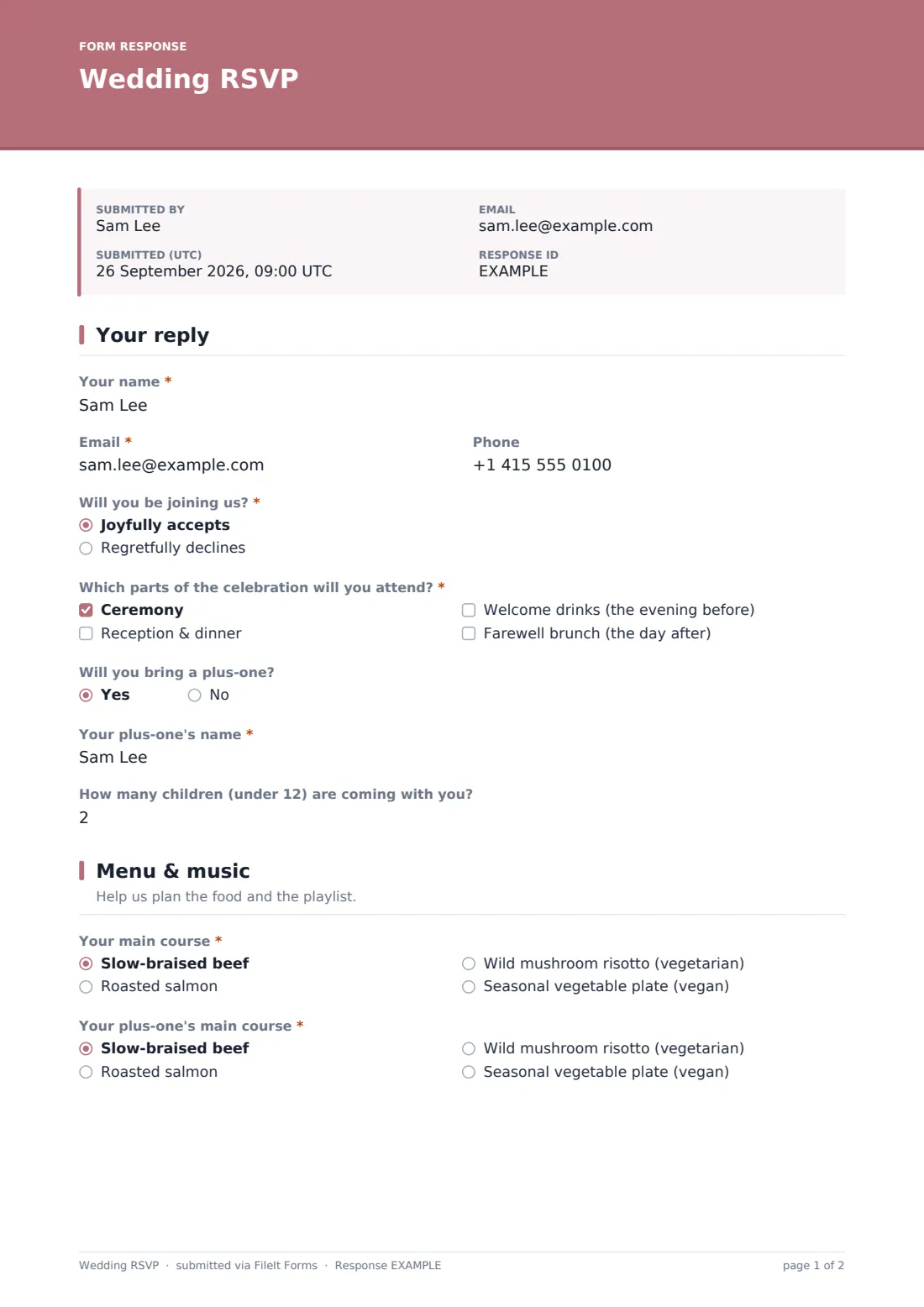
1 Your reply
- Your name*
- Email*
- Phone
- Will you be joining us?* Joyfully accepts · Regretfully declines
- Which parts of the celebration will you attend?* asked only when it applies Ceremony · Reception & dinner · Welcome drinks (the evening before) · Farewell brunch (the day after)
- Will you bring a plus-one? asked only when it applies
- Your plus-one's name* asked only when it applies
- How many children (under 12) are coming with you? asked only when it applies
2 Menu & music
- Your main course* asked only when it applies Slow-braised beef · Roasted salmon · Wild mushroom risotto (vegetarian) · Seasonal vegetable plate (vegan)
- Your plus-one's main course* asked only when it applies Slow-braised beef · Roasted salmon · Wild mushroom risotto (vegetarian) · Seasonal vegetable plate (vegan)
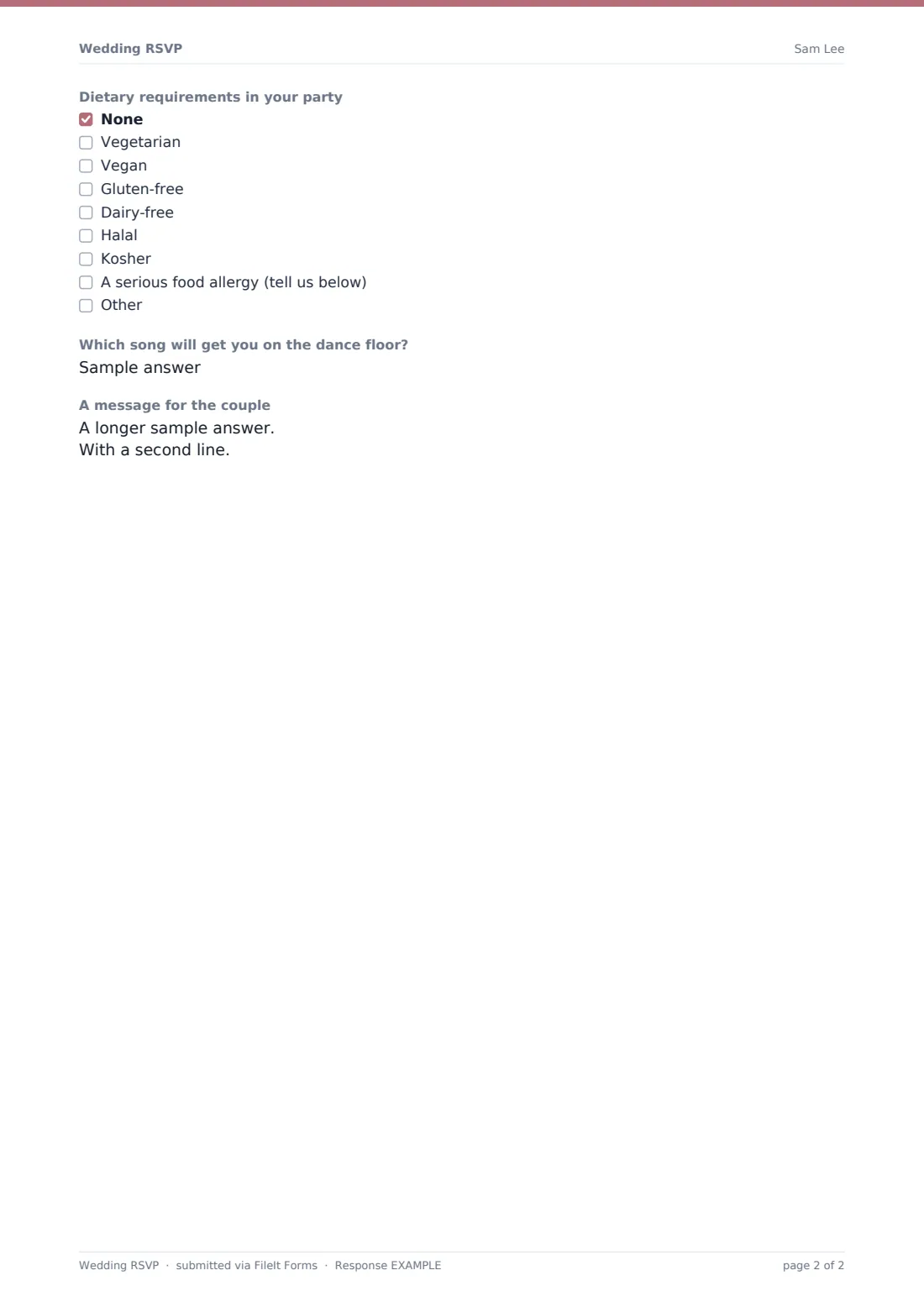
- Dietary requirements in your party asked only when it applies None · Vegetarian · Vegan · Gluten-free · Dairy-free · Halal · Kosher · A serious food allergy (tell us below)
- Tell us about the allergy* asked only when it applies
- Which song will get you on the dance floor? asked only when it applies
- A message for the couple
The wedding RSVP form, page by page
1 Your reply
Guests start with their name (as it appears on the invitation), email and optional phone, followed by the key question: Will you be joining us? A joyful accept reveals which parts of the celebration they'll attend — ceremony, reception & dinner, welcome drinks the evening before, or a farewell brunch the day after — since not every guest is invited to every event.
Accepting also reveals a plus-one question, which only shows a name field if the guest says yes, and a children's headcount for guests whose invitation includes children. Anyone who declines skips straight past all of this, keeping their reply to a single question.
2 Menu & music
Guests attending choose their own main course — slow-braised beef, roasted salmon, a vegetarian mushroom risotto, or a vegan vegetable plate — and if they're bringing a plus-one, a second meal choice appears for that guest too. A checklist covers dietary requirements across the whole party, from vegetarian and vegan through to halal, kosher and gluten-free, with a "serious food allergy" option that reveals a required field asking for detail the kitchen needs to know.
A lighthearted song request — Which song will get you on the dance floor? — and an optional message for the couple round out the reply, giving guests a chance to add something personal alongside the practical RSVP details.
Make the template yours
- Adjust the celebration events checklist to match your actual wedding weekend — remove welcome drinks or brunch if you're not hosting them
- Change the menu options to your caterer's actual choices, including naming dishes the way they'll appear on the day
- Add a hotel or accommodation question if you've arranged room blocks guests need to confirm
- Set a closing date matching the deadline your caterer or venue needs for final numbers
- Turn on the maximum responses setting if your guest list and venue capacity are both fixed
- Add a gift registry link or note in the confirmation message, if you'd like to share it after guests reply
- File responses into a single wedding folder so the whole guest list stays together as one document set
Tips for a better wedding RSVP form
- Send the RSVP link well ahead of your catering deadline, since replies tend to trickle in slowly at first
- Follow up personally with guests who haven't replied a week or two before your cut-off date
- Keep meal options to a small, clear set — too many choices makes final catering counts harder to plan around
- Take allergy answers seriously and pass them directly to your caterer, not just the general dietary checklist
- Export the guest list to CSV in good time to share final numbers with your venue and caterer
- Remember this form only records what a guest tells you — always double check numbers against your original invitation list
Every response becomes a PDF in your vault
As soon as a guest submits their reply, FileIt saves it as a PDF in your vault, and you're notified by email right away, so you can watch your guest list fill in as replies arrive. If you've turned on the optional copy, the guest also receives a copy of their own RSVP for their records.
Couples typically use the Responses table to track who's replied and who hasn't, filter by meal choice for the caterer, and export the final list to CSV once the reply deadline has passed. The song requests and messages collected along the way often end up informing the reception playlist or a keepsake for the couple afterward.
- Start from this template. It opens in the FileIt Forms designer — change any question, add pages, set the rules for when questions appear.
- Share it. Turn on a public link, or send it to people by email, each with their own link. They don’t need a FileIt account.
- Get the answers as PDFs. Each response is saved as a PDF in the vault folder you choose, with uploaded files attached — and listed in a Responses table you can export to CSV.
Wedding RSVP form: frequently asked questions
Is this wedding RSVP form template free?
Yes. It's included in FileIt's Forms app on every plan, including the free plan, and every question can be edited to match your wedding.
Do guests need a FileIt account to RSVP?
No. Send each guest a personal emailed invitation link, or share one public link — either way, no account is needed to reply.
How do we track who has and hasn't replied?
Every RSVP is saved automatically as a PDF, and the Responses table shows all replies, which you can filter and export to CSV for your caterer or venue.
Can guests RSVP for a plus-one?
Yes, accepting the invitation reveals a plus-one question, and answering yes to that reveals a name and meal choice field for the plus-one too.
Can we track dietary requirements and allergies separately?
Yes, there's a dietary checklist covering common needs, plus a required detail field that appears if a guest flags a serious food allergy.
Can we limit the number of RSVPs we accept?
Yes, the Forms app lets you set a maximum number of responses or a closing date, useful if your venue has a fixed capacity.
Can guests confirm which parts of the wedding weekend they're attending?
Yes, accepting guests can tick which events they'll be at — such as the ceremony, reception, welcome drinks or a farewell brunch.
Is there a way to collect song requests for the reception?
Yes, there's a dedicated song request question for every guest who accepts the invitation.