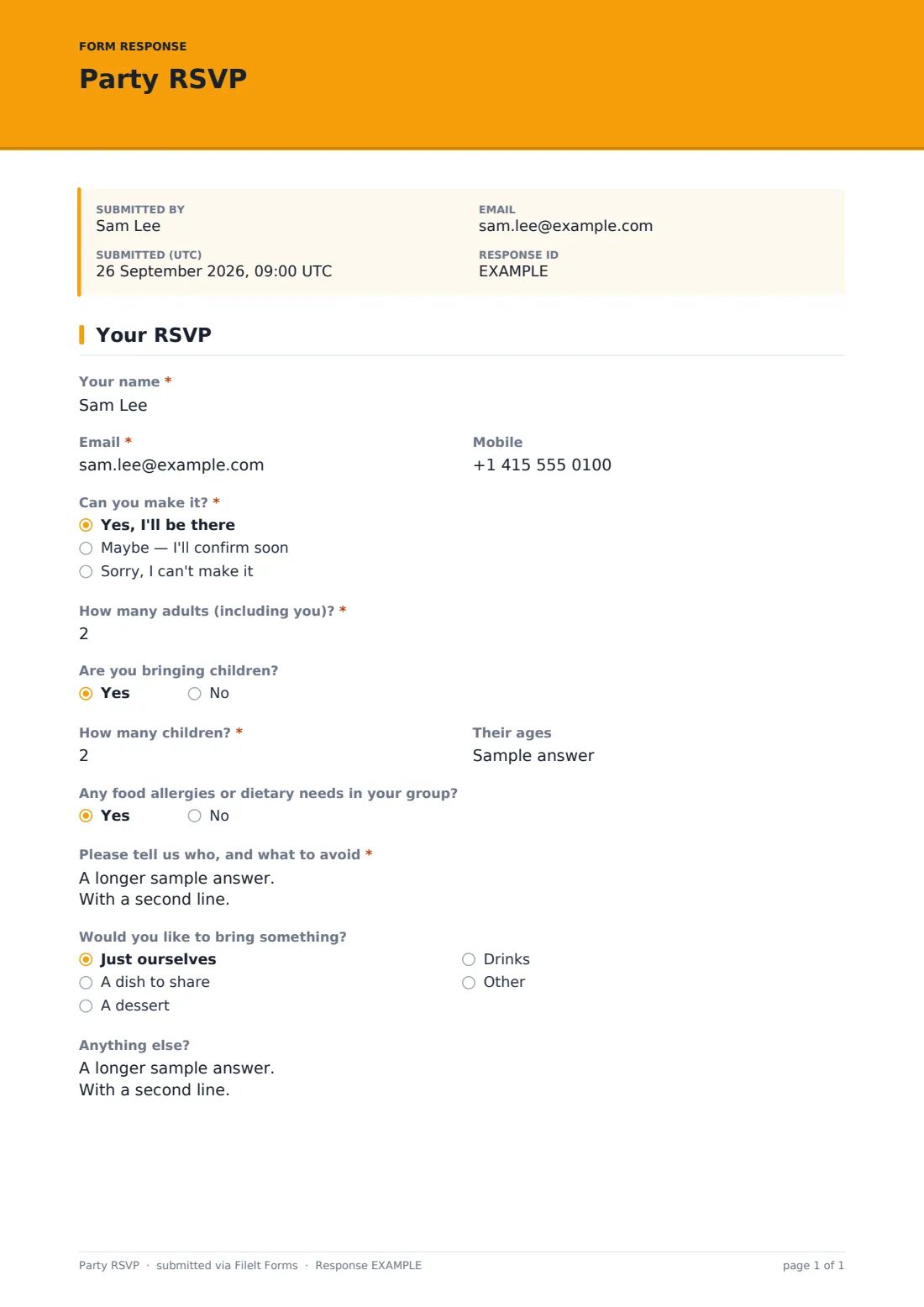
What is the party RSVP form template?
Chasing RSVPs by text is fine for five guests and a nightmare for fifty. This template gives guests a one-page form that takes under a minute to fill in: whether they can come, how many adults and children, and any food allergies you need to know about before you start cooking.
It's deliberately simple — a single page, no account needed, works just as well shared in a group chat as printed as a QR code on an invitation. Guests who aren't sure yet can say "maybe" and confirm later, and anyone bringing children gets asked their ages so you can plan activities or party bags accordingly.
Every RSVP is saved as a PDF in your FileIt vault the moment someone submits it, so instead of scrolling back through old texts to remember who said yes, you have one running list you can check at a glance.
- Best for
- Birthdays, family get-togethers and informal celebrations
- Filled in by
- Anyone invited to the party
- Time to complete
- Under a minute
- Includes
- Adult and child headcounts, allergy details, and an optional "bring a dish" question
Who uses a party RSVP form?
- A birthday party where the host needs an accurate headcount for food and seating
- A family reunion or get-together spanning several households
- A kids' party where the host needs to know ages for activities and party bags
- A potluck-style gathering where guests can offer to bring a dish, dessert or drinks
- A milestone celebration where the host wants to track allergies before deciding on catering
- Any casual event where a group chat RSVP has gotten too messy to track
Questions on this party RSVP form
12 questions · includes conditional questions.
1 Your RSVP
- Your name*
- Email*
- Mobile
- Can you make it?* Yes, I'll be there · Maybe — I'll confirm soon · Sorry, I can't make it
- How many adults (including you)?* asked only when it applies
- Are you bringing children? asked only when it applies
- How many children?* asked only when it applies
- Their ages asked only when it applies
- Any food allergies or dietary needs in your group? asked only when it applies
- Please tell us who, and what to avoid* asked only when it applies
- Would you like to bring something? asked only when it applies Just ourselves · A dish to share · A dessert · Drinks
- Anything else?
The party RSVP form, page by page
1 Who's replying
The form opens with Your name, Email and Mobile, then the question that matters most: Can you make it?, with Yes, Maybe or Sorry, I can't as the options. Anyone who isn't declining moves straight on to the headcount questions rather than being asked anything irrelevant.
2 Headcount & allergies
Guests confirm How many adults (including you)? and whether they're Bringing children, which opens fields for how many and their ages — handy for planning activities or party bags. An Any food allergies or dietary needs question opens a details field asking who's affected, what to avoid, and how serious it is, so the host can plan food with real information rather than guessing.
3 Bringing something & a note
A lighthearted Would you like to bring something? question offers a dish, dessert, drinks or just themselves — entirely optional. A final Anything else? field leaves room for a short note to the host, whether that's a logistics question or just an excited reply.
Make the template yours
- Remove the "bring something" question entirely if you're not running a potluck-style event
- Add a question for song requests or a gift registry link if it suits the occasion
- Set a maximum number of responses if you're working with a fixed venue capacity
- Set a closing date a few days before the party so you have time to finalise catering numbers
- Turn off collecting phone numbers if you only need email to send updates
- Change the confirmation message to include the party address or a map link for guests who RSVP yes
Tips for a better party RSVP form
- Send the RSVP link out early enough that guests have time to check their calendars, but not so early they forget to reply
- Set a closing date and follow up individually with anyone who hasn't responded a few days before
- Take allergy answers seriously even for a casual party — a quick question here avoids a stressful moment on the day
- Keep the form to one page; a long RSVP form is the fastest way to make people put off answering it
- Check the Responses table a day or two before the party for a final accurate headcount
Every response becomes a PDF in your vault
The moment a guest submits their RSVP, FileIt saves it as a PDF in your vault and you get a notification, so you always know who's replied without needing to check a group chat. If you've turned on the emailed copy, the guest gets their own confirmation too.
Most hosts keep an eye on the Responses table in the days leading up to the party, using the running headcount to plan food and seating, and the allergy answers to double-check anything that needs separate catering. It's also easy to export the whole guest list to CSV if you want a simple checklist for the day itself.
- Start from this template. It opens in the FileIt Forms designer — change any question, add pages, set the rules for when questions appear.
- Share it. Turn on a public link, or send it to people by email, each with their own link. They don’t need a FileIt account.
- Get the answers as PDFs. Each response is saved as a PDF in the vault folder you choose, with uploaded files attached — and listed in a Responses table you can export to CSV.
Party RSVP form: frequently asked questions
Is this party RSVP form template free?
Yes, it's included in FileIt's Forms app on every account, including the free plan, and every question can be edited or removed.
Do guests need a FileIt account to RSVP?
No. You share a link by text, email or a QR code on the invitation, and guests reply without creating an account.
Do we get a record of every RSVP?
Yes, each reply is saved as a PDF automatically in your FileIt vault, and you can also see and export the whole guest list from the Responses table.
Can guests say "maybe" and update their answer later?
Yes — the attending question includes a "maybe, I'll confirm soon" option, and guests can submit the form again later to update their reply if multiple responses are allowed.
Can we track food allergies for the whole party?
Yes, anyone who flags an allergy or dietary need is asked for details on who it affects, what to avoid, and how serious it is.
Can we limit the number of guests who can RSVP?
Yes, you can set a maximum number of responses in the form settings if you're working with a fixed venue capacity.
Can guests offer to bring food?
Yes, there's an optional question asking if they'd like to bring a dish, dessert or drinks, or just come as they are.
Is this suitable for a formal event like a wedding instead?
It's built for casual get-togethers — for a wedding, the dedicated wedding RSVP template covers details like plus-ones and meal choices more specifically.