What is the race registration form template?
A race registration form collects everything an event needs from every entrant — distance, category, emergency contact and any medical conditions — in one consistent submission, instead of a spreadsheet stitched together from emails and paper sign-up sheets. It's built for events run by clubs, schools and small race organisers who need something reliable without complex event-management software.
Paper entry forms get left in a bag, and a shared spreadsheet is easy to fill in inconsistently, especially for details like age category or emergency contact that matter most on the day itself. A form asks every entrant the same required questions, including a signed waiver and safety declarations, before they can submit.
This template runs on FileIt's Forms app, included on every FileIt account including the free plan. Entrants fill it in and submit it with no FileIt account of their own. Every entry becomes a PDF automatically filed in your vault, giving you a dated, complete record for each runner, rider or swimmer.
- Best for
- Running clubs, cycling sportives, school fun runs and small race organisers
- Filled in by
- Entrants signing up to take part
- Time to complete
- About 6 minutes
- Includes
- Distance and category selection, guardian consent for under-18s, medical and waiver declarations
Who uses a race registration form?
- A local 5K or 10K run taking entries directly from its own website
- A club-organised half marathon collecting age-category and club affiliation details
- A school fun run with a kids' distance requiring parent or guardian consent
- A relay event where teams register under a shared team name
- An organiser recording emergency contacts and medical conditions for the medical team
- A race collecting T-shirt sizes ahead of ordering event merchandise
Questions on this race registration form
26 questions over 4 pages · includes conditional questions, multiple pages, consent checkbox.
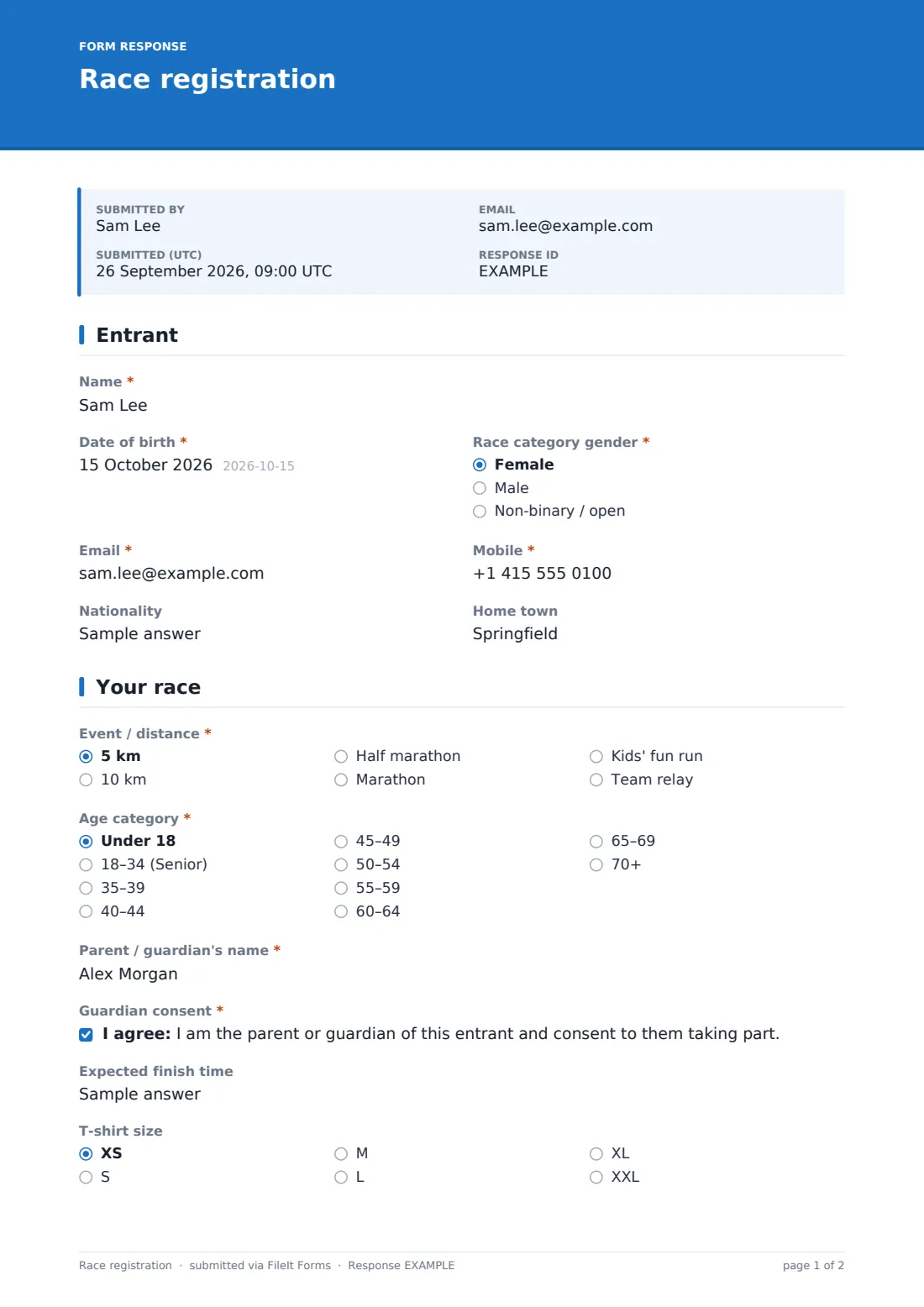
1 Entrant
- Name*
- Date of birth*
- Race category gender* Female · Male · Non-binary / open
- Email*
- Mobile*
- Nationality
- Home town
2 Your race
- Event / distance* 5 km · 10 km · Half marathon · Marathon · Kids' fun run · Team relay
- Relay team name* asked only when it applies
- Age category* Under 18 · 18–34 (Senior) · 35–39 · 40–44 · 45–49 · 50–54 · 55–59 · 60–64 · 65–69 · 70+
- Parent / guardian's name* asked only when it applies
- Guardian consent* asked only when it applies
- Expected finish time
- T-shirt size XS · S · M · L · XL · XXL
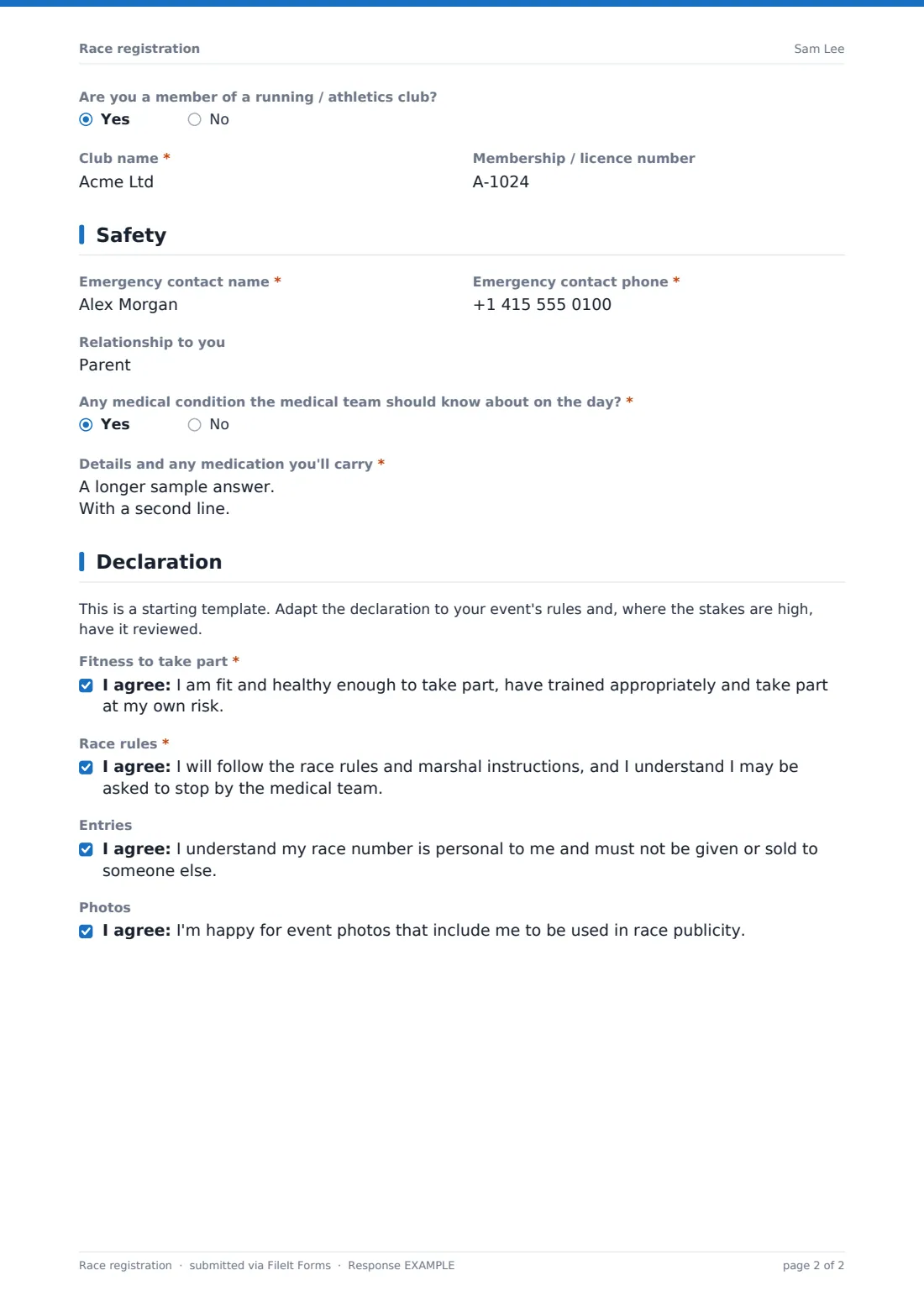
- Are you a member of a running / athletics club?
- Club name* asked only when it applies
- Membership / licence number asked only when it applies
3 Safety
- Emergency contact name*
- Emergency contact phone*
- Relationship to you
- Any medical condition the medical team should know about on the day?*
- Details and any medication you'll carry* asked only when it applies
4 Declaration
- Fitness to take part*
- Race rules*
- Entries
- Photos
The race registration form, page by page
1 Entrant
The form opens with Name (as it should appear in the results), Date of birth, and Race category gender for category results, alongside Email and Mobile. Optional Nationality and Home town fields are useful for results pages and local press, without holding up anyone who'd rather skip them.
2 Your race
Event / distance covers 5K, 10K, half marathon, marathon, a kids' fun run, or a team relay, with a Relay team name field appearing only for relay entries. Age category is based on age on race day, and choosing Under 18 opens a required parent or guardian's name and a guardian consent statement, so no minor can complete an entry without that consent being recorded. Expected finish time helps place entrants in the right start wave, T-shirt size is optional, and Are you a member of a running / athletics club? opens fields for the club name and membership number when relevant.
3 Safety
Emergency contact name, phone and relationship are all collected before any medical question, so the information the medical team is most likely to need first is easy to find. Any medical condition the medical team should know about on the day? is required, and answering yes opens a field for details and any medication the entrant will carry — covering conditions like asthma, diabetes, epilepsy or a heart condition, plus allergies.
4 Declaration
A plain note reminds organisers this is a starting template to adapt to their own event's rules, and recommends review where the stakes are high. Entrants then confirm they are fit and healthy enough to take part and take part at their own risk, agree to follow race rules and marshal instructions, and can optionally agree that their race number is personal to them and that event photos including them may be used in race publicity.
Make the template yours
- Add or remove distances to match exactly what your event offers this year
- Adjust age categories to match your federation's or governing body's own bands
- Add a field for a chip timing number or bib collection point if your event uses one
- Turn on a maximum number of responses to cap entries once your event reaches capacity
- Add a closing date so entries stop automatically ahead of race day
- Adjust the waiver wording to reflect your own event's insurance and safety requirements — and consider having it checked
Tips for a better race registration form
- Have your waiver and safety declarations reviewed to make sure they fit your event and local rules
- Collect emergency contact and medical information for every entrant, not just those doing longer distances
- Set expected finish time as optional but encourage it — it makes start waves much easier to organise
- Keep club and licence questions optional so casual entrants aren't held up by fields that don't apply to them
- Export entries to CSV well before race day to plan bibs, T-shirts and results categories
- Remind entrants under 18 that a parent or guardian must complete the consent section
Every response becomes a PDF in your vault
As soon as an entrant submits the form, FileIt saves their entry as a PDF named with their entrant name and files it in the vault folder you've set up for the event. With owner notification and a copy to the entrant both switched on by default, your organising team is alerted immediately and the entrant has a record of exactly what they agreed to.
From there, most organisers use the Responses table to track entries against capacity, filter by distance or age category, and export the full list to CSV for bib allocation, timing systems or T-shirt ordering. The usual next step is confirming race-day details and start wave by email, exactly as the built-in confirmation message promises.
- Start from this template. It opens in the FileIt Forms designer — change any question, add pages, set the rules for when questions appear.
- Share it. Turn on a public link, or send it to people by email, each with their own link. They don’t need a FileIt account.
- Get the answers as PDFs. Each response is saved as a PDF in the vault folder you choose, with uploaded files attached — and listed in a Responses table you can export to CSV.
Race registration form: frequently asked questions
Is this race registration form template free?
Yes. It's included with the Forms app on every FileIt account, including the free plan.
Do entrants need a FileIt account to register?
No. Entrants fill in and submit the form using only the link you share — they never need a FileIt account.
How do I get entries as PDFs?
Every submission is automatically saved as a PDF in the vault folder you choose, and you can browse, open or export the full entry list to CSV from the Responses table.
Does this form take entry fee payments?
No. FileIt doesn't handle payments or e-commerce — this form collects the entry details as a PDF, and any entry fee needs to be taken through a separate payment method.
Can under-18s enter using this form?
Yes. Selecting the under-18 age category opens a required parent or guardian's name and a guardian consent statement before the entry can be submitted.
Is the waiver on this form legally binding?
FileIt doesn't provide legal advice, and this template is only a starting point — organisers should adapt the wording to their event and, where the stakes are high, have it reviewed to make sure it fits local rules.
Can I add my own distances or categories?
Yes. Every option in the designer, including distances and age categories, can be edited to match your event.
Can I limit the number of entries?
Yes — you can set a maximum number of responses or a closing date so entries stop once your event reaches capacity.