What is the fitness waiver & health screening form template?
Before anyone starts a gym membership, a class or personal training, most fitness businesses need two things on file: an honest answer to a handful of basic health screening questions, and a signed acknowledgement that exercise carries some risk. This fitness waiver and health screening template combines both into a single online form instead of a clipboard at the front desk.
Filling this in online rather than on paper means the answers are legible, nothing gets skipped, and the whole thing — screening answers, risk statement and signature — travels together as one document rather than a loose sheet that can go missing. Conditional logic keeps it efficient too: if someone answers no to every health question, they never see the follow-up detail box; answer yes to any of them, and the form asks for more before moving on.
Each signed waiver becomes a PDF saved automatically in your FileIt vault, giving your business a dated, retrievable record for every participant, whether that's a one-off class visitor or a new long-term member.
- Best for
- Gyms, personal trainers, fitness classes and sports clubs
- Filled in by
- The participant, or a parent/guardian if under 18
- Time to complete
- About 5 minutes
- Includes
- PAR-Q-style screening, assumption of risk, release, signature
Who uses a fitness waiver & health screening form?
- A new gym member completes health screening and a waiver before their first visit
- A personal trainer collects this before a client's first one-to-one session
- A fitness class organiser gets it signed before a drop-in participant joins a session
- A sports club uses it for adult members joining training for the first time
- A one-off event, like a charity fitness challenge, collects a signed waiver from every participant
- A studio keeps a record of medical clearance for members who flagged a health condition
Questions on this fitness waiver & health screening form
24 questions over 3 pages · includes signature, file upload, conditional questions, multiple pages, consent checkbox.
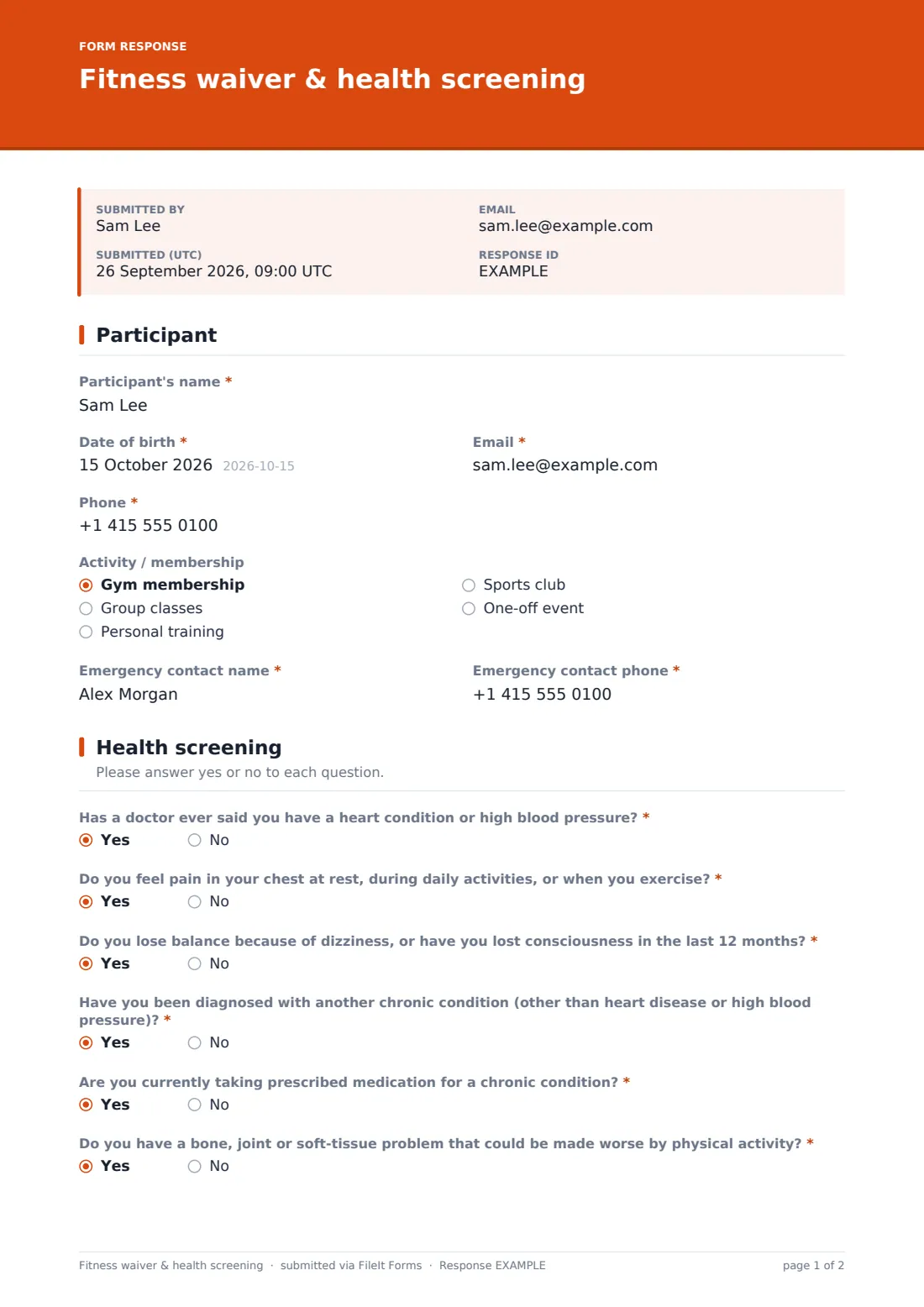
1 Participant
- Participant's name*
- Date of birth*
- Email*
- Phone*
- Activity / membership Gym membership · Group classes · Personal training · Sports club · One-off event
- Emergency contact name*
- Emergency contact phone*
2 Health screening
- Has a doctor ever said you have a heart condition or high blood pressure?*
- Do you feel pain in your chest at rest, during daily activities, or when you exercise?*
- Do you lose balance because of dizziness, or have you lost consciousness in the last 12 months?*
- Have you been diagnosed with another chronic condition (other than heart disease or high blood pressure)?*
- Are you currently taking prescribed medication for a chronic condition?*
- Do you have a bone, joint or soft-tissue problem that could be made worse by physical activity?*
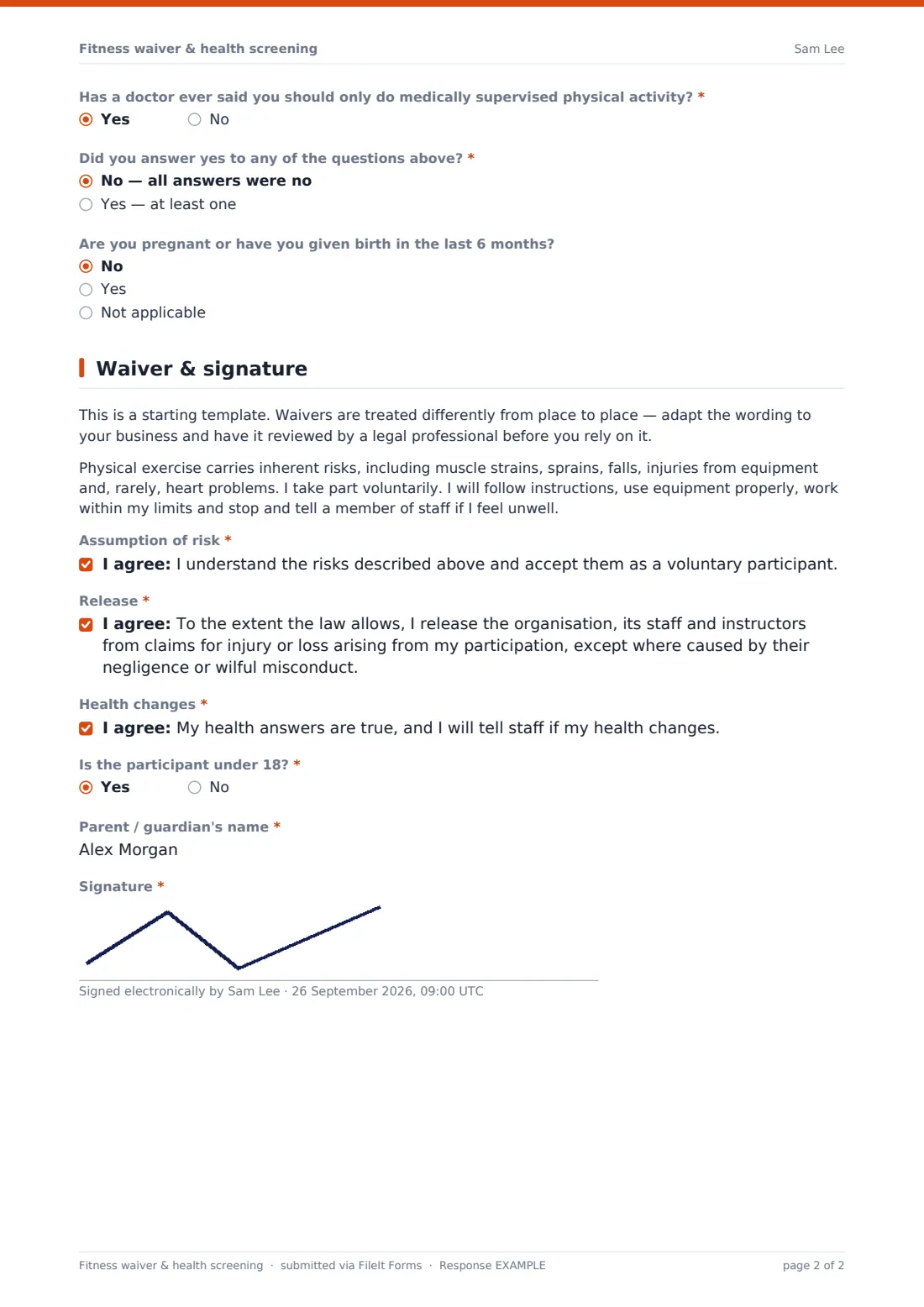
- Has a doctor ever said you should only do medically supervised physical activity?*
- Did you answer yes to any of the questions above?* No — all answers were no · Yes — at least one
- Please tell us more* asked only when it applies
- Doctor's clearance (if you have one) asked only when it applies
- Are you pregnant or have you given birth in the last 6 months? No · Yes · Not applicable
3 Waiver & signature
- Assumption of risk*
- Release*
- Health changes*
- Is the participant under 18?*
- Parent / guardian's name* asked only when it applies
- Signature*
The fitness waiver & health screening form, page by page
1 Participant
Basic details come first: Participant's name, Date of birth, Email, Phone and an Activity / membership dropdown (gym membership, group classes, personal training, sports club or a one-off event), plus an Emergency contact name and phone that stay on file for the duration of their participation.
2 Health screening
Seven yes/no questions modelled on a standard pre-activity screening cover heart conditions or high blood pressure, chest pain, dizziness or loss of consciousness, other chronic conditions, prescribed medication, bone or joint problems, and whether a doctor has advised medically supervised activity only. A summary question, Did you answer yes to any of the questions above, decides what happens next: answering yes requires more detail on which question, the condition, and anything to avoid, plus an optional upload for a doctor's clearance letter. A separate question asks about pregnancy or having given birth in the last six months.
3 Waiver & signature
A plain note explains that this waiver is a starting template and should be reviewed by a legal professional and adapted to local rules before relying on it. A short paragraph describes the inherent risks of exercise — strains, sprains, falls, equipment injuries and, rarely, heart problems — and three separate consent statements cover assumption of risk, a release of the organisation except for negligence or wilful misconduct, and confirming health answers are true with an undertaking to report any change. A yes/no question about the participant being under 18 reveals a field for a parent or guardian's name, and the form closes with a signature from the participant, or the parent or guardian if they're a minor.
Make the template yours
- Replace the placeholder risk and release wording with text reviewed by your own legal adviser for where you operate
- Add activity-specific risks (for example for a pool, climbing wall or contact sport) to the risk paragraph
- Set a required upload for medical clearance rather than optional, if your insurer or policy requires it
- Add your own membership or class terms alongside the waiver if you want a single combined sign-up
- File signed waivers by activity type so gym, class and personal training waivers stay easy to find separately
- Add a renewal reminder if your business asks members to re-confirm their health status periodically
Tips for a better fitness waiver & health screening form
- Never suggest a 'yes' answer to a health question will stop someone joining — the help text already reassures people it just means a few more questions
- Keep the risk statement honest and specific to your activity rather than vague boilerplate
- Always have a legal professional review the waiver and risk wording for your location before relying on it — this template is a starting point, not legal advice
- Store medical clearance letters as attachments rather than asking staff to remember verbal disclosures
- Revisit a participant's health answers periodically, especially for ongoing memberships, since circumstances change
Every response becomes a PDF in your vault
As soon as someone signs and submits the waiver, FileIt saves the whole thing — screening answers, risk statements and signature — as a PDF in the vault folder you've set up, with an immediate email notification so your team knows a new participant is cleared to start.
Most gyms and trainers check the Responses table before a person's first session to confirm the waiver is on file and to note anything flagged in the health screening, such as a condition to be aware of during training. Because it's stored as a signed PDF rather than a loose paper form, it's easy to retrieve later if a question ever comes up about what a participant disclosed.
- Start from this template. It opens in the FileIt Forms designer — change any question, add pages, set the rules for when questions appear.
- Share it. Turn on a public link, or send it to people by email, each with their own link. They don’t need a FileIt account.
- Get the answers as PDFs. Each response is saved as a PDF in the vault folder you choose, with uploaded files attached — and listed in a Responses table you can export to CSV.
Fitness waiver & health screening form: frequently asked questions
Is this fitness waiver and health screening form template free?
Yes — it's included in the Forms app on every FileIt account, including the free plan, and every question and statement can be edited.
Do participants need a FileIt account to sign the waiver?
No. They complete and sign it from a shared link or emailed invitation, with no account required.
How do we get signed waivers as PDFs?
Every submission, including the signature, is automatically saved as a PDF in the vault folder you choose for this form.
Is this waiver legally binding as it stands?
No — it's a starting template, not legal advice. Waivers are treated differently in different places, so have the wording reviewed by a legal professional for where you operate before relying on it.
What happens if someone answers yes to a health screening question?
The form asks for a bit more detail about the condition and anything to avoid, and offers an optional upload for a doctor's clearance letter, without ever refusing entry based on the answer itself.
Can a parent or guardian sign for someone under 18?
Yes — answering yes to the under-18 question reveals a field for the parent or guardian's name, and they provide the signature.
Can we combine this with membership sign-up in one form?
You can add membership questions to this template in the designer, or keep it separate and use FileIt's gym membership sign-up template alongside it.