What is the gym membership sign-up form template?
Joining a gym usually means filling in a form at the front desk while someone waits behind you, or emailing back and forth to sort out a plan and payment method. This gym membership sign-up template moves that whole process online: personal and emergency contact details, plan and payment choice, fitness goals, a short health question, and the membership terms and gym rules, all completed before the new member's first visit.
An online sign-up means staff spend less time keying in details from a paper form, and new members can complete it from home rather than standing at reception. Conditional logic adjusts to the plan chosen — asking for other members' details on a couple or family plan, or proof of eligibility for a student concession — and to how the health screening question is answered, only asking for a doctor's clearance acknowledgement when medical advice hasn't yet been sought.
The completed, signed sign-up becomes a PDF in your FileIt vault the moment it's submitted, giving your gym a dated, retrievable membership record from day one — no separate filing cabinet or spreadsheet required.
- Best for
- Gyms, health clubs and leisure centres signing up new members
- Filled in by
- The new member
- Time to complete
- About 5 minutes
- Includes
- Plan-based conditional logic, a health screening question, signed terms
Who uses a gym membership sign-up form?
- A gym signs up a new member for a monthly rolling membership
- A leisure centre processes a student concession sign-up with proof of eligibility
- A health club sets up a couple or family membership covering more than one person
- A gym offers a free induction session as part of the sign-up process
- A corporate wellness scheme member joins through an employer-linked plan
- A gym records a member's health screening answers before their first workout
Questions on this gym membership sign-up form
25 questions over 3 pages · includes signature, file upload, conditional questions, multiple pages, consent checkbox.
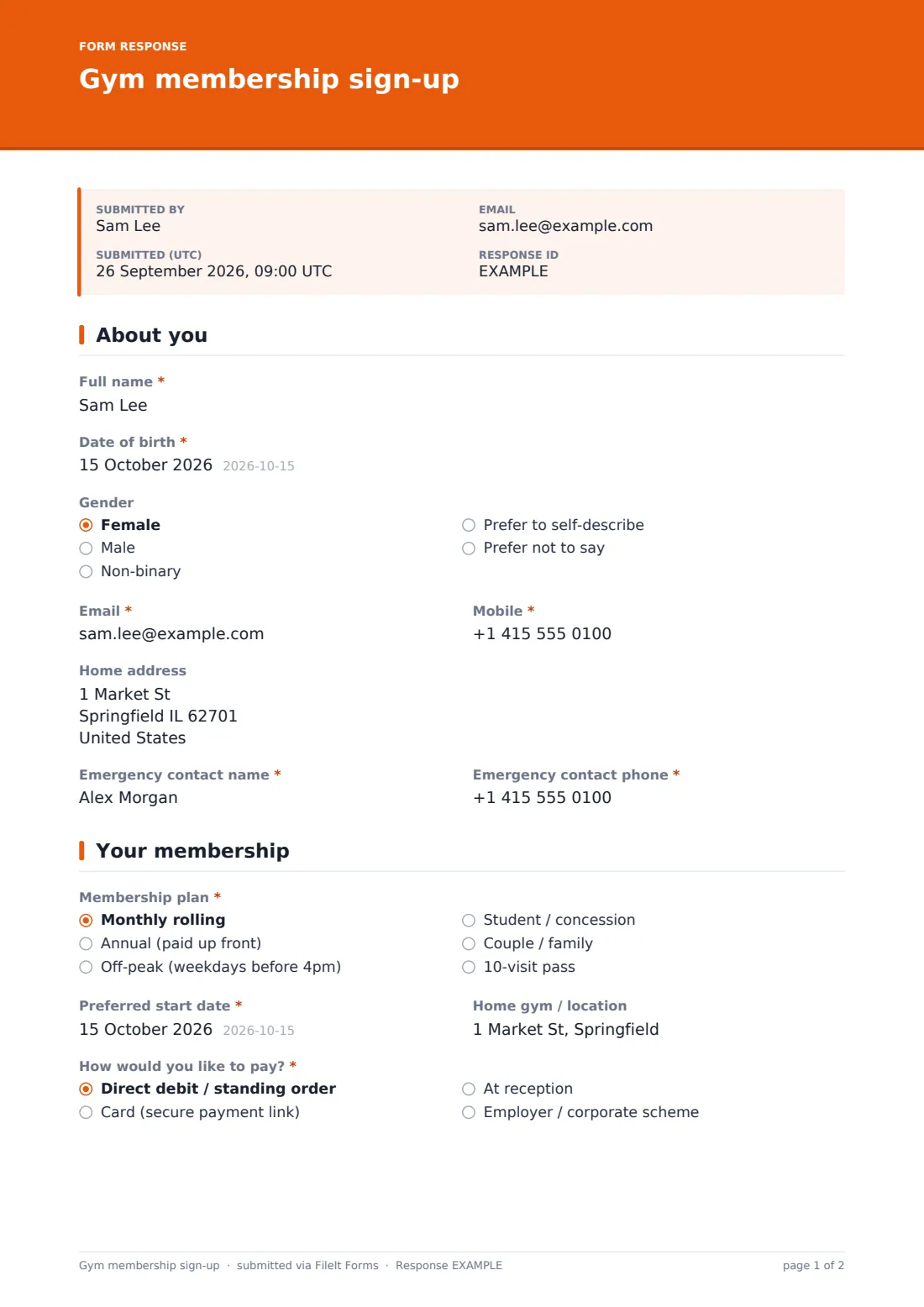
1 About you
- Full name*
- Date of birth*
- Gender Female · Male · Non-binary · Prefer to self-describe · Prefer not to say
- Email*
- Mobile*
- Home address
- Emergency contact name*
- Emergency contact phone*
2 Your membership
- Membership plan* Monthly rolling · Annual (paid up front) · Off-peak (weekdays before 4pm) · Student / concession · Couple / family · 10-visit pass
- Other members on this plan* asked only when it applies
- Proof of concession asked only when it applies
- Preferred start date*
- Home gym / location
- How would you like to pay?* Direct debit / standing order · Card (secure payment link) · At reception · Employer / corporate scheme
- Employer or scheme name* asked only when it applies
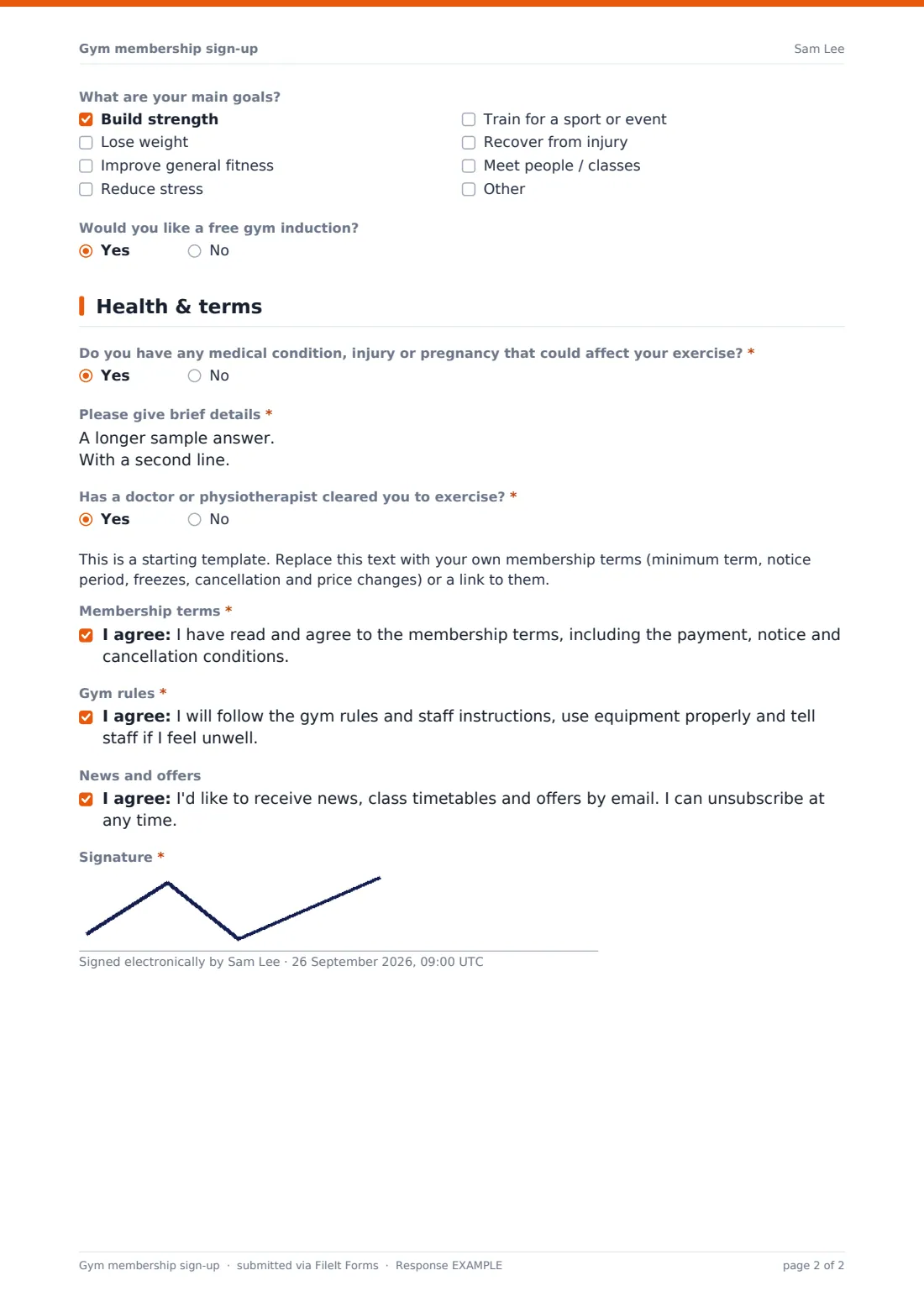
- What are your main goals? Build strength · Lose weight · Improve general fitness · Reduce stress · Train for a sport or event · Recover from injury · Meet people / classes
- Would you like a free gym induction?
3 Health & terms
- Do you have any medical condition, injury or pregnancy that could affect your exercise?*
- Please give brief details* asked only when it applies
- Has a doctor or physiotherapist cleared you to exercise?* asked only when it applies
- Before you train* asked only when it applies
- Membership terms*
- Gym rules*
- News and offers
- Signature*
The gym membership sign-up form, page by page
1 About you
New members give their Full name, Date of birth, optional Gender, Email, Mobile, an optional Home address, and a required Emergency contact name and phone — details every gym needs on file from day one.
2 Your membership
A required Membership plan choice covers monthly rolling, annual paid up front, off-peak, student/concession, couple/family, or a 10-visit pass. Choosing couple/family reveals a box for the other members' names and dates of birth, and choosing student reveals an upload for proof of concession. A Preferred start date, optional Home gym / location, and a required How would you like to pay choice (direct debit or standing order, a secure card payment link, at reception, or an employer or corporate scheme) follow, with employer chosen revealing a field for the scheme's name — and a clear note not to write card or bank numbers directly on the form. An optional Goals checklist (strength, weight loss, general fitness, stress, training for an event, injury recovery or meeting people) and a yes/no for a free gym induction round out the page.
3 Health & terms
A required yes/no on any medical condition, injury or pregnancy that could affect exercise reveals a box for brief details when answered yes, followed by a required yes/no on whether a doctor or physiotherapist has cleared them to exercise; answering no to that reveals an acknowledgement that they understand they should get medical advice before starting and train at their own risk until they do. A placeholder note marks the membership terms as a starting template to replace with the gym's own terms, followed by three consent statements — agreeing to the membership terms, agreeing to follow gym rules and tell staff if unwell, and an optional opt-in to marketing news and offers — closed with a signature.
Make the template yours
- Replace the placeholder membership terms with your own, covering minimum term, notice period, freezes and cancellation
- Adjust plan options and pricing tiers to match what your gym actually offers
- Add a photo upload field if your access system needs a member photo at sign-up
- Set the vault folder so membership records file by plan type or location
- Add a referral source question if you track how new members hear about the gym
- Turn on a welcome email with class timetables alongside the built-in confirmation message
Tips for a better gym membership sign-up form
- Reassure members that a yes to the health screening question doesn't stop them joining — the help text already says this, but reinforce it in person too
- Never collect card or bank numbers directly on the sign-up form; use a separate secure payment link or process instead
- Replace the placeholder membership terms with your own reviewed wording before relying on this form for real sign-ups
- Keep the goals checklist visible to trainers doing an induction, so the first session can be tailored from the start
- Follow up quickly on anyone who requests a free induction, while their enthusiasm for joining is still high
Every response becomes a PDF in your vault
As soon as a new member submits and signs their sign-up, FileIt saves the whole thing as a PDF in the vault folder you've set up, and your team gets an immediate email notification so the membership can be activated without delay.
Most gyms check the Responses table before a member's first visit to confirm their plan, payment method and any health notes, and to book in a requested induction. Because the signed terms and health screening are preserved together as one PDF, there's a single, retrievable record of exactly what each member agreed to when they joined.
- Start from this template. It opens in the FileIt Forms designer — change any question, add pages, set the rules for when questions appear.
- Share it. Turn on a public link, or send it to people by email, each with their own link. They don’t need a FileIt account.
- Get the answers as PDFs. Each response is saved as a PDF in the vault folder you choose, with uploaded files attached — and listed in a Responses table you can export to CSV.
Gym membership sign-up form: frequently asked questions
Is this gym membership sign-up form template free?
Yes, it's included in the Forms app on every FileIt account, including the free plan, and every question can be edited.
Does a new member need a FileIt account to sign up?
No. They complete and sign the form from a shared link or emailed invitation, with no account needed.
How do we get membership sign-ups as PDFs?
Every submission, including the signature, is automatically saved as a PDF in the vault folder you set up for this form.
Does this form collect payment card details?
No — it only records how a member wants to pay. Card and bank details are handled separately through a secure payment link or mandate, as the help text on the form makes clear.
Are the membership terms on this template ready to use as they are?
No — they're a placeholder. Replace them with your own reviewed membership terms covering things like minimum term, notice and cancellation before relying on this form.
What happens if a new member answers yes to the health screening question?
The form asks for brief details and whether a doctor has cleared them to exercise; answering no to that instead shows an acknowledgement that they should seek advice and train at their own risk until they do.
Can we sign up couples or families on one form?
Yes, choosing the couple/family plan reveals a box for the other members' names and dates of birth.