What is the tournament entry form template?
Running a tournament means collecting the same information from every team — division, squad, kit colours, entry fee — and paper or email entries rarely arrive in a consistent format. This tournament entry form template gives every team manager the same structured process, so organisers get a complete, comparable entry from every squad without chasing missing player lists or kit clashes at the last minute.
The form adapts to what a team needs: saying the squad includes players under 18 opens a parental consent statement, choosing to pay by invoice asks for the invoice name and address, and any player with a medical need gets a dedicated space to describe it for the first aid team. Managers can type the player list directly or upload a spreadsheet — whichever is easier for their club.
Every entry becomes a PDF filed in the organiser's FileIt vault the moment it's submitted, so a tournament's entire entry list — teams, players and signed declarations — sits in one place, ready for fixtures and check-in on the day.
- Best for
- Tournament and league organisers taking team entries
- Filled in by
- The team manager or captain
- Time to complete
- About 10 minutes
- Includes
- Player list or spreadsheet upload, conditional junior consent, three declarations, signature
Who uses a tournament entry form?
- A five-a-side football or futsal tournament collecting team entries by division
- A youth sports league taking squad registrations across multiple age groups
- A cup competition where clubs enter one or more teams with their own kit and fixtures
- A corporate or community sports day gathering informal team entries
- Recording entry fee payment method up front, including invoicing for schools or clubs
- Building a filed record of every team's declared eligibility and conduct agreement
Questions on this tournament entry form
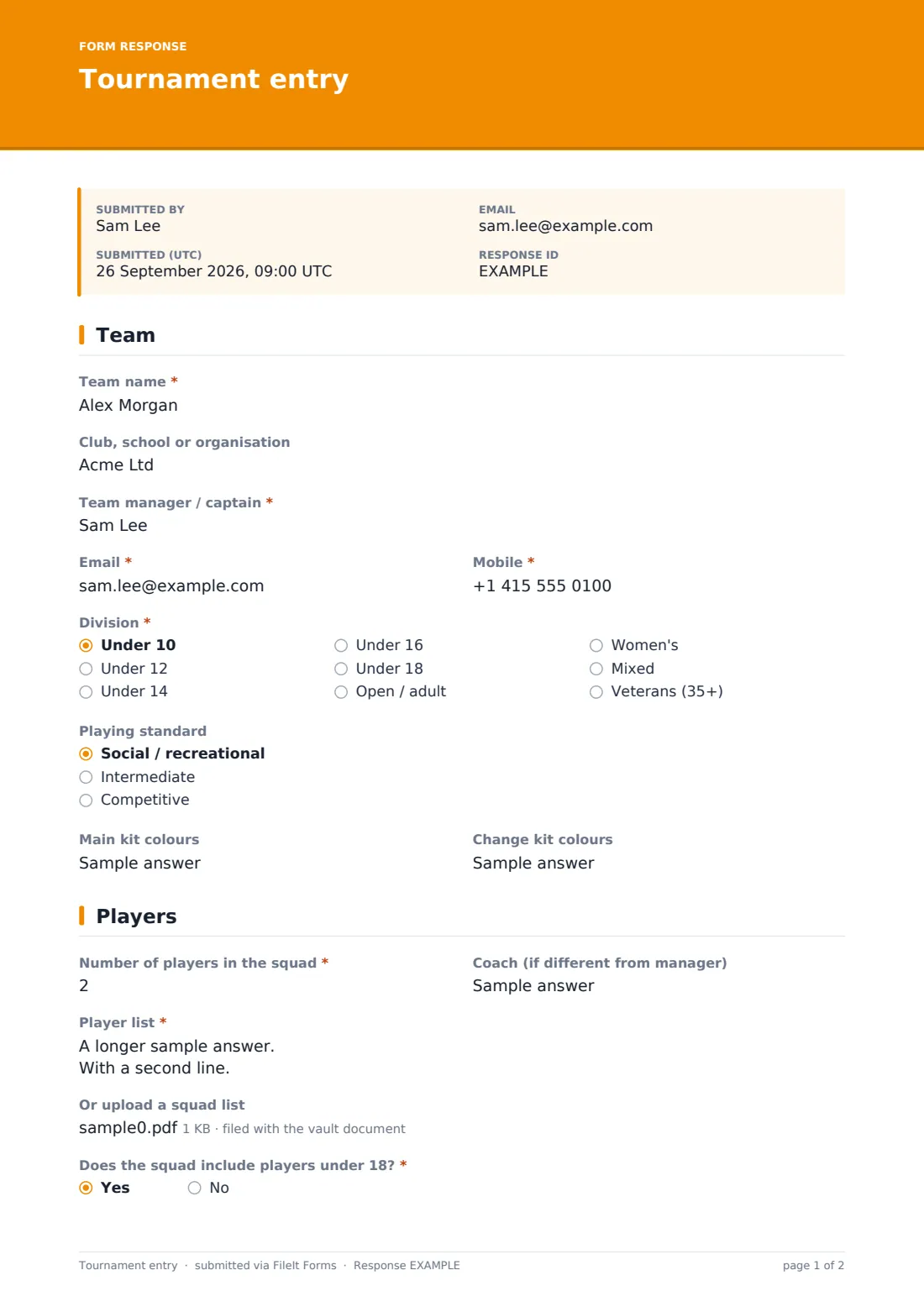
23 questions over 3 pages · includes signature, file upload, conditional questions, multiple pages, consent checkbox.
1 Team
- Team name*
- Club, school or organisation
- Team manager / captain*
- Email*
- Mobile*
- Division* Under 10 · Under 12 · Under 14 · Under 16 · Under 18 · Open / adult · Women's · Mixed · Veterans (35+)
- Playing standard Social / recreational · Intermediate · Competitive
- Main kit colours
- Change kit colours
2 Players
- Number of players in the squad*
- Coach (if different from manager)
- Player list*
- Or upload a squad list
- Does the squad include players under 18?*
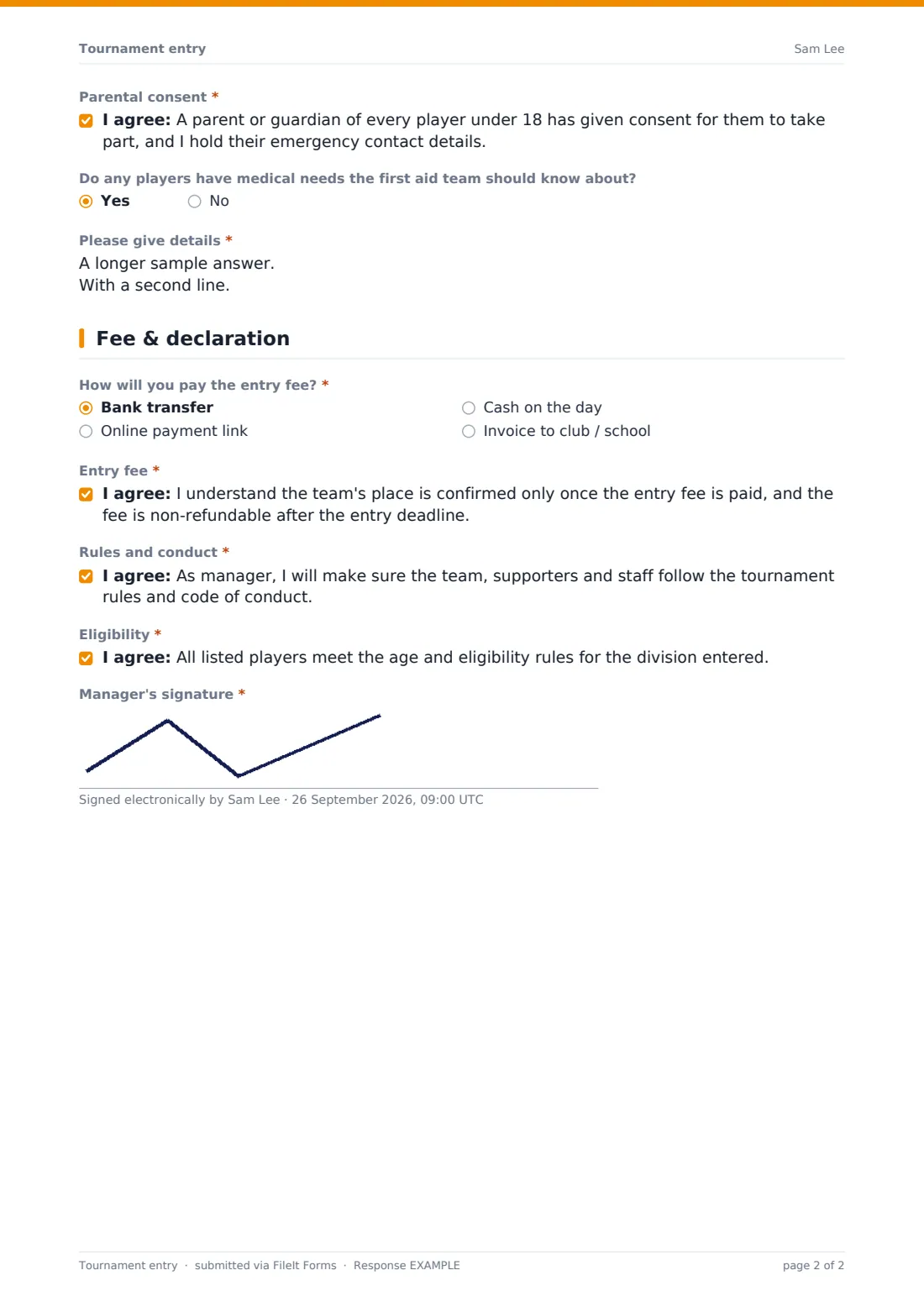
- Parental consent* asked only when it applies
- Do any players have medical needs the first aid team should know about?
- Please give details* asked only when it applies
3 Fee & declaration
- How will you pay the entry fee?* Bank transfer · Online payment link · Cash on the day · Invoice to club / school
- Invoice name and address* asked only when it applies
- Entry fee*
- Rules and conduct*
- Eligibility*
- Manager's signature*
The tournament entry form, page by page
1 Team
The entry starts with the team name, club or organisation if there is one, and the team manager or captain's name, email and mobile. Managers choose a division — from Under 10 through to Veterans, plus women's and mixed options — an optional playing standard, and their main and change kit colours, which helps organisers avoid clashes on the day.
2 Players
Managers give the number of players in the squad and, if different from the manager, the coach's name. The player list itself can be typed directly — one player per line with full name, date of birth and shirt number — or a squad list spreadsheet or PDF can be uploaded instead.
A direct question asks whether the squad includes any players under 18; if so, the manager confirms a parent or guardian has consented for every junior player and that emergency contact details are held for them. A separate question asks whether any players have medical needs the first aid team should know about, opening a space to describe them by player.
3 Fee & declaration
Managers choose how they'll pay the entry fee — bank transfer, an online payment link, cash on the day, or invoice to a club or school, which opens a field for the invoice name and address. The entry finishes with three declarations: that the team's place is only confirmed once the fee is paid and it's non-refundable after the entry deadline, that the manager will make sure the team, supporters and staff follow the tournament's rules and code of conduct, and that all listed players meet the age and eligibility rules for their division — signed to complete the entry.
Make the template yours
- Replace the divisions with your tournament's actual age groups or skill categories
- Add your specific entry fee amount and payment deadline directly to the fee section
- Set a maximum number of responses per division if spaces are limited
- Add a question for dietary requirements if you're providing food at the tournament
- File entries into a vault folder per division for easier fixture planning
- Adjust the eligibility and conduct declarations to match your specific competition rules
Tips for a better tournament entry form
- Set an entry deadline with enough buffer to build fixtures and confirm payments before the tournament
- Cross-check player lists against age eligibility rules rather than relying only on the manager's declaration
- Follow up quickly on any medical needs flagged, so first aid staff are briefed before the tournament starts
- Confirm kit colours in advance and flag any clashes to the affected teams before match day
- Keep a simple tracker of which teams have paid, since the form records the payment method chosen but not the payment itself
Every response becomes a PDF in your vault
As soon as a manager submits an entry, FileIt saves it as a signed PDF in your vault — including any uploaded squad list — and sends you an email notification. If you've turned on a copy for the respondent, the manager also gets their own PDF confirming what was submitted.
From there, most organisers use the Responses table to see entries by division, open individual PDFs to check player lists and consents, and export everything to CSV to build fixtures, check-in sheets or a full tournament programme.
- Start from this template. It opens in the FileIt Forms designer — change any question, add pages, set the rules for when questions appear.
- Share it. Turn on a public link, or send it to people by email, each with their own link. They don’t need a FileIt account.
- Get the answers as PDFs. Each response is saved as a PDF in the vault folder you choose, with uploaded files attached — and listed in a Responses table you can export to CSV.
Tournament entry form: frequently asked questions
Is this tournament entry form template free?
Yes — it's included with the Forms app on every FileIt account, including the free plan, along with more than 160 other ready-made templates.
Do team managers need a FileIt account to enter?
No. Share the form as a link or send an email invitation, and managers complete and submit it without creating any account.
Does this form take payment for the entry fee?
No. It records how a team plans to pay — bank transfer, an online payment link, cash, or invoice — but the actual payment is handled separately through your own process.
Where do submitted entries go?
Every entry is saved automatically as a PDF in your FileIt vault, and you can review, filter and export all entries from the Responses table.
Does the form ask for parental consent only when needed?
Yes — the parental consent statement only appears if the manager confirms the squad includes players under 18, using conditional logic already built into the template.
Can teams upload a squad list instead of typing it in?
Yes — there's an optional file upload for a spreadsheet or PDF squad list, alongside the option to type the player list directly into the form.
Can we limit the number of teams per division?
Yes — set a maximum number of responses in the form's settings, and it will stop accepting new entries once that limit is reached.