What is the class booking form template?
Most fitness and wellness studios don't need a full booking system for every class — sometimes a straightforward online form that captures the class, date, time and a few safety questions is all that's required, especially for drop-ins or smaller studios running alongside word-of-mouth bookings. This single-page class booking form template does exactly that, while still adjusting itself for first-time attendees who need a bit more attention than a regular.
An online booking form beats a phone call or a text message thread because every booking arrives in the same format, with the same questions asked every time — no risk of forgetting to ask about an injury because the call was rushed, and no booking details scribbled on a sticky note that gets lost before the class starts. Attendees fill it in themselves, from any device, with no FileIt account required.
Each booking becomes a PDF the moment it's submitted, filed automatically into your FileIt vault, so you have a clean, searchable record of who booked which class and when — useful for spotting your regulars and for following up if a class needs to be cancelled or moved.
- Best for
- Fitness studios, yoga and pilates instructors, gyms and sports centres taking class bookings
- Filled in by
- The person booking a place in the class
- Time to complete
- About 2 to 4 minutes for a returning attendee, a little longer for a first-timer
- Includes
- A single page with conditional first-timer questions and a cancellation consent
Who uses a class booking form?
- A yoga or pilates studio taking drop-in bookings for individual sessions rather than running a full membership system
- A gym offering spin, HIIT or boxing fitness classes that fill up and need a simple record of who's coming
- A dance fitness or swim instructor collecting bookings and first-timer safety information in one step
- A studio wanting to flag pregnancy, injuries or medical conditions before a new attendee's very first class
- A small business testing a new class format and wanting quick, low-friction sign-ups without building a booking platform
- An instructor who wants a consistent cancellation reminder built into every booking, rather than repeating it verbally each time
Questions on this class booking form
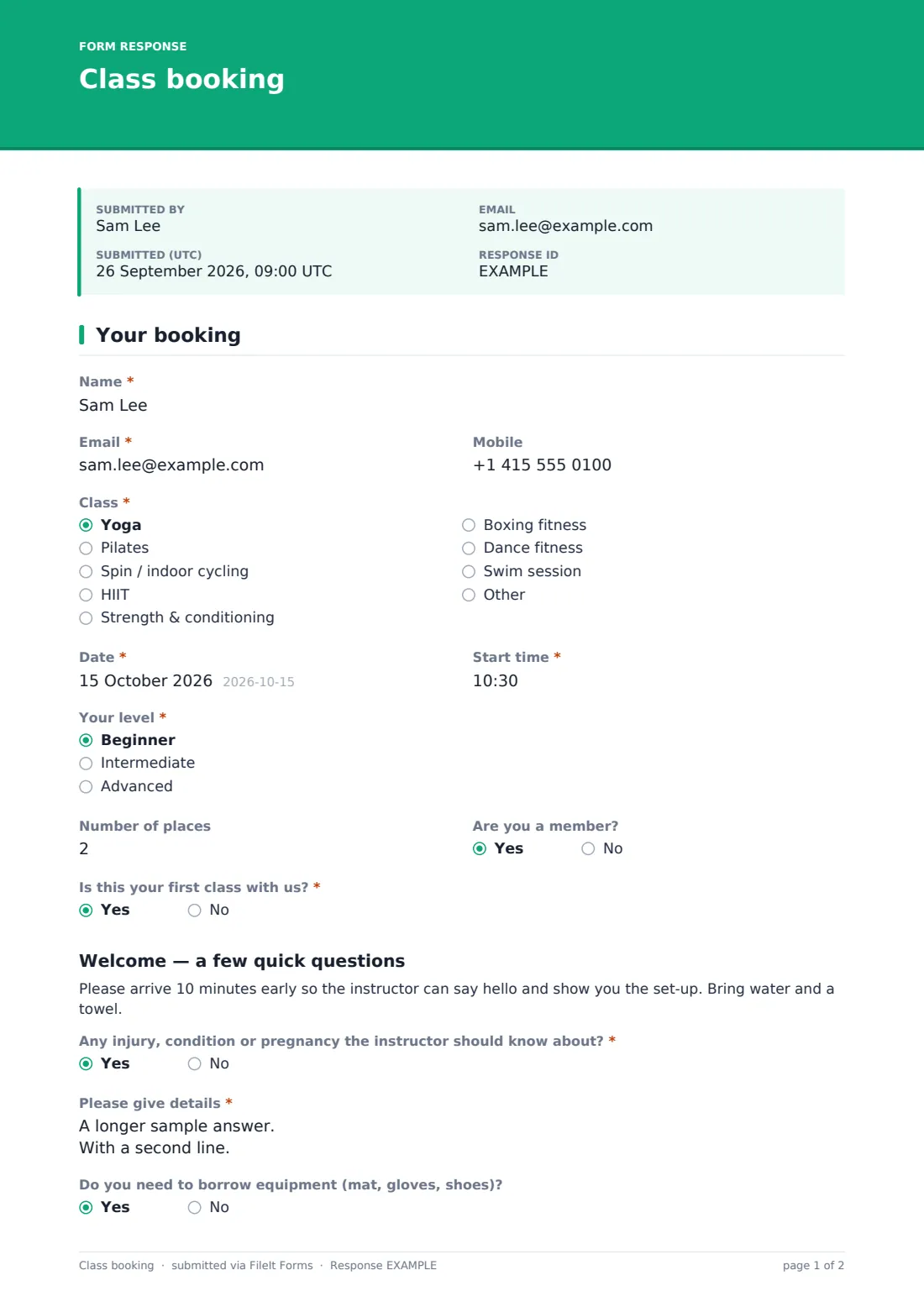
17 questions · includes conditional questions, consent checkbox.
1 Your booking
- Name*
- Email*
- Mobile
- Class* Yoga · Pilates · Spin / indoor cycling · HIIT · Strength & conditioning · Boxing fitness · Dance fitness · Swim session · Other
- Which class?* asked only when it applies
- Date*
- Start time*
- Your level* Beginner · Intermediate · Advanced
- Number of places
- Are you a member?
- Is this your first class with us?*
- Any injury, condition or pregnancy the instructor should know about?* asked only when it applies
- Please give details* asked only when it applies
- Do you need to borrow equipment (mat, gloves, shoes)? asked only when it applies
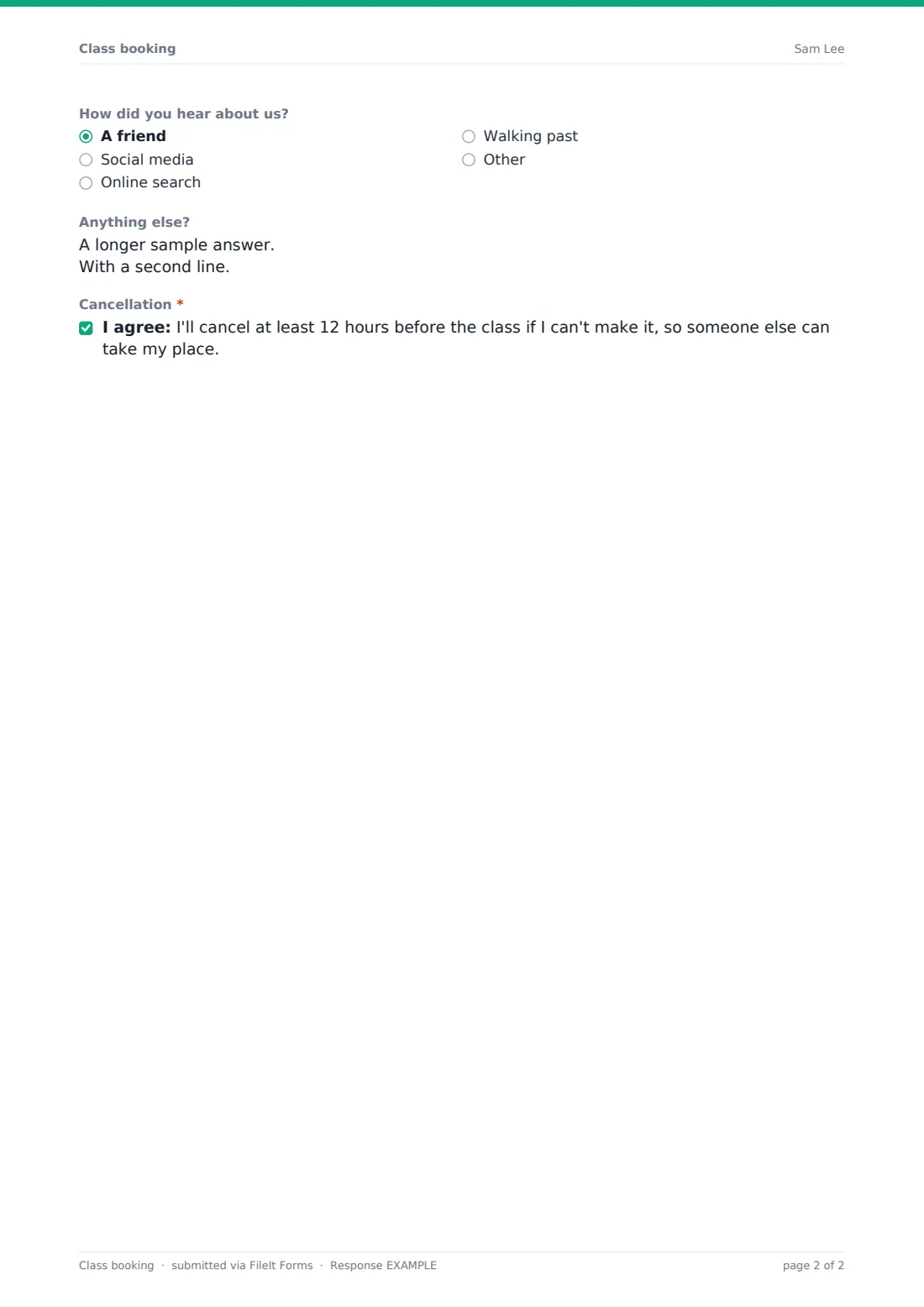
- How did you hear about us? asked only when it applies A friend · Social media · Online search · Walking past · Other
- Anything else?
- Cancellation*
The class booking form, page by page
1 Your booking
Because this is a single-page template, it's easiest to think of it in three natural groups of questions. The booking basics come first: name, email, an optional mobile number for last-minute changes, the class itself (yoga, pilates, spin, HIIT, strength and conditioning, boxing fitness, dance fitness, swim session, or a typed-in "Other"), date, start time, the attendee's level (beginner, intermediate or advanced), how many places they need including themselves, and whether they're already a member.
The second group only appears for people new to the studio. Answering yes to "Is this your first class with us?" reveals a welcome heading, a short note asking them to arrive 10 minutes early with water and a towel, and two required safety questions: whether there's any injury, condition or pregnancy the instructor should know about (with a follow-up detail box if so), and whether they need to borrow equipment such as a mat, gloves or shoes. A final optional question for first-timers asks how they heard about the studio — a friend, social media, an online search, walking past, or something else — useful for tracking where new attendees are coming from.
Every booking, first-timer or not, ends with an open notes field and a required consent statement: the attendee agrees to cancel at least 12 hours before the class if they can't make it, so someone else can take their place.
Make the template yours
- Replace the fixed list of classes with your own studio's actual class names and times, or add a date-and-time picker per class if your schedule is fixed
- Change the cancellation window in the consent statement to match your own policy — 12 hours, 24 hours, or whatever you require
- Add a maximum number of responses on the form's settings to act as a simple capacity limit per session
- Ask for an emergency contact number for first-timers doing higher-intensity classes like HIIT or spin
- Turn on a closing date so bookings for a specific session automatically stop once that class has happened
- File bookings into a folder per class type or per instructor, so each teacher can see their own upcoming attendees at a glance
Tips for a better class booking form
- Take injury and medical answers seriously for first-timers — a quick read before class means the instructor can genuinely offer a modification rather than finding out mid-session
- Keep the class list short and specific; a long, vague list of options makes it harder for people to book the right session quickly
- Remind attendees of your cancellation policy in the confirmation message as well as the consent line, since people don't always read every field carefully
- Use the "how did you hear about us" answers occasionally to check whether your marketing efforts are actually bringing in new faces
- Don't ask for more health detail than an instructor can act on in a single class — this isn't a full intake form, just enough for basic safety
- Follow up personally with first-time bookers after their class; a booking form is a good start, but a real welcome keeps people coming back
Every response becomes a PDF in your vault
As soon as someone submits a booking, FileIt saves their answers as a PDF, names it using the document title pattern you've set (by default including the attendee's name), and files it into the vault folder you've chosen. Turning on owner notifications means you or the instructor get an email the moment a new booking comes in, which matters most for first-timer bookings that need a quick read before the class starts.
Most studios then simply check the day's bookings before class, note who's new, and follow up directly if a first-timer has flagged an injury or condition. The confirmation message this template sends is deliberately worded to remind people to cancel if their plans change, and the Responses table lets you filter by class or date, or export to CSV if you want to review attendance patterns over a term or season.
- Start from this template. It opens in the FileIt Forms designer — change any question, add pages, set the rules for when questions appear.
- Share it. Turn on a public link, or send it to people by email, each with their own link. They don’t need a FileIt account.
- Get the answers as PDFs. Each response is saved as a PDF in the vault folder you choose, with uploaded files attached — and listed in a Responses table you can export to CSV.
Class booking form: frequently asked questions
Is this class booking form template free?
Yes. It's included in the Forms app on every FileIt account, including the free plan, and you can edit the class list and every other question.
Does the person booking need a FileIt account?
No. You share a public link or a personal emailed link, and they book their spot without creating an account.
Do I get each booking as a PDF?
Yes, every submission is automatically saved as a PDF in the vault folder you choose, so you have a written record of every booking.
Can this form actually track how many spots are left in a class?
Not automatically — it doesn't check remaining capacity in real time. Setting a maximum number of responses in the form's settings will stop bookings once that limit is reached, which works as a simple capacity cap.
Can I use one form for all my classes, or should each class have its own?
Either works. One form with a class dropdown keeps things simple for smaller schedules; separate forms per class or time slot give you cleaner, class-specific response lists as your schedule grows.
What happens with the injury or health information collected from first-timers?
It's shown only to whoever reviews the booking and is meant to help an instructor plan safe modifications — it isn't medical advice, and instructors should use their own judgement alongside anything an attendee shares.
Can attendees cancel or change a booking through this form?
This template is built for making a new booking rather than editing an existing one; most studios handle cancellations by having the attendee contact them directly, in line with the cancellation consent on the form.
How to create an online class booking form for a studio or gym?
Start from this template in the FileIt Forms designer, update the class list and any studio-specific questions, and share the link with your members or on social media — no separate booking software required.