
What is the congregation membership form template?
Welcoming someone into a faith community is about more than collecting a name and phone number. A congregation membership form gives new and returning members a comfortable way to share their household, their interests, and how they'd like to be involved — while giving the community office a complete, well-organized record instead of a stack of handwritten cards or a scattered spreadsheet.
A paper sign-up sheet at the back of the hall gets lost, damaged, or is hard to read; a form filled in on a phone or laptop captures everything clearly the first time, and lets someone fill it in at home in their own time rather than rushing between services. It also makes it easy to ask a few more thoughtful questions — about pastoral care, accessibility, or skills to offer — without the form feeling like a queue.
This template is built in FileIt, so every completed membership form is saved automatically as a PDF in your vault, in whichever folder you choose — one tidy, dated record per household, ready whenever someone in the office needs to look a member up.
- Best for
- Churches, mosques, temples, synagogues, gurdwaras and other faith communities welcoming new or returning members
- Filled in by
- The person joining, on behalf of themselves and their household
- Time to complete
- About 8-10 minutes
- Includes
- Conditional questions, a signature field, consent statements, four organized pages
Who uses a congregation membership form?
- A congregation welcoming new members after a service or an open house
- A community registering household members, including children, as part of a joining process
- An office collecting information on who would like a pastoral visit from a faith leader
- A community building a volunteer pipeline by asking members where they'd like to help
- A congregation updating its member directory and communication preferences in one pass
- A faith community welcoming a member transferring in from another congregation
Questions on this congregation membership form
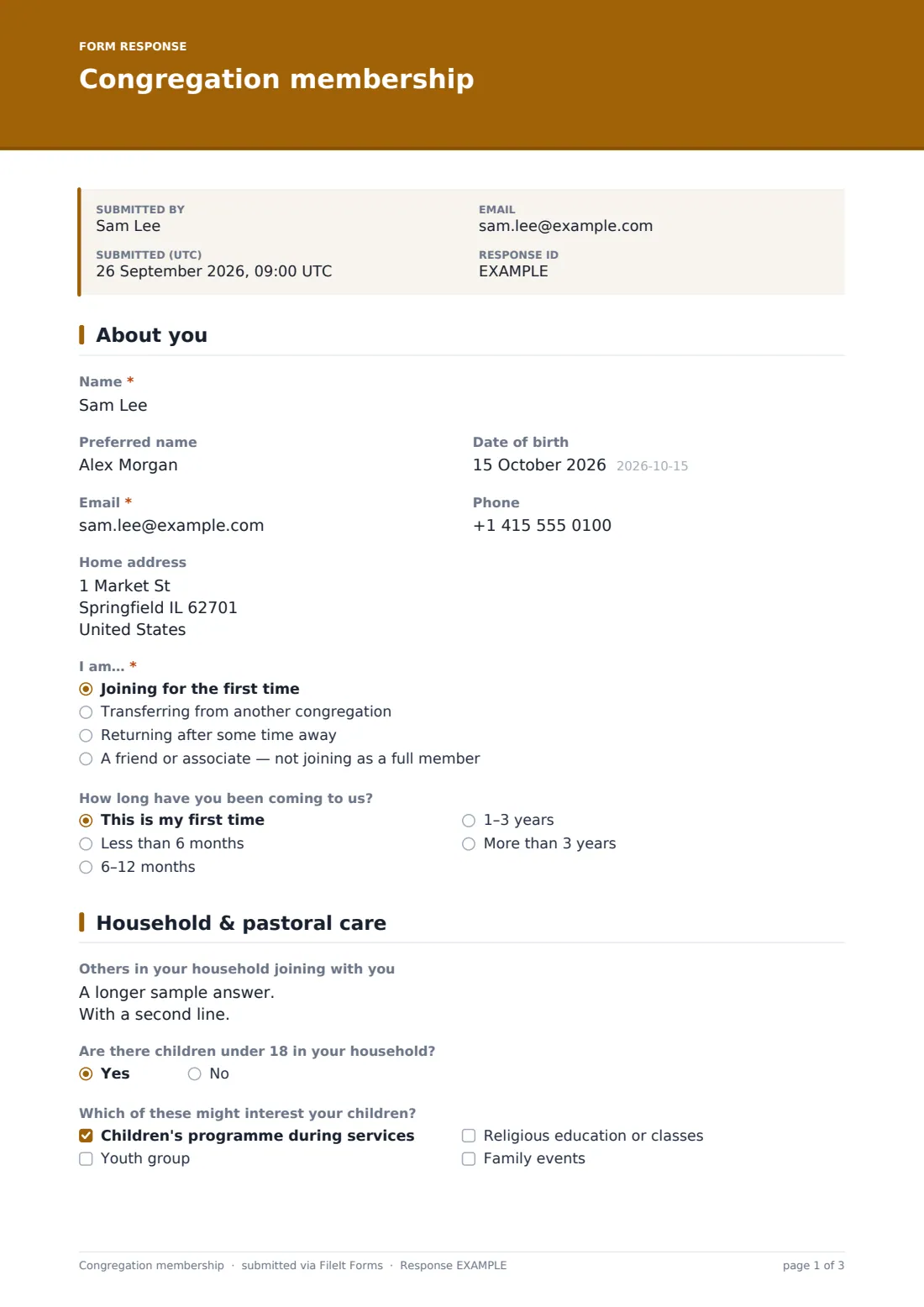
25 questions over 4 pages · includes signature, conditional questions, multiple pages, consent checkbox.
1 About you
- Name*
- Preferred name
- Date of birth
- Email*
- Phone
- Home address
- I am…* Joining for the first time · Transferring from another congregation · Returning after some time away · A friend or associate — not joining as a full member
- Previous congregation and location asked only when it applies
- How long have you been coming to us? This is my first time · Less than 6 months · 6–12 months · 1–3 years · More than 3 years
2 Household & pastoral care
- Others in your household joining with you
- Are there children under 18 in your household?
- Which of these might interest your children? asked only when it applies Children's programme during services · Youth group · Religious education or classes · Family events
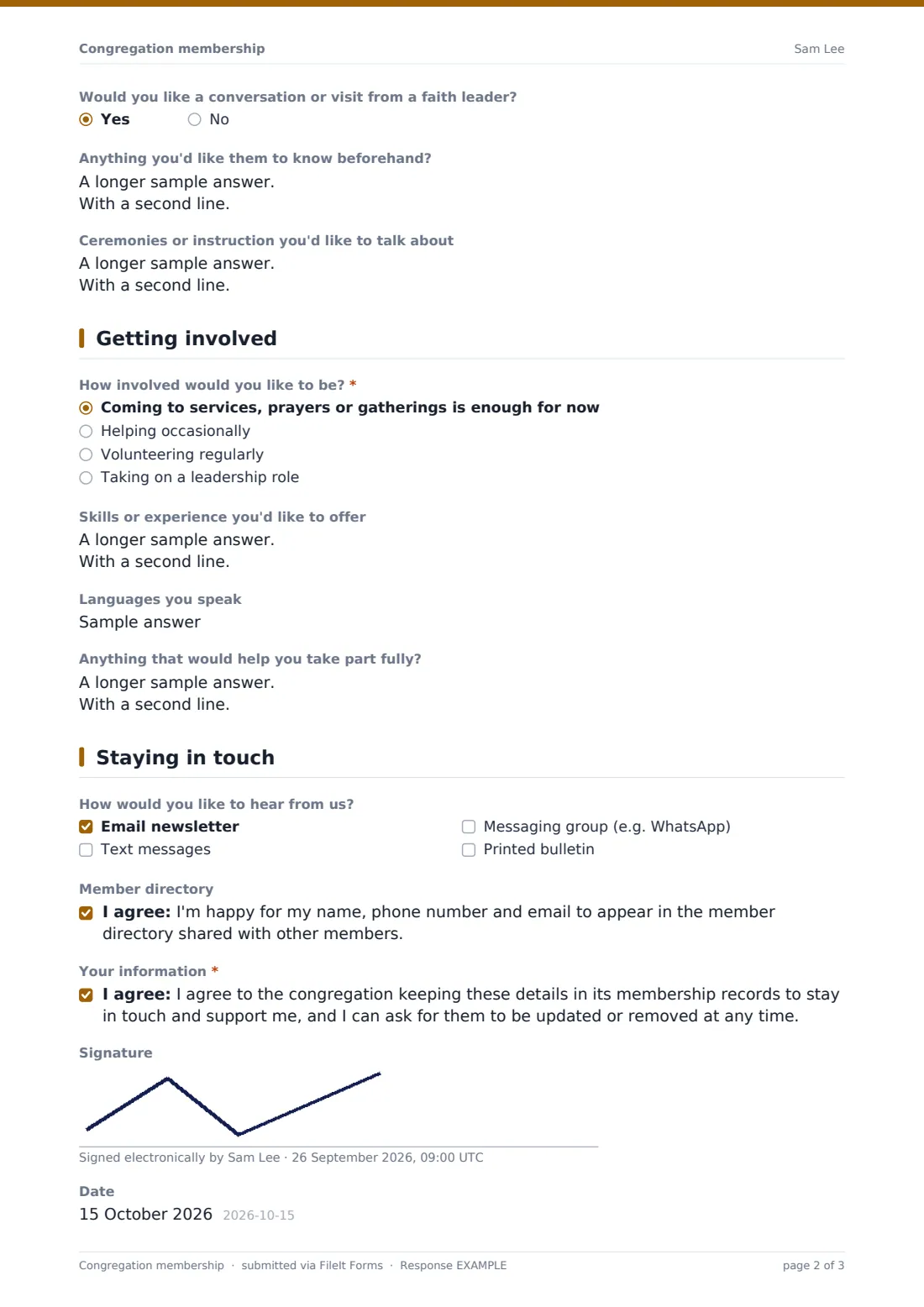
- Would you like a conversation or visit from a faith leader?
- Anything you'd like them to know beforehand? asked only when it applies
- Ceremonies or instruction you'd like to talk about
3 Getting involved
- How involved would you like to be?* Coming to services, prayers or gatherings is enough for now · Helping occasionally · Volunteering regularly · Taking on a leadership role
- Where would you like to help? asked only when it applies Welcoming & hospitality · Music, choir or recitation · Teaching & study groups · Children & youth · Community outreach & food · Visiting the sick or elderly · Building & grounds · Events & festivals · Finance & administration · Media, sound & livestream
- Skills or experience you'd like to offer
- Languages you speak
- Anything that would help you take part fully?
4 Staying in touch
- How would you like to hear from us? Email newsletter · Text messages · Messaging group (e.g. WhatsApp) · Printed bulletin
- Member directory
- Your information*
- Signature
- Date
The congregation membership form, page by page
1 About you
The form opens with Name, an optional Preferred name, an optional Date of birth, Email (required), Phone, and a Home address field. It then asks I am…, a required choice between Joining for the first time, Transferring from another congregation, Returning after some time away, or A friend or associate — not joining as a full member. Choosing Transferring from another congregation reveals a Previous congregation and location field, so the office knows where to follow up if a reference or record transfer is needed.
An optional How long have you been coming to us? dropdown (from This is my first time up to More than 3 years) rounds out the page, giving context on how familiar the person already is with the community before they answer anything else.
2 Household & pastoral care
This page asks about Others in your household joining with you — name, relationship, and age for children, one per line — and Are there children under 18 in your household?. Answering Yes reveals Which of these might interest your children?, covering Children's programme during services, Youth group, Religious education or classes, and Family events, so households without kids aren't asked about them.
Would you like a conversation or visit from a faith leader? is a simple yes/no, and answering Yes opens Anything you'd like them to know beforehand?, a private way to flag something ahead of a visit. An open Ceremonies or instruction you'd like to talk about field lets anyone mention a blessing, naming, study or preparation classes without committing to anything yet.
3 Getting involved
How involved would you like to be? ranges from Coming to services, prayers or gatherings is enough for now up to Taking on a leadership role. Choosing anything but the first option reveals Where would you like to help?, a checklist spanning Welcoming & hospitality, Music, choir or recitation, Teaching & study groups, Children & youth, Community outreach & food, Visiting the sick or elderly, Building & grounds, Events & festivals, Finance & administration, and Media, sound & livestream, plus a typed-in option.
Open fields for Skills or experience you'd like to offer, Languages you speak, and Anything that would help you take part fully? (accessibility, a hearing loop, dietary needs) help the community match people to the right opportunities.
4 Staying in touch
The last page asks How would you like to hear from us? — email newsletter, text messages, a messaging group such as WhatsApp, or a printed bulletin — so communications go out the way each household actually wants them. An optional Member directory consent statement lets someone agree to have their name, phone and email shared with other members, kept separate from the required Your information consent covering how the congregation keeps their details on file.
Optional Signature and Date fields close out the form for congregations that like a signed record of joining, though neither is required, so the form still works smoothly for someone who'd rather not sign on a touchscreen.
Make the template yours
- Rename or reorder the pages to match how your own community talks about membership — for example, splitting Getting involved into separate pages
- Add or remove options under Where would you like to help? to reflect the actual ministries or committees your congregation runs
- Make the Signature field required if your community's process calls for a signed membership record
- Set the vault folder so completed forms file under a Membership folder, or under each household's own family folder
- Turn on email notifications to your office team so a staff member or volunteer follows up personally within a few days
- Adjust the confirmation message to mention a welcome event, a next service time, or who will be in touch
Tips for a better congregation membership form
- Ask only what your office will actually use — a long form about ministries nobody currently runs just adds friction for new members
- Follow up personally, ideally within a week, rather than letting the form be the only contact a new member gets
- Keep pastoral notes and any sensitive answers restricted to the people who genuinely need to see them
- Review the Responses table periodically to spot members interested in volunteering who haven't yet been contacted
- Be transparent in the consent wording about who can see the member directory information before someone opts in
Every response becomes a PDF in your vault
The moment someone submits the form, FileIt turns it into a PDF and files it in your vault, in the folder you've set up for membership records — one dated document per household. You get an email notification for each new member, and if you've turned on the optional copy, the new member receives a PDF of their own answers too.
From there, most communities have someone from the office or pastoral team review the record and reach out personally. The Responses table keeps every submission searchable, so staff can look up a household, filter for people who asked for a pastoral visit, or export the list to CSV for a welcome mailing.
- Start from this template. It opens in the FileIt Forms designer — change any question, add pages, set the rules for when questions appear.
- Share it. Turn on a public link, or send it to people by email, each with their own link. They don’t need a FileIt account.
- Get the answers as PDFs. Each response is saved as a PDF in the vault folder you choose, with uploaded files attached — and listed in a Responses table you can export to CSV.
Congregation membership form: frequently asked questions
Is this congregation membership form template free?
Yes. This template and the Forms app it runs on are included on every FileIt account, including the free plan, with no extra cost to use or customize it.
Do new members need a FileIt account to fill this in?
No. You share a link or send a personal email invite, and the person joining fills it in without creating any account of their own.
How do we get each membership submission as a PDF?
Every submitted form is automatically saved as a PDF in your FileIt vault, in the folder you choose, so your office ends up with one organized record per household.
How do I create a membership form for my congregation online?
Start from this template in FileIt's Forms app, edit the questions, options and wording to match your community in the drag-and-drop designer, then share the link or email it out.
Can we ask about children and pastoral visits without making every household answer those questions?
Yes — the template uses conditional logic, so questions about children's programs only appear if someone says they have children, and pastoral visit follow-up questions only appear if they ask for a visit.
Can members choose not to appear in the member directory?
Yes, the directory listing is a separate, optional consent statement, kept apart from the required consent about the congregation simply keeping their details on file.
Does this form register someone as an official, legally recognized member?
No — this form collects information for your community's own records. Any formal or ceremonial requirements for full membership in your tradition are a separate step your community handles itself.