What is the prayer request form template?
A prayer request form gives people in your congregation or community a simple, private way to ask for prayer without having to catch a leader after a service or write a note that might get lost. Anyone with the link can submit one from a phone or computer, at any hour, whether they want to share it publicly or keep it completely confidential.
A paper card box or a shared inbox works, but it's easy for a card to sit unread for a week, or for a sensitive message to end up visible to the wrong person. An online form lets you route requests straight to a pastoral team, ask the right follow-up questions automatically, and never lose one in a stack of papers.
This template is built in FileIt's Forms app, included on every FileIt account including the free plan. Build it from scratch or start here and change anything — wording, questions, who gets notified. Every submission becomes a PDF saved in your FileIt vault, so your pastoral team has a private, dated record of every request.
- Best for
- Churches, mosques, temples, synagogues and other faith communities
- Filled in by
- Congregation members or anyone visiting your community
- Time to complete
- About 2 minutes
- Includes
- Anonymous option, conditional contact questions, urgent flag
Who uses a prayer request form?
- A congregation member asks for prayer for a family health issue without giving their name
- Someone new to the community submits a request for guidance and would like a pastoral visit
- A member shares thanksgiving or good news to be read out at a service
- A prayer team collects requests during the week ahead of a Sunday or Friday gathering
- A pastoral care coordinator triages which requests need a same-day phone call
- A member asks for prayer for a friend or neighbour outside the congregation
Questions on this prayer request form
13 questions over 2 pages · includes conditional questions, multiple pages.
1 Your request
- Would you like to stay anonymous?*
- Your name* asked only when it applies
- Who is this request for?* Myself · A family member · A friend or neighbour · Our community or the wider world
- Their first name asked only when it applies
- What is it about? Health or healing · Family or relationships · Grief or loss · Work, money or housing · Faith or spiritual life · Guidance for a decision · Thanksgiving or good news
- Your request*
2 Sharing & contact
- Who may see this request?* Only our faith leader or pastoral team — keep it private · Our prayer team, in confidence · It may be shared with the community (first name only) · It may be shared with the community without any name
- Would you like someone to get in touch?* asked only when it applies
- How should we contact you?* asked only when it applies Phone call · Text message · Email · A visit or a chat in person
- Email* asked only when it applies
- Phone* asked only when it applies
- Best time to reach you asked only when it applies
- Is this urgent?
The prayer request form, page by page
1 Your request
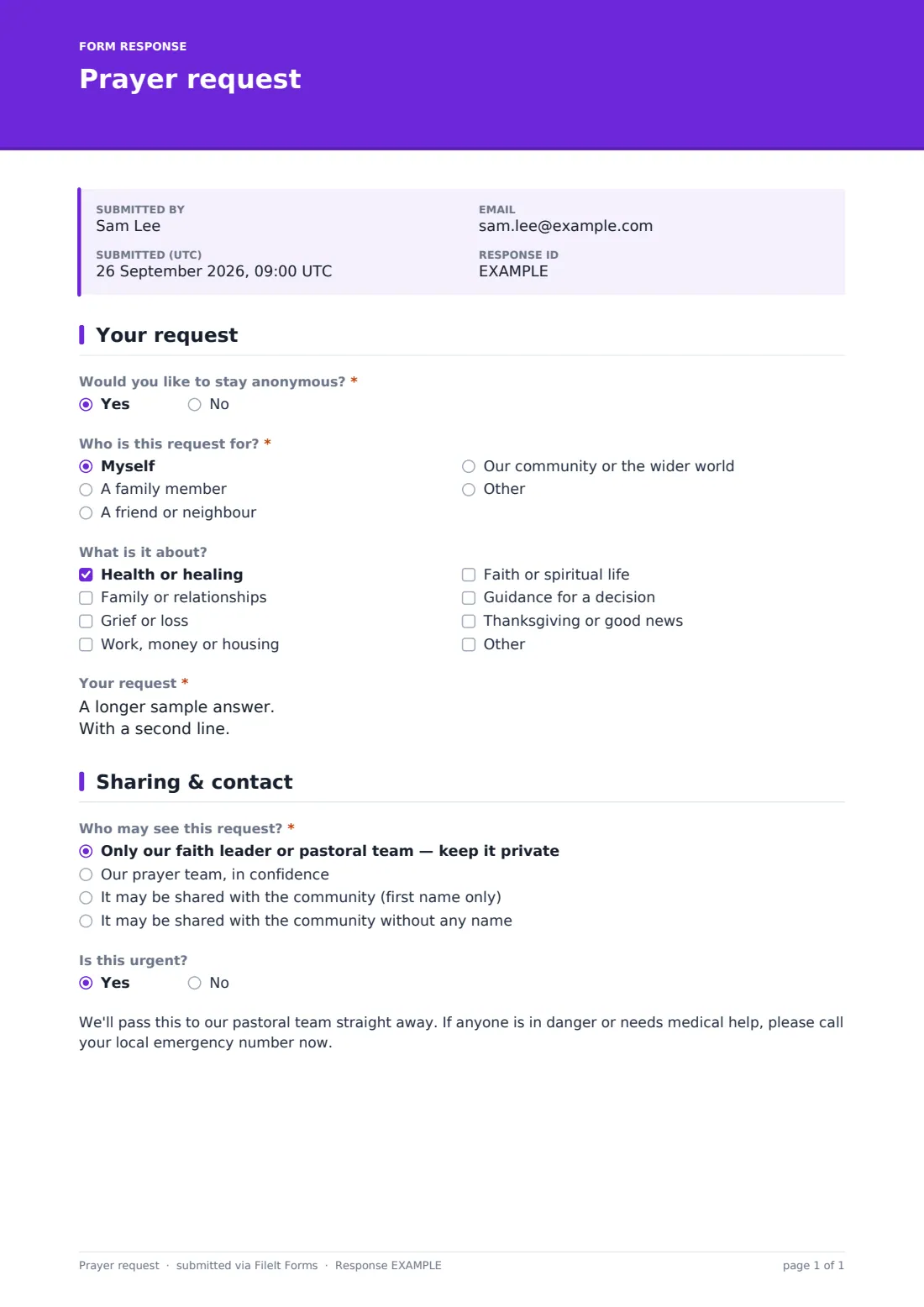
The form opens by asking "Would you like to stay anonymous?" If someone answers yes, the Your name field never appears, so no one filling this in has to worry about being identified against their wishes. If they answer no, their name is collected so a leader can follow up personally.
Next, Who is this request for? lets the requester pick Myself, A family member, A friend or neighbour, or Our community or the wider world, with an optional first name for anyone other than themselves. What is it about? offers checkboxes like Health or healing, Grief or loss, and Thanksgiving or good news, so a pastoral team can see patterns at a glance without reading every request in full. The heart of the page is Your request, a long-answer field where someone can write as much or as little as they're comfortable sharing.
2 Sharing & contact
Who may see this request? is the privacy control at the centre of this template: options range from Only our faith leader or pastoral team — keep it private, through Our prayer team, in confidence, up to sharing with the wider community by first name or with no name at all. Nothing is shared more widely than the requester chooses.
If the person didn't ask to stay anonymous, the form then asks Would you like someone to get in touch?, and only if they say yes does it ask how — phone, text, email or a visit — followed by the matching contact field and a best time to reach them. Finally, Is this urgent? triggers a short but important message reminding the requester that anyone in danger or needing medical help should call their local emergency number right away, rather than waiting for someone to read the form.
Make the template yours
- Change the wording on the cover to match your community's voice, language or scripture reference
- Add or remove topic checkboxes to reflect the categories your pastoral team actually tracks
- Turn on email notifications to a shared pastoral inbox so urgent requests are seen the same day
- File responses into a private FileIt folder that only your pastoral team can open
- Add a closing date if you only want to collect requests ahead of a specific gathering
- Adjust the confirmation message to include a verse, blessing or next step
Tips for a better prayer request form
- Keep the anonymous option genuinely anonymous — don't ask for anything in later questions that could identify someone who chose to stay private
- Only ask for contact details when someone has said they want to be contacted
- Agree in advance who on your team reads urgent requests, and how quickly
- Review your sharing settings with new volunteers so private requests never get read aloud by mistake
- Keep the language warm and unhurried — this is often someone's hardest moment of the week
- Revisit your topic list once a year so it still matches what your congregation is asking for
Every response becomes a PDF in your vault
As soon as someone submits a request, FileIt turns it into a PDF and files it in the vault folder you've chosen, with the requester's sharing preference clearly recorded on the document. If you've switched on owner notifications, your pastoral team gets an email right away so nothing waits until someone happens to check a form dashboard.
From there, most churches and faith communities open the Responses table to see new requests at a glance, filter for anything marked urgent, and decide together how each one should be handled — a private prayer chain, a mention at a service, or a personal visit. Because every request is a dated PDF, you also have a simple record to look back on if someone asks about a request from a few weeks earlier.
- Start from this template. It opens in the FileIt Forms designer — change any question, add pages, set the rules for when questions appear.
- Share it. Turn on a public link, or send it to people by email, each with their own link. They don’t need a FileIt account.
- Get the answers as PDFs. Each response is saved as a PDF in the vault folder you choose, with uploaded files attached — and listed in a Responses table you can export to CSV.
Prayer request form: frequently asked questions
Is this prayer request form template free?
Yes. This template and the Forms app that runs it are included on every FileIt account, including the free plan. There's nothing extra to buy to use it.
Do people need a FileIt account to submit a prayer request?
No. Anyone with your form's link can fill it in and submit it — they never need to sign up for or log into FileIt.
How do I get responses as PDFs?
Every submission is automatically converted to a PDF and saved in the FileIt vault folder you choose when you set up the form. You can open, download or export them at any time from the Responses table.
Can someone really submit a request anonymously?
Yes. If they answer "yes" to the anonymous question at the start, the form skips the name field entirely, and later questions only ask for contact details if they've separately said they want to be contacted.
Can I control who sees each request?
Yes — the Who may see this request? question lets each person choose whether it stays with leadership only, goes to a confidential prayer team, or can be shared with the wider community, with or without a name.
Can I add my own questions to this template?
Yes. Everything in the designer can be edited — add, remove or reword questions, change the pages, or add conditional logic, just like any other FileIt form.
What happens if someone marks a request as urgent?
The form displays a message asking anyone in danger or needing medical help to call their local emergency number immediately, and you can set up an instant email notification so your team sees urgent requests right away.
Can I share this form outside our building?
Yes. You can turn on a public link for your website or social media, or send personal email invitations to specific people — respondents never need a FileIt account either way.