What is the training session log form template?
Good coaching depends on knowing what a client did last time. Notebooks get lost and app exports rarely match how a coach actually works. This training session log gives you one consistent entry per session, filled in on your phone straight after the client leaves.
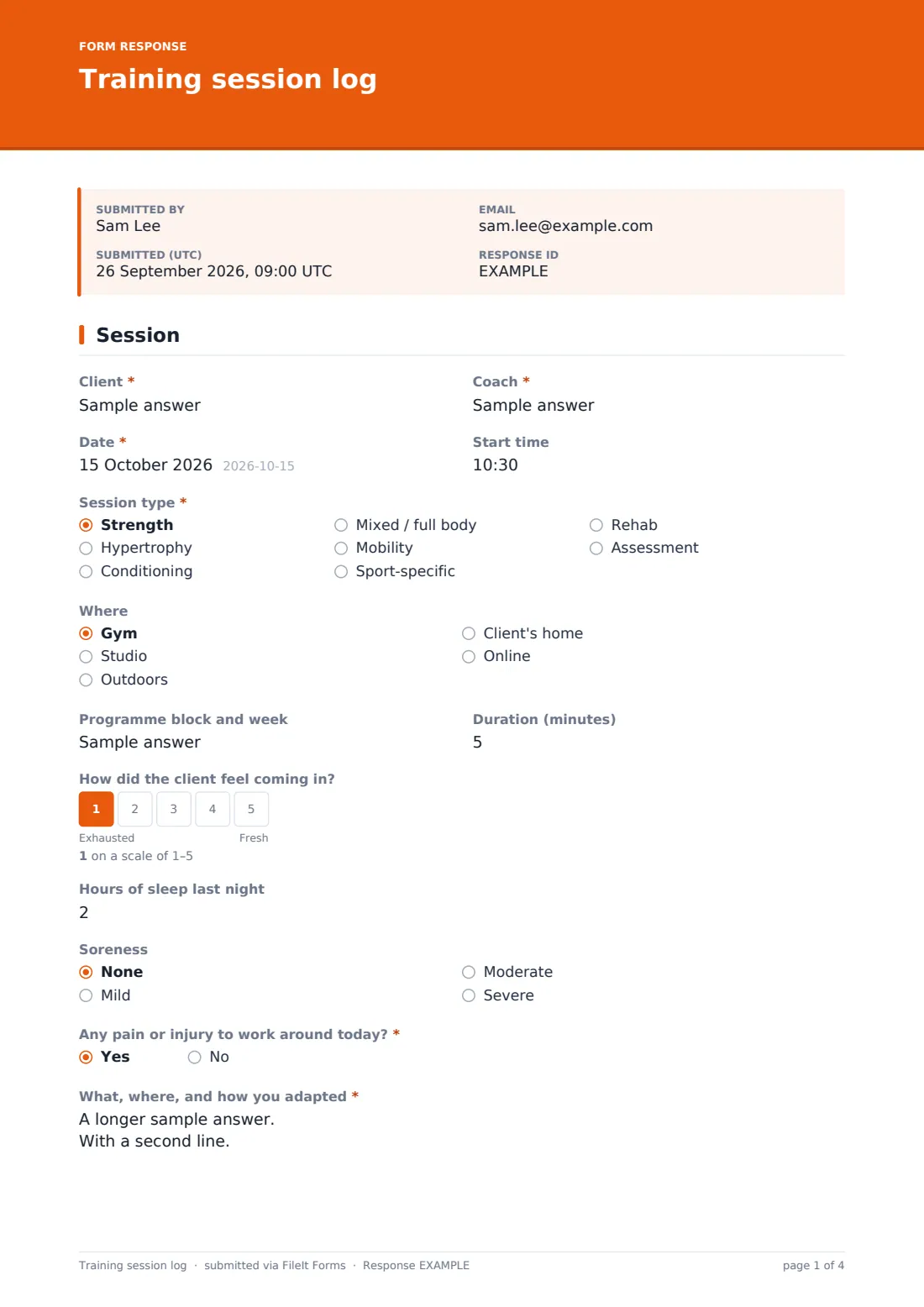
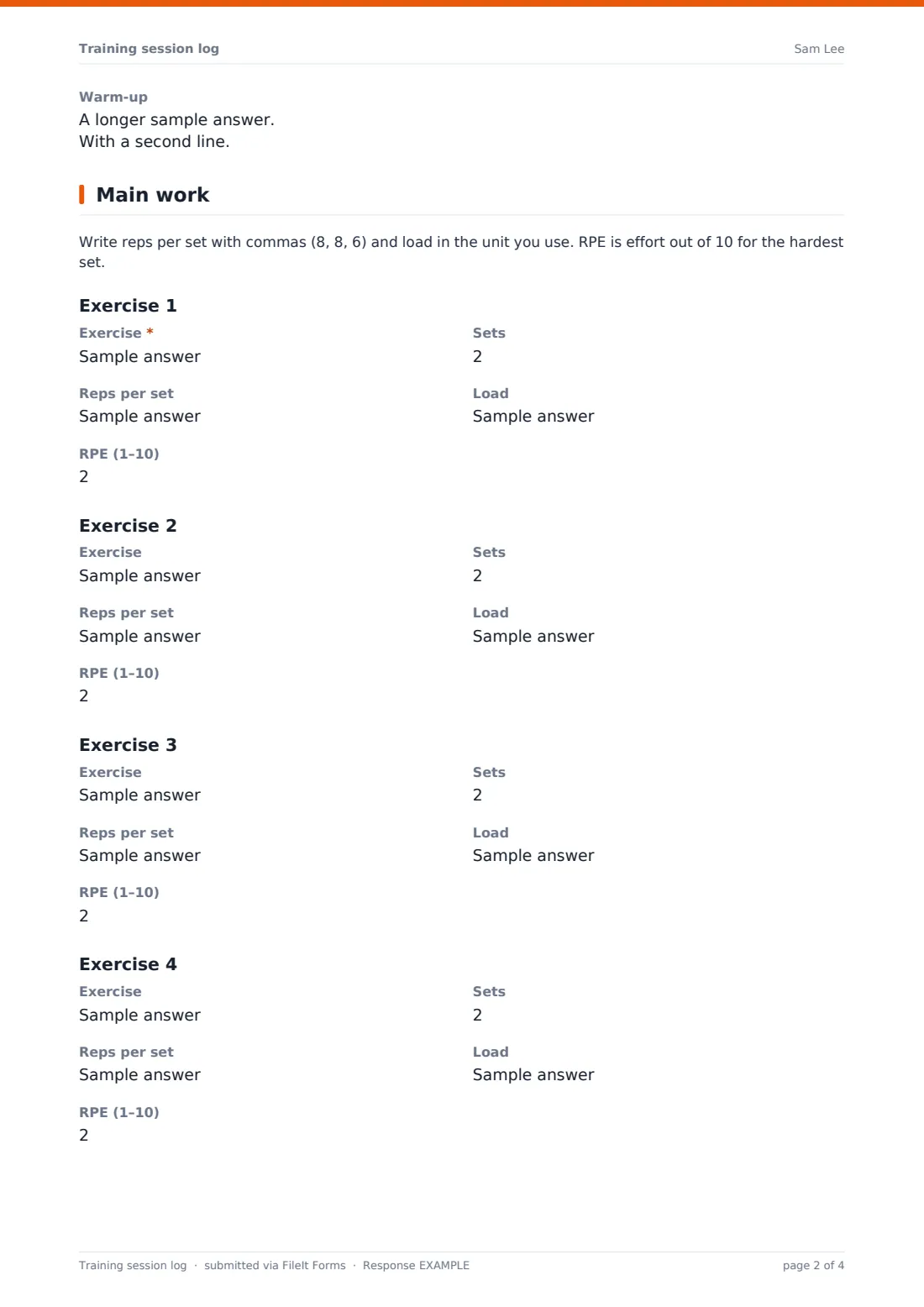
It starts with the session basics — client, coach, date, type, location, programme week and duration — and a quick readiness check: how the client felt coming in, sleep, soreness and any pain or injury to work around. The main page has space for up to six exercises, each with sets, reps per set, load and RPE; the next exercise block appears once you've named the one before, so the log stays short on lighter days.
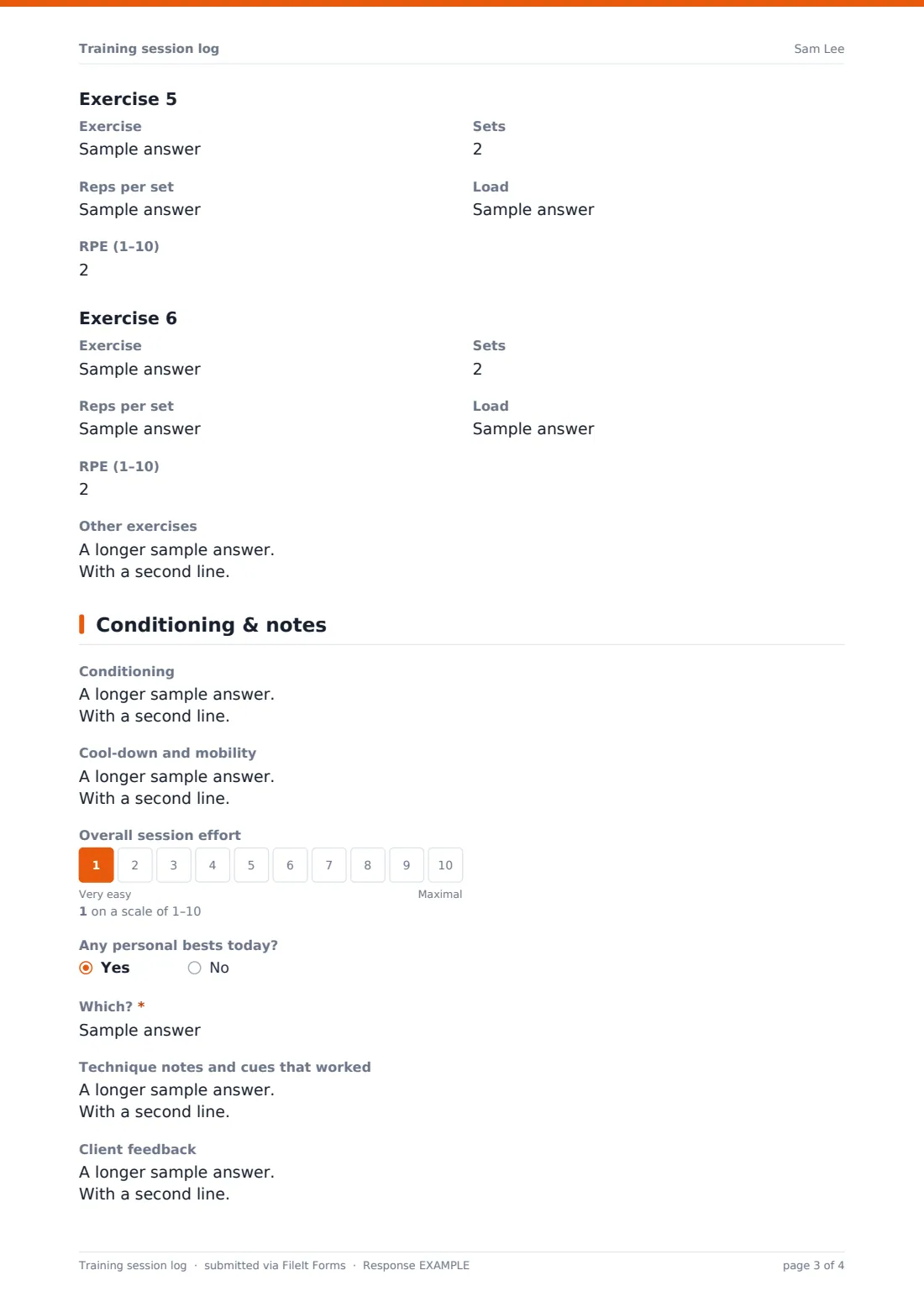
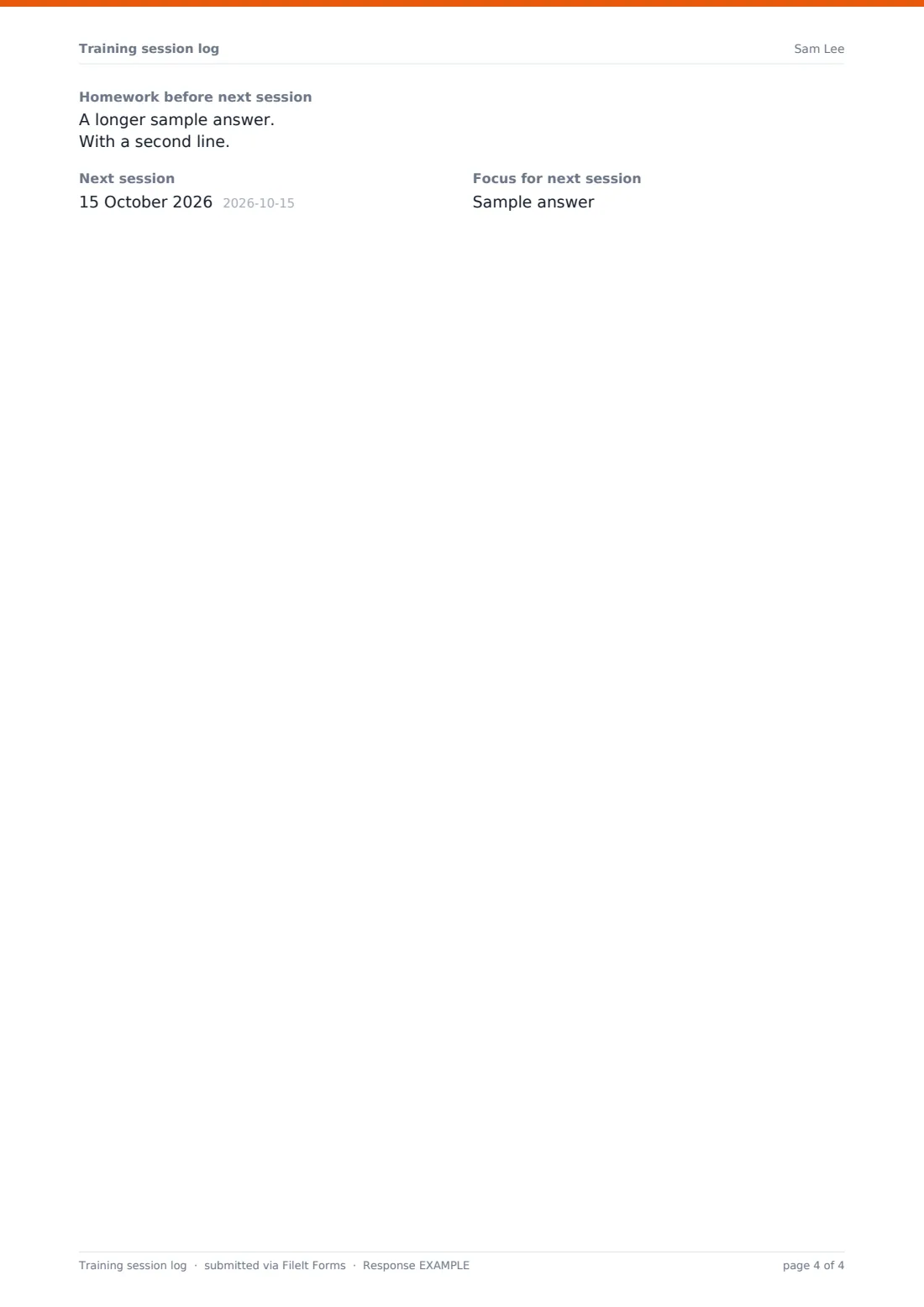
The last page records conditioning, cool-down, overall session effort, personal bests, technique cues, client feedback, homework and the plan for the next session. Every log is saved as a PDF in your FileIt vault, building a complete training history per client.
- Best for
- Personal trainers, strength coaches and small-group coaches
- Filled in by
- The coach
- Time to complete
- 2–4 minutes per session
- Includes
- Readiness check, six exercise blocks with RPE, PB tracking, next-session plan
Who uses a training session log form?
- A personal trainer logs each one-to-one session straight afterwards
- A strength coach tracks loads across a training block
- A coach flags pain and records how a session was adapted
- An online coach logs a client's remote session from their notes
- A rehab-focused trainer records exercises and progressions for a physio
- A coach records a personal best to share with the client
Questions on this training session log form
55 questions over 3 pages · includes conditional questions, multiple pages, ratings.
1 Session
- Client*
- Coach*
- Date*
- Start time
- Session type* Strength · Hypertrophy · Conditioning · Mixed / full body · Mobility · Sport-specific · Rehab · Assessment
- Where Gym · Studio · Outdoors · Client's home · Online
- Programme block and week
- Duration (minutes)
- How did the client feel coming in?
- Hours of sleep last night
- Soreness None · Mild · Moderate · Severe
- Any pain or injury to work around today?*
- What, where, and how you adapted* asked only when it applies
- Warm-up
2 Main work
- Exercise*
- Sets
- Reps per set
- Load
- RPE (1–10)
- Exercise
- Sets
- Reps per set
- Load
- RPE (1–10)
- Exercise asked only when it applies
- Sets asked only when it applies
- Reps per set asked only when it applies
- Load asked only when it applies
- RPE (1–10) asked only when it applies
- Exercise asked only when it applies
- Sets asked only when it applies
- Reps per set asked only when it applies
- Load asked only when it applies
- RPE (1–10) asked only when it applies
- Exercise asked only when it applies
- Sets asked only when it applies
- Reps per set asked only when it applies
- Load asked only when it applies
- RPE (1–10) asked only when it applies
- Exercise asked only when it applies
- Sets asked only when it applies
- Reps per set asked only when it applies
- Load asked only when it applies
- RPE (1–10) asked only when it applies
- Other exercises
3 Conditioning & notes
- Conditioning
- Cool-down and mobility
- Overall session effort
- Any personal bests today?
- Which?* asked only when it applies
- Technique notes and cues that worked
- Client feedback
- Homework before next session
- Next session
- Focus for next session
The training session log form, page by page
1 Session
Client and coach names, date and start time, a required session type (strength, hypertrophy, conditioning, full body, mobility, sport-specific, rehab or assessment), location, programme block and week, and duration. Readiness is a 1–5 scale, with sleep hours and soreness, and a required pain or injury question that asks how you adapted when answered yes. A box records the warm-up.
2 Main work
A short note explains how to write reps and RPE. Exercise 1 and 2 are always shown; Exercises 3 to 6 appear one at a time as you fill in the name of the previous one. Each has the exercise name, sets, reps per set, load and RPE out of 10. A final box takes any other exercises, supersets or accessories.
3 Conditioning & notes
Conditioning and cool-down, an overall session effort scale from 1 to 10, whether there were personal bests (with details), technique notes and cues, client feedback, homework, the next session date and its focus.
Make the template yours
- Add more exercise blocks, or reduce them if your sessions are simpler
- Replace RPE with reps in reserve or percentage of 1RM
- Change the session types to match the services you offer
- Point the form at a vault folder per client
- Add a body-weight or heart-rate field if you track them each session
- Share the form with other coaches at your gym so logs are consistent
Tips for a better training session log form
- Log immediately after the session — details fade fast
- Keep exercise names consistent (for example always 'Back squat', not sometimes 'Squat') so logs are easy to compare
- Use the pain question every time, even when the answer is no
- Write the next session's focus before you close the log
- Review the last two logs before each session to plan progression
Every response becomes a PDF in your vault
Each log is saved as a PDF in the vault folder you choose. Using one folder per client gives you a dated training history you can scroll through or share.
The Responses table puts every session side by side, which makes it easy to see load progression, spot a run of low readiness scores, or find the last time a client did a particular lift.
- Start from this template. It opens in the FileIt Forms designer — change any question, add pages, set the rules for when questions appear.
- Share it. Turn on a public link, or send it to people by email, each with their own link. They don’t need a FileIt account.
- Get the answers as PDFs. Each response is saved as a PDF in the vault folder you choose, with uploaded files attached — and listed in a Responses table you can export to CSV.
Training session log form: frequently asked questions
Is this training session log template free?
Yes, it's included in the Forms app on every FileIt account, including the free plan, and every question can be edited.
How many exercises can I log per session?
Six structured exercise blocks, each with sets, reps, load and RPE, plus a free-text box for anything else. You can add more blocks when you customise the form.
Does the client fill this in?
It's designed for the coach, but you can share it with clients who train on their own and ask them to log their sessions.
Can I use kilograms or pounds?
Either. The load field is free text, so write the unit you use.
Can I see a client's history?
Yes. Every log is a PDF in your vault and a row in the Responses table, so a client's sessions are easy to review together.
What is RPE?
Rate of perceived exertion — how hard the set felt on a scale of 1 to 10. You can swap it for another measure when you customise the form.