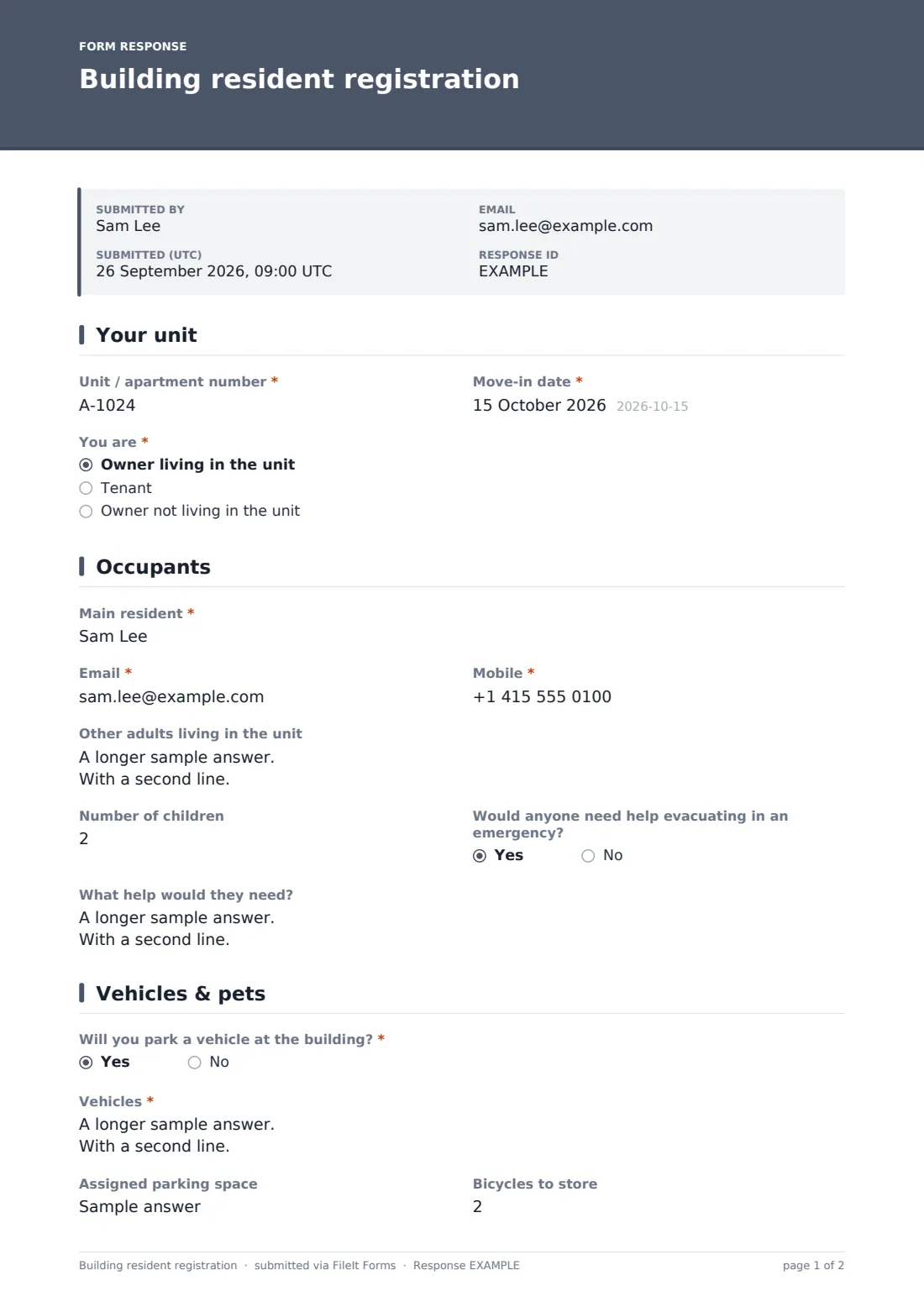
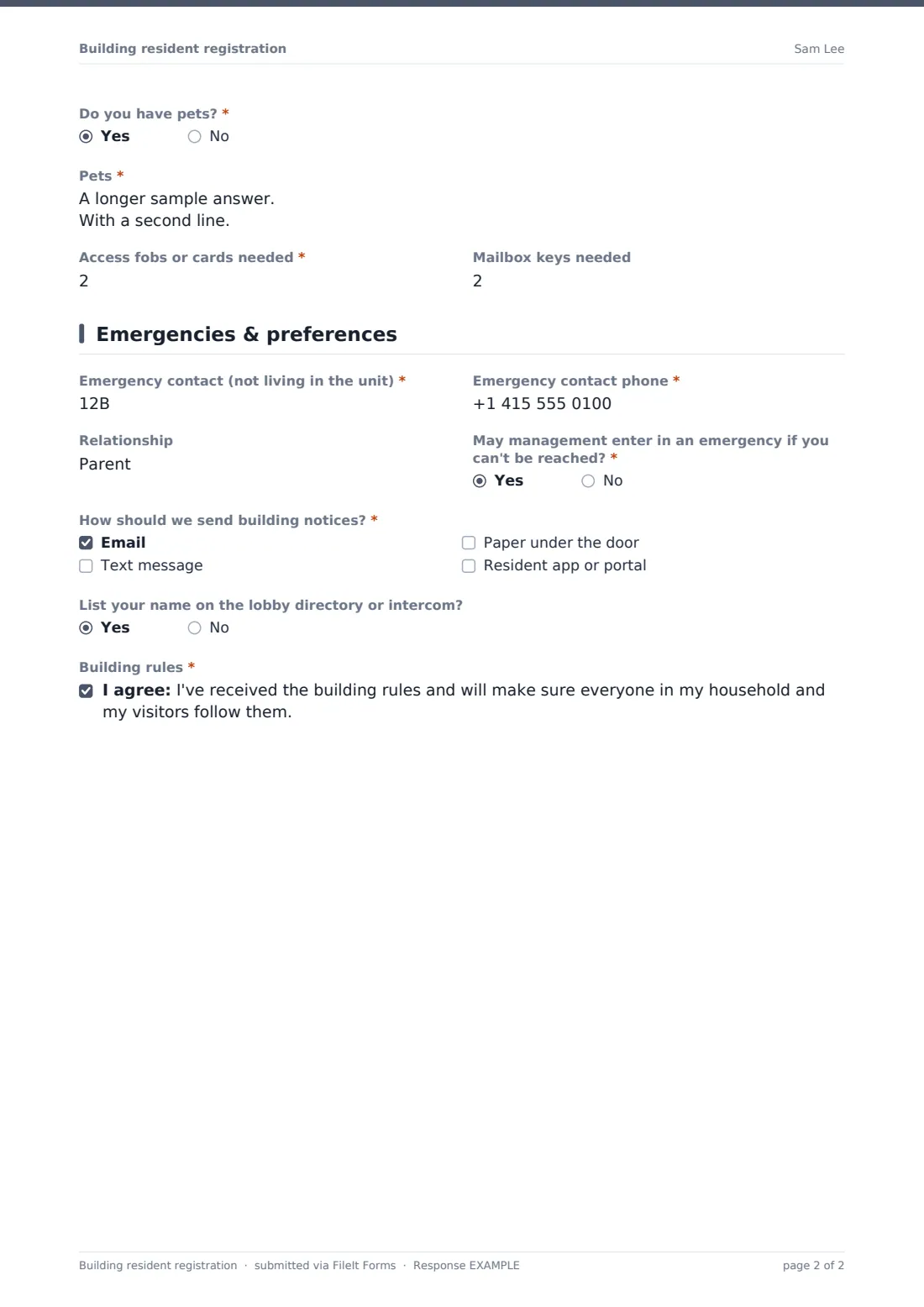
What is the building resident registration form template?
Building managers and concierge teams need to know who lives in each unit, how to reach them, which cars belong in the car park, which pets live upstairs, and who to call if there's a leak at 3am. A building resident registration form collects all of that when someone moves in, rather than over weeks of scattered emails and notes at the front desk.
This template starts with the unit and move-in date, and whether the resident is an owner living there, a tenant or an owner living elsewhere; tenants are asked for the owner or letting agent and the lease end date. It records the main resident and other adults, children, and — optionally — whether anyone would need help evacuating. Vehicles, parking space, bikes and pets follow, along with the number of access fobs and mailbox keys needed. The last page covers an emergency contact, entry permission, how residents want to receive notices and the building rules.
It runs on FileIt's Forms app. Share one link with all new residents, and each registration is filed as a PDF in your vault.
- Best for
- Apartment buildings, condominiums, owners' associations and concierge teams
- Filled in by
- The new resident
- Time to complete
- About 5 minutes
- Includes
- Owner or tenant logic, optional evacuation assistance, vehicle and pet lists, fob counts, notice preferences, rules acknowledgement
Who uses a building resident registration form?
- Registering every new resident at move-in
- Updating the residents list after a sale or new lease
- Recording vehicles for car park permits
- Knowing which residents may need help in an evacuation
- Issuing the right number of fobs and mailbox keys
- Building an email and text list for notices
Questions on this building resident registration form
28 questions over 4 pages · includes conditional questions, multiple pages, consent checkbox.
1 Your unit
- Unit / apartment number*
- Move-in date*
- You are* Owner living in the unit · Tenant · Owner not living in the unit
- Owner or letting agent name* asked only when it applies
- Owner or agent phone asked only when it applies
- Lease end date asked only when it applies
2 Occupants
- Main resident*
- Email*
- Mobile*
- Other adults living in the unit
- Number of children
- Would anyone need help evacuating in an emergency?
- What help would they need? asked only when it applies
3 Vehicles & pets
- Will you park a vehicle at the building?*
- Vehicles* asked only when it applies
- Assigned parking space asked only when it applies
- Bicycles to store
- Do you have pets?*
- Pets* asked only when it applies
- Access fobs or cards needed*
- Mailbox keys needed
4 Emergencies & preferences
- Emergency contact (not living in the unit)*
- Emergency contact phone*
- Relationship
- May management enter in an emergency if you can't be reached?*
- How should we send building notices?* Email · Text message · Paper under the door · Resident app or portal
- List your name on the lobby directory or intercom?
- Building rules*
The building resident registration form, page by page
1 Your unit
Unit number, move-in date and "You are": owner living in the unit, tenant, or owner not living there. Tenants are asked for the owner or letting agent's name and phone, and the lease end date.
2 Occupants
The main resident's name, email and mobile, other adults one per line, and the number of children. "Would anyone need help evacuating in an emergency?" is optional and opens a description if answered yes.
3 Vehicles & pets
"Will you park a vehicle at the building?" opens a vehicle list and assigned space. Bikes, pets with a list of type, breed, name and weight, and the number of access fobs and mailbox keys needed complete the page.
4 Emergencies & preferences
An emergency contact who doesn't live in the unit, their phone and relationship, and whether management may enter in an emergency. Residents choose how to receive notices — email, text, paper or a resident app — whether to appear on the lobby directory, and tick to confirm they've received the building rules.
Make the template yours
- Add your building's fob fee or deposit to the help text
- Change the notice options to the channels you actually use
- Turn the unit question into a dropdown of unit numbers
- File registrations into a vault folder per building
- Notify the concierge desk on every submission
- Link to your building rules in the cover text
Tips for a better building resident registration form
- Ask residents to re-register when anything changes
- Keep evacuation-assistance information confidential and up to date
- Match vehicle plates to parking permits
- Collect an emergency contact who doesn't live in the building
- Track fobs issued so lost ones can be deactivated
- Remove old residents from notice lists when they move out
Every response becomes a PDF in your vault
Each registration is filed as a PDF in your vault, and the management team is notified. The resident receives a copy for reference.
Export the Responses table to CSV to build a residents list, a vehicle register or a notice mailing list, and search by unit number to find who lives where.
- Start from this template. It opens in the FileIt Forms designer — change any question, add pages, set the rules for when questions appear.
- Share it. Turn on a public link, or send it to people by email, each with their own link. They don’t need a FileIt account.
- Get the answers as PDFs. Each response is saved as a PDF in the vault folder you choose, with uploaded files attached — and listed in a Responses table you can export to CSV.
Building resident registration form: frequently asked questions
Is this resident registration template free?
Yes. It's included in FileIt's Forms app on every plan, including free.
Do residents need a FileIt account?
No. They open the link and fill it in.
Is the evacuation question required?
No. It's optional, and the help text says the answer is only shared with building management and emergency planning.
Can I use it for owners and tenants?
Yes. The form asks which they are and shows owner or agent questions only to tenants.
Can I get a list of all residents?
Yes. Export the Responses table to CSV.
Does FileIt issue access fobs?
No. The form records how many are needed; your team issues them.