What is the guest pass request form template?
Visitors are how most gyms and clubs find new members, but a stack of paper waivers at reception slows the first impression down. This guest pass template lets a visitor sort everything out beforehand: who they are, the pass they want, when they're coming, what they'd like to use, and the health questions and waiver your team needs.
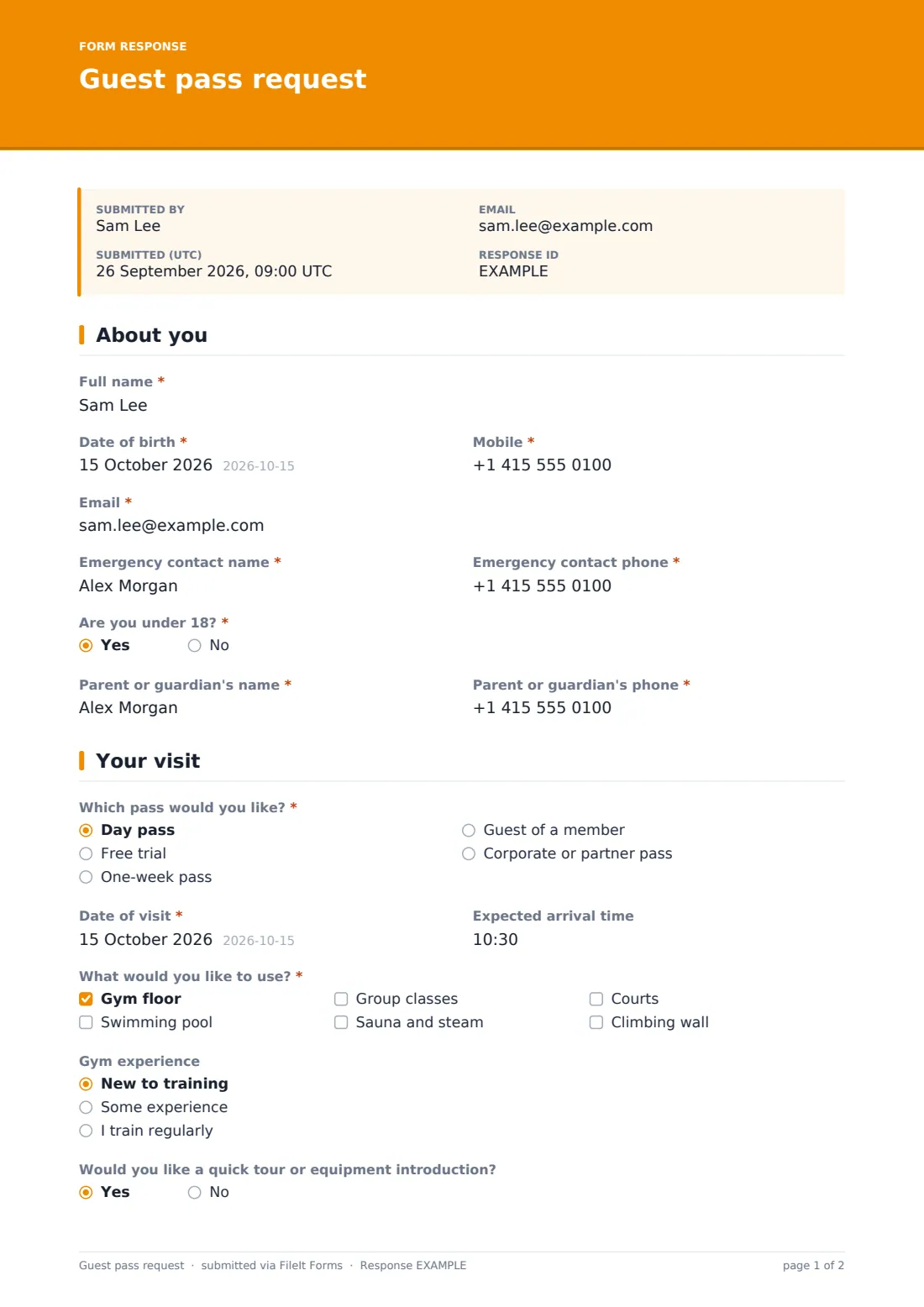
Visitors give their details, date of birth, an emergency contact and whether they're under 18 (which asks for a parent or guardian). They choose a day pass, free trial, one-week pass, a pass as a member's guest (with the member's name and number) or a corporate pass, then the date, arrival time, the areas they'll use, their experience and whether they'd like a tour. Picking the pool asks whether they can swim 25 metres; picking classes asks which one.
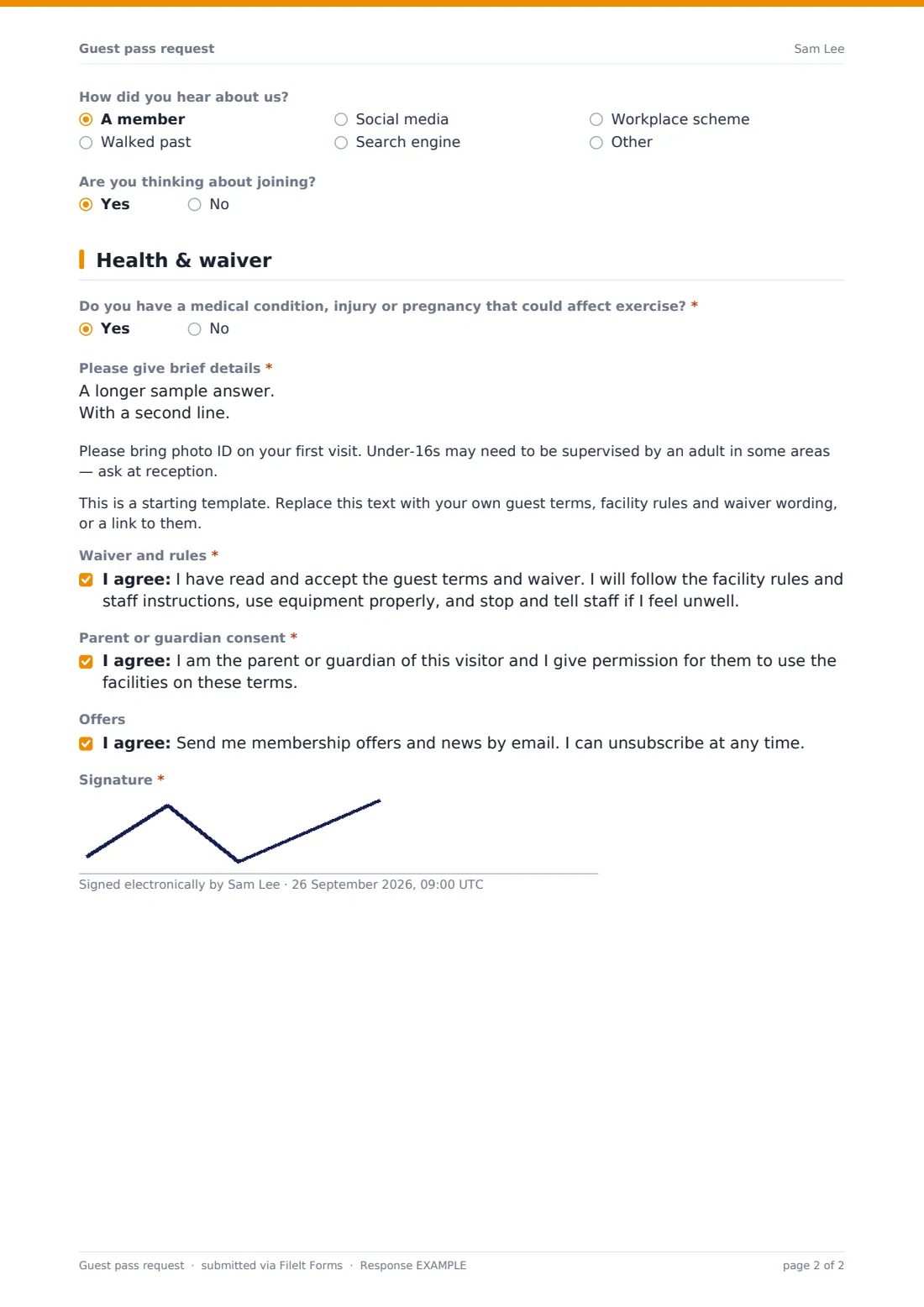
The last page has a short health declaration, reminders about photo ID, a placeholder for your guest terms and the waiver, with parent or guardian consent for under-18s and a signature. Each request becomes a PDF in your FileIt vault, and visitors who say they're thinking of joining are easy to follow up.
- Best for
- Gyms, leisure centres, climbing walls and sports clubs
- Filled in by
- The visitor (or their parent or guardian)
- Time to complete
- About 3 minutes
- Includes
- Pass types, member-guest details, health declaration, under-18 consent, signed waiver
Who uses a guest pass request form?
- A prospective member books a free trial before deciding to join
- A member brings a friend as their guest for a session
- A traveller buys a day pass for a gym near their hotel
- A partner company's employees request corporate passes
- A teenager's parent signs the consent for a day pass
- A club collects health declarations and waivers before visitors arrive
Questions on this guest pass request form
28 questions over 3 pages · includes signature, conditional questions, multiple pages, consent checkbox.
1 About you
- Full name*
- Date of birth*
- Mobile*
- Email*
- Emergency contact name*
- Emergency contact phone*
- Are you under 18?*
- Parent or guardian's name* asked only when it applies
- Parent or guardian's phone* asked only when it applies
2 Your visit
- Which pass would you like?* Day pass · Free trial · One-week pass · Guest of a member · Corporate or partner pass
- Member's name* asked only when it applies
- Member's membership number asked only when it applies
- Company or partner name* asked only when it applies
- Date of visit*
- Expected arrival time
- What would you like to use?* Gym floor · Swimming pool · Group classes · Sauna and steam · Courts · Climbing wall
- Which class? asked only when it applies
- Gym experience New to training · Some experience · I train regularly
- Would you like a quick tour or equipment introduction?
- How did you hear about us? A member · Walked past · Social media · Search engine · Workplace scheme · Other
- Are you thinking about joining?
3 Health & waiver
- Do you have a medical condition, injury or pregnancy that could affect exercise?*
- Please give brief details* asked only when it applies
- Can you swim at least 25 metres unaided?* asked only when it applies
- Waiver and rules*
- Parent or guardian consent* asked only when it applies
- Offers
- Signature*
The guest pass request form, page by page
1 About you
Full name, date of birth, mobile, email and a required emergency contact. Answering yes to being under 18 asks for a parent or guardian's name and phone.
2 Your visit
A required pass type: day pass, free trial, one-week pass, guest of a member (which asks for the member's name and number) or a corporate or partner pass (which asks for the company). Then the date, arrival time, areas to use — gym floor, pool, classes, sauna and steam, courts or climbing wall — with the class name if classes are ticked, gym experience, a tour request, how they heard about you and whether they're thinking of joining.
3 Health & waiver
A required health question with details on a yes, and a swimming-ability question if they picked the pool. Notes cover photo ID and a placeholder for your own guest terms. The visitor accepts the waiver and rules, a parent or guardian consents for under-18s, there's an optional opt-in to offers, and a signature.
Make the template yours
- Replace the placeholder with your own guest terms and waiver wording
- Edit the pass types and facility areas to match what you offer
- Limit how often a person can have a free trial with your own policy note
- Set a closing date or a maximum number of responses when you run a limited free-trial promotion
- Add a photo ID upload if your access control needs it before arrival
- Route member-guest requests to the front desk inbox
Tips for a better guest pass request form
- Send the link with trial bookings so waivers are signed before the visitor arrives
- Check the pool swimming question before letting a guest into deep water
- Follow up with anyone who ticked 'thinking about joining' within a day or two
- Keep your waiver wording reviewed and up to date — the form's text is only a placeholder
- Match under-18 rules on the form to your facility's actual supervision policy
Every response becomes a PDF in your vault
Each request is saved as a signed PDF in your vault and reception is emailed so the pass can be issued. The visitor sees a message reminding them to bring photo ID.
The Responses table works as a guest list for the day and a follow-up list for visitors thinking about joining.
- Start from this template. It opens in the FileIt Forms designer — change any question, add pages, set the rules for when questions appear.
- Share it. Turn on a public link, or send it to people by email, each with their own link. They don’t need a FileIt account.
- Get the answers as PDFs. Each response is saved as a PDF in the vault folder you choose, with uploaded files attached — and listed in a Responses table you can export to CSV.
Guest pass request form: frequently asked questions
Is this guest pass request template free?
Yes, it's included in the Forms app on every FileIt account, including the free plan, and every question can be edited.
Can members bring a guest using this form?
Yes. Choosing 'Guest of a member' asks for the member's name and membership number.
Does it include a waiver?
It includes a waiver acceptance and signature, with placeholder wording. Replace it with your own reviewed guest terms and waiver.
What about under-18s?
Answering yes to being under 18 asks for a parent or guardian's contact details and their consent, and the signature help text says the parent or guardian signs.
Does the form issue the pass automatically?
No. Your team reviews the request and emails the pass, as the confirmation message says.
Do visitors need a FileIt account?
No. They fill in and sign the form from a link.