What is the lost or stolen device report form template?
When a work laptop is left on a train or a phone is stolen from a café, the first hour matters. IT may be able to lock or wipe it remotely, sign it out of email and revoke access — but only if someone tells them, and tells them enough to act on.
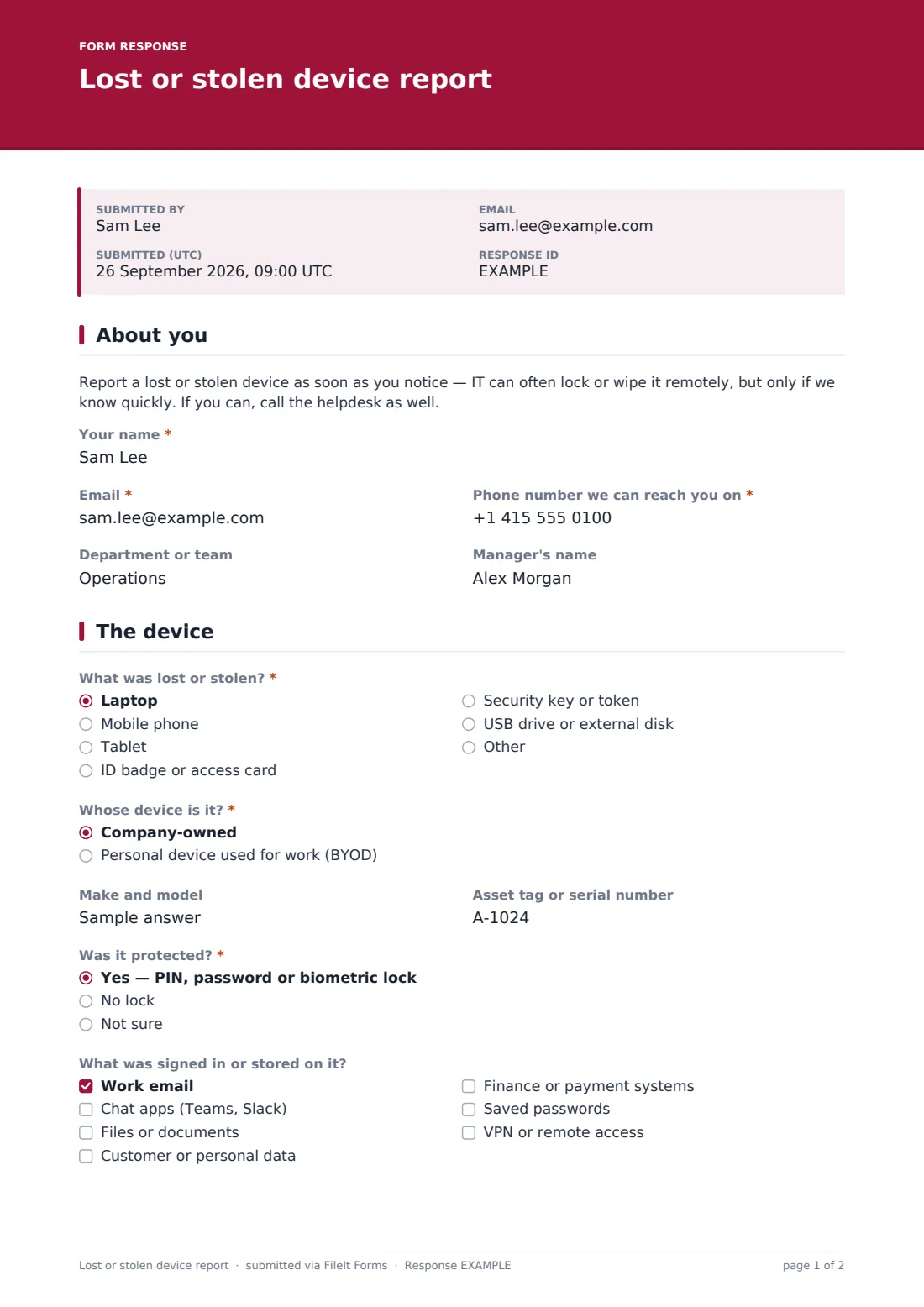
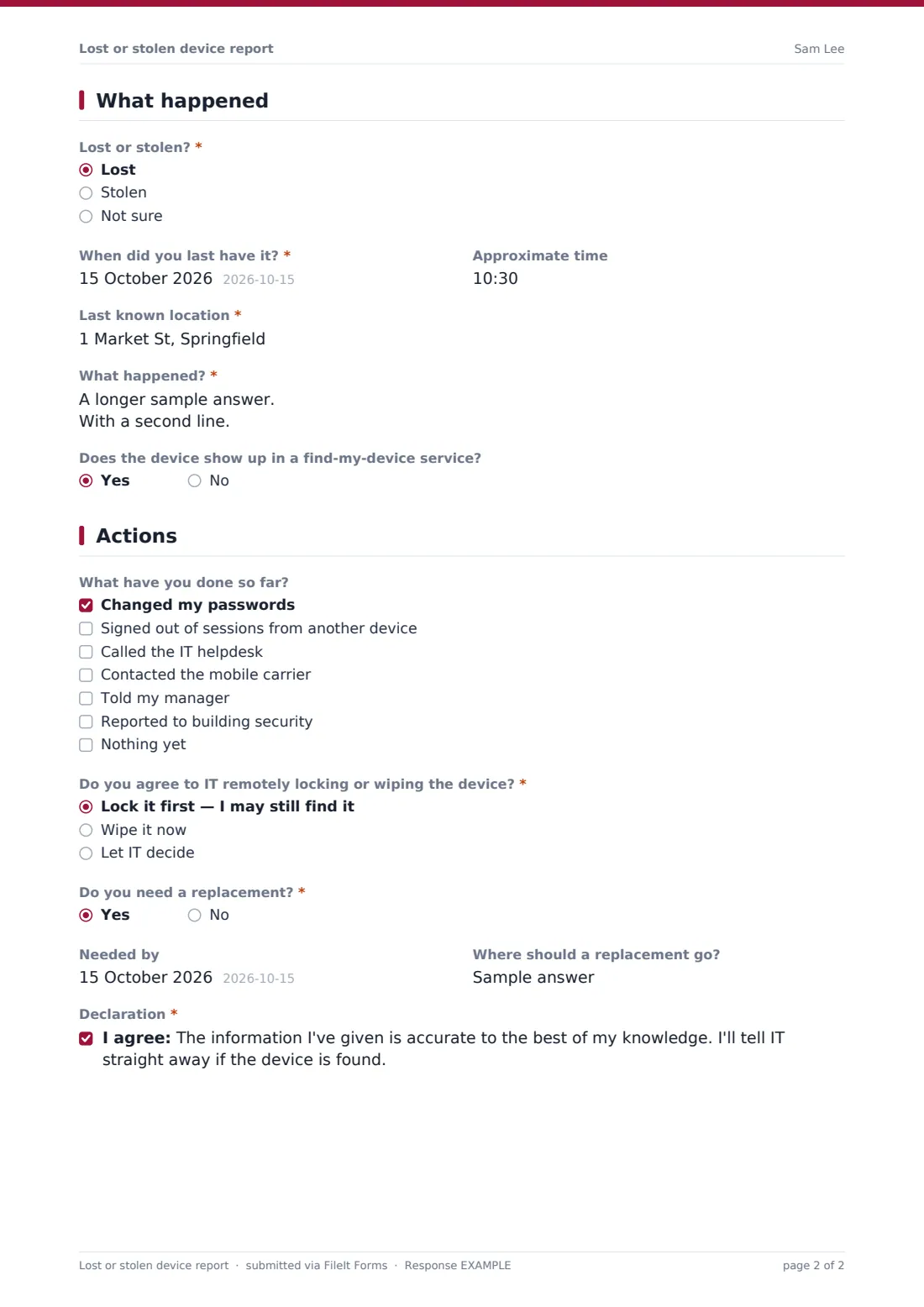
This lost or stolen device report asks for the device type and whether it's company-owned or personal, its make, model and asset tag, whether it was locked, and what was signed in or stored on it. It records when and where it was last seen, what happened, any police reference number, what the person has already done and whether they agree to a remote lock or wipe. Badges get their own question about which buildings they open.
Each report is saved as a PDF in your FileIt vault, which gives you a dated record for insurance claims, asset registers and — where personal data was on the device — your data protection assessment.
- Best for
- IT teams, security and facilities managers, and organisations with laptops, phones or access badges
- Filled in by
- The member of staff who lost the device, or their manager
- Time to complete
- About 3–5 minutes
- Includes
- Questions that change for badges and phones, police reference fields, remote wipe choice, replacement request
Who uses a lost or stolen device report form?
- An employee who left their work laptop on public transport
- A phone stolen while travelling for work
- A lost office access badge that needs deactivating
- A personal phone used for work email (BYOD) that has gone missing
- A USB drive with project files lost between offices
- A facilities team keeping a record of lost security tokens
Questions on this lost or stolen device report form
29 questions over 4 pages · includes conditional questions, multiple pages, consent checkbox.
1 About you
- Your name*
- Email*
- Phone number we can reach you on*
- Department or team
- Manager's name
2 The device
- What was lost or stolen?* Laptop · Mobile phone · Tablet · ID badge or access card · Security key or token · USB drive or external disk
- Whose device is it?* Company-owned · Personal device used for work (BYOD)
- Make and model
- Asset tag or serial number
- Phone number of the lost phone asked only when it applies
- Was it protected?* asked only when it applies Yes — PIN, password or biometric lock · No lock · Not sure
- What was signed in or stored on it? asked only when it applies Work email · Chat apps (Teams, Slack) · Files or documents · Customer or personal data · Finance or payment systems · Saved passwords · VPN or remote access
- Describe any sensitive data on it asked only when it applies
- Which buildings or areas did the badge open? asked only when it applies
3 What happened
- Lost or stolen?* Lost · Stolen · Not sure
- When did you last have it?*
- Approximate time
- Last known location*
- What happened?*
- Does the device show up in a find-my-device service? asked only when it applies
- Have you reported it to the police? asked only when it applies
- Police or crime reference number asked only when it applies
- Police force or station asked only when it applies
4 Actions
- What have you done so far? Changed my passwords · Signed out of sessions from another device · Called the IT helpdesk · Contacted the mobile carrier · Told my manager · Reported to building security · Nothing yet
- Do you agree to IT remotely locking or wiping the device?* asked only when it applies Lock it first — I may still find it · Wipe it now · Let IT decide
- Do you need a replacement?*
- Needed by asked only when it applies
- Where should a replacement go? asked only when it applies
- Declaration*
The lost or stolen device report form, page by page
1 About you
A note asks people to report immediately and call the helpdesk if they can. The reporter gives their name, an email — a personal one if the lost device was their only way into work mail — a phone number, department and manager.
2 The device
The reporter chooses the device type — laptop, phone, tablet, badge, security key or USB drive — and whether it's company-owned or a personal device used for work. Make, model and asset tag follow, and a lost phone asks for its number. For anything other than a badge, the form asks whether it was locked and what was signed in or stored on it; ticking customer or personal data reveals a box to describe it. For a badge, it asks which buildings or areas it opened.
3 What happened
The reporter says whether it was lost, stolen or they're not sure, when and where they last had it, and what happened. Devices are asked about find-my-device tracking. If it may have been stolen, the form asks whether it was reported to the police and, if so, the reference number and force or station.
4 Actions
A checklist records what's been done — passwords changed, sessions signed out, helpdesk called, carrier contacted, manager and building security told. For devices, the reporter chooses between locking it first, wiping it now or letting IT decide. They say whether they need a replacement, by when and where it should go, and confirm the report is accurate.
Make the template yours
- Add your helpdesk and building security phone numbers to the opening note
- Change the device types to match what your organisation issues
- Add a question about cost centre if replacements are charged to departments
- Route reports to a security or IT mailbox with notifications
- Add an upload for a police report or insurance paperwork if you need one
- Adjust the remote wipe wording to match your BYOD or device policy
Tips for a better lost or stolen device report form
- Revoke sessions and tokens for the user as soon as a report comes in, even before a wipe
- Deactivate lost badges immediately — they're easy to use and hard to spot
- If personal data was on the device, start your data breach process too
- Check the asset register against the report to confirm encryption status
- Keep the police reference with the report for insurance claims
- Close the loop: update the record if the device turns up
Every response becomes a PDF in your vault
Each report is saved as a PDF in your FileIt vault, and the form owner is emailed as soon as it arrives. The reporter can get a copy with the details they gave.
IT takes action in its own device management and identity tools — FileIt doesn't lock or wipe devices. The Responses table and CSV export make it easy to review losses over time, for example by device type or department.
- Start from this template. It opens in the FileIt Forms designer — change any question, add pages, set the rules for when questions appear.
- Share it. Turn on a public link, or send it to people by email, each with their own link. They don’t need a FileIt account.
- Get the answers as PDFs. Each response is saved as a PDF in the vault folder you choose, with uploaded files attached — and listed in a Responses table you can export to CSV.
Lost or stolen device report form: frequently asked questions
Is this lost device report form free?
Yes. It's a starter template in the FileIt Forms app, included on every plan including free.
Can FileIt wipe the device?
No. The form records the report and the person's agreement to a lock or wipe. IT performs it in your device management tools.
Does the form cover personal phones used for work?
Yes. The ownership question includes personal devices used for work, and the remote wipe question applies to them too — make sure the wording matches your BYOD policy.
Do people need to be signed in to report?
No. Anyone with the link can report from any device, which matters when their own phone or laptop is the one missing.
What if the device held personal data?
Ticking customer or personal data asks for a description of the kind of data. Your data protection lead should then decide whether it needs to be handled as a data breach.
Is a police report required?
No. The form asks whether one was made and records the reference if so. Whether you require one is your own policy.