What is the shared mailbox or distribution list request form template?
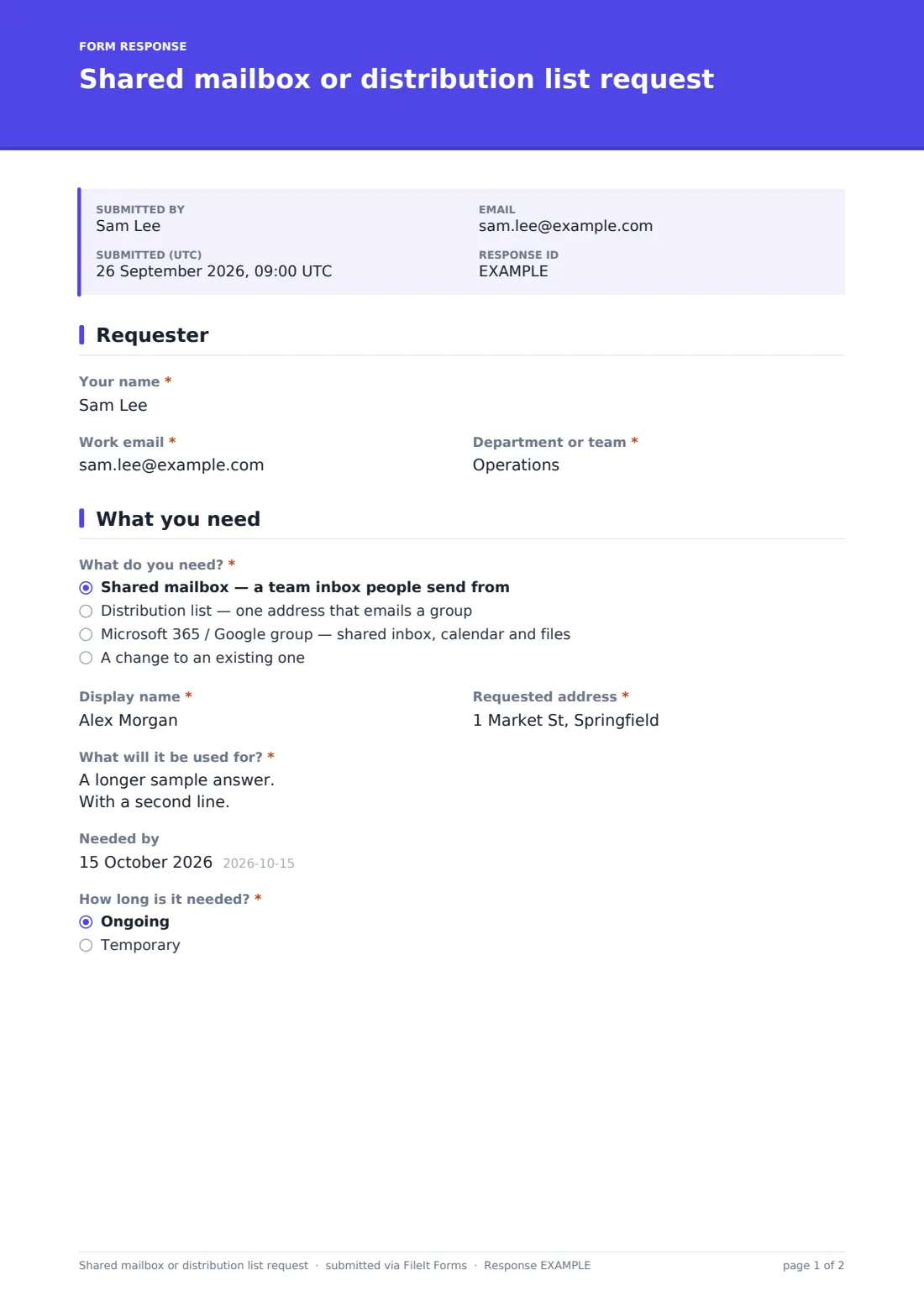
This form collects everything IT needs to set up a shared mailbox, a distribution list or a Microsoft 365 or Google group — or change an existing one. The requester picks what they need, suggests a display name and address, explains what it's for, lists owners and members, and chooses whether outside senders can email it.
Requests that arrive as a one-line email usually miss the details that matter later: who owns the address, whether it will receive personal data, and when it can be removed. The result is orphaned mailboxes nobody manages. The form asks for owners, a purpose and a temporary-or-ongoing choice up front, and records the approving manager.
It runs on FileIt's Forms app, included on every FileIt account. Anyone can submit it from a shared link, and each request becomes a PDF filed in your vault — a simple record of why each shared address exists and who asked for it.
- Best for
- IT teams and administrators of Microsoft 365, Google Workspace or Exchange
- Filled in by
- A team lead or employee asking for a shared address
- Time to complete
- About 5 minutes
- Includes
- Request-type logic, member list upload, permissions, external sender control, manager approval
Who uses a shared mailbox or distribution list request form?
- A support@ or info@ shared inbox for a customer-facing team
- A distribution list for a department, project or committee
- A Microsoft 365 or Google group with a shared calendar and files
- A temporary address for an event, campaign or recruitment drive
- Adding members, renaming or opening an existing list to outside senders
- Keeping a record of who owns every shared address in the organisation
Questions on this shared mailbox or distribution list request form
25 questions over 4 pages · includes file upload, conditional questions, multiple pages, consent checkbox.
1 Requester
- Your name*
- Work email*
- Department or team*
2 What you need
- What do you need?* Shared mailbox — a team inbox people send from · Distribution list — one address that emails a group · Microsoft 365 / Google group — shared inbox, calendar and files · A change to an existing one
- Existing address to change* asked only when it applies
- What should change?* asked only when it applies
- Display name* asked only when it applies
- Requested address* asked only when it applies
- What will it be used for?*
- Needed by
- How long is it needed?* Ongoing · Temporary
- Can be removed after* asked only when it applies
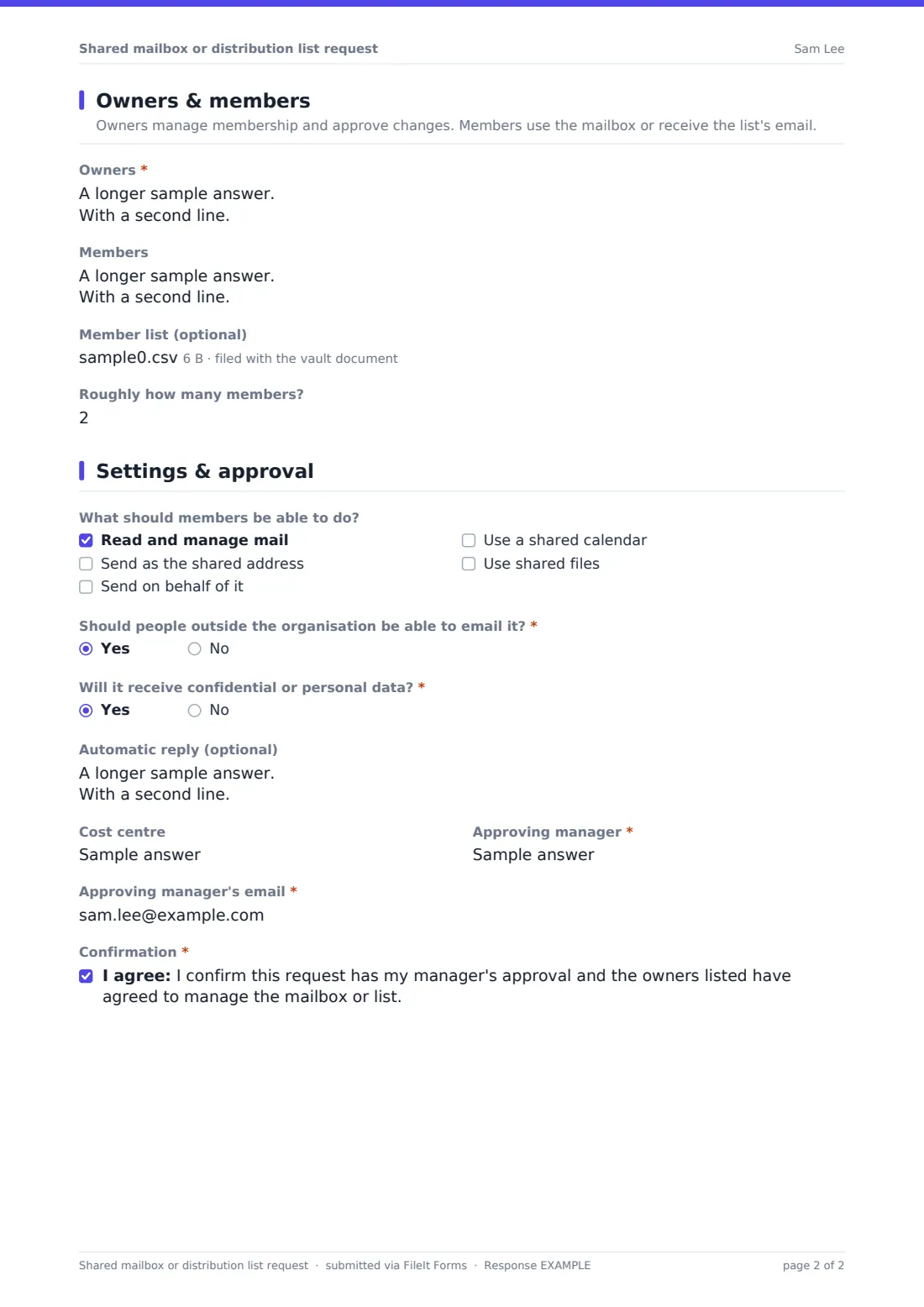
3 Owners & members
- Owners*
- Members
- Member list (optional)
- Roughly how many members?
4 Settings & approval
- What should members be able to do? asked only when it applies Read and manage mail · Send as the shared address · Send on behalf of it · Use a shared calendar · Use shared files
- Should people outside the organisation be able to email it?*
- Should any external addresses be members? asked only when it applies
- Will it receive confidential or personal data?*
- Automatic reply (optional)
- Cost centre
- Approving manager*
- Approving manager's email*
- Confirmation*
The shared mailbox or distribution list request form, page by page
1 Requester
Name, work email and department identify who's asking.
2 What you need
The requester chooses a shared mailbox, a distribution list, a group, or a change to an existing one — which asks for the current address and what should change instead of a new name. New requests give a display name and the requested address. Everyone explains the purpose and can add a needed-by date, and if it's temporary, the form asks when it can be removed.
3 Owners & members
Owners are listed by name and email, with help text asking for at least two. Members can be typed one per line or supplied as a CSV or spreadsheet upload instead — for a change, just the people to add or remove — and an approximate member count helps IT plan.
4 Settings & approval
For mailboxes, groups and changes, the requester ticks what members can do: read mail, send as or on behalf of the address, and use a shared calendar or files. Everyone answers whether outside senders are allowed and whether it will receive confidential data; distribution lists also ask about external members. An optional auto-reply, cost centre, the approving manager's name and email, and a confirmation finish the request.
Make the template yours
- Replace the type options with the exact names your platform uses
- Add your organisation's email domain to the address help text
- Add a naming-convention reminder, like team- or dl- prefixes, to the cover
- Send requests to your messaging administrator's address as well as your own
- File requests into one folder so you build an inventory of shared addresses
- Add a signature field for the approving manager if your process needs it
Tips for a better shared mailbox or distribution list request form
- Ask for two owners — mailboxes with one owner become orphaned when that person leaves
- Set an end date for temporary addresses so they can be cleaned up
- Be careful about allowing external senders to internal-only lists
- Flag addresses that will receive personal data so retention and access can be set correctly
- Use the purpose field later when reviewing whether an address is still needed
- Confirm the final address back to the requester — the one they asked for may be taken
Every response becomes a PDF in your vault
Each request is saved as a PDF titled with the requester's name and date and filed in your vault, with any member list attached. You're notified and the requester gets a copy.
Use the Responses table to see open requests and export them to CSV — a quick inventory of shared addresses, their owners and their purposes when you run a periodic review.
- Start from this template. It opens in the FileIt Forms designer — change any question, add pages, set the rules for when questions appear.
- Share it. Turn on a public link, or send it to people by email, each with their own link. They don’t need a FileIt account.
- Get the answers as PDFs. Each response is saved as a PDF in the vault folder you choose, with uploaded files attached — and listed in a Responses table you can export to CSV.
Shared mailbox or distribution list request form: frequently asked questions
Is this shared mailbox request template free?
Yes. It's included with the Forms app on every FileIt account, including the free plan.
Do requesters need a FileIt account?
No. Anyone with the link can fill in and submit the form.
Does FileIt create the mailbox?
No. The form collects and files the request. Your administrator sets up the mailbox or list in your email platform.
What's the difference between a shared mailbox and a distribution list?
A shared mailbox is an inbox several people can read and send from. A distribution list is one address that forwards each message to everyone on it. The options on the form describe both.
Can people upload a member list?
Yes. One CSV, Excel or text file can be attached alongside the members field.
Can it handle changes to an existing list?
Yes. Choosing a change asks for the existing address and what should change.
Can I require manager approval?
The approving manager's name and email are already required. Add a signature field if you want their sign-off on the form itself.